Local task scheduler and worker manager with MCP integration for Claude Desktop.
Quick Install
Automated & IDE SetupCopy the AI prompt to install this server into Claude Code, Cursor, or another agent — or use 1-click editor setup below.
Manual Client & Custom JSON ConfigExpand JSON ▾
Client Config & Setup
Choose your client or environment
Target File:
💡 Paste the JSON block into your client's configuration file under mcpServers, then restart the application.
Documentation Overview


Conductor
Claude's hands for local automation — with a web dashboard for the humans who watch it.
Conductor gives Claude direct, persistent control of a local task runner. Tell Claude what you want automated; it creates the scheduled workers, builds multi-step pipelines, wires up email reports, fires test runs, and reads back the logs when something fails — all through conversation. A web dashboard at 127.0.0.1:5000 runs alongside it for humans who want to peek at status, click pause, or hand-edit a worker.
Originally built to automate warehouse reporting workflows (the daily ShipExec metrics pull) and now general-purpose: any Python / batch / shell script, any schedule, any chain.
The MCP server lives in this repo (
server.py) — the thin layer that exposes Conductor's REST API as Claude tools. It's bundled and auto-registered on install, so most users won't need to touch it directly. The separate conductor-mcp repo is deprecated — it holds an older copy without the auto-launch race protection.
Claude Integration
Conductor registers itself as an MCP server in Claude Desktop on first launch. After restarting Claude Desktop once, Claude has 21 tools for full control:
Example conversation:
You: Run my metrics script every night at 8:30 PM and email me the report
Claude: I'll set that up using the Run + Email template. (creates the worker, configures the schedule, wires up Gmail, fires it to test) Done — worker "Daily Metrics Report" is live. Check your email for the test run.
You: That uptime check keeps failing. What's going on?
Claude: (pulls the last 10 runs, reads the error logs) The site returned a 503 three times in the last hour. The SSL certificate expired yesterday. Here's the full error from the last run...
You: Chain my backup script and cleanup script together. Run backup first, then cleanup after it finishes. Every day at 2 AM.
Claude: *(creates a chain with stage 0 = backup, stage 1 = cleanup, cron schedule "0 2 * * ") Chain "Nightly Maintenance" created with 2 steps. Backup runs first, cleanup runs after it succeeds.
How it works:
- Install Conductor (Windows installer or from source)
- Conductor writes its MCP entry to Claude Desktop's config on first launch
- Restart Claude Desktop once
- Claude now controls Conductor through natural language — create workers, build chains, fire tasks, check logs, send emails
Features
- Claude-Controlled — 21 MCP tools let Claude create workers, chains, groups, templates, and more. Non-technical users can automate anything through conversation.
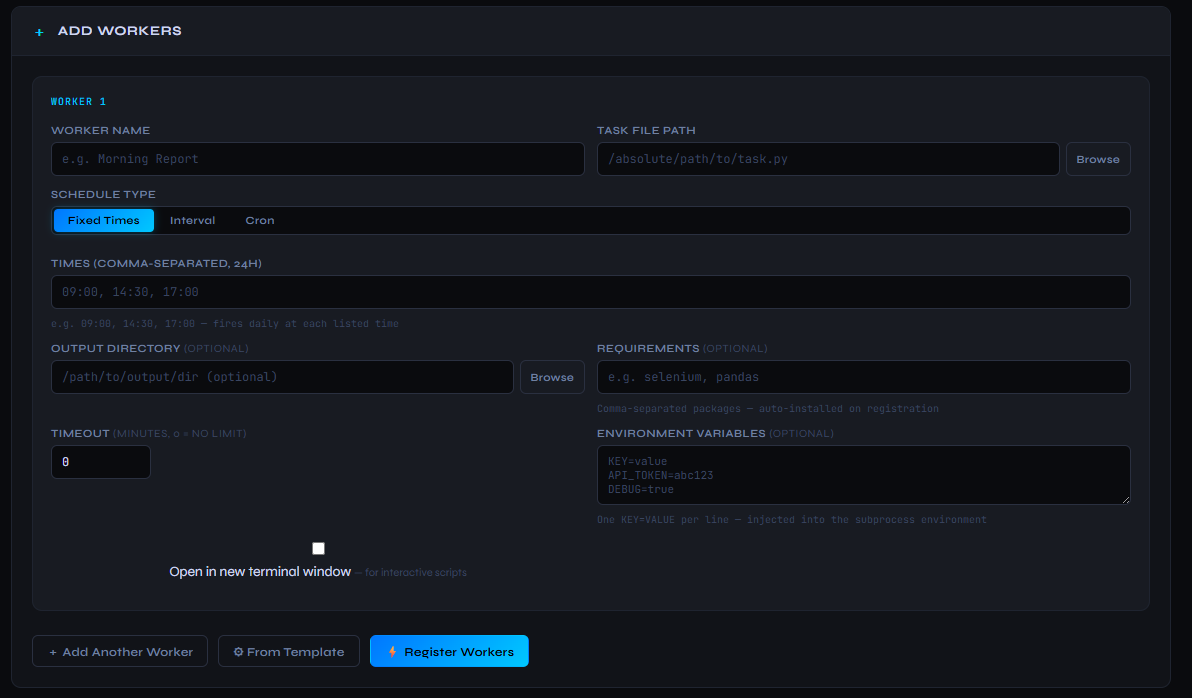
- Flexible Scheduling — Fixed times (
09:00, 14:30), intervals (2h 30m), or cron expressions (0 9 * * 1-5with plain-English preview). - Task Support — Python (
.py), batch (.bat,.cmd), and shell (.sh) scripts. Selenium and GUI scripts run in a visible terminal window vianew_console. - Built-in Email — configure Gmail once, then any template or worker can send emails. Run + Email template for automated reports. Folder Watcher emails files on arrival. Uptime Check sends DOWN alerts. Worker notifications on success/failure.
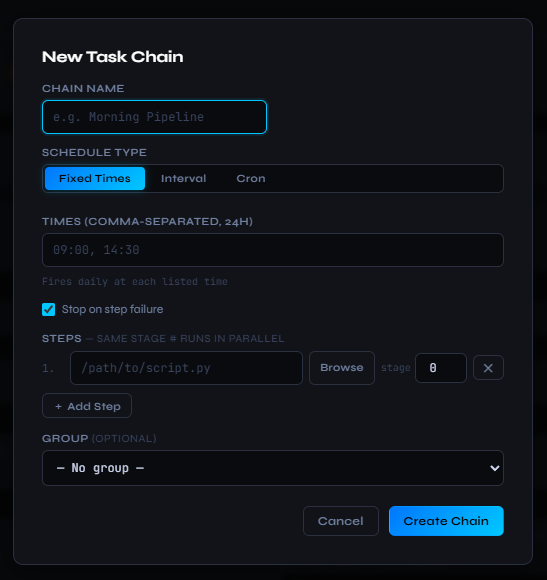
- Task Chains — multi-step pipelines with parallel execution. Same stage number = run in parallel. Stop-on-failure toggle.
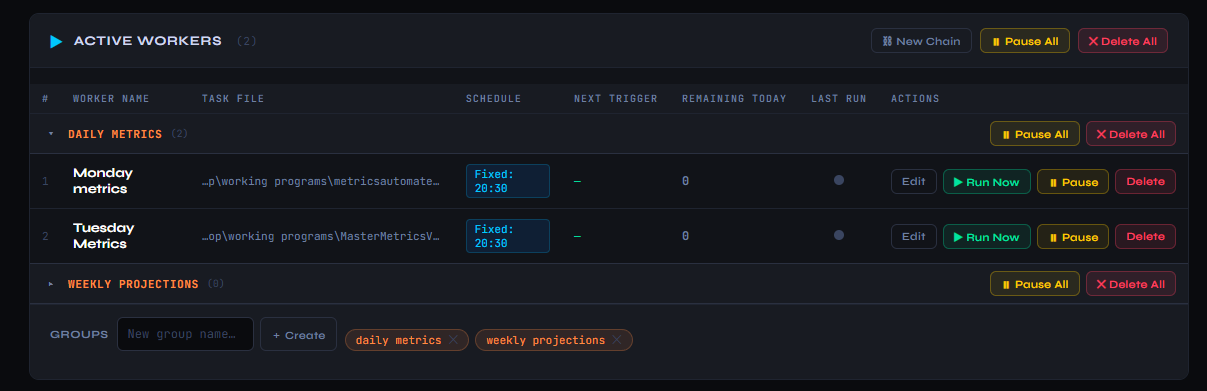
- Worker Groups — collapsible named groups for organization. Bulk pause/delete per group.
- Run History — per-worker/chain history with status, duration, and error details. Colored dots show last run status at a glance.
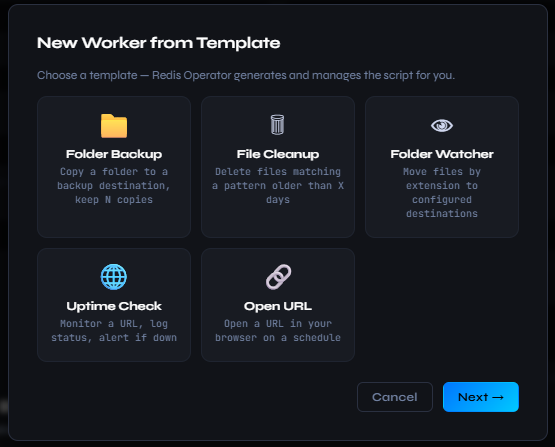
- Built-in Templates — Folder Backup, File Cleanup, Folder Watcher, Uptime Check, Open URL, Run + Email. Generated scripts are stdlib-only and self-contained.
- Per-worker Environment Variables — inject
KEY=VALUEpairs into subprocess environments. - Worker Timeout — kill and log workers that run over a set number of minutes.
- Email Notifications — per-worker/chain email alerts: Always, On Failure, or On Success.
- Import / Export — portable JSON snapshot of all workers, chains, and groups.
- Saved Profiles — save and load named worker configurations.
- Auto-start on Login — one-click Registry Run key install. No admin required.
- Auto-update Check — modal dialog when a newer release is available.
- System Tray Icon — right-click for Open Dashboard or Stop.
- AI Error Analysis — send error logs to Claude for diagnosis directly in the dashboard.
- Persistent State — SQLite database. Workers and chains restore on restart.
Add Workers Form
Built-in Templates
Task Chains
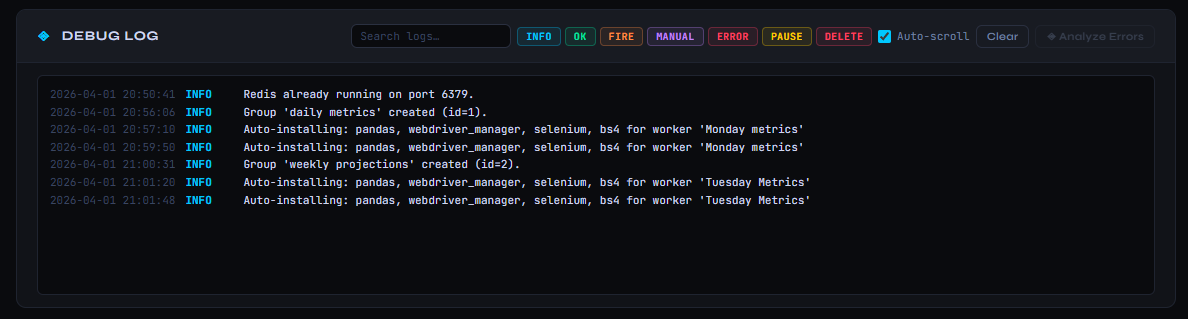
Debug Log
Installation (Windows)
Download and run Conductor_Setup.exe from the latest release.
- Requires Python 3 on the machine (see note below) — Conductor runs your
.pyworkers with it - Installs to
%AppData%\Conductor— no admin/UAC required - Adds Start Menu shortcut and optional desktop shortcut
- Optional auto-start at login
- Uninstaller included
Python is required for Python workers. Conductor itself ships as a self-contained executable, but it runs your
.pyscripts with a real interpreter found on your system (thepylauncher,PATH, or the Windows registry). If none is found, workers fail loudly with instructions — they are never reported as successful. SetCONDUCTOR_PYTHONto a full path to pin a specific interpreter..bat/.cmd/.shworkers do not need Python.
Setup from Source
Requirements
- Python 3.10+
The dashboard opens at http://127.0.0.1:5000. Press Ctrl+C to stop.
Building the Installer
Forces a full rebuild:
Output: Output\Conductor_Setup.exe. Requires Inno Setup.
Task File Format
Python (.py)
Scripts run as subprocesses:
Batch / Shell (.bat, .sh, .cmd)
Executed as subprocesses. The worker's output directory (if set) is used as the working directory.
Schedule Formats
| Type | Format | Example |
|---|---|---|
| Fixed | HH:MM or HH:MM,HH:MM | 09:00, 14:30, 17:00 |
| Interval | Xh Ym | 2h 30m, 1h, 45m |
| Cron | 5-field crontab | 0 9 * * 1-5 (weekdays at 9am) |
Task Chains
Chains run multiple scripts in sequence. Each step has a stage number — steps with the same stage run in parallel, stages execute in order. Stop on failure halts the chain when any step fails.
Templates
| Template | What it does | Email capability |
|---|---|---|
| Folder Backup | Copy folder, keep N backups | Summary email |
| File Cleanup | Delete old files by pattern | Summary email |
| Folder Watcher | Move/email files by extension | Per-rule: move, email, or both |
| Uptime Check | Monitor URL, log status | Alert email on DOWN |
| Open URL | Open URL in browser | — |
| Run + Email | Run script, email output file | Sends output as attachment |
All generated scripts use Python stdlib only.
Architecture
| Layer | Technology |
|---|---|
| Backend | Python 3, Flask |
| Scheduling | APScheduler (BackgroundScheduler + MemoryJobStore) |
| Persistence | SQLite (WAL mode) |
| Frontend | Vanilla JS, single HTML file |
| AI Integration | Claude via MCP (21 tools) + Anthropic API (error analysis) |
AI Error Analysis
The debug log includes an Analyze Errors button. When ERROR entries are present, click it to send them to Claude for diagnosis. Requires an Anthropic API key in .env:
Example — before / after:
Raw error in the debug log:
Claude's diagnosis (one click later):
Related MCP Servers
Reviews
No reviews yet — be the first to share how this listing worked for you.
Frequently Asked Questions about Conductor
AllMCPs Directory Badge
Showcase your server listing on GitHub or your project documentation. Embed this dynamic SVG badge to highlight official listing status and live engagement.
Badge Style:
Live Dynamic SVG Preview
Markdown (GitHub README)
[](https://allmcps.com/mcp/conductor)HTML Embed
<a href="https://allmcps.com/mcp/conductor"><img src="https://allmcps.com/api/badge/conductor?style=directory" alt="Conductor on AllMCPs" /></a>Technical Specs & Signals
CategoryDeveloper Tools
29Quality signal: Emerging · 29/100How this signal is calculated ▾
Server availabilityNot measured
Not scored for repo-hosted servers — we can't reach the running server, only its GitHub page. Hosted MCP endpoints are health-checked live.
Verified ownership10/20
Documentation & tools11/30
Adoption & activity1/15
Community engagement0/10
A guidance signal from public completeness & health data — not a user rating. New listings start lower and rise as they add docs, get verified, and grow adoption. Signals we can't observe for a listing are skipped, not counted against it.
Own this project?
This directory is pre-filled from public sources. Claim via GitHub README, site badge, or DNS TXT to unlock edit access and the Official badge — proof is checked automatically, then reviewed by our team.
Free dofollow backlink: add your website and place the AllMCPs badge on it — no claim needed. We detect it automatically and keep it verified as long as the badge stays live.
Claim & get free dofollowShare & Embed
Add our SVG badge (dark/light directory styles) or embeddable widget to your site.