A 1:1 replica of Claude Desktop's computer-use tool surface, for Windows and the Claude Code CLI.
Quick Install
Automated & IDE SetupCopy the AI prompt to install this server into Claude Code, Cursor, or another agent — or use 1-click editor setup below.
Not yet automatically verified
We haven't yet run this listing's install command through our automated sandbox check. This isn't a red flag — we're steadily working through the catalog.
Manual Client & Custom JSON ConfigExpand JSON ▾
Client Config & Setup
Choose your client or environment
Target File:
💡 Paste the JSON block into your client's configuration file under mcpServers, then restart the application.
Capabilities & Tool Schemas (2)
Inspect callable tools, capabilities, and parameters exposed to AI agents by Computer Use Omni.
deactivateend the session without killing the process (glow off, controlling window restored, grants revoked); the counterpart to `request_access`.
display_overviewone composite, labeled image of all monitors laid out per the virtual-desktop arrangement (an orientation aid for "which screen is that window on?"; not a click surface).
Documentation Overview
omni-computer-use
I got tired of the permission limits in the computer use of Claude Code and Codex, so I built my own. Especially for us Windows users: there is no computer use at all in the Claude Code CLI here. I really resent that. Why are we Windows users always second class citizens in vibe coding?
I have been using omni myself since June 2026. Whenever I find something that annoys me, I update it.
I use both Claude Code and Codex, and omni runs perfectly on Claude Desktop Code, the Claude Code CLI and Codex. The GIFs below show it: both Claude and GPT open VS Code and type into it. I tested it in Warp too, works there. I also recommended it to a friend who uses Cursor, he tested it and it works for him.
It works everywhere because it does not integrate with any of them. It is a plain MCP server. When it starts it walks up its own process ancestry, and the first ancestor that owns a window is the window it serves. So whether you run it from a terminal, from Claude Desktop or from Codex, it works that out by itself, and you configure nothing.
If you are building a desktop app of your own, try omni. The agent can see your UI and debug it by itself, which is very handy. Same idea as using Playwright when you build web apps.
One line to install it:
Here are the two GIFs:
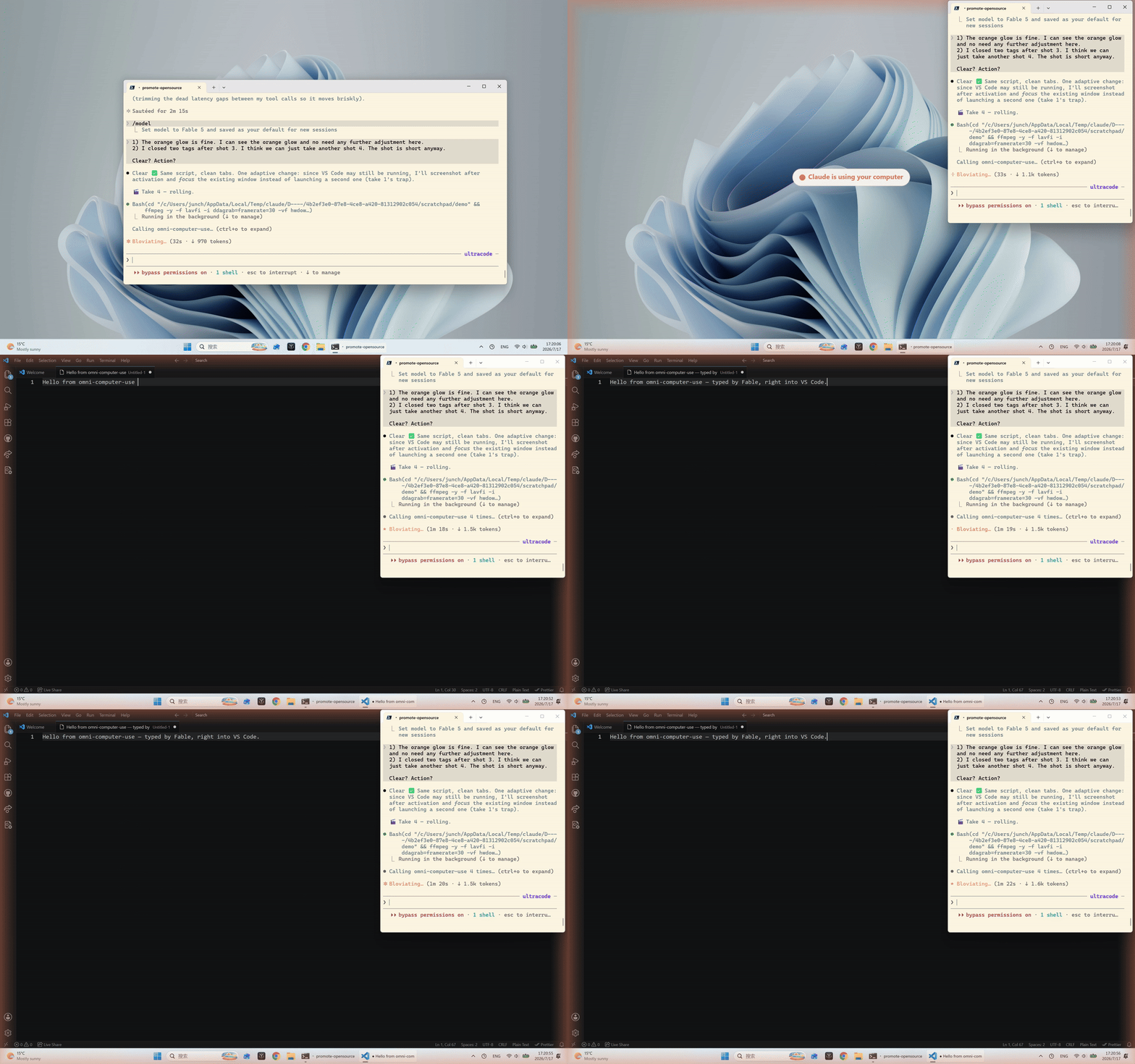
Claude Code CLI, one take.
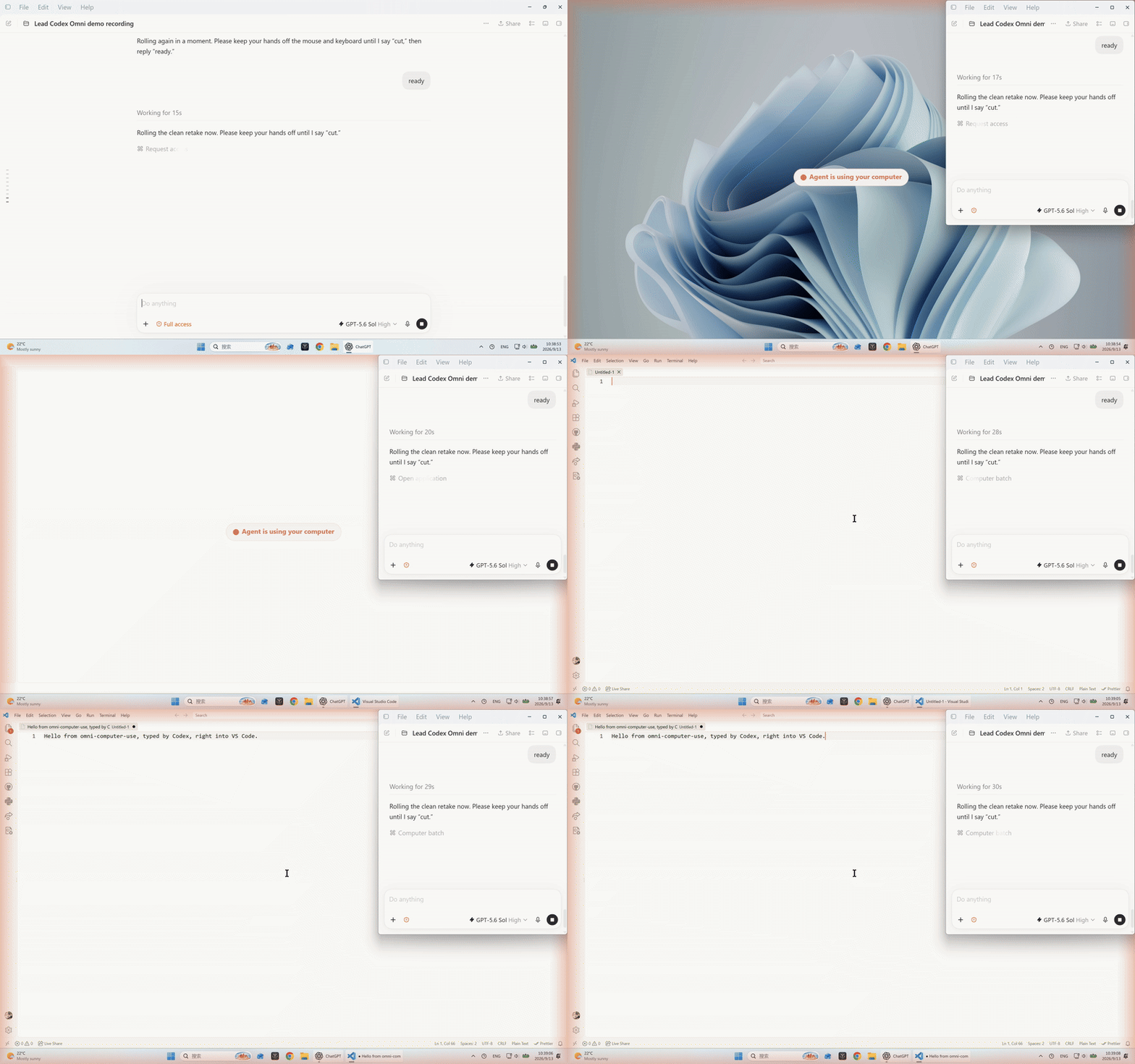
Codex, one take. Codex recorded and cut this one itself.
Everything below is written for AI. Skip it if you want. Good luck 👍
Install
Requires Windows and Python 3.11+ (uv / uvx fetch Python for you). The PyPI package name carries an -mcp suffix; everything else — the command, the server key, this repo — is plain omni-computer-use.
Recommended — install into Claude Code. Claude Desktop reads Claude Code's MCP servers in addition to its own, so this one command makes the server available in both the Claude Code CLI and the Claude Desktop app:
The other directions are narrower. In Claude Desktop's claude_desktop_config.json — visible to Claude Desktop only, the CLI won't see it:
A desktop-extension bundle (.mcpb, one-click install) is attached to each GitHub release — same scope caveat: Claude Desktop only.
Run standalone (any MCP client, or just to poke at it):
Windows spawn tip:
uv/uvxare native executables and need no wrapper. If your MCP client launches servers through a.cmdshim (likenpx), that one needs acmd /cprefix — this server doesn't.
Example
On a multi-monitor rig every screenshot self-describes — it names the monitor it captured and what else is attached, so the agent never loses track of which screen it is looking at:
open_application reports what actually happened instead of fire-and-forget:
Status
- 29 tools — 27 matching Claude Desktop's computer-use, plus
deactivateanddisplay_overview; a devreloadtool makes 30 whenCOMPUTER_USE_DEV=on. - 16-scenario end-to-end suite under
tests/(scen_*.json), each run through a fresh MCP process. - Built and verified on Windows 11 (2560×1600 @ 150% DPI) against Claude Desktop's computer-use as the oracle; the screenshot downscale matches CDC's ~1.2 MP within rounding.
Tools
Matching Anthropic's computer-use (27): request_access, list_granted_applications, request_teach_access, screenshot, zoom, switch_display, cursor_position, mouse_move, left_click, right_click, middle_click, double_click, triple_click, left_click_drag, left_mouse_down, left_mouse_up, scroll, key, hold_key, type, wait, open_application, read_clipboard, write_clipboard, computer_batch, teach_step, teach_batch.
omni-specific (2):
deactivate— end the session without killing the process (glow off, controlling window restored, grants revoked); the counterpart torequest_access.display_overview— one composite, labeled image of all monitors laid out per the virtual-desktop arrangement (an orientation aid for "which screen is that window on?"; not a click surface).
All click / move / scroll / drag / zoom coordinates are in the image-pixel space of the most recent screenshot; the server maps them back to physical pixels.
How it works (the parts worth reading)
Faithful desktop visuals. While a session is active the server reproduces Claude Desktop's on-screen affordances, pixel-calibrated from reference captures: a static orange edge glow, a centered "Agent is using your computer" pill that flies to the corner, and the controlling window (the Windows Terminal running the CLI, or the Claude Desktop window itself) shrunk flush to the top-right and parked off-screen during each capture so screenshots show the true desktop with no black box. Click-through is kind-aware: a non-layered terminal drops to the bottom of the z-order for each synthetic click; the layered Claude Desktop window gets WS_EX_TRANSPARENT (the desktop tool's own approach) so clicks pass through to whatever is beneath — the window itself never moves, so the user's real mouse is unaffected.
Keyboard self-harm guard. Synthetic keystrokes go to whatever holds OS focus. If the controlling window (the Claude window, or the hosting terminal) is frontmost, type / key are blocked — otherwise the text would land in the agent's own conversation, or run as a shell command with a trailing Return. The guard is unconditional and identifies the control surface by window identity and owning process, while still leaving a second, unrelated terminal window a legitimate target. Mouse actions are exempt (a click carries its own coordinate).
Multi-monitor. Screenshots carry an event-driven note naming the captured monitor and flagging when it changed; open_application warns when a window opened on a different monitor than captures currently target — precisely, by monitor name, when it has the window handle; display_overview returns the all-screens map. The glow and shrink land on the controlling window's own monitor, leaving other displays untouched.
Honest launching & self-heal. open_application polls for a real window and distinguishes opened / running-no-window-yet / crashed-on-startup / nothing-launched instead of always reporting success. A force-killed session's shrunk terminal is restored on the next start from a small state file (guarded against window-handle reuse).
Hot-reload (dev). Set COMPUTER_USE_DEV=on to add a reload tool that importlib.reloads the logic modules in-process, so edited code takes effect without restarting the session — handy while developing automation against the server. It is off by default (the clean 29-tool surface).
See SPEC.md for the authoritative, tool-by-tool contract and the module architecture.
Differences from the desktop tool (by design)
The built-in computer use grants apps from the list of installed applications and applies a tiered model: browsers are visible but read-only, terminals and IDEs are click-only — no keystrokes, by architecture. Sensible defaults for general desktop use, and they close off the workflow this server was built for: letting the agent launch the app you are currently building — a loose .exe no install list knows about — click through it, type into it, verify behavior, then go back to the IDE and edit code.
omni grants every approved app at tier:"full" — IDEs, terminals, and dev builds included (open_application accepts a full .exe path). Full power, your responsibility.
A CLI has no permission GUI, so request_access auto-grants resolvable apps at tier:"full" and returns the same JSON shape; foreground gating is permissive by default (it only errors on an empty allowlist). Masking of non-allowlisted windows defaults off (the rect-based masker over-masks). Teach mode is a stub — it executes the step's actions and returns a screenshot, but there is no fullscreen tooltip overlay (a desktop-app feature). Each of these is controlled by the env vars below.
Configuration
Related MCP Servers
Adoption & maintenance
Factual signals from GitHub, npm, and our automated checks — not a rating.
GitHub stars
4
Stargazers on the source repository.
npm downloads
389k
Package downloads in the last 30 days.
Last commit
12d ago
Most recent push to the default branch.
Tools exposed
2
Callable tools this server registers over MCP.
Reviews
No reviews yet — be the first to share how this listing worked for you.
Frequently Asked Questions about Computer Use Omni
AllMCPs Directory Badge
Showcase your server listing on GitHub or your project documentation. Embed this dynamic SVG badge to highlight official listing status and live engagement.
Badge Style:
Live Dynamic SVG Preview
Markdown (GitHub README)
[](https://allmcps.com/mcp/computer-use-omni)HTML Embed
<a href="https://allmcps.com/mcp/computer-use-omni"><img src="https://allmcps.com/api/badge/computer-use-omni?style=directory" alt="Computer Use Omni on AllMCPs" /></a>