Prompt evals over MCP: run a prompt on your dataset, score each output 1-5 with an LLM judge.
Quick Install
Automated & IDE SetupCopy the AI prompt to install this server into Claude Code, Cursor, or another agent — or use 1-click editor setup below.
Manual Client & Custom JSON ConfigExpand JSON ▾
Client Config & Setup
Remote HTTPChoose your client or environment
Target File:
💡 Paste the JSON block into your client's configuration file under mcpServers, then restart the application.
Documentation Overview




Your prompts need tests too.
Run every prompt against real data. Score each output with an LLM judge against criteria you define. Change anything: the prompt, the model, the temperature, the dataset. Re-run and see exactly what got better and what broke. When the scores tell you something's off, CompletionKit suggests an improved prompt based on the judge's actual feedback on your runs. You inspect the diff, apply it as a new version, and verify the improvement.
It's the difference between "this prompt seems to work" and "this prompt scores 4.3 out of 5 across 200 inputs, up from 3.8 last version."
Start on completionkit.com → | RubyGems
Just want to use it? CompletionKit Cloud is the same engine, fully hosted — zero install, no Rails ops, plans at completionkit.com/pricing.
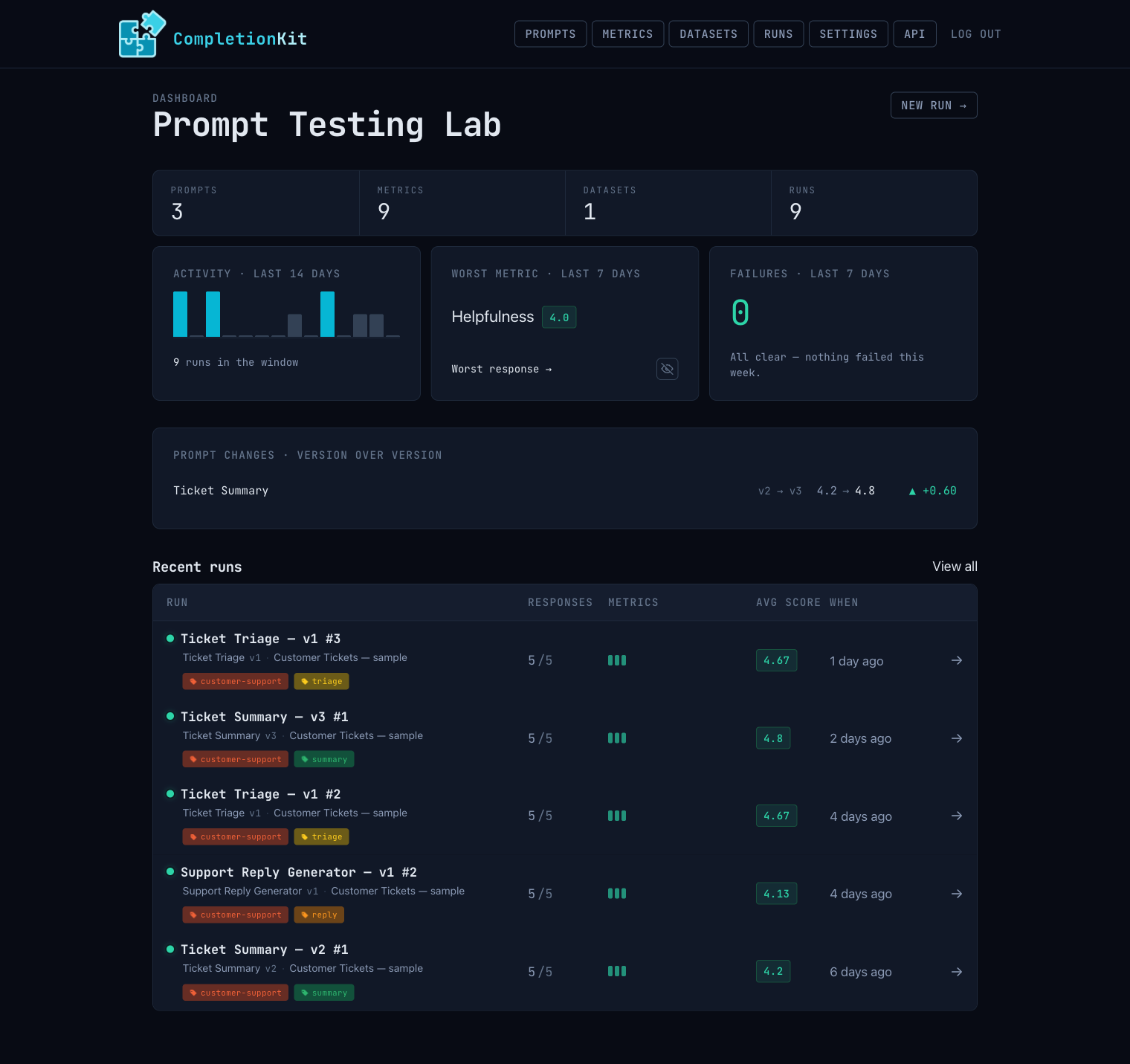
Three ways to run it
Same engine, same UI, same REST API and MCP server — pick the deployment that fits. The first two are stack-agnostic: you run CompletionKit as a product and talk to it over HTTP and MCP, whatever language your own app is written in. The third is for teams already building on Rails.
1. Hosted — completionkit.com (recommended)
The fastest path. Sign up and you're running on the same engine you'd self-host, without touching a Rails app. No db:migrate, no Puma, no Solid Queue, no provider key management — multi-tenant workspaces, your team logs in, you go. Plans at completionkit.com/pricing.
2. Self-hosted — the bundled standalone app
Run it on your own infra as a self-contained product. There's nothing to integrate and no Ruby to write — once it's up, you drive everything through the web UI, the REST API, and the MCP server, from whatever stack your own app is built in. It needs Postgres and a host that can run the app (Fly, Render, Heroku, Docker, …).
Run both a web server and a Solid Queue worker. In two terminals:
Or with foreman in one terminal: foreman start -f Procfile.dev.
Visit http://localhost:3000. Add a provider credential (Settings), create a prompt, upload a CSV dataset, and run it. See Deploying self-hosted for the production-env setup.
3. Rails engine — mount into your existing Rails app
The engine mounts at /completion_kit. Generate / judge flows enqueue Active Job jobs (CompletionKit::GenerateRowJob, CompletionKit::JudgeReviewJob, CompletionKit::RunCompletionCheckJob), so your host app needs an Active Job adapter that actually processes them — Solid Queue, Sidekiq, GoodJob, etc. The :async adapter is not suitable for production: it runs jobs in the web Puma's thread pool with no durability and no retry, and a long LLM call will block request handling.
Host-app layout integration. If your host app overrides the engine layout (e.g. layout "application" on engine controllers, or rendering engine views inside your own shell), include both the engine's stylesheet and JavaScript in that layout:
Without the JavaScript include, in-page behaviours silently fail: live tag-breadcrumb updates, relative-time ticking, CSV row hover-expand, model-refresh progress, focus-first-error, and local-time formatting.
Providers
CompletionKit discovers available models from each provider's API automatically.
| Provider | Env vars | What it covers |
|---|---|---|
| OpenAI | OPENAI_API_KEY | GPT-5, GPT-4.1, GPT-4o, etc. |
| Anthropic | ANTHROPIC_API_KEY | Claude Opus, Sonnet, Haiku |
| Ollama / local endpoint | OLLAMA_API_ENDPOINT (default: http://localhost:11434/v1) | Any model you've ollama pull-ed, or any OpenAI-compatible local server (vLLM, LM Studio, llama.cpp) |
| OpenRouter | OPENROUTER_API_KEY | 100+ models from 30+ providers through one API key |
| Azure AI Foundry | No env var — add via the Providers UI / a ProviderCredential (api_key + api_endpoint required, api_version optional) | Azure OpenAI deployments and Foundry projects |
Set these as environment variables or configure them in the generated initializer. You can also add provider credentials through the web UI under Settings.
Encryption
Provider API keys are encrypted at rest using Active Record encryption. You need three encryption keys configured before the app will boot in production.
Generate them:
Then set them as environment variables:
Or add them to config/credentials.yml.enc under active_record_encryption. In development, the standalone app uses built-in fallback values so you can skip this step locally.
Authentication
CompletionKit requires authentication in any deployed environment. In development and test, routes are open by default (with a log warning); every other environment returns 403 until auth is configured.
Basic Auth (recommended for simple setups)
Custom Auth (Devise, etc.)
Only one mode can be active.
Rate limiting
The REST API, the MCP endpoint, and the web UI are rate limited per IP, per minute. The defaults are generous; tune them in the initializer:
Limiting uses Rails.cache. A shared cache store (Solid Cache, Redis) throttles accurately across multiple app instances; a per-process store still throttles each instance independently.
How it works
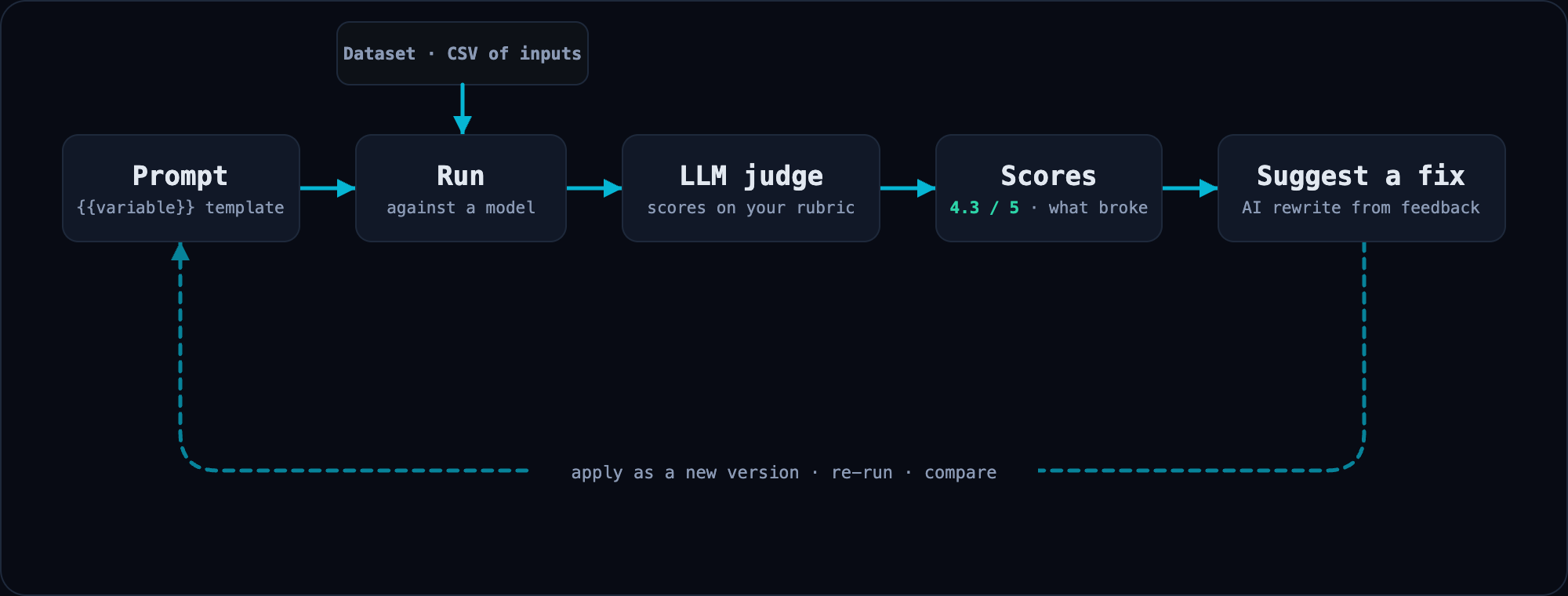
It's a loop. Each pass leaves you with a score you can compare against the last one.
- Create a prompt with
{{variable}}placeholders - Upload a dataset. A CSV where column headers match the variable names.
- Run it against a model and score outputs with an LLM judge against criteria you define.
- Iterate. Change the prompt, the model, the temperature, or the dataset and re-run. CompletionKit versions your prompts so you can always compare against previous results.
- Get suggestions. When scores drop, ask CompletionKit for an AI-generated improvement. The suggestion is based on the judge's actual per-response feedback, not generic prompt-engineering advice. Inspect the diff and apply it as a new version.
Concepts
- Prompt. A versioned template with
{{variable}}placeholders. Editing a prompt that's already been run creates a new version, so earlier results stay reproducible. - Dataset. A CSV of real inputs. Each row becomes one test case.
- Run. One execution of a prompt against a dataset. Captures every input (model, temperature, metrics) and stores all outputs and scores.
- Response. The model's output for one dataset row, with reviews attached.
- Metric. An evaluation dimension with a name, instruction, evaluation steps, and a 1-5 star scoring scale. The LLM judge uses this to score each response.
- Metric Group. A reusable group of metrics you can apply to a run as a set.
- Tag. A domain label you can attach to prompts, runs, metrics, and datasets. Auto-assigned from a 10-color palette. Filter any index page by tag (
?tag[]=...). - Provider Credential. An API key for a model provider. Encrypted at rest, never returned through the API.
REST API
Every resource is accessible via a bearer-token JSON API:
Related MCP Servers
Adoption & maintenance
Factual signals from GitHub, npm, and our automated checks — not a rating.
GitHub stars
3
Stargazers on the source repository.
Last commit
8d ago
Most recent push to the default branch.
Reviews
No reviews yet — be the first to share how this listing worked for you.
Frequently Asked Questions about CompletionKit
AllMCPs Directory Badge
Showcase your server listing on GitHub or your project documentation. Embed this dynamic SVG badge to highlight official listing status and live engagement.
Badge Style:
Live Dynamic SVG Preview
Markdown (GitHub README)
[](https://allmcps.com/mcp/completionkit)HTML Embed
<a href="https://allmcps.com/mcp/completionkit"><img src="https://allmcps.com/api/badge/completionkit?style=directory" alt="CompletionKit on AllMCPs" /></a>Technical Specs & Signals
CategoryDeveloper Tools
11/12 checks healthy over the last 45d
41Quality signal: Fair · 41/100How this signal is calculated ▾
Server availabilityNot measured
Not scored for repo-hosted servers — we can't reach the running server, only its GitHub page. Hosted MCP endpoints are health-checked live.
Verified ownership10/20
Documentation & tools16/30
Adoption & activity5/15
Community engagement0/10
A guidance signal from public completeness & health data — not a user rating. New listings start lower and rise as they add docs, get verified, and grow adoption. Signals we can't observe for a listing are skipped, not counted against it.
Own this project?
This directory is pre-filled from public sources. Claim via GitHub README, site badge, or DNS TXT to unlock edit access and the Official badge — proof is checked automatically, then reviewed by our team.
Free dofollow backlink: add your website and place the AllMCPs badge on it — no claim needed. We detect it automatically and keep it verified as long as the badge stays live.
Claim & get free dofollowShare & Embed
Add our SVG badge (dark/light directory styles) or embeddable widget to your site.