comdirect-mcp





Read-only MCP server and typed Python client for the comdirect REST API. Let Claude, GitHub Copilot or a local model look at your accounts, transactions, depot and postbox. You approve the login in the photoTAN app, and no tool can move money.
[!WARNING] Unofficial, not affiliated with comdirect. It handles your banking credentials, and every tool result goes to the model behind your MCP client: with a cloud assistant your financial data leaves your computer. For the most privacy use a local model. See SECURITY.md.
Warnung (auf Deutsch, weil comdirect)
Leute, hier geht es um euer Geld. Nutzt das nur, wenn ihr den Code versteht und die Risiken kennt. MIT-Lizenz: Jeder darf damit machen, was er/sie will (auch ihr, comdirect 👀), aber ohne Gewährleistung und ohne Haftung.
Transparenz: Ein Teil des Codes stammt von Opus 5.5 und gpt-6.1-sol, ich habe reviewed, getestet und weise genickt. Genau deshalb: Code verstehen.
Der Server nutzt nur lesende Endpunkte, aber Fehler passieren trotzdem: comdirect kann die API ändern, Dependencies können kompromittiert werden, und 2FA ist kein Freifahrtschein. Deshalb:
- Nur lokal auf dem eigenen Rechner nutzen, Zugangsdaten niemandem geben.
- Zugangsdaten in den OS-Schlüsselbund (
comdirect-mcp configure). Eine.enventhält das Passwort im Klartext: niemals committen. - Updates nicht blind einspielen: Version pinnen, Änderungen anschauen.
MCP-Server: Hängt ihr ihn an einen Cloud-Client, verlassen eure Daten euren Rechner und können in Logs landen. Verwendungszwecke und Dokumente können Prompt-Injections enthalten. Also nur in Umgebungen nutzen, denen ihr vertraut.
Wer seine Kontoauszüge eh schon in ChatGPT kopiert: Macht, was ihr wollt, aber auf eigene Verantwortung!
Features
- Safe login: push TAN confirmed in your client; stops before comdirect's lock after five unconfirmed challenges; revokes the session on logout and shutdown
- Credentials in the OS keychain, read-only tools with truthful annotations
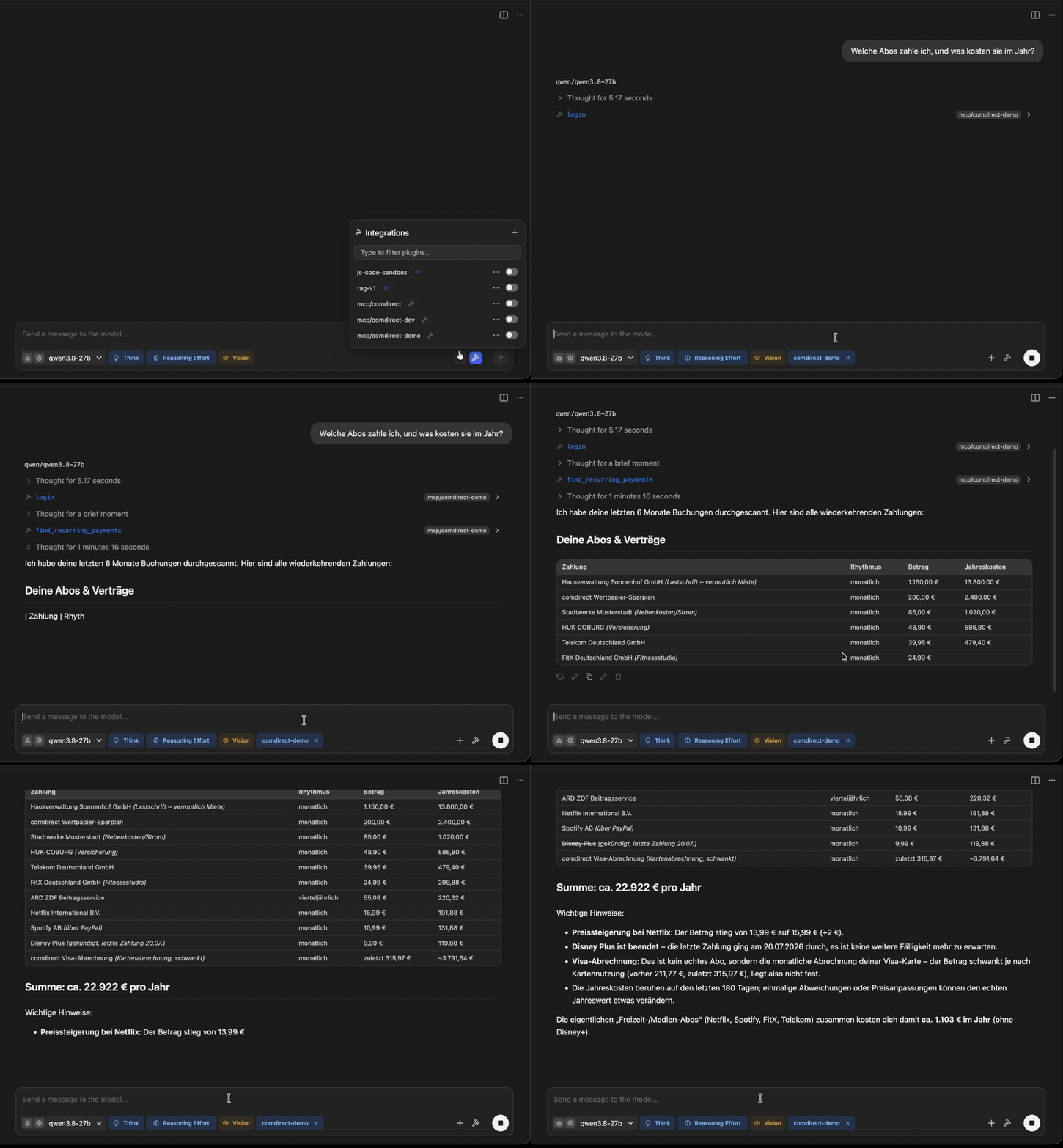
- Answers on the server: cash flow and spending per month, counterparty or your own categories, subscriptions with yearly costs, portfolio allocation
- Clean data: transfers between your own accounts are kept out of spending, PayPal payments show the merchant, payment texts are cleaned up, IBANs masked
- Typed Python client for your own scripts
The API returns account transactions of the last 180 days only.
| Tool | |
|---|---|
login / logout | Start a session (push TAN) / end and revoke it |
list_accounts, list_cards, get_wealth_overview | Balances of accounts, cards and all products |
list_transactions | Individual transactions |
summarize_transactions | Income, expenses and net per month, counterparty, type or category |
find_recurring_payments | Subscriptions, contracts and standing orders |
list_depots, get_depot_positions, summarize_portfolio | Depot positions and allocation |
list_depot_transactions, list_orders, get_order, get_instrument | Securities movements, order book, security data |
list_documents, read_document | Postbox documents as text or PDF (reading marks them as read) |
Prompts: monthly_review, find_subscriptions, tax_documents. Details: Tools reference.
Quickstart
You need uv, comdirect API access (Client ID and Secret) and photoTAN Push as default TAN method.
uvx comdirect-mcp@0.6.1 configure # stores your credentials in the OS keychain
Add the server to your client, e.g. Claude Code:
claude mcp add --transport stdio --scope user comdirect -- uvx comdirect-mcp@0.6.1
or Claude Desktop, LM Studio and others:
{
  "mcpServers": {
    "comdirect": {
      "command": "uvx",
      "args": ["comdirect-mcp@0.6.1"]
    }
  }
}
Then ask, e.g. „Welche Abos zahle ich, und was kosten sie im Jahr?“ The assistant calls login and you approve
the push in the app. VS Code, Ollama and more: Configure MCP clients ·
step by step: Getting started · problems: Troubleshoot.
Python library
from comdirect_mcp import ComdirectClient
from comdirect_mcp.utils import default_push_tan_callback

client = ComdirectClient(
    {"client_id": "...", "client_secret": "...", "username": "...", "password": "..."},
    {"push_tan_cb": default_push_tan_callback},
)
client.login()  # approve the push TAN, then press Enter
for account in client.list_accounts():
    print(account.id, account.balance, account.currency)
More
Documentation · CHANGELOG · CONTRIBUTING · AGENTS.md for AI coding agents · MIT License