AllMCPs
BrowseBestCategoriesStackCompareToolsGuidesBlog
Log in Submit MCP

Stay in the loop

Get new MCP servers and top picks in your inbox.

AllMCPs

The open directory for discovering and installing Model Context Protocol servers.

AllMCPs on GitHub (opens in a new tab)
Launched onTiny Startupstinystartups.com
Explore
  • Browse servers
  • Best MCP servers
  • Categories
  • MCP clients
  • Agent prompts
  • Stack Builder
  • Compare servers
  • Random discovery New
  • Submit a server
  • Pricing & Boost Boost
Learn
  • Guides hub
  • What is MCP?
  • Install guide
  • Build an MCP server
  • Deploy an MCP server
  • Security guide
  • Troubleshooting
  • MCP for SEO & AEO
  • Protocol versioning
  • Blog & updates
Tools
  • All developer tools
  • Config generator
  • Config validator
  • Config auditor
  • MCP playground
  • Token calculator
  • OpenAPI β†’ MCP
  • Badge generator
For agents
  • REST API docs
  • Trust & traffic Live
  • Remote MCP server SSE β†— (opens in a new tab)
  • llms.txt β†— (opens in a new tab)
  • Catalog JSON β†— (opens in a new tab)
Company
  • About
  • Advertise Sponsor
  • Contact
  • GitHub β†— (opens in a new tab)
  • Terms
  • Privacy
AllMCPs VerifiedAllMCPs VerifiedFeatured on Nick LaunchesFeatured on Nick LaunchesLaunch Llama NewsletterLaunch Llama NewsletterVerified DR - allmcps.comVerified DR - allmcps.comFeatured on SaaSGrowFeatured on SaaSGrowFeatured on Twelve ToolsFeatured on Twelve ToolsFeatured on Saaspa.geFeatured on Saaspa.geFeatured on Findly.toolsFeatured on Findly.toolsFeatured on Startup FameFeatured on Startup FameFeatured on LaunchKiwiFeatured on LaunchKiwiFeatured on ScrollLaunchFeatured on ScrollLaunchFeatured on DailyPingsFeatured on DailyPingsFazier badgeFazier badgeFeatured on NewTool.siteFeatured on NewTool.siteFeatured on saasfame.comFeatured on saasfame.comDR Checker - Domain RatingDR Checker - Domain RatingListed on Turbo0Listed on Turbo0Launched on LaunchBoard - Product Launch PlatformLaunched on LaunchBoard - Product Launch PlatformList on SimilarlabsList on Similarlabshttps://codetrendy.comhttps://codetrendy.comListed on DevTool.ioFeatured on BuildlistFeatured on BuildlistLaunched on Tiny StartupsFeatured on ShowMeBestAIFeatured on ShowMeBestAIFind us on LaunchZoneFind us on LaunchZoneAllMCPs VerifiedAllMCPs VerifiedFeatured on Nick LaunchesFeatured on Nick LaunchesLaunch Llama NewsletterLaunch Llama NewsletterVerified DR - allmcps.comVerified DR - allmcps.comFeatured on SaaSGrowFeatured on SaaSGrowFeatured on Twelve ToolsFeatured on Twelve ToolsFeatured on Saaspa.geFeatured on Saaspa.geFeatured on Findly.toolsFeatured on Findly.toolsFeatured on Startup FameFeatured on Startup FameFeatured on LaunchKiwiFeatured on LaunchKiwiFeatured on ScrollLaunchFeatured on ScrollLaunchFeatured on DailyPingsFeatured on DailyPingsFazier badgeFazier badgeFeatured on NewTool.siteFeatured on NewTool.siteFeatured on saasfame.comFeatured on saasfame.comDR Checker - Domain RatingDR Checker - Domain RatingListed on Turbo0Listed on Turbo0Launched on LaunchBoard - Product Launch PlatformLaunched on LaunchBoard - Product Launch PlatformList on SimilarlabsList on Similarlabshttps://codetrendy.comhttps://codetrendy.comListed on DevTool.ioFeatured on BuildlistFeatured on BuildlistLaunched on Tiny StartupsFeatured on ShowMeBestAIFeatured on ShowMeBestAIFind us on LaunchZoneFind us on LaunchZone
Β© 2026 Jackalope Digital LLC. All rights reserved.
  1. Home
  2. πŸ’» Developer Tools
  3. Codesentinel MCP
Codesentinel MCP logo
Health: ActiveRecent health check succeeded.Last checked 9/7/2026, 8:32:59 PM

Codesentinel MCP

User RatingsBe the first to rate and review this MCP server! Enrichment pendingWe haven’t run our AI enrichment pass on this listing yet, so the overview, use cases, and FAQ below may be sparse or missing. We work through the catalog over time β€” check back soon.
View RepositoryVisit Website

Codebase health MCP: dead code, cycles, coupling, architectural drift.

Quick Install

Automated & IDE Setup

Copy the AI prompt to install this server into Claude Code, Cursor, or another agent β€” or use 1-click editor setup below.

Add to CursorAdd to VS Code
Not yet automatically verified

We haven't yet run this listing's install command through our automated sandbox check. This isn't a red flag β€” we're steadily working through the catalog.

Manual Client & Custom JSON ConfigExpand JSON β–Ύ

Client Config & Setup

Choose your client or environment
Target File:~/Library/Application Support/Claude/claude_desktop_config.json
claude_desktop_config.json
{
  "mcpServers": {
    "codesentinel-mcp": {
      "command": "npx",
      "args": [
        "-y",
        "vercel"
      ]
    }
  }
}

πŸ’‘ Paste the JSON block into your client's configuration file under mcpServers, then restart the application.

Install Directory Badge Claim listing AlternativesπŸ’» More in Developer Tools

Documentation Overview

CodeHealth MCP

Codebase health analysis that works everywhere. Dead code, circular dependencies, coupling issues, and architectural drift β€” exposed as MCP tools for Claude Desktop, Cursor, Windsurf, and Slack.

MCP Node.js License: MIT MCP Registry awesome-mcp-servers


The Problem

Dead code, circular dependencies, excessive coupling, and architectural drift are invisible in day-to-day work. Static analysis tools produce noise in CI dashboards nobody checks. CodeHealth MCP brings these insights into the tools developers actually use β€” via the Model Context Protocol.


What CodeHealth MCP Does

7 analysis tools, available in any MCP-compatible client:

ToolWhat It Finds
analyze_dead_codeUnused functions, classes, modules with file:line + fix suggestions
detect_circular_depsModule import cycles via DFS with impact assessment
analyze_couplingFan-out per module, tight cluster detection, refactoring suggestions
detect_architectural_driftLayer boundary violations (UI→Data, Business→UI, etc.)
full_health_scanAll four analyses + 0–100 health score + prioritized action items
explain_findingAI-powered detailed explanation of any finding
check_mcp_healthRemote MCP handshake (initialize + tools/list), schema drift, secret scan β€” HTTP 200 is not healthy

Where It Works

ClientHow to Add
Claude DesktopAdd to claude_desktop_config.json
Cursor / WindsurfAdd to MCP settings
SlackBuilt-in Agent Builder integration with Block Kit UI
Any MCP clientStandard MCP server (stdio) or remote Streamable HTTP

Claude Desktop Config (stdio)

config.json
{
  "mcpServers": {
    "codehealth": {
      "command": "node",
      "args": ["/path/to/codehealth-mcp/mcp-server/index.js"]
    }
  }
}

Remote Streamable HTTP (Glama / hosted)

Public HTTPS + streamable-http is required to list CodeSentinel as a Glama remote connector. Replace the host from your deploy env β€” do not commit a fake hostname.

server.ts
export MCP_BEARER_TOKEN="replace-with-a-long-random-secret"
npm run mcp:http

Local default: http://127.0.0.1:8787/mcp (health: GET /health). Production must be HTTPS.

config.json
{
  "mcpServers": {
    "codesentinel": {
      "type": "streamable-http",
      "url": "https://${MCP_HTTP_HOST}/mcp",
      "headers": {
        "Authorization": "Bearer ${MCP_BEARER_TOKEN}"
      }
    }
  }
}

Cursor / Claude remote connectors use the same url + Authorization header. Unauthenticated /mcp returns HTTP 401. LLM_API_KEY and other provider keys stay on the server and are never echoed.

Deploy on Vercel (public HTTPS)

Stateless Streamable HTTP (JSON request/response) runs on Vercel Fluid Compute. No sticky sessions. Do not invent a hostname β€” use the URL Vercel assigns.

Terminal
npx vercel          # preview
npx vercel env add MCP_BEARER_TOKEN     # required for /mcp β€” fail-closed Bearer auth
npx vercel env add LLM_API_KEY          # optional, server-side only
npx vercel env add DAYTONA_API_KEY      # optional, isolated GitHub scans
npx vercel env add GITHUB_TOKEN         # optional, private repo fetch
npx vercel --prod
# GET /health must be 200 even if MCP_BEARER_TOKEN is not set yet.

After deploy, the MCP endpoint is:

https://$VERCEL_PROJECT_PRODUCTION_URL/mcp

(VERCEL_URL for a specific deployment). Health: https://$VERCEL_PROJECT_PRODUCTION_URL/health.

Turn off Vercel Deployment Protection on the production host, or Glama/clients cannot complete initialize.

Glama connector fields (fill after the Vercel URL exists)

FieldValue
TypeConnector (remote MCP)
Server URLhttps://$VERCEL_PROJECT_PRODUCTION_URL/mcp
Transportstreamable-http
AuthAPI Key / Bearer
HeaderAuthorization
Header valueBearer $MCP_BEARER_TOKEN (same secret as the Vercel env)
Ownership claimhttps://$VERCEL_PROJECT_PRODUCTION_URL/.well-known/glama.json (static public/ file)

See docs/mcp-http.md for Vercel env vars, Fluid Compute notes, and Docker/Fly fallback.


Quick Start

bash
git clone https://github.com/Cubiczan/codesentinel.git
cd codesentinel
npm install
cp .env.sample .env
# Edit .env with your LLM API key (and MCP_BEARER_TOKEN for HTTP mode)
npm start

HTTP MCP (same tools, Bearer auth):

server.ts
export MCP_BEARER_TOKEN="replace-with-a-long-random-secret"
npm run mcp:http
npm run mcp:http:smoke

Use in Claude Desktop

Code
Run a full health scan on /path/to/my/repo
Code
Find circular dependencies in the frontend
Code
Check coupling metrics in src/services
Code
Check MCP health on https://example.com/mcp

Remote MCP protocol health (not HTTP uptime)

A remote MCP endpoint can return HTTP 200 while initialize, tools/list, or the SSE stream fails. CodeSentinel probes the protocol itself:

  • Synthetic Streamable HTTP / legacy SSE handshake (initialize + tools/list)
  • Canonical tool-schema hash and drift alarms
  • Discovery-latency metrics
  • Secret scanning of tool descriptions/schemas before they enter agent context
Terminal
npm test
npm run mcp:health -- https://example.com/mcp

Library: src/lib/mcp-health. Analyzer: lib/analyzers/mcp-health.js. Full write-up: docs/mcp-health.md.

Daytona sandbox scans (optional)

Set DAYTONA_API_KEY (and optionally GITHUB_TOKEN for private repos). MCP tools and Slack analysis will shallow-clone GitHub URLs in a Daytona VM and return live import-graph findings instead of demo data.

Code
full_health_scan repo_path=https://github.com/org/repo

Use in Slack

Add the Slack app manifest, enable Agent Builder, and @CodeHealth in any channel.


Architecture

Code
β”Œβ”€β”€β”€β”€β”€β”€β”€β”€β”€β”€β”€β”€β”€β”€β”€β”€β”€β”€β”€β”€β”€β”€β”€β”€β”€β”€β”€β”€β”€β”€β”€β”€β”€β”€β”€β”€β”€β”€β”€β”€β”€β”€β”
β”‚          MCP CLIENT (any)                β”‚
β”‚  Claude Desktop, Cursor, Slack, etc.     β”‚
β””β”€β”€β”€β”€β”€β”€β”€β”€β”€β”€β”€β”€β”€β”€β”€β”€β”€β”€β”¬β”€β”€β”€β”€β”€β”€β”€β”€β”€β”€β”€β”€β”€β”€β”€β”€β”€β”€β”€β”€β”€β”€β”€β”˜
                   β”‚ MCP Protocol (stdio or Streamable HTTP)
β”Œβ”€β”€β”€β”€β”€β”€β”€β”€β”€β”€β”€β”€β”€β”€β”€β”€β”€β”€β–Όβ”€β”€β”€β”€β”€β”€β”€β”€β”€β”€β”€β”€β”€β”€β”€β”€β”€β”€β”€β”€β”€β”€β”€β”
β”‚         CODEHEALTH MCP SERVER            β”‚
β”‚                                          β”‚
β”‚  πŸ”§ analyze_dead_code                    β”‚
β”‚  πŸ”§ detect_circular_deps                 β”‚
β”‚  πŸ”§ analyze_coupling                     β”‚
β”‚  πŸ”§ detect_architectural_drift           β”‚
β”‚  πŸ”§ full_health_scan                     β”‚
β”‚  πŸ”§ explain_finding                      β”‚
β”‚  πŸ”§ check_mcp_health                     β”‚
β”‚                                          β”‚
β”‚  β”Œβ”€β”€β”€β”€β”€β”€β”€β”€β”€β”€β”€β”€β”€β”€β”€β”€β”€β”€β”€β”€β”€β”€β”€β”€β”€β”€β”€β”€β”€β”€β”€β”€β”€β”€β”    β”‚
β”‚  β”‚       Analysis Engine            β”‚    β”‚
β”‚  β”‚  dead-code | circular-deps       β”‚    β”‚
β”‚  β”‚  coupling | drift | mcp-health   β”‚    β”‚
β”‚  β””β”€β”€β”€β”€β”€β”€β”€β”€β”€β”€β”€β”€β”€β”€β”€β”€β”€β”€β”€β”€β”€β”€β”€β”€β”€β”€β”€β”€β”€β”€β”€β”€β”€β”€β”˜    β”‚
β”‚                                          β”‚
β”‚  β”Œβ”€β”€β”€β”€β”€β”€β”€β”€β”€β”€β”€β”€β”€β”€β”€β”€β”€β”€β”€β”€β”€β”€β”€β”€β”€β”€β”€β”€β”€β”€β”€β”€β”€β”€β”    β”‚
β”‚  β”‚       LLM Provider               β”‚    β”‚
β”‚  β”‚  Deepseek / OpenAI / Anthropic   β”‚    β”‚
β”‚  β””β”€β”€β”€β”€β”€β”€β”€β”€β”€β”€β”€β”€β”€β”€β”€β”€β”€β”€β”€β”€β”€β”€β”€β”€β”€β”€β”€β”€β”€β”€β”€β”€β”€β”€β”˜    β”‚
β””β”€β”€β”€β”€β”€β”€β”€β”€β”€β”€β”€β”€β”€β”€β”€β”€β”€β”€β”€β”€β”€β”€β”€β”€β”€β”€β”€β”€β”€β”€β”€β”€β”€β”€β”€β”€β”€β”€β”€β”€β”€β”€β”˜

Slack Integration

CodeHealth MCP ships with a full Slack Agent Builder app featuring:

  • Block Kit UI β€” Severity-coded findings, health scores, actionable suggestions
  • Thread-based conversations β€” Follow-up analysis in threads
  • Suggested prompts β€” One-click analysis triggers
  • MCP server β€” Same tools, available everywhere

Demo Sandbox (Devpost judges)

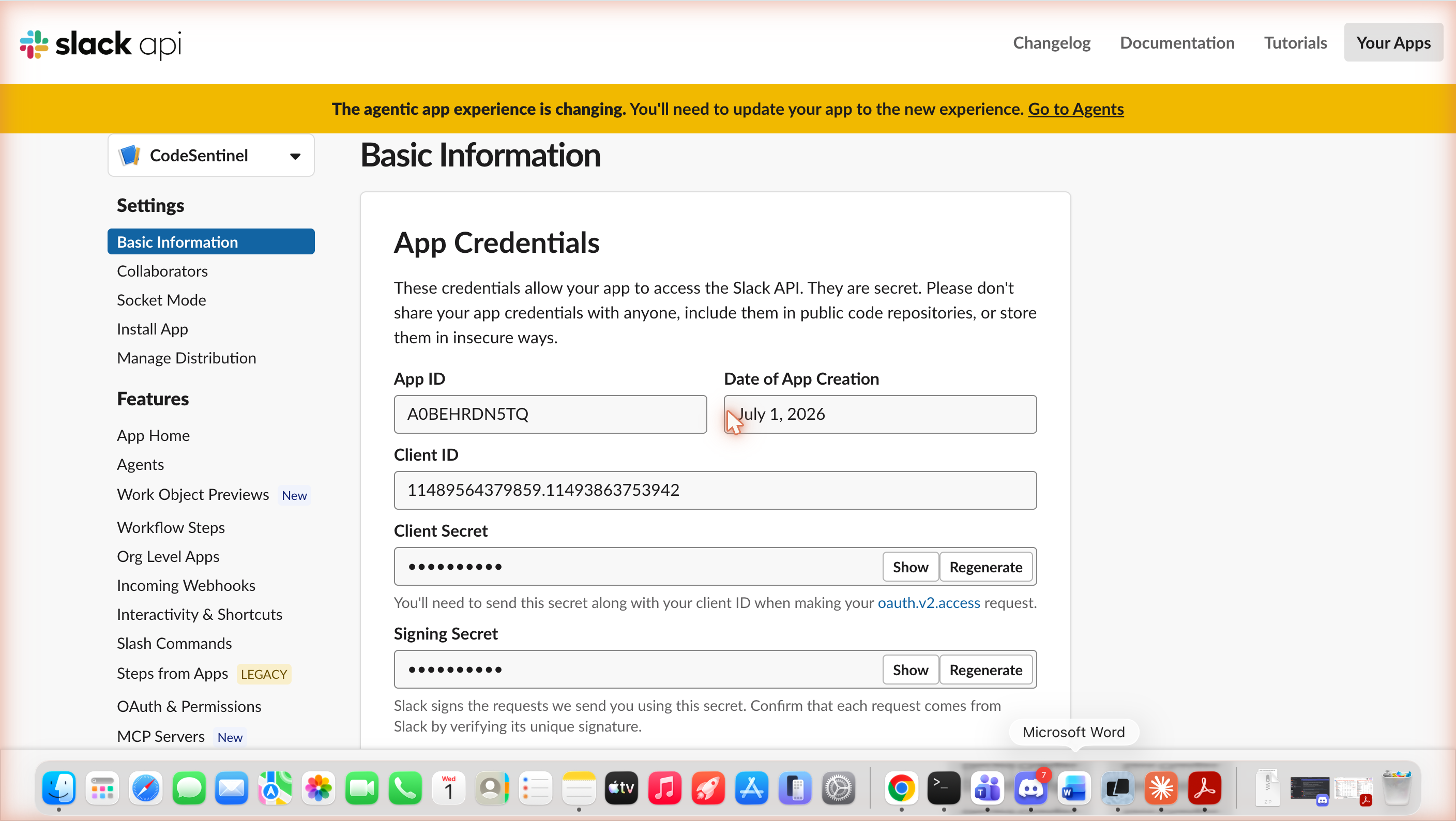
The live demo workspace is codehealthdemo.slack.com β€” the CodeSentinel agent (App ID A0BEHRDN5TQ) is installed and authorized there. Mention it in any channel:

Code
@CodeSentinel run a full health scan on https://github.com/icohangar-ops/codesentinel

Sandbox configuration:

Live agent response in the sandbox β€” a real @CodeSentinel mention in #general triggering a Daytona-sandboxed repo scan:
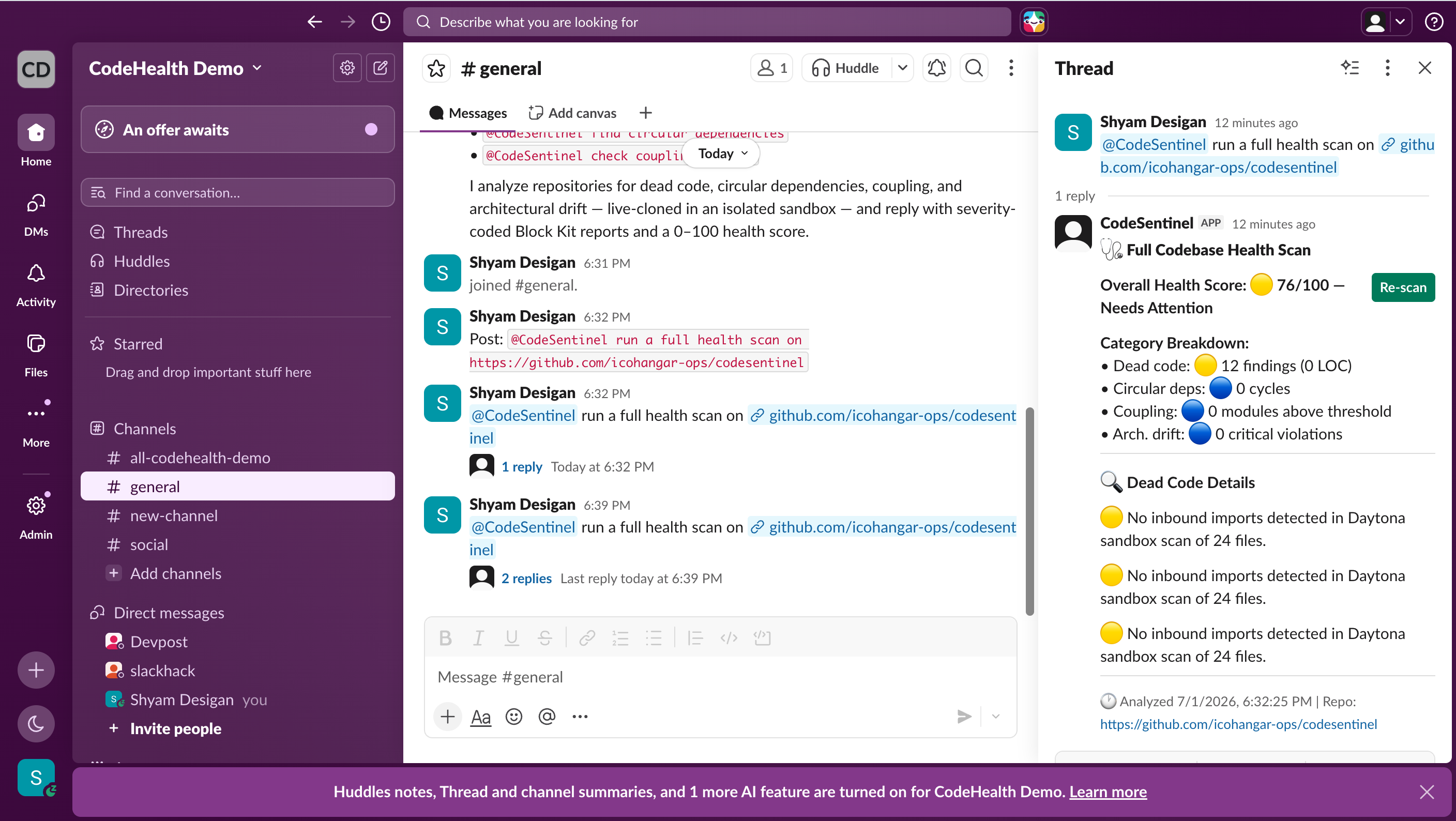
CodeSentinel responding in #general

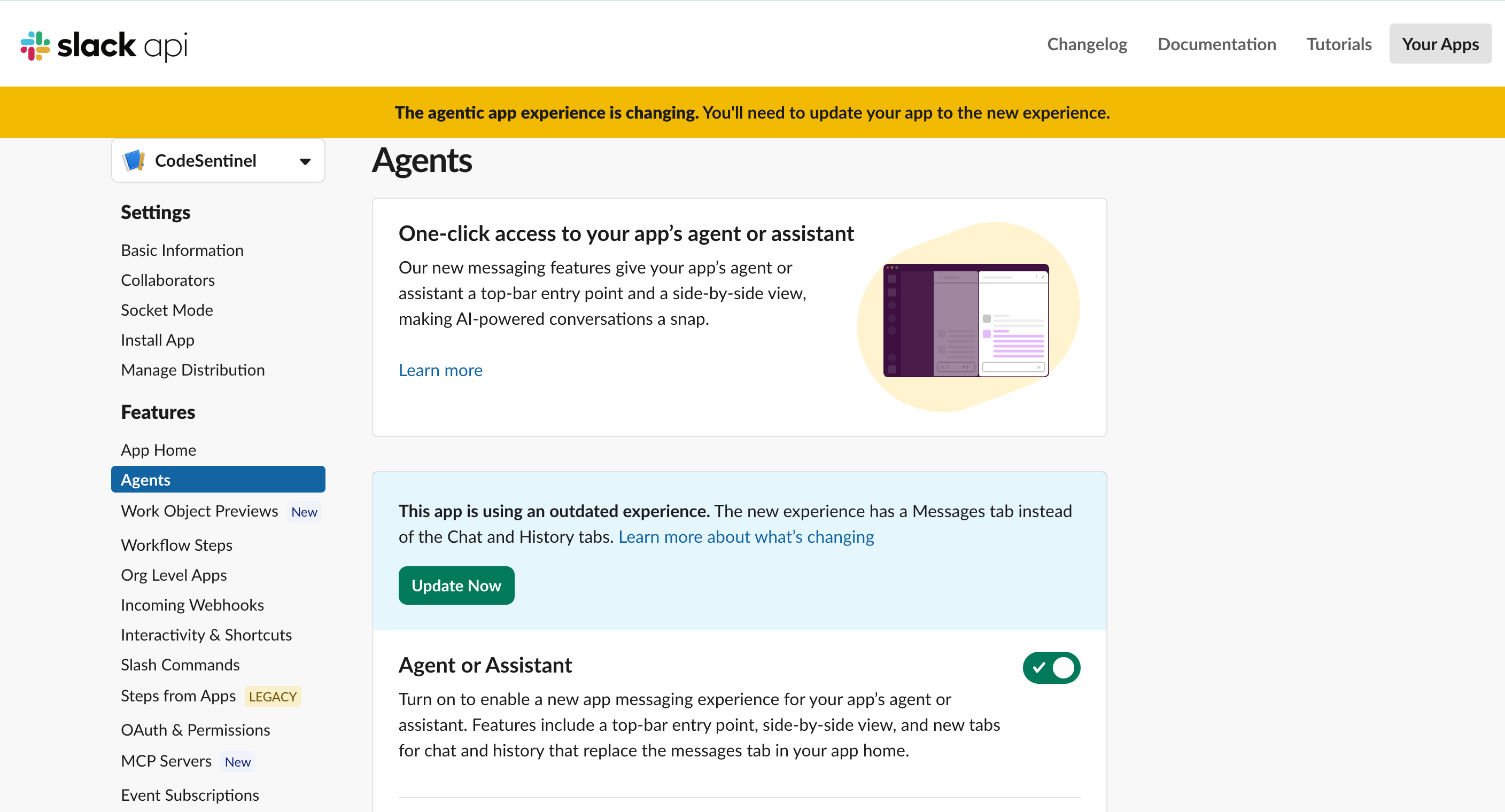
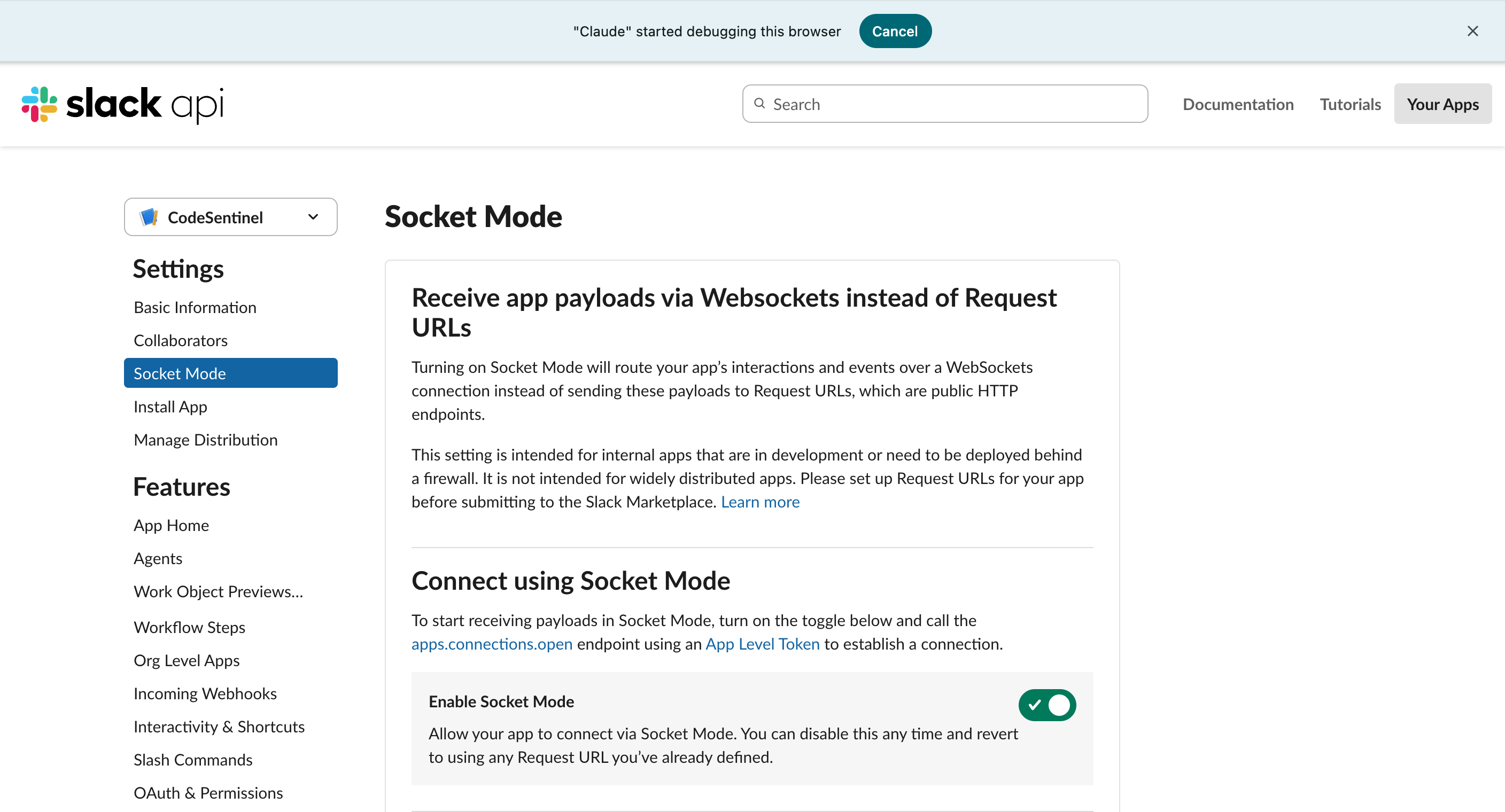
App credentials & App IDAgent capability enabledSocket Mode enabled
App Basic InformationAgent enabledSocket Mode enabled

Adding Custom Analyzers

Each analyzer follows a simple interface:

javascript
function analyze(repoInfo) {
  return {
    type: "your_analysis_type",
    findings: [
      {
        type: "finding_type",
        severity: "critical" | "warning" | "info",
        file: "path/to/file.ts",
        line: 42,
        name: "symbol_name",
        reason: "Why this is a problem",
        suggestion: "How to fix it",
      },
    ],
    stats: { /* summary metrics */ },
  };
}

Add a new analyzer in lib/analyzers/, register it in analysis-engine.js, and it's automatically available in Slack and via MCP.


Roadmap

  • Real AST analysis β€” ts-morph for TypeScript, tree-sitter for multi-language
  • GitHub App β€” Automatic analysis on PRs with inline comments
  • Historical trends β€” Track health score over time per repo
  • Custom architecture rules β€” Define layer boundaries via config
  • Team dashboards β€” Aggregate health in Slack Canvas

Project Structure

Read the full README β†’View source on GitHub β†’

Related MCP Servers

View all in Developer Tools View all alternatives
  • Pyscn logoPyscn

    Python code analysis for AI agents: complexity, dead code, clones, coupling, and a health score.

    πŸ’» Developer Tools0 views
    Compare vs Pyscn β†’
  • Codescene MCP Server logoCodescene MCP Server

    An MCP server that provides CodeScene Code Health analysis tools.

    πŸ’» Developer Tools1 views
    Compare vs Codescene MCP Server β†’
  • Ovecc logoOvecc

    Architecture guardrails for AI-written code: dependency graph, impact, dead code, CI gate

    πŸ’» Developer Tools2 views
    Compare vs Ovecc β†’
  • Omni Scanner logoOmni Scanner

    Codebase observatory with 56+ scanners for git health, architecture, and documentation.

    πŸ’» Developer Tools0 views
    Compare vs Omni Scanner β†’

Reviews

No reviews yet β€” be the first to share how this listing worked for you.

Frequently Asked Questions about Codesentinel MCP

Add the following block to your claude_desktop_config.json under mcpServers: "mcpServers": { "codesentinel-mcp": { "command": "npx", "args": ["-y", "codesentinel-mcp"] } }

AllMCPs Directory Badge

Full Badge Customizer

Showcase your server listing on GitHub or your project documentation. Embed this dynamic SVG badge to highlight official listing status and live engagement.

Badge Style:
Live Dynamic SVG PreviewCodesentinel MCP AllMCPs Directory Badge

Markdown (GitHub README)
[![AllMCPs](https://allmcps.com/api/badge/codesentinel-mcp?style=directory)](https://allmcps.com/mcp/codesentinel-mcp)
HTML Embed
<a href="https://allmcps.com/mcp/codesentinel-mcp"><img src="https://allmcps.com/api/badge/codesentinel-mcp?style=directory" alt="Codesentinel MCP on AllMCPs" /></a>

Technical Specs & Signals

CategoryπŸ’»Developer Tools
More technical detailsExpand β–Ύ
TransportSTDIO
RuntimeNode.js
Last updatedSep 7, 2026
Views0
Unique ViewsTotal visits recorded for this listing page on AllMCPs.
Installs0
Installs & Copy ActionsTotal times users copied install commands or configuration snippets for this server.
GitHub stars0
GitHub Star CountTotal stargazers on GitHub representing community popularity (0 stars).
35Quality signal: Fair Β· 35/100How this signal is calculated β–Ύ
Server availabilityNot measured

Not scored for repo-hosted servers β€” we can't reach the running server, only its GitHub page. Hosted MCP endpoints are health-checked live.

Verified ownership10/20
Documentation & tools15/30
Adoption & activity1/15
Community engagement0/10

A guidance signal from public completeness & health data β€” not a user rating. New listings start lower and rise as they add docs, get verified, and grow adoption. Signals we can't observe for a listing are skipped, not counted against it.

β˜… FeaturedAllMCPs Server logo

AllMCPs Server

The official MCP server for AllMCPs.com - submit and manage tools directly from your AI. The open directory for MCP servers. Connect Claude, Cursor, Windsurf, and AI agents to databases, tools, files, and APIs. Explore 10,000+ servers. AllMCPs is the premier, open directory for discovering, evaluating, and installing Model Context Protocol (MCP) servers to equip AI agents and LLMs with real-world superpowers.

Explore Server β†’

Own this project?

This directory is pre-filled from public sources. Claim via GitHub README, site badge, or DNS TXT to unlock edit access and the Official badge β€” proof is checked automatically, then reviewed by our team.

Free dofollow backlink: add your website and place the AllMCPs badge on it β€” no claim needed. We detect it automatically and keep it verified as long as the badge stays live.

Claim & get free dofollow

Share & Embed

Add our SVG badge (dark/light directory styles) or embeddable widget to your site.

Explore more

More in πŸ’» Developer Tools β†’Best MCP servers for Developers β†’Alternatives to Codesentinel MCP β†’Install in Claude DesktopInstall in CursorInstall in VS Code