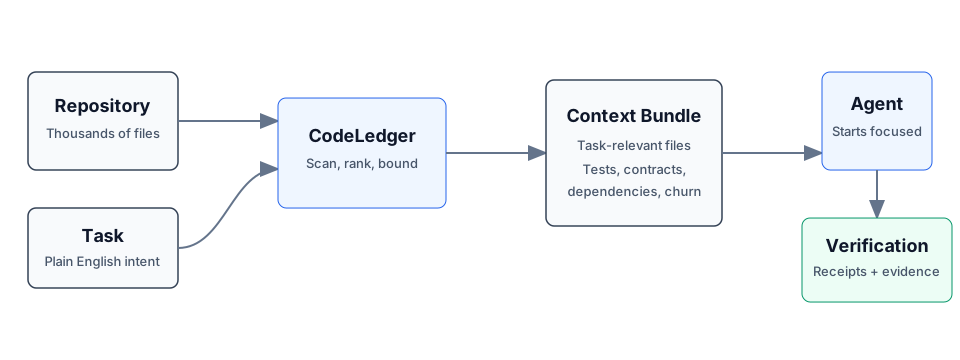
The full upstream README, mirrored here for reference. Install config, tool schemas, adoption signals, and an original overview live on the Codeledger listing page.
What problem are we solving?
The Problem — AI coding agents waste 40–60% of their context window on irrelevant files. Every session starts cold. Institutional knowledge lives in people's heads and disappears when they leave. There is no risk signal before a merge.
The Solution — CodeLedger is a deterministic context control plane for software development. It scores every file in a repository, selects only what the current task requires, captures outcomes, and promotes successful patterns into reusable institutional memory.
The Intelligence Layer — The Task Intelligence Engine does not start from zero. It is seeded from day one with a curated ontology pack of golden patterns — distilled from peer organizations and leading engineering teams at organizations including Google, SAP, and Salesforce. As your team uses CodeLedger, your own earned patterns layer on top, making the system progressively more tailored to your codebase, your conventions, and your standards.
The Principle — No cloud. No training pipeline. No behavior change required. Engineering management installs it once. Every developer and every AI agent benefits automatically — from collective intelligence on day one, and from your own institutional memory from day two onward.
Logs are history. Ledger is intelligence.
CodeLedger turns every coding action into a persistent, compounding asset.
Without CodeLedger:
With CodeLedger:
This is not another AI tool. This is a Context Control Plane for your repo.
Works with: Claude Code | Cursor | Codex | GitHub Copilot | Gemini CLI | Any CLI-based agent
Over time, your repo builds its own intelligence layer.
CodeLedger helps in two ways:
⚡ Now — Assembles the minimal context needed for your current task. Fewer irrelevant files, fewer retries, faster execution.
💎 Next — Captures what worked and builds reusable memory so future tasks start smarter. Successful patterns compound into institutional knowledge.
CodeLedger includes an MCP server that gives Claude, Cursor, and Windsurf direct access to your repo's memory:
Tools available to agents:
query_ledger — Search for verified patterns before codingget_active_context — Get the task-specific context bundlerecord_interaction — Report outcomes for memory compoundingMCP integration requires Team or Enterprise tier. See Feature Tiers.
Generate a repo-local engineering dashboard from your Context Ledger:
The dashboard shows: system health, integrity signals, quality metrics, pattern reuse intelligence, and estimated engineering value — all derived from real execution evidence.
Full dashboard requires Team or Enterprise tier. Individual tier receives a placeholder with teaser stats.
Prevent silent merge failures where code compiles but types or config are semantically broken:
Catches removed types with active importers, config fields accessed but missing from defaults, and name collisions across packages.
| Feature | Individual (Free) | Team | Enterprise |
|---|---|---|---|
| Context selection + scanning | ✅ | ✅ | ✅ |
| Prompt coaching (automatic) | ✅ | ✅ | ✅ |
CI enforcement (ci check --json) | ✅ | ✅ | ✅ |
| Local evidence + pattern capture | ✅ | ✅ | ✅ |
| Semantic merge verification | ✅ | ✅ | ✅ |
| Full Engineering Dashboard | 🔒 | ✅ | ✅ |
| MCP Server (AI agent memory) | 🔒 | ✅ | ✅ |
| Team coordination (claims, leases) | 🔒 | ✅ | ✅ |
| Pattern sync (GitHub mirror) | 🔒 | ✅ | ✅ |
| Provenance (causal traceability) | 🔒 | 🔒 | ✅ |
| Audit export (SIEM-ready) | 🔒 | 🔒 | ✅ |
CodeLedger is built on a local-first Context Ledger:
Your repo becomes an evolving system — not just code.
Download Latest Release · npm install -g @codeledger/cli · Getting Started Guide · CLI Command Reference
Your agent reads the right files first. Every time.
For browser/cloud sessions, the committed .codeledger/bin/ runtime package is what gets executed. codeledger ready initializes the repo, scans it, and deploys the canonical standalone build so the checked-in runtime matches the version you tested locally. Inside a vendored repo, ./.codeledger/bin/codeledger <command> is the easiest interactive entry point.
Once a repo is initialized, CodeLedger can reconcile reality across drift, outcomes, snapshots, handoffs, and release state:
These commands extend CodeLedger's existing verification and memory systems. They do not create a separate ledger or memory store.
Installing CodeLedger gives you the CLI. To use it in a project, initialize that project:
That sets up CodeLedger inside the repo by creating:
.codeledger/ for project-local cache, bundles, sessions, and runtime data.codeledger/bin/ for the vendored standalone runtime.claude/hooks.json for automatic integrationCLAUDE.md so agents know how to use the context bundleYour normal flow after install is:
CodeLedger is just the beginning.
It’s built on ContextECF — a broader context infrastructure approach for making AI systems deterministic, auditable, and cumulative instead of probabilistic and forgetful.
At the core is a simple idea:
Every interaction with AI should make the system smarter, more reliable, and more accountable over time.
While you’re using CodeLedger for development, the same foundation extends to:
Most AI tools:
ContextECF + CodeLedger:
What you’re building isn’t just output.
You’re building a long-term context asset for yourself — and potentially your entire organization.
If CodeLedger is helping you, it’s worth a quick share with:
Intelligent Context AI Inc is the creator of CodeLedger and ContextECF.
If your team is exploring AI at scale, agent systems, or enterprise context management:
📩 customersuccess@intelligentcontext.ai
📞 916-753-7432
CodeLedger helps you capture truth in code.
ContextECF helps you scale that truth across the enterprise.
Important:
.codeledger/..codeledger/bin/ runtime is what makes CodeLedger portable.AI coding agents are powerful, but on real codebases they waste time, tokens, and accuracy because they lack targeted context. CodeLedger fixes that — deterministically.
No embeddings. No cloud. No telemetry. Fully local at runtime. Fully deterministic.
| Pain Point (Without CodeLedger) | Feature (With CodeLedger) | How It Works | Benefit |
|---|---|---|---|
| Agent reads 30-50 files before finding the right ones | Deterministic file selection | Scores every file across multiple weighted signals and selects the top-ranked set within a token budget | Agent starts with the right files from the first turn |
| Irrelevant context burns tokens and degrades model accuracy | Bounded token budgets | Stop-rule algorithm packs files greedily until the budget is full; --expand doubles when you need more | 60-99% context reduction — pay only for what matters |
| Agent edits files in package A when the task is in package B | Monorepo scope restriction (--scope) + Auto-scope inference | Constrains candidate generation to specified path prefixes. Auto-detects service names in the task (e.g., "fix auth for api-gateway") and scopes automatically — no --scope flag needed | No cross-package pollution; bundles stay focused |
| Compound tasks ("fix auth and add tests") miss half the files | Task decomposition | Splits compound tasks into sub-clauses and unions the discovery results | Every clause gets its own file discovery pass |
| Agent doesn't know which tests to run after a change | Blast radius annotation (--blast-radius) | Traces direct dependents, transitive dependents, and impacted test files for each bundle file via the dependency graph | Agent knows exactly what to test and what might break |
| Hard to tell if the bundle actually covers the task | Confidence scoring with actionable UX | Assesses keyword coverage, score distribution, and reason diversity; suggests improvements when confidence is low | Low-confidence bundles come with specific "try this" guidance |
| No visibility into files that almost made the cut | Near-miss explanation (--near-misses) | Reports the top N excluded files with scores, ranks, budget gaps, and keyword suggestions | Refine your task description or bump budget with precision |
| "Add a new endpoint" tasks lack structural examples | Pattern exemplars | Detects creation-intent tasks and includes sibling files from the same directory as structural templates | Agent sees how existing endpoints are built before writing new ones |
| Bundle scores feel like a black box | Explain mode (--explain) | Shows the per-file scoring breakdown for every selected file | Full transparency into why each file was chosen |
| Agent loses context after compaction or long sessions | Session continuity (session-progress, session-summary) | Writes ground-truth snapshots from git (commits, changed files, remaining bundle files) before compaction; session-end recall/precision metrics | Re-orient after compaction without redoing work |
| Mid-session learning can't feed back into context | Mid-session refine (refine --learned "...") | Re-scores the bundle with new learned context, extra keywords (--add-keywords), and file exclusions (--drop); recomputes all derived metadata | Bundle evolves as the agent learns, without starting over |
| Manually figuring out which files changed on the current branch | Branch-aware scoring (--branch-aware) | Detects uncommitted and branch-diffed files and boosts their scores automatically | Work-in-progress files float to the top |
| Config files, type definitions, and contracts get missed | Surface-aware auto-inclusion | Automatically includes config files, type definitions, and API contracts that match task keywords | Critical context files never fall through the cracks |
| Agent reads files in random order, missing structural context | Architectural layer ordering (--layer-order) | Sorts bundle files by architectural layer (types, models, services, routes, tests) | Agent reads contracts before implementations, just like a human would |
| Only works on TypeScript/JavaScript repos | Language-agnostic scanning | Built-in language registry for 42 file extensions across 15 language families. Python and Go get full deep support (import resolution, test conventions, keyword extraction). Any language works out of the box | Polyglot and multi-language monorepos just work |
| Co-changed files missing from the bundle | Shadow Files | Mines git history to find files that commonly change together and expands the bundle accordingly | Cross-cutting companions (types ↔ tests, schema ↔ migration) included automatically |
| Agent introduces architectural violations that linters miss | Review Intelligence | 5 invariant modules detect missing runtime validation (P1), unguarded outbound HTTP (P1), helper bypass (P2). Baselines, inline suppressions, disposition tracking | Catches architectural risks — not just syntax issues — deterministically |
| Token estimates are wildly inaccurate across languages | Language-aware token calibration | Uses per-language token/line rates (TypeScript 3.5, Python 3.2, Java 4.5, etc.) instead of a flat 4.0 | Budgets are accurate; no over- or under-packing |
| Task type doesn't influence which files are prioritized | Task-type inference | Auto-detects bug fix, feature add, refactor, test update, or config task and adjusts scoring weights accordingly | Bug fixes emphasize error infrastructure; test tasks heavily prioritize test files |
| TODO/FIXME markers scattered across the codebase are invisible | TODO/FIXME awareness | Scans selected files for TODO, FIXME, HACK, XXX markers and surfaces counts in the bundle | Agent sees open work items in the files it's about to edit |
| No way to compare agent performance with vs. without context | A/B benchmarking (compare) | Runs the same task twice — once with CodeLedger context, once without — and diffs test pass rate, iterations, token usage, and time | Quantified proof that context selection works |
| Agent gets stuck in test-fail-edit-retry loops | Loop detection & circuit-breaker | Detects repeated test failures, file edit loops, and command retries from the event ledger with configurable thresholds | Stuck agents get a clear signal to change approach |
| Agent edits files outside the task's scope | Scope contract enforcement | Derives allowed file paths from bundle + dependency neighbors; warns or blocks out-of-scope edits | Haphazard changes caught before they land |
| Multiple agents edit the same files concurrently | Cross-session conflict zones | Detects file overlap between active sessions and warns before edits begin | Merge conflicts prevented before they happen |
| Refreshed bundles re-surface already-resolved files | Commit-aware bundle invalidation | Marks bundled files as "addressed" when committed; suggests refresh when staleness >= 75% | No re-review parroting — agents move forward |
| Task objective drifts mid-session without detection | Intent governance (intent) | Tracks structured task contracts (objective, scope, constraints) with deterministic Jaccard-based drift scoring across 7 fields | Scope creep detected and flagged automatically |
| Rate limit or crash loses all work-in-progress | Checkpoint bundles (checkpoint) | Incremental snapshots of bundle state + git HEAD + changed files; restore to resume | Work survives interruptions |
| No visibility across concurrent agent sessions | Multi-agent shared summary (shared-summary) | Cross-session overlap matrix, per-session metrics, hotspot detection | Orchestrators see the full picture |
Verify it works:
See GETTING-STARTED.md for the full 5-step setup guide, configuration, and troubleshooting. For a command-by-command walkthrough with example output, see the CLI Command Reference.
Download the latest release — extract the zip, then drag install.sh into your terminal and press Enter. The installer uses the bundled package from the zip, so the installed wrapper version matches the release. The wrapper then fetches the matching hardened binary from the GitHub release unless your environment already provides it.
| Repo Profile | Source Files | Impact |
|---|---|---|
| Large monolith or service | 500 – 5,000 | Highest. Cuts straight to the 10-25 files that matter. |
| Mid-size application | 100 – 500 | High. Sweet spot for tight-budget precision. |
| Multi-package monorepo | 1,000 – 50,000+ | High. Auto-scope inference detects service names in your task automatically. |
| Small project | 20 – 100 | Moderate. Still useful for churn-based prioritization. |
Rule of thumb: If your agent regularly reads more than 25 files before making its first edit, CodeLedger will help.
Same task + same repo state = same file rankings and content. Every time.
Use codeledger activate --task "..." --explain to see behavior-level reasons
for a specific bundle without exposing protected implementation details.
After a new release, npm install -g @codeledger/cli automatically fetches the hardened platform binary from GitHub Releases. For the first ~10 minutes following a release, the binary may still be uploading. The installer retries automatically with backoff — this is expected behavior, not an error.
If you see "Binary pending" messages during install, simply wait. The installer handles the timing automatically and will complete within a few minutes.
That's it. Start your agent and describe your task in plain English. The hooks will:
No commands to memorize. Context is ready when your agent starts.
Inside an initialized repo, prefer:
That repo-local wrapper prefers a newer global codeledger install on your machine and falls back to the vendored standalone runtime in browser, CI, and container environments.
CodeLedger ships with Claude Code hooks. Just run codeledger init and start Claude Code — init warms the repo index, and the SessionStart hook handles activation automatically.
| Hook | When | What |
|---|---|---|
| SessionStart | Session opens | Scans repo, generates bundle |
| PreToolUse | Before edit/write | Checks activation freshness and warns on CodeLedger reservation conflicts; managed installs may block |
| PreCompact | Before compression | Saves progress snapshot to survive compaction |
| Stop | Session ends | Shows recall/precision metrics |
No commands to remember. Context is ready when your agent starts.
See the public Claude Code hook example for the hook configuration.
After codeledger init, your agent reads the CLAUDE.md instructions and .codeledger/active-bundle.md for context. Hook-aware environments refresh automatically for new meaningful tasks. In local non-hook environments, the repo-local ambient wrappers now apply the same rule before handoff:
Acknowledgement-only follow-ups like Yes please do not refresh context. If you need to trigger the rule directly, use:
For plugin-first, mid-session retrieval, ask CodeLedger for refreshed context before using raw search:
That returns the active bundle, top-ranked files, and bundle delta for the task shift. Use rg or manual file search only if the broker result is insufficient.
Human-readable broker output also includes matched runtime patterns with ranking reasons like lifecycle status, confidence, reuse count, promotion state, merge count, and the most recent promotion rationale.
For session-aware inspection during the same run:
codeledger scan ends with a compact executive summary, grouped policy recommendations, and suggested next commands. Use codeledger scan --full-policy when you want the full override list instead of the compact default view.
codeledger memory patterns shows promoted runtime patterns along with trust basis and promotion state for quick inspection.
codeledger memory activity gives one compact view of active learning proposals plus harvested runtime outcomes.
For relevance-managed architectural memory:
Policy memory is stored under .codeledger/memory/policy-artifacts.json and keeps HOT/WARM/COLD/ARCHIVED artifacts deterministic, compact, and auditable.
codeledger memory inject builds the bounded task-start injection bundle that sits on top of DRS: HOT is eligible, not automatically injected.
Task-start injection is driven by a deterministic taxonomy classifier. Before injection, CodeLedger classifies the task into one primary type such as bug_fix, auth_change, migration, infra_change, dependency_change, api_change, ui_change, docs_only, or unknown. It also emits secondary tags like high_risk, shared_core, auth_sensitive, schema_sensitive, customer_visible, and incident_related, plus a confidence score, risk level, complexity, and evidence trace.
If you need repo-specific tuning, add .codeledger/taxonomy.yaml:
This lets you bias classification deterministically without changing the global defaults.
| Metric | Without CodeLedger | With CodeLedger | Delta |
|---|---|---|---|
| Tests Passed | 78% | 94% | +16% |
| Iterations | 4 | 2 | -50% |
| Files Changed | 17 | 9 | -47% |
| Time to Finish | 6m 12s | 3m 40s | -41% |
| Token Usage | 28k | 18k | -36% |
Example results from a mid-sized Node.js service.
| Budget | Avg Recall | Avg Precision |
|---|---|---|
| Tight (10 files) | 100% | 62.5% |
| Default (25 files) | 100% | -- |
CodeLedger uses a multi-stage candidate pipeline and a ten-signal scorer:
Candidate Generation: Multi-stage pipeline combining keyword analysis, graph traversal, test pairing, and git history signals.
Scoring:
Deterministic weighted combination of positive and negative signals, configurable in .codeledger/config.json.
Post-Selection Enrichment:
Run codeledger bundle --task "…" --explain to see per-file selection reasons
for a specific task.
codeledger verify includes Review Intelligence — a repository-aware architectural verification layer that catches risks linters and SAST tools miss. Runs automatically with zero configuration:
Findings support baselines (--update-baseline), inline suppressions (// codeledger: ignore <rule>), and dispositions (new/baselined/suppressed). CI blocks only on new P0/P1 findings.
CodeLedger extends beyond context selection into deterministic agent governance — three containment layers that keep agents productive without requiring LLM judgment:
Context Containment — what the agent sees:
Execution Containment — what the agent does:
Quality Containment — what the agent produces:
All governance features are deterministic — numeric thresholds, pattern matching, and set distance calculations. No LLM reasoning. No probabilistic language. Fully auditable.
The CLI wrapper, benchmarking harness, types, and repo scanning are fully open — inspect them, contribute improvements, build trust. The protected engine ships as platform-specific hardened binaries to protect the IP while keeping runtime behavior local and inspectable through public receipts.
Use codeledger about, codeledger doctor, and command-specific --explain
output to inspect behavior, health, and evidence without exposing protected
implementation internals.
The scoring engine is closed, but there are many ways to contribute:
See the public contribution guide for details.
| Requirement | Minimum | Check |
|---|---|---|
| Node.js | v20+ | node -v |
| npm | v9+ | npm -v |
| Git | v2.15+ | git --version |
| Individual (Free) | Team | Organization | |
|---|---|---|---|
| Who | Solo devs, personal projects, OSS | Dev teams (>1 developer), commercial | Engineering orgs, enterprise, regulated |
| Context selection | Full (multi-signal, Shadow Files, auto-scope) | Same | Same |
| Agent governance | Full (scope, loops, intent, checkpoints) | Same | Same |
| Review Intelligence | Full (5 invariant modules) | Same | Same |
| Multi-session coordination | — | Conflict zones, shared summary | Same |
| CI enforcement | — | setup-ci for 4 CI providers | Same |
| Audit & compliance | — | — | Audit export (JSON/CSV/JSONL), manifest signing |
| Deployment | Local CLI | Local CLI | + Docker, Helm, AWS, Terraform |
| API server | — | — | codeledger serve |
| Policy cascading | — | — | Org → repo policy resolution |
| Enterprise platform | — | — | ContextECF |
| Price | Free | Contact us | Contact us |
Start free. Tier up when your team — or your compliance team — needs more.
Large context windows are not the answer.
Smarter context selection is.
CodeLedger is produced by Intelligent Context AI, Inc. timetocontext.co · codeledger.dev