Local-first SCIP code navigation and Zoekt search over your own indexed repositories
Quick Install
Automated & IDE SetupCopy the AI prompt to install this server into Claude Code, Cursor, or another agent — or use 1-click editor setup below.
Manual Client & Custom JSON ConfigExpand JSON ▾
Client Config & Setup
Choose your client or environment
Target File:
💡 Paste the JSON block into your client's configuration file under mcpServers, then restart the application.
Documentation Overview
jarvis
Local-first code intelligence for coding agents. Precomputed SCIP navigation (go-to-definition, find-references, call hierarchy, document symbols), Zoekt lexical search, cross-repo blast radius, and semantic search — exposed as MCP tools to Claude Code, Cursor, or any MCP client.
Runs as a single stdio process reading local SQLite files. No server, no auth, no network, nothing leaves your machine.
Quick Start
4. Register the MCP server. Using Claude Code, install the plugin and it registers itself:
Any other MCP client (or Claude Code without the plugin) registers manually:
That's it — ask your agent "find all references to AuthService" and it will
call findReferences instead of grepping.
Other MCP clients (Cursor, Claude Desktop, any stdio client)
If your client can't find jarvis-server on PATH (GUI apps often don't
inherit your shell's), use the absolute path from which jarvis-server.
Running from a clone instead
MCP tools
| Tool | What it does |
|---|---|
goToDefinition | Resolve a symbol to its defining file and range |
findReferences | Every occurrence of a symbol across the indexed repo |
callHierarchy | Incoming/outgoing calls for a symbol |
documentSymbols | Outline of every symbol defined in one file |
searchCode | Zoekt lexical/regex search, optionally filtered to one repo |
semanticSearch | Natural-language search — vector hits fused with Zoekt lexical hits and SCIP symbol-definition matches via reciprocal rank fusion |
blastRadius | Which other indexed repos depend on a package, up to 2 hops |
getIndexStatus | Published commit, freshness, staleness vs. a working tree |
typeHierarchy | Supertypes/subtypes — needs an index built with the bundled scip, see limitations |
Every nav tool takes repo (the slug from jarvis index) plus a
tool-specific symbol or path. All tools report failure the same way — a
{"error": "..."} payload rather than a transport-level error, so a query bug
never kills the stdio server.
Requirements and limits
Read this before installing — jarvis is deliberately narrow.
-
macOS and Linux only. Windows is not supported.
-
One language per repo. Language is detected by extension plurality across git-tracked files; a polyglot monorepo gets indexed as whichever language has the most files. Multi-language merge is out of scope. Override with
--language. -
SCIP navigation (
goToDefinition,findReferences, etc.) covers four language families: TypeScript/TSX, Python, Java/Kotlin, Swift.jarvis index --search-onlyadditionally covers Go, Ruby, Rust, C, C++, C#, PHP, Scala, shell, and SQL forsearchCode/semanticSearchonly — no navigation. -
Navigation and search only — jarvis never edits code. If you want an agent that can perform semantic renames and refactors, you want Serena; the two are complementary.
-
Indexing is a separate, explicit step. Nothing is live-analyzed. Run
jarvis index(orjarvis watch) to publish an index before querying. -
Requires external binaries that
setup.shinstalls:Purpose Binary Source SCIP → SQLite conversion scipprebuilt, pinned v0.9.0(minimum — older versions silently drop occurrence ranges)Lexical search zoekt-index·zoekt-webservercross-compiled by our CI — upstream publishes no binaries TypeScript indexing scip-typescriptnpm install -gPython indexing scip-pythonnpm install -gSwift indexing scip-swiftprebuilt, macOS arm64 only Java/Kotlin indexing scip-javadetect-only — Docker image, asks before pulling Options:
--only <name>to install one dependency,--forceto reinstall,--helpfor usage. Re-running is safe: anything already present is skipped.
Optional extras:
Why it's built this way
Storage is the seam. The runtime half only ever reads down into it; the indexing half only ever writes up into it; the two share no other contract:
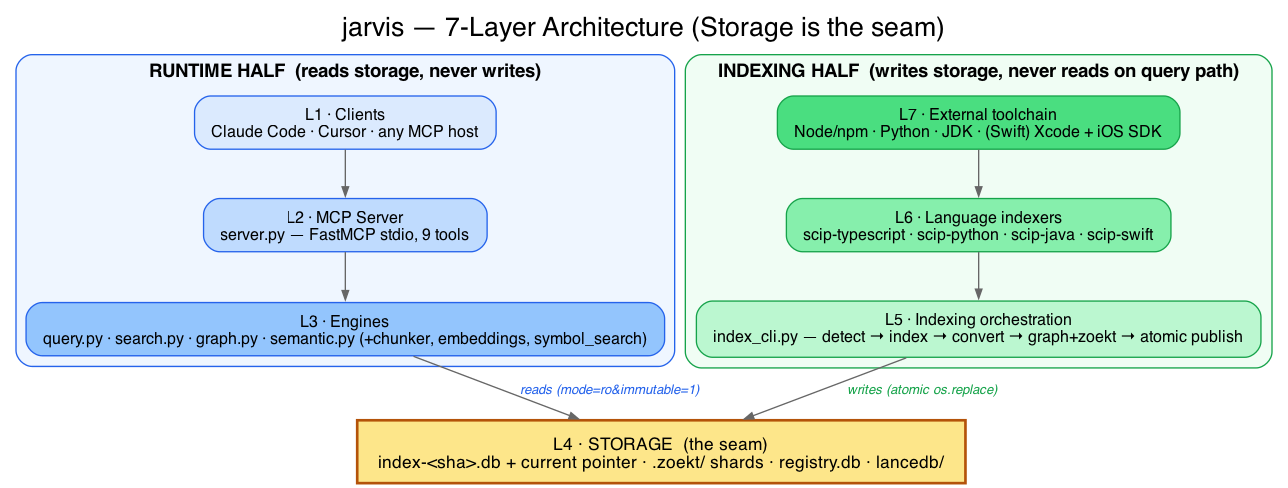
Three things worth reading the diagram for:
- The runtime path never writes. Queries open a published
index-<sha>.dbread-only (mode=ro&immutable=1). Index files are never mutated in place. - Publishing is atomic. A reindex writes a new versioned
.db, populates the package graph, and runszoekt-index— only once all of that succeeds doesos.replace(POSIXrename(2)) flip the smallcurrentpointer. A query already reading the old file keeps working; there is no downtime window, and a failure anywhere leaves the previously published index live. - The package graph is rebuilt, not accumulated. Each reindex clears that
repo's own outgoing edges before recomputing them, so a removed dependency's
edge is retracted —
blastRadiusalways reflects each repo's last index run.
Editable source:
docs/assets/jarvis-layers.dot (Graphviz).
Layer-by-layer detail, the full index pipeline, and the semantic path are in
docs/system-architecture.md.
Core query/search logic is ported from an internal reference implementation; the enterprise shell (FastAPI, Postgres, hosted-git auth, Cloud Build) is dropped in favor of a single stdio process reading local SQLite files.
Indexing a repo
status (as shown by both list and status) is usually indexed or
failed, but can also be partial: the index published real symbols but no
navigable positions (an indexer/converter bug) — check the stderr warning
from jarvis index for details.
--semantic-include is repeatable — pass it once per path prefix to
force-include several. Like --scheme and --language, once set there is no flag to clear
it; change it by re-running jarvis index with the new value(s).
Language detection counts source files by extension across git-tracked files and picks the winner — one language per index:
| Extensions | Indexer |
|---|---|
.ts .tsx | scip-typescript |
.py | scip-python |
.java .kt | scip-java |
.swift | scip-swift |
Ties break by fixed priority (.ts → .tsx → .py → .java → .kt → .swift).
.git, node_modules, .venv, __pycache__, dist, and build are
skipped. Reading git rather than walking the filesystem is deliberate: a walk
also counts gitignored scratch directories, which can outnumber a repo's own
code and pick a language it doesn't use.
The pipeline then runs: chosen indexer → scip expt-convert → populate the
package dependency graph (packages/edges tables in registry.db) →
zoekt-index into ~/.jarvis/.zoekt → copy to
~/.jarvis/scip/_/<slug>/_/index-<sha>.db → atomic current pointer flip →
registry update.
The
scip/_/<slug>/_/path shape reuses the vendoredIndexConnectionCache's(project, repo, branch)3-tuple layout with the outer two pinned to_(seesrc/jarvis/config.py). It is not a user-facing contract — only<slug>matters when calling tools.
Swift indexing works end-to-end. It requires scip >= v0.9.0: older converters
cannot read scip.proto's typed_range oneof, which is the only range encoding
scip-swift emits, and silently produce an index with no navigable positions.
jarvis index refuses an older scip rather than publishing one.
Indexing a Swift repo with code-signed app-extension targets additionally requires
scip-swift >= v0.1.2: earlier versions pass no code-signing overrides to xcodebuild, which
then fails provisioning for every signed target before compiling anything. Because setup.sh
skips any dependency that is merely present, an existing install is not upgraded by
re-running it — use sh ./setup.sh --only scip-swift --force.
Related MCP Servers
Reviews
No reviews yet — be the first to share how this listing worked for you.
Frequently Asked Questions about Codeintel
AllMCPs Directory Badge
Showcase your server listing on GitHub or your project documentation. Embed this dynamic SVG badge to highlight official listing status and live engagement.
Badge Style:
Live Dynamic SVG Preview
Markdown (GitHub README)
[](https://allmcps.com/mcp/codeintel)HTML Embed
<a href="https://allmcps.com/mcp/codeintel"><img src="https://allmcps.com/api/badge/codeintel?style=directory" alt="Codeintel on AllMCPs" /></a>Technical Specs & Signals
CategoryDeveloper Tools
27Quality signal: Emerging · 27/100How this signal is calculated ▾
Server availabilityNot measured
Not scored for repo-hosted servers — we can't reach the running server, only its GitHub page. Hosted MCP endpoints are health-checked live.
Verified ownership8/20
Documentation & tools11/30
Adoption & activity1/15
Community engagement0/10
A guidance signal from public completeness & health data — not a user rating. New listings start lower and rise as they add docs, get verified, and grow adoption. Signals we can't observe for a listing are skipped, not counted against it.
Own this project?
This directory is pre-filled from public sources. Claim via GitHub README, site badge, or DNS TXT to unlock edit access and the Official badge and attach your website — proof is checked automatically, then reviewed by our team.
Free dofollow backlink: add your website and place the AllMCPs badge on it — no claim needed. We detect it automatically and keep it verified as long as the badge stays live.
Claim & get free dofollowShare & Embed
Add our SVG badge (dark/light directory styles) or embeddable widget to your site.