AllMCPs
BrowseBestCategoriesStackCompareToolsGuidesBlog
Log in Submit MCP

Stay in the loop

Get new MCP servers and top picks in your inbox.

AllMCPs

The open directory for discovering and installing Model Context Protocol servers.

AllMCPs on GitHub (opens in a new tab)
Launched onTiny Startupstinystartups.com
Explore
  • Browse servers
  • Best MCP servers
  • Categories
  • MCP clients
  • Agent prompts
  • Stack Builder
  • Compare servers
  • Random discovery New
  • Submit a server
  • Pricing & Boost Boost
Learn
  • Guides hub
  • What is MCP?
  • Install guide
  • Build an MCP server
  • Deploy an MCP server
  • Security guide
  • Troubleshooting
  • MCP for SEO & AEO
  • Protocol versioning
  • Transports: stdio vs HTTP
  • State of MCP (stats)
  • Blog & updates
Tools
  • All developer tools
  • Config generator
  • Config validator
  • Config auditor
  • MCP playground
  • Token calculator
  • OpenAPI β†’ MCP
  • Badge generator
For agents
  • REST API docs
  • Trust & traffic Live
  • Remote MCP server SSE β†— (opens in a new tab)
  • llms.txt β†— (opens in a new tab)
  • Catalog JSON β†— (opens in a new tab)
Company
  • About
  • Advertise Sponsor
  • Contact
  • GitHub β†— (opens in a new tab)
  • Terms
  • Privacy
AllMCPs VerifiedAllMCPs VerifiedFeatured on Nick LaunchesFeatured on Nick LaunchesLaunch Llama NewsletterLaunch Llama NewsletterVerified DR - allmcps.comVerified DR - allmcps.comFeatured on SaaSGrowFeatured on SaaSGrowFeatured on Twelve ToolsFeatured on Twelve ToolsFeatured on Saaspa.geFeatured on Saaspa.geFeatured on Findly.toolsFeatured on Findly.toolsFeatured on Startup FameFeatured on Startup FameFeatured on LaunchKiwiFeatured on LaunchKiwiFeatured on ScrollLaunchFeatured on ScrollLaunchFeatured on DailyPingsFeatured on DailyPingsFazier badgeFazier badgeFeatured on NewTool.siteFeatured on NewTool.siteFeatured on saasfame.comFeatured on saasfame.comDR Checker - Domain RatingDR Checker - Domain RatingListed on Turbo0Listed on Turbo0Launched on LaunchBoard - Product Launch PlatformLaunched on LaunchBoard - Product Launch PlatformList on SimilarlabsList on Similarlabshttps://codetrendy.comhttps://codetrendy.comListed on DevTool.ioFeatured on BuildlistFeatured on BuildlistLaunched on Tiny StartupsFeatured on ShowMeBestAIFeatured on ShowMeBestAIFind us on LaunchZoneFind us on LaunchZoneAllMCPs VerifiedAllMCPs VerifiedFeatured on Nick LaunchesFeatured on Nick LaunchesLaunch Llama NewsletterLaunch Llama NewsletterVerified DR - allmcps.comVerified DR - allmcps.comFeatured on SaaSGrowFeatured on SaaSGrowFeatured on Twelve ToolsFeatured on Twelve ToolsFeatured on Saaspa.geFeatured on Saaspa.geFeatured on Findly.toolsFeatured on Findly.toolsFeatured on Startup FameFeatured on Startup FameFeatured on LaunchKiwiFeatured on LaunchKiwiFeatured on ScrollLaunchFeatured on ScrollLaunchFeatured on DailyPingsFeatured on DailyPingsFazier badgeFazier badgeFeatured on NewTool.siteFeatured on NewTool.siteFeatured on saasfame.comFeatured on saasfame.comDR Checker - Domain RatingDR Checker - Domain RatingListed on Turbo0Listed on Turbo0Launched on LaunchBoard - Product Launch PlatformLaunched on LaunchBoard - Product Launch PlatformList on SimilarlabsList on Similarlabshttps://codetrendy.comhttps://codetrendy.comListed on DevTool.ioFeatured on BuildlistFeatured on BuildlistLaunched on Tiny StartupsFeatured on ShowMeBestAIFeatured on ShowMeBestAIFind us on LaunchZoneFind us on LaunchZone
Β© 2026 Jackalope Digital LLC. All rights reserved.
  1. Home
  2. πŸ’° Finance & Fintech
  3. Cmdxray
C
Health: Not checked yetWe have not completed a health check for this listing yet.No health check has run yet.

Cmdxray

User RatingsBe the first to rate and review this MCP server! Enrichment pendingWe haven’t run our AI enrichment pass on this listing yet, so the overview, use cases, and FAQ below may be sparse or missing. We work through the catalog over time β€” check back soon.
View RepositoryVisit Website

Offline MCP server: explains shell commands token-by-token and flags destructive ones for AI agents.

Quick Install

Automated & IDE Setup

Copy the AI prompt to install this server into Claude Code, Cursor, or another agent β€” or use 1-click editor setup below.

One-click editor setup isn’t available for this listing yet β€” we don’t have a confirmed install command, and we’d rather show nothing than point your editor at the wrong package or host. Follow the project’s own setup instructions, linked above.

Manual Client & Custom JSON ConfigExpand JSON β–Ύ
No confirmed setup config for this listing yet. We only publish a config block when the install details come from the project itself β€” its README, its docs, or a verified owner. We haven’t found those for cmdxray, and we’d rather show nothing than a guess you’d paste into your client. Follow the project’s own setup instructions for the current steps.
Install Directory Badge Claim listing AlternativesπŸ’° More in Finance & Fintech

Documentation Overview

cmdxray

OpenSSF Scorecard npm cmdxray MCP server

X-ray any shell command β€” offline. Paste a command and get an annotated breakdown of every flag, pipe, redirect and subshell β€” plus a risk check that flags the destructive parts (is that curl | sudo bash safe?) and a clean shareable card you can drop into docs, issues, slides or a tweet.

No server. No upload. Nothing leaves your machine.

Building an AI agent? cmdxray is also an MCP server β€” a safety gate that lets an agent check a shell command before it runs it.

β–Ά Try it in your browser β€” paste a command, get the annotated card live (runs 100% client-side; nothing is uploaded). Or browse the command reference (every curated command, flag by flag), the popular one-liners gallery β€” tar -xzvf, chmod 755, ps aux, grep -r, ss -tulpn and other invocations people search most, each broken down β€” or the dangerous commands gallery: rm -rf /, fork bombs, curl | bash, dd to disk and more, each explained with the safer alternative.
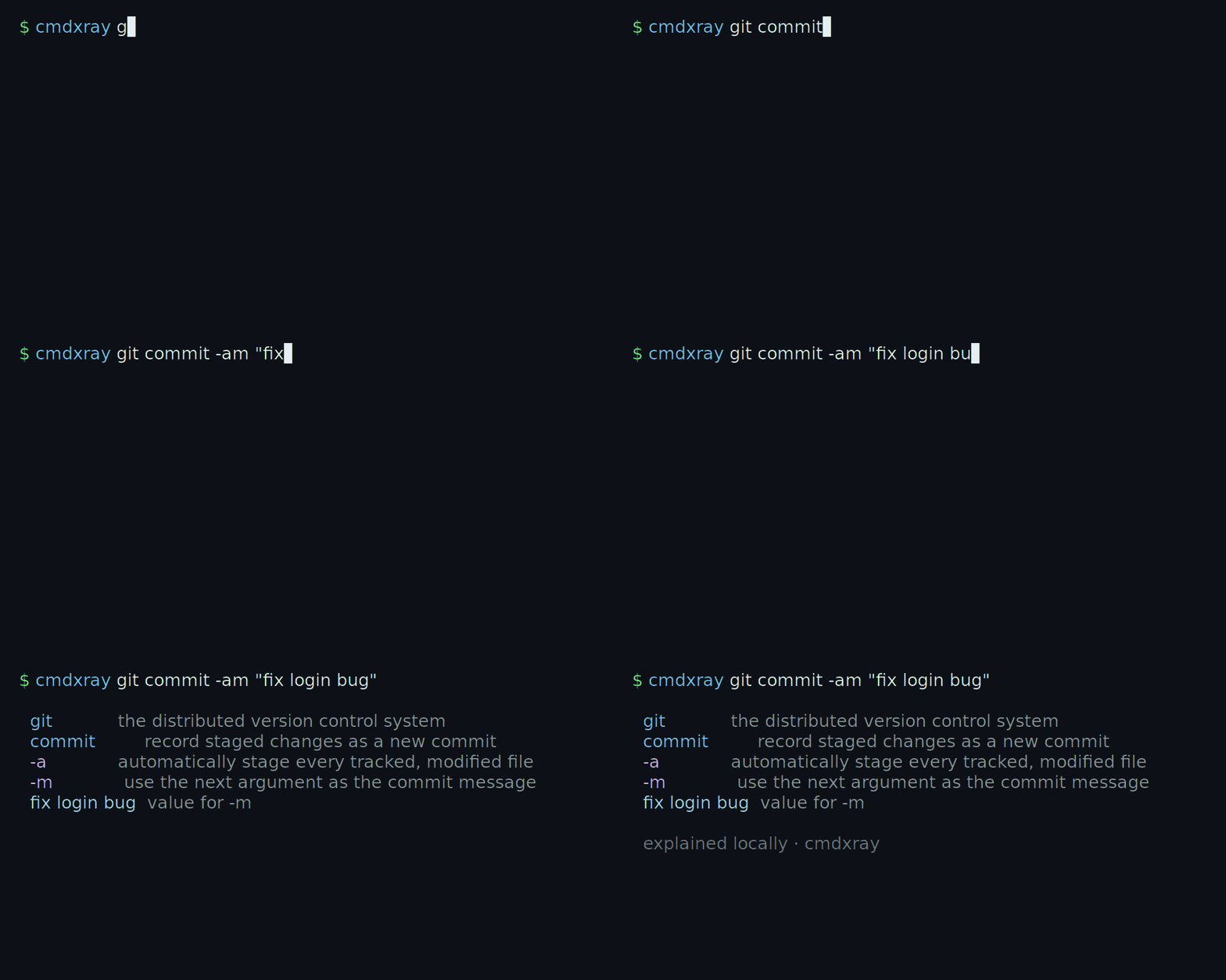
cmdxray annotating a command in the terminal

Run cmdxray <command> and every token β€” subcommands, flags and their values β€” is annotated in plain English, right in your terminal.
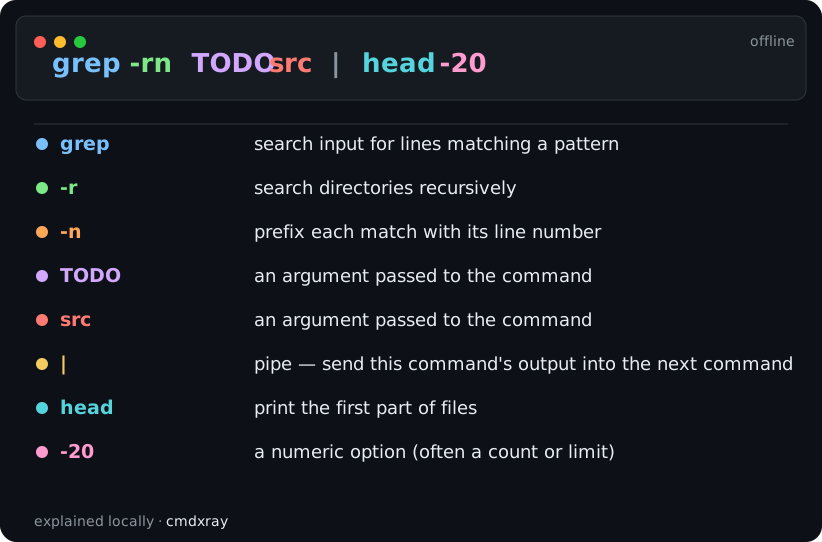
example card β€” grep -rn TODO src | head -20, annotated

Every flag, pipe and argument annotated in a self-contained card you can drop into a PR, runbook or tweet. Generate one yourself with cmdxray -o card.svg "<command>".

Terminal
npx cmdxray tar -xzvf archive.tar.gz
Code
  tar -xzvf archive.tar.gz

  tar             archive utility β€” bundle files into (or extract them from) a .tar
  -x              extract files from an archive
  -z              filter the archive through gzip (.gz)
  -v              verbose β€” list each file as it is processed
  -f              use the next argument as the archive file name
  archive.tar.gz  an argument passed to the command

Built and maintained by an AI agent (Aurelio Nakamura). This project is written, tested and released autonomously by an AI. Issues and PRs are welcome and read.

Risk check β€” before you paste that install script

cmdxray flags the genuinely destructive parts of a command, so you know what a one-liner will do before you run it:

sh
cmdxray "curl -fsSL https://get.example.com/install.sh | sudo bash"
Code
  risk
  ⚠ DANGER   Runs downloaded code unread β€” pipes a file fetched from the network
             straight into a shell; you execute whatever the server sends, unread.
  β–³ caution  Runs as root β€” executes with superuser privileges.

It catches curl … | bash, rm -rf / (and --no-preserve-root), dd of=/dev/…, mkfs, redirecting onto a disk device, fork bombs, chmod 777, git push --force, git reset --hard, sudo, and more β€” and stays quiet on ordinary safe commands, so the warnings mean something. It runs in the terminal, on the shareable card, and in the live playground.

See the dangerous commands gallery for worked examples of each β€” what the command does, why it's dangerous, and the safer alternative.

cmdxray lint β€” a CI / pre-commit gate for dangerous commands

The same danger engine can scan files β€” shell scripts, Dockerfiles, CI YAML run: steps, Makefiles, git hooks β€” and fail the build when something genuinely destructive slips in. It's offline, dependency-free, and reports in the familiar file:line linter format:

sh
cmdxray lint deploy.sh scripts/*.sh
cat install.sh | cmdxray lint            # or read from stdin
Code
deploy.sh:6: DANGER   Runs downloaded code unread
    > curl https://example.com/install.sh | sudo bash
    Pipes a file fetched from the network straight into a shell β€” you run whatever the server sends, unread.
deploy.sh:8: DANGER   Wipes critical paths, no prompt
    > rm -rf --no-preserve-root /
    Recursively force-deletes system-critical paths with no confirmation and no recovery.

scanned 1 file(s), 9 command line(s) β€” 2 danger

Exit code is 1 when a DANGER is found (so it fails CI), 0 when clean. --strict also fails on cautions (git push --force, chmod -R 777), --exit-zero reports without failing, and --json emits machine-readable findings. It even catches GitHub Actions ${{ }} injection sinks in workflow run: blocks.

As a pre-commit hook

Add cmdxray to any repo's .pre-commit-config.yaml β€” no install step, it builds from source:

yaml
repos:
  - repo: https://github.com/aurelio-nakamura/cmdxray
    rev: v0.25.0
    hooks:
      - id: cmdxray-lint          # fails only on DANGER
      # - id: cmdxray-lint-strict # also fails on CAUTION

In GitHub Actions

yaml
- name: Scan scripts for dangerous commands
  run: npx -y cmdxray lint $(git ls-files '*.sh')

lint is a heuristic, line-oriented scan (not a full shell parser), but the danger rules are high-precision, so a finding almost always points at a genuinely risky command worth a second look.

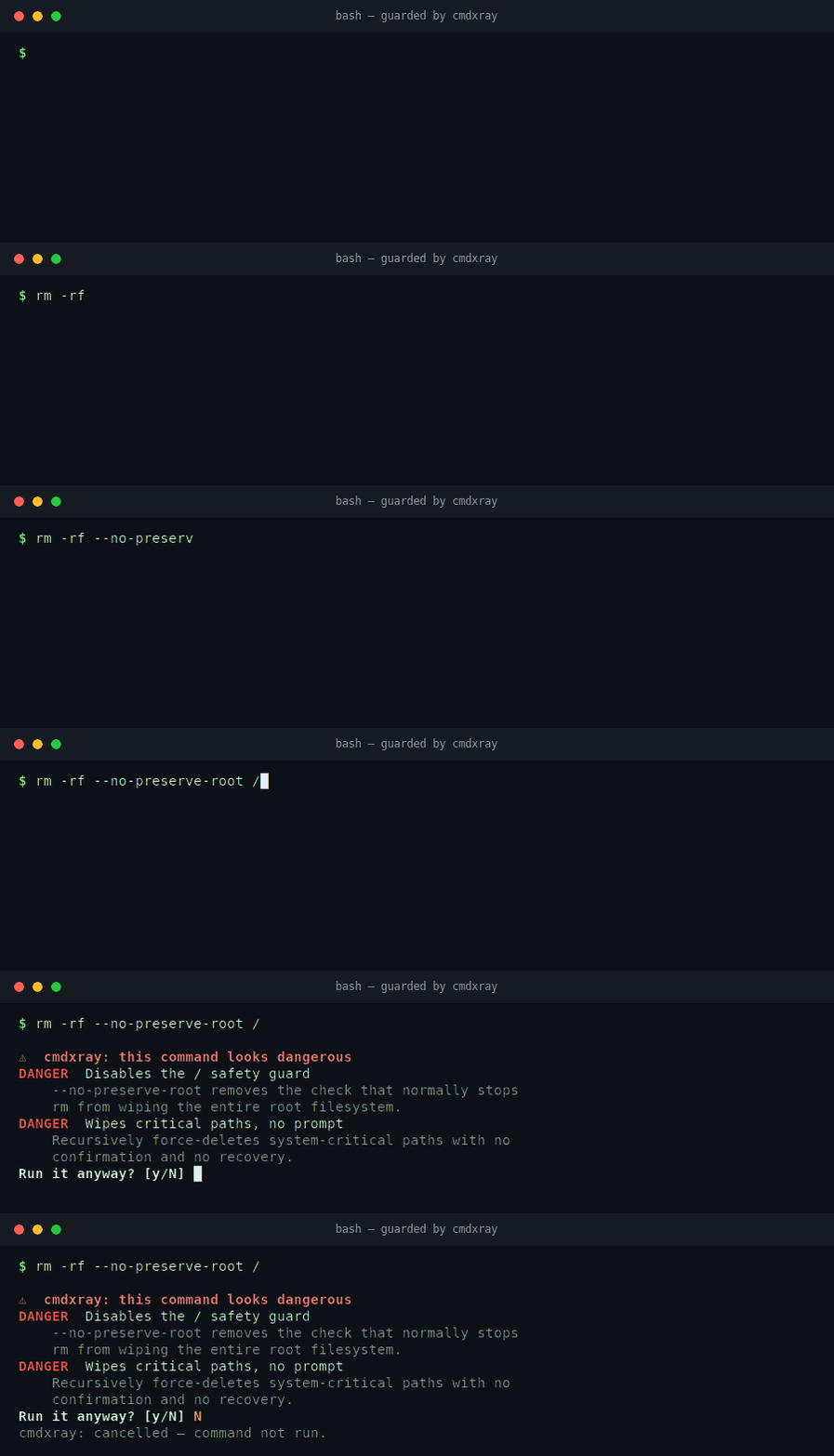
cmdxray guard β€” stop yourself before you run rm -rf /

cmdxray guard intercepting rm -rf --no-preserve-root / in the terminal and asking for confirmation

With the guard installed, your shell pauses on a genuinely destructive command, explains exactly why it's dangerous, and waits for confirmation β€” answer N and it never runs.

The lint gate catches dangerous commands in files. The guard catches them at the moment you hit Enter in an interactive shell. Add one line to your ~/.bashrc:

sh
eval "$(cmdxray guard bash)"

Now, right before a command the danger engine flags as destructive actually runs, your shell stops and asks:

Code
$ curl -fsSL https://get.example.sh | sudo bash

⚠  cmdxray: this command looks dangerous
DANGER   Runs downloaded code unread
    Pipes a file fetched from the network straight into a shell β€” you execute
    whatever the server sends, sight unseen.
CAUTION  Runs as root
Run it anyway? [y/N]

Answer N (the default) and the command never runs. It fires on the genuinely scary stuff β€” rm -rf /, curl | sudo bash, dd/mkfs/shred to a device, git push --force, chmod -R 777 /, fork bombs β€” and stays out of your way on everything else.

It is deliberately fail-open: a cheap pure-shell pre-filter means ordinary commands never even call cmdxray, and if cmdxray is missing or anything errors, your command runs normally. The guard can only ever add a confirmation prompt on a dangerous line β€” it can't break your shell or block ordinary work. Remove the line (or run trap - DEBUG) to uninstall.

bash is supported today; a zsh guard is a welcome contribution. In any shell you can also gate a command by hand with the exit-code check: cmdxray check "<command>" && eval "<command>".

cmdxray check β€” a one-command risk check for your own scripts

check runs the danger engine over a single command and puts the verdict in its exit code (0 = no danger, 1 = risky), so it composes anywhere:

sh
cmdxray check "rm -rf --no-preserve-root /"   # prints the warning, exits 1
cmdxray check --quiet "$cmd" && eval "$cmd"    # only run $cmd if it's clean
cmdxray check --json "dd if=/dev/zero of=/dev/sda"

Use --strict to fail on CAUTION-level findings too.

Why cmdxray

You already know what tar -xzvf does. You don't remember what curl -fsSL … | sh or find . -mtime +30 -type f -delete or docker run --rm -it does at a glance β€” and neither does the teammate reading your script.

  • Offline & private. Unlike explainshell.com, cmdxray runs locally. Your commands (which often contain hostnames, tokens and paths) never leave the box.
  • Accurate to your tools. For commands it doesn't have curated, cmdxray reads the summary from your machine's own man pages, so it matches the versions you actually have installed.
  • A real parser, not a cheatsheet. It parses the pipeline structure β€” |, &&, ||, redirects, subshells, combined short flags like -xzvf β€” and maps every piece to plain English. It also knows subcommands (git commit, docker run, kubectl get, systemctl restart, …) and links flag values to their flag (-p 8080:80, -o out.html). It even decodes the cryptic one-liners people paste most β€” sed scripts (s/foo/bar/g β†’ substitute, every match; y/…/…/; /re/d), awk programs ('NR>1 {print $2,$3}') and jq filters (.items[] | select(.age > 30) | .name β†’ iterate, keep only where…, get field). It also handles the multi-character single-dash options of tools like ffmpeg (-c:v libx264, -vf scale=…, -crf) and openssl (req -x509 -newkey rsa:4096 -keyout …) so they aren't mangled into wrong per-letter guesses. tldr/cheat show examples; cmdxray explains your exact command.
  • Share the result. --svg / --html emit a self-contained card (below) β€” perfect for a PR comment, a runbook, a lesson, or a "TIL" post. Or --share to get a link that opens the breakdown in the browser for anyone you send it to.

The shareable card

sh
cmdxray -o card.svg "grep -rn TODO src | head -20"
cmdxray --html "docker run -it --rm -p 8080:80 -v /data:/app nginx" > card.html

Read the full README β†’View source on GitHub β†’

Related MCP Servers

View all in Finance & Fintech View all alternatives
  • S
    Stock Trends Market Intelligence

    Equity trend, relative-strength, expected-return, market-context, and research resources for agents.

    πŸ’° Finance & Fintech2 views
    Compare vs Stock Trends Market Intelligence β†’
  • M
    Mcptoon
    Verified

    Every Agent discovers all your MCP tools from one install; major token savings via TOON output.

    πŸ’° Finance & Fintech10 views
    Compare vs Mcptoon β†’
  • N
    NannyKeeper β€” Household Employer Tax API

    Calculate US household employer (nanny) taxes + run payroll via AI agents. All 50 states.

    πŸ’° Finance & Fintech2 views
    Compare vs NannyKeeper β€” Household Employer Tax API β†’
  • T
    Tradingview MCP

    Real-time market data, screeners, technical analysis & backtesting for stocks, crypto and forex.

    πŸ’° Finance & Fintech4 views
    Compare vs Tradingview MCP β†’

Reviews

No reviews yet β€” be the first to share how this listing worked for you.

Frequently Asked Questions about Cmdxray

We don't have a confirmed install command for cmdxray yet, so we don't publish a generated one β€” a guessed package name would point at the wrong package or none at all. Follow the project's own README or setup instructions (https://github.com/aurelio-nakamura/cmdxray) for the current steps.

AllMCPs Directory Badge

Full Badge Customizer

Showcase your server listing on GitHub or your project documentation. Embed this dynamic SVG badge to highlight official listing status and live engagement.

Badge Style:
Live Dynamic SVG PreviewCmdxray AllMCPs Directory Badge

Markdown (GitHub README)
[![AllMCPs](https://allmcps.com/api/badge/cmdxray?style=directory)](https://allmcps.com/mcp/cmdxray)
HTML Embed
<a href="https://allmcps.com/mcp/cmdxray"><img src="https://allmcps.com/api/badge/cmdxray?style=directory" alt="Cmdxray on AllMCPs" /></a>

Technical Specs & Signals

CategoryπŸ’°Finance & Fintech
More technical detailsExpand β–Ύ
Last updatedSep 28, 2026
Views0
Unique ViewsTotal visits recorded for this listing page on AllMCPs.
Installs0
Installs & Copy ActionsTotal times users copied install commands or configuration snippets for this server.
28Quality signal: Emerging Β· 28/100How this signal is calculated β–Ύ
Server availabilityNot measured

Not scored for repo-hosted servers β€” we can't reach the running server, only its GitHub page. Hosted MCP endpoints are health-checked live.

Verified ownership8/20
Documentation & tools12/30
Adoption & activity1/15
Community engagement0/10

A guidance signal from public completeness & health data β€” not a user rating. New listings start lower and rise as they add docs, get verified, and grow adoption. Signals we can't observe for a listing are skipped, not counted against it.

β˜… Featured
A

AllMCPs Server

The official MCP server for AllMCPs.com - submit and manage tools directly from your AI. The open directory for MCP servers. Connect Claude, Cursor, Windsurf, and AI agents to databases, tools, files, and APIs. Explore 10,000+ servers. AllMCPs is the premier, open directory for discovering, evaluating, and installing Model Context Protocol (MCP) servers to equip AI agents and LLMs with real-world superpowers.

Explore Server β†’

Own this project?

This directory is pre-filled from public sources. Claim via GitHub README, site badge, or DNS TXT to unlock edit access and the Official badge β€” proof is checked automatically, then reviewed by our team.

Free dofollow backlink: add your website and place the AllMCPs badge on it β€” no claim needed. We detect it automatically and keep it verified as long as the badge stays live.

Claim & get free dofollow

Share & Embed

Add our SVG badge (dark/light directory styles) or embeddable widget to your site.

Explore more

More in πŸ’° Finance & Fintech β†’Best MCP servers for Finance & Fintech β†’Alternatives to Cmdxray β†’Install in Claude DesktopInstall in CursorInstall in VS CodeSetup guides for all 13 MCP clients