cloudcostwise






Find AWS waste from your terminal or your AI assistant. cloudcostwise runs CloudWise's free waste
checks on your own machine, with your own read-only AWS credentials.
- Nothing is sent to CloudWise. The only network calls are AWS API calls in your account. No signup, no IAM role for a third party, no telemetry. Used through an AI assistant (MCP), the findings go to that assistant like any tool output.
- It cannot change anything. Every AWS call goes through a guard that
refuses any operation that isn't a
Describe,List,Get,SearchorLookup, whatever your credentials allow. - 20 of CloudWise's 46 service checks: EC2, Lambda, SageMaker, WorkSpaces, Lightsail, EBS, S3, EFS, ECR, RDS, DynamoDB, ElastiCache, Elastic IPs, NAT gateways and load balancers, VPC endpoints, dangling DNS records, CloudWatch logs and dashboards, security posture, RI/Savings Plans opportunities, and Compute Optimizer.
Install and run
pipx install cloudcostwise          # or: uvx cloudcostwise scan
cloudcostwise scan                      # us-east-1 plus your profile's region
cloudcostwise scan --profile prod --regions all
cloudcostwise scan --format json > waste.json
Options:
| Option | Meaning |
|---|---|
--profile NAME | AWS profile; otherwise the standard credential chain (env vars, SSO, instance role) |
--regions LIST | Comma-separated regions, or all for every enabled region. Account-level checks (Cost Explorer, Route 53) run once, in us-east-1 |
--format table|markdown|json | Output format |
--no-cost-explorer | Make no Cost Explorer call. AWS bills those at $0.01 per request and a scan makes about 13. Skips the RI/Savings Plans checks; extended-support surcharges fall back to estimates |
--parallel N | Regions scanned at once, each in its own process (default 4; --regions all takes ~2–3 min instead of ~10) |
--verbose | Show data warnings (checks that could not read a metric report it as missing, never as zero) |
What AWS's free tools don't flag
This tool has 44 proven checks (L2 or above in VALIDATION.md: each fired on a real AWS resource built to trigger it and stayed silent on a healthy twin). 17 of them flag waste that none of AWS's own tools flag, and 9 more go further than the closest AWS check, going by AWS's lists of what its tools cover (Trusted Advisor, Cost Optimization Hub, Compute Optimizer; checked 2026-10-11).
| Check | What it finds | Closest AWS check |
|---|---|---|
ami_orphaned_snapshot | EBS snapshots left behind by an AMI that was deregistered | None |
classic_lb_migration | Classic Load Balancers that would cost less as an ALB or NLB | None |
elasticache_engine_migration | Redis OSS or Memcached clusters that would cost about 20% less on Valkey | None |
elasticache_extended_support_cost | ElastiCache engine versions billed the Extended Support surcharge | None |
idle_lightsail | Stopped or idle Lightsail instances that still bill their bundle price | None |
lambda_arm64_migration | Lambda functions that would cost about 20% less on arm64 (Graviton) | None |
lambda_provisioned_concurrency_idle | Lambda provisioned concurrency that is paid for and barely used | None |
lightsail_idle_load_balancer | Idle Lightsail load balancers | None |
lightsail_unattached_disk | Lightsail disks attached to nothing | None |
lightsail_unattached_static_ip | Lightsail static IPs attached to nothing | None |
low_traffic_alb | Application Load Balancers carrying almost no traffic | None |
multiple_eips_per_instance | Extra Elastic IPs on one instance, each billed as a public IPv4 address | None |
no_lifecycle_efs | Large EFS file systems with no Infrequent Access or Archive tiering | None |
orphaned_ebs_snapshot | EBS snapshots whose source volume no longer exists | None |
previous_gen_sagemaker_instance | SageMaker instances on a previous generation with a cheaper current one | None |
s3_empty_bucket | Empty S3 buckets left behind for 30+ days | None |
stopped_sagemaker_notebook_storage |
For idle EC2, RDS and NAT gateways, rightsizing and Savings Plans, AWS's tools cover the same ground: use them too. Trusted Advisor's cost checks need a Business, Enterprise or Unified Operations support plan; Cost Optimization Hub and Compute Optimizer are free.
The hosted CloudWise product adds 19 more proven checks that none of AWS's tools flag, across AWS Backup, AppSync, Elastic Beanstalk, FSx, Glue, KMS, Step Functions.
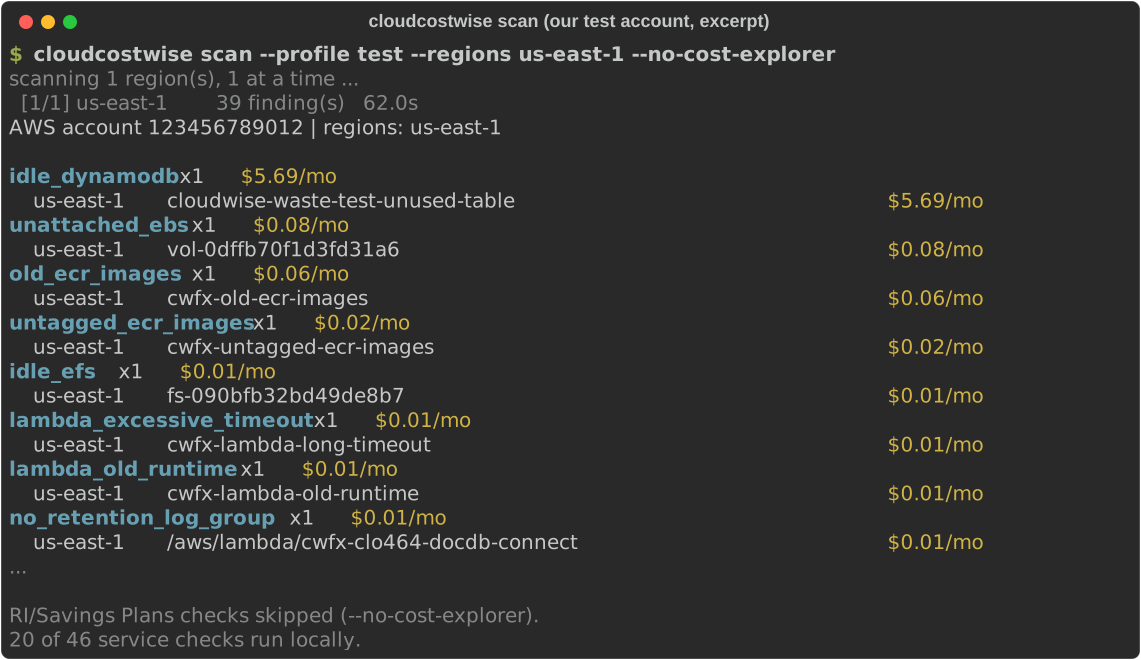
A few of them on our test account, where the resources are deliberately tiny (which is why the amounts are cents). Excerpt of a scan (0.1.3, us-east-1):
old_ecr_images  x1  $0.06/mo
    us-east-1       cwfx-old-ecr-images                         $0.06/mo
untagged_ecr_images  x1  $0.02/mo
    us-east-1       cwfx-untagged-ecr-images                    $0.02/mo
idle_efs  x1  $0.01/mo
    us-east-1       fs-090bfb32bd49de8b7                        $0.01/mo
no_retention_log_group  x1  $0.01/mo
    us-east-1       /aws/lambda/cwfx-clo464-docdb-connect       $0.01/mo
Use it from Claude Code, Codex or any MCP client
cloudcostwise mcp runs the same scan as an MCP server (stdio). Then ask your
assistant: "Where am I wasting money on AWS?"
The plugin and registry entries start the server with uvx, so install
uv first (brew install uv or pipx install uv).
Claude Code, as a plugin (asks for your AWS profile):
/plugin marketplace add cloudwise-app/cloudcostwise
/plugin install cloudcostwise@cloudcostwise
Claude Code, as a plain MCP server:
claude mcp add cloudcostwise -- uvx cloudcostwise mcp
# a specific profile:
claude mcp add cloudcostwise -e AWS_PROFILE=prod -- uvx cloudcostwise mcp
Codex (~/.codex/config.toml):
[mcp_servers.cloudcostwise]
command = "uvx"
args = ["cloudcostwise", "mcp"]
env = { AWS_PROFILE = "prod" }
Tools, all read-only: scan, list_findings, explain_finding,
fix_guidance. fix_guidance returns the steps and AWS CLI command as text
for you to review; nothing is ever executed. The assistant is told about the
Cost Explorer cost before it scans, and include_cost_explorer=false skips it.
Permissions
ReadOnlyAccess (AWS managed) is enough. The minimal policy the checks use is
in docs/iam-policy.json. It was derived from a scan of
an account with most supported resource types; if a check lacks a permission,
the scan says so in its data warnings instead of failing.
How the numbers are counted
Each finding shows an estimated monthly saving. Advisory waste types, ones CloudWise could not validate against a real AWS resource, are listed but never added to the total.
What the hosted product adds
The other 26 service checks (Glue, ECS, Step Functions, Backup, CloudFront, commitments and more), history and trends, alerts, and safe automated fixes: https://cloudcostwise.io/connect?utm_source=cloudcostwise&utm_medium=cli.
Tell us where it's wrong
A false positive, a miss, or a dollar figure that looks off: post it in issue #1, or email cloudwise@cloudcostwise.io if you'd rather not post in public. The waste types and counts from your scan are enough. Leave out account IDs and resource names. Every report gets a reply, and a confirmed false positive gets fixed in the next release.
License
FSL-1.1-ALv2. Each release becomes Apache-2.0 two years after it ships.
How we know it's right
See VALIDATION.md: the validation level of every waste type this tool reports, from L0 (unit-tested) to L2 (fired on a real AWS resource and stayed silent on a healthy twin) and beyond.