Your clipboard, but Claude can read it. Type-classified, secret-encrypted. macOS + Linux.
Quick Install
Automated & IDE SetupCopy the AI prompt to install this server into Claude Code, Cursor, or another agent — or use 1-click editor setup below.
One-click editor setup isn’t available for this listing yet — we don’t have a confirmed install command, and we’d rather show nothing than point your editor at the wrong package or host. Follow the project’s own setup instructions, linked above.
Manual Client & Custom JSON ConfigExpand JSON ▾
No confirmed setup config for this listing yet. We only publish a config block when the install details come from the project itself — its README, its docs, or a verified owner. We haven’t found those for Clipboard History MCP, and we’d rather show nothing than a guess you’d paste into your client. Follow the project’s own setup instructions for the current steps.
Documentation Overview
clipboard-history-mcp
Your clipboard, but Claude can read it. Type-classified, secret-encrypted, macOS-native.
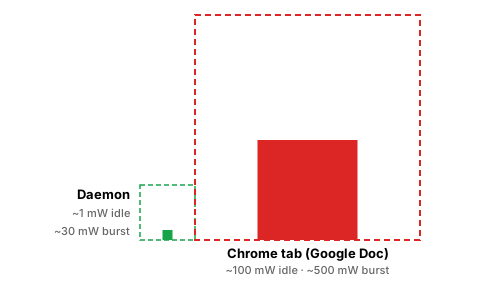
One Rust binary. No Node.js, no Swift toolchain, no other apps to install. Drag a .mcpb into Claude Desktop, done.
One process · ~1 mW idle · ~24 MB RAM. Replaces the clipboard-manager + secret-scanner + Obsidian-export stack a typical setup needs three or four background apps to assemble.
What this gets you
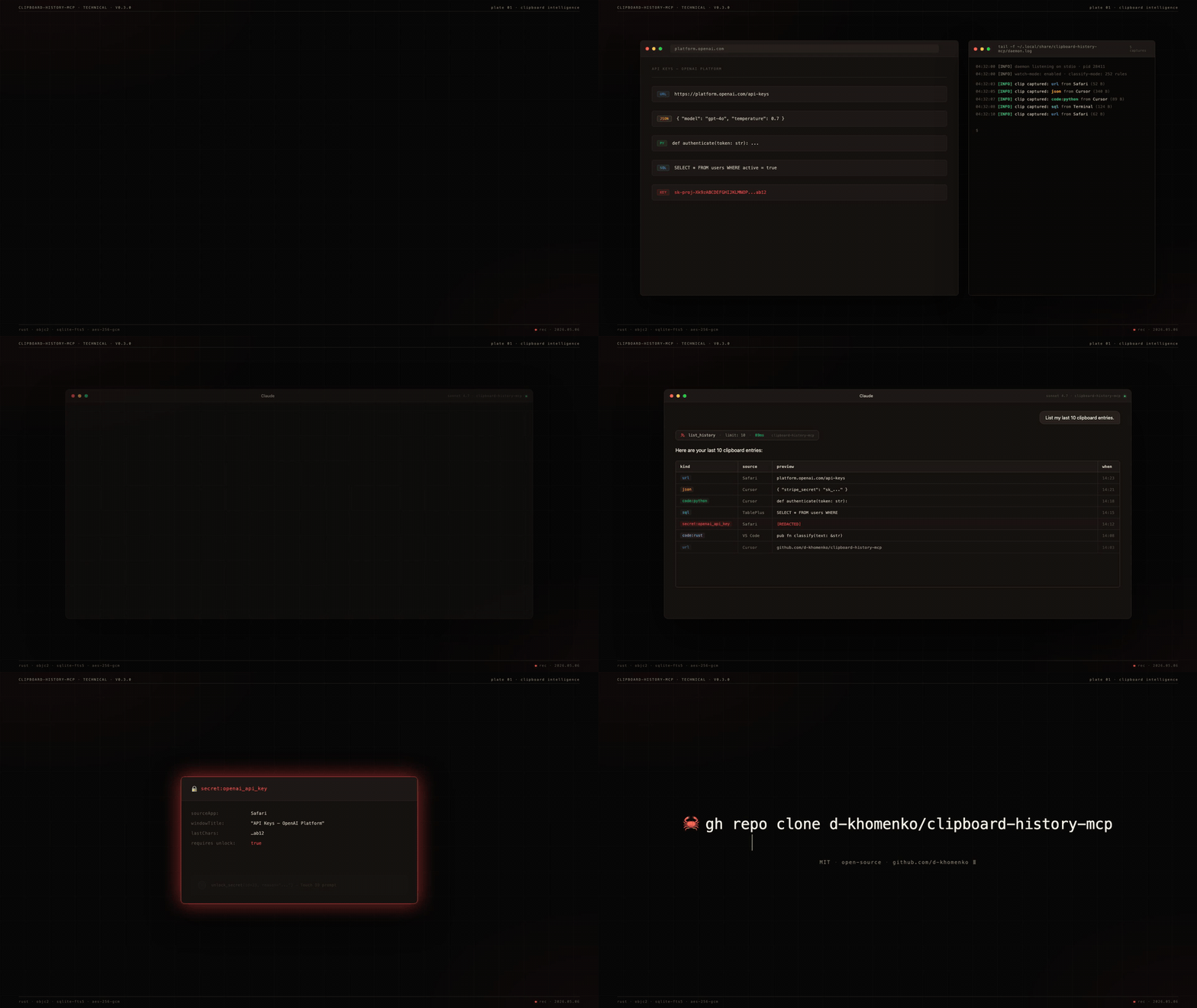
You're working in Claude. You've copied 47 things today — URLs, JSON snippets, an OpenAI key from a dashboard, a SQL query from your DB tool, half a Stripe webhook payload. Now Claude can use any of them:
Search uses SQLite FTS5 + window-title indexing — you find clips by where you copied them, not just by content.
Why nothing else does this
| Maccy | maccy-clipboard-mcp | clipboard-history-mcp | |
|---|---|---|---|
| Captures clipboard | ✓ | (reads Maccy's DB) | ✓ |
| Classifies clip type (URL/JSON/code/SQL/secret) | ✗ | ✗ | ✓ |
| Indexes window titles for context-search | ✗ | ✗ | ✓ |
| Detects secrets at capture (252 gitleaks rules) | ✗ | ✗ | ✓ |
| Encrypts secrets at rest with Touch ID gate | ✗ | ✗ | ✓ |
| Standalone binary (no runtime needed) | n/a | ✗ | ✓ macOS + Linux |
.mcpb one-click install | n/a | ✗ | ✓ |
The other ~20 clipboard-mcp repos on GitHub only read the current clipboard. None capture history.
Install
One-click — Claude Desktop
- Download
clipboard-history-mcp.mcpbfrom the latest release. - Claude Desktop → Settings → Extensions → "Install from file" → pick the
.mcpb. - Restart Claude Desktop. Ask: "List my recent clipboard URLs."
Manual — Claude Code / CLI
Quick install — cargo install
If you have a Rust toolchain (Rust 1.95+) and use Claude Code:
This pulls a release crate from crates.io and compiles locally. Slightly slower than the .mcpb drag-and-drop above (compile takes ~2 min on Apple Silicon), but it's the cleanest path for Claude Code users — three commands and you're capturing.
From source (macOS)
Requirements: Rust 1.95+, macOS 13+.
Linux (X11; Wayland partial)
Requirements: a working Secret Service implementation (GNOME Keyring or KWallet — comes with most desktop installs), xvfb not required for normal use (only for headless CI).
Wayland note: clipboard read/write works on Wayland via arboard's portal handling. Window-title capture (opt-in via CLIPBOARD_CAPTURE_WINDOW_TITLE=1) currently only works on X11; Wayland support is deferred to v0.4.x once xdg-desktop-portal window-title APIs are widely shipped.
1Password / Bitwarden: add app names to CLIPBOARD_IGNORE_APPS so password-manager paste events are skipped:
Auto-mirror to Obsidian vault (optional)
If you also use Obsidian, the daemon can write a sidecar .md for every captured clip plus a daily-note timeline entry. Configure at install time:
Result: every non-secret clip lands as <vault>/clipboard/YYYY-MM/<id>-<kind>-<slug>.md with frontmatter (kind, source, captured-at), and a bullet appended to <vault>/daily/YYYY-MM-DD.md linking back to the sidecar. Secrets are never mirrored — they stay encrypted in the SQLite vault.
The daemon owns the ## Clipboard captures H2 section in your daily notes — append-only, idempotent. You can write anything else above or below it.
Try asking Claude
Copy any of these prompts into Claude after install:
Claude picks the right tool from 15 available and answers directly.
Configuration
Set env vars in the launchd plist (install writes them) or via claude mcp add --env KEY=val:
| Variable | Default | What it does |
|---|---|---|
CLIPBOARD_POLL_MS | 1500 | Watcher poll interval (ms) |
CLIPBOARD_HISTORY_MAX | 1000 | Ring-buffer size (unpinned clips only — pinned items sit outside the ring buffer) |
CLIPBOARD_CAPTURE_WINDOW_TITLE | 0 | Capture window titles (needs Accessibility permission) |
CLIPBOARD_IGNORE_APPS | (empty) | Comma-separated app display names to skip |
CLIPBOARD_NEVER_STORE_SECRETS | 0 | Paranoid mode — metadata only, no ciphertext |
CLIPBOARD_DATA_DIR | ~/Library/Application Support/clipboard-history-mcp | Override data dir |
CLIPBOARD_VAULT_PATH | (empty) | Auto-mirror non-secret clips to this Obsidian vault directory (sidecar .md per clip + bullet in daily/YYYY-MM-DD.md). Set via --vault PATH at install time. |
CLIPBOARD_MAX_BLOB_BYTES | 26214400 (25 MB) | Skip image / file pasteboards larger than this. Logs a WARN line with the source app + size. |
Tools (15)
Read
list_history(limit?, kind?, source_app?, since?, pinned_only?) | Paginated history, newest first. pinned_only=true returns only pinned clips. |
get_item(id) | Single clip by id |
search_history(query, limit?) | FTS5 BM25 across preview + window title |
get_urls(limit?) | URL clips, deduped by hostname |
get_code(language?, limit?) | Code clips, optional language filter |
get_json(limit?) | JSON clips with parsed structure |
get_secrets_index(kind?) | Secret metadata — no values |
unlock_secret(id, reason) | Decrypt one secret — gated by Touch ID |
get_stats | Counts by kind, oldest/newest, db size |
daemon_status | PID, running state |
Write
copy_item(id) | Restore a clip back to system clipboard |
pin_item(id, pinned) | Pin so it survives clear_history |
tag_item(id, tag, remove?) | Free-form tagging |
delete_item(id) | Hard delete |
clear_history(scope) | 'all' | 'older_than_days:N' | 'kind:K' |
CLI
Related MCP Servers
Reviews
No reviews yet — be the first to share how this listing worked for you.
Frequently Asked Questions about Clipboard History MCP
AllMCPs Directory Badge
Showcase your server listing on GitHub or your project documentation. Embed this dynamic SVG badge to highlight official listing status and live engagement.
Badge Style:
Live Dynamic SVG Preview
Markdown (GitHub README)
[](https://allmcps.com/mcp/clipboard-history-mcp)HTML Embed
<a href="https://allmcps.com/mcp/clipboard-history-mcp"><img src="https://allmcps.com/api/badge/clipboard-history-mcp?style=directory" alt="Clipboard History MCP on AllMCPs" /></a>Technical Specs & Signals
CategoryDeveloper Tools
32Quality signal: Emerging · 32/100How this signal is calculated ▾
Server availabilityNot measured
Not scored for repo-hosted servers — we can't reach the running server, only its GitHub page. Hosted MCP endpoints are health-checked live.
Verified ownership10/20
Documentation & tools11/30
Adoption & activity3/15
Community engagement0/10
A guidance signal from public completeness & health data — not a user rating. New listings start lower and rise as they add docs, get verified, and grow adoption. Signals we can't observe for a listing are skipped, not counted against it.
Own this project?
This directory is pre-filled from public sources. Claim via GitHub README, site badge, or DNS TXT to unlock edit access and the Official badge — proof is checked automatically, then reviewed by our team.
Free dofollow backlink: add your website and place the AllMCPs badge on it — no claim needed. We detect it automatically and keep it verified as long as the badge stays live.
Claim & get free dofollowShare & Embed
Add our SVG badge (dark/light directory styles) or embeddable widget to your site.