Drive a real Playwright browser: annotated screenshot + structured page state after every action.
Quick Install
Automated & IDE SetupCopy the AI prompt to install this server into Claude Code, Cursor, or another agent — or use 1-click editor setup below.
One-click editor setup isn’t available for this listing yet — we don’t have a confirmed install command, and we’d rather show nothing than point your editor at the wrong package or host. Follow the project’s own setup instructions, linked above.
Manual Client & Custom JSON ConfigExpand JSON ▾
No confirmed setup config for this listing yet. We only publish a config block when the install details come from the project itself — its README, its docs, or a verified owner. We haven’t found those for clickcast, and we’d rather show nothing than a guess you’d paste into your client. Follow the project’s own setup instructions for the current steps.
Documentation Overview
🎞️ clickcast — Playwright browser automation, screenshots, and GIF/MP4/WebP recording for AI agents
Give AI agents visual + structured feedback about live web UIs — and give humans deterministic demo reels while you're at it.




What's new (v0.3.0) — live agent control via a new MCP server, pixel-level
clickcast diff, accessibility semantics fused with the pixel-grid overlay, an official CI GitHub Action, day-one Homebrew/apt packaging, and a self-healing first run. SeeCHANGELOG.mdfor the full notes.
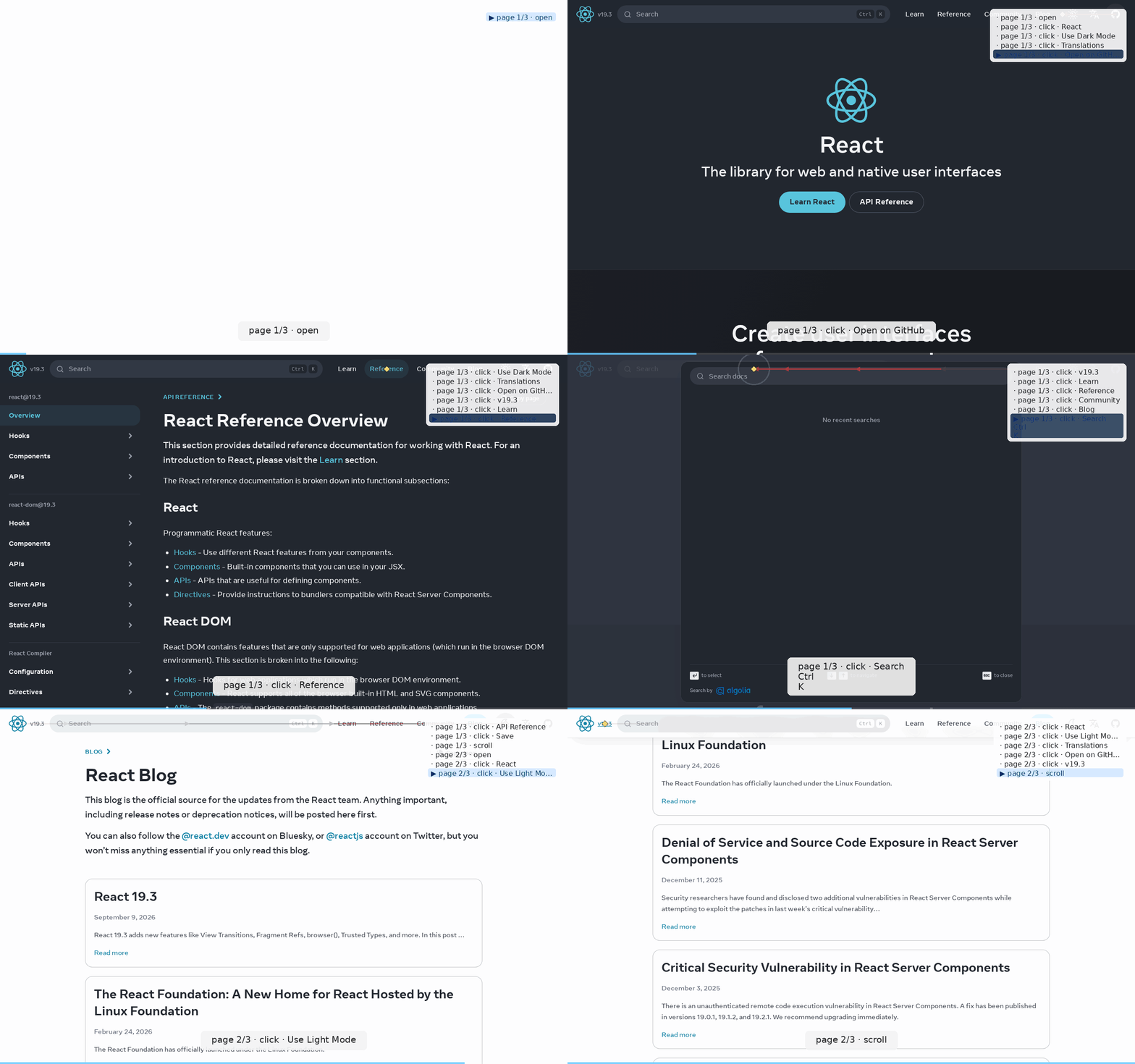
See
docs/ONE_PAGE_NAVIGATION_ORDER_TIPS.mdfor the nine principles behind why this reel reads as legibly as it does — and the scenario template you can copy for your own reels.
clickcast drives a real browser through a website and hands back two things:
- A watchable reel — GIF / MP4 / WebP / raw frames.
- A machine-readable JSON sidecar — every step's selector, timings, per-step frame paths, discovered elements, and post-action page state (title, URL, console errors, failed requests). Versioned. See
docs/feedback-schema.md.
Point it at a URL and it will auto-discover the interactive elements and build a tour for you, or hand it a small YAML scenario for a scripted, repeatable walkthrough.
Install
One line, ready to run immediately after:
Broken down — pip install clickcast (requires Python ≥ 3.10) gets you the
CLI; clickcast install downloads Chromium (~one-time, ~180MB — kept out of
the pip package itself since it's versioned independently and every project
doesn't need every engine); --with-deps also pulls the system libraries
Chromium needs (Linux only, may prompt for sudo); clickcast doctor
confirms everything above actually worked.
Forgot the second step? Any command that needs a browser (auto, run,
shot, elements, mcp) detects a missing engine itself and offers to
install it right then instead of failing — say yes once and it retries
automatically. That prompt only fires in an interactive terminal; CI/scripted
runs fail fast with the exact fix command instead of hanging on stdin.
Homebrew (macOS/Linux)
apt (Debian/Ubuntu, .deb)
Both native packages skip the Chromium download (~180MB, versioned
independently of clickcast) and never install a second ffmpeg (clickcast
already bundles one via imageio[ffmpeg]) -- run clickcast install --with-deps chromium once after either install path. Full design rationale,
what's live today vs. what needs one-time bootstrapping, and the exact
bootstrap steps: docs/packaging/homebrew.md,
docs/packaging/apt.md.
npm (clickcast + clickcast-mcp)
Two npm packages -- thin Node wrappers whose postinstall provisions an
isolated Python venv and pip-installs the pinned PyPI clickcast, since
there's no way to ship clickcast's Playwright/Pillow/ffmpeg runtime as pure
JS. Built specifically because the MCP ecosystem's install pattern is
npx <package>, not pip install:
Both are published on the npm registry. To run against your working copy instead of the published version:
Full design rationale
(including why the shared provisioning code is a vendored copy rather than
a file: dependency), what's live today vs. what needs bootstrapping, and
the exact bootstrap steps: docs/packaging/npm.md.
For AI agents — copy this prompt into your chat
Paste the block below into your coding agent (Claude Code, Cursor, Copilot Chat, Codex, etc.) to teach it clickcast in one message. The agent will install the tool, verify the environment, generate a visual + machine-readable report for your project, and know how to gate CI on the results.
Once the agent has this, ask it something concrete like "run clickcast auto against http://localhost:3000 and tell me which clicks had DOM reactions" — it now has everything it needs.
Live agent control (MCP)
Everything above is batch mode: record a whole tour, then read back a GIF + sidecar. clickcast mcp is the live counterpart — an MCP server that drives one action at a time (goto/click/type/scroll/...) and hands back clickcast's richer per-call payload (annotated frame, page_state, grid coordinates, an enumerated error_code) instead of a bare screenshot, so an agent can react before deciding the next step.
Reach for mcp when an agent needs to explore and react live; reach for auto/run for a repeatable, one-shot artifact (CI, docs, release notes). Full tool reference, client config for Claude Code / Claude Desktop, and the schema doc: docs/mcp.md · docs/mcp-tool-schema.md.
First run — 30 seconds
Produces two files:
tour.gif— the reeltour.gif.json— the AI-consumable sidecar (schema_version: 1, spec atdocs/feedback-schema.md)
For a walkthrough of how an LLM agent consumes both, see docs/ai-integration.md.
Three modes
Related MCP Servers
Reviews
No reviews yet — be the first to share how this listing worked for you.
Frequently Asked Questions about Clickcast
AllMCPs Directory Badge
Showcase your server listing on GitHub or your project documentation. Embed this dynamic SVG badge to highlight official listing status and live engagement.
Badge Style:
Live Dynamic SVG Preview
Markdown (GitHub README)
[](https://allmcps.com/mcp/clickcast)HTML Embed
<a href="https://allmcps.com/mcp/clickcast"><img src="https://allmcps.com/api/badge/clickcast?style=directory" alt="Clickcast on AllMCPs" /></a>