AllMCPs
BrowseBestCategoriesStackCompareToolsGuidesBlog Log in Submit MCP

Stay in the loop

Get new MCP servers and top picks in your inbox.

AllMCPs

The open directory for discovering and installing Model Context Protocol servers.

Explore

  • Browse servers
  • Best MCP servers
  • Categories
  • MCP clients
  • Agent prompts
  • Stack Builder
  • Compare servers
  • Tags index
  • Submit a server
  • Pricing

Learn

  • Guides hub
  • What is MCP?
  • Install guide
  • Troubleshooting
  • Security
  • Blog
  • Blog RSS

Tools

  • All tools
  • Config generator
  • Config validator
  • MCP playground
  • OpenAPI β†’ MCP
  • Badge generator

For agents

  • API docs
  • Trust & traffic
  • llms.txt β†— (opens in a new tab)
  • Catalog JSON β†— (opens in a new tab)
  • Remote MCP β†— (opens in a new tab)

Company

  • About
  • Contact
  • X (@AllMCPs) β†— (opens in a new tab)
  • GitHub β†— (opens in a new tab)
  • Terms
  • Privacy
AllMCPs VerifiedAllMCPs VerifiedFeatured on Nick LaunchesFeatured on Nick LaunchesLaunch Llama NewsletterLaunch Llama NewsletterVerified DR - allmcps.comVerified DR - allmcps.comFeatured on SaaSGrowFeatured on SaaSGrowFeatured on Twelve ToolsFeatured on Twelve ToolsFeatured on Saaspa.geFeatured on Saaspa.geFeatured on Findly.toolsFeatured on Findly.toolsFeatured on Startup FameFeatured on Startup FameFeatured on LaunchKiwiFeatured on LaunchKiwiFeatured on ScrollLaunchFeatured on ScrollLaunchFeatured on DailyPingsFeatured on DailyPingsFazier badgeFazier badgeFeatured on NewTool.siteFeatured on NewTool.siteFeatured on saasfame.comFeatured on saasfame.comDR Checker - Domain RatingDR Checker - Domain RatingListed on Turbo0Listed on Turbo0Launched on LaunchBoard - Product Launch PlatformLaunched on LaunchBoard - Product Launch PlatformList on SimilarlabsList on Similarlabshttps://codetrendy.comhttps://codetrendy.comListed on DevTool.ioFeatured on BuildlistFeatured on BuildlistAllMCPs VerifiedAllMCPs VerifiedFeatured on Nick LaunchesFeatured on Nick LaunchesLaunch Llama NewsletterLaunch Llama NewsletterVerified DR - allmcps.comVerified DR - allmcps.comFeatured on SaaSGrowFeatured on SaaSGrowFeatured on Twelve ToolsFeatured on Twelve ToolsFeatured on Saaspa.geFeatured on Saaspa.geFeatured on Findly.toolsFeatured on Findly.toolsFeatured on Startup FameFeatured on Startup FameFeatured on LaunchKiwiFeatured on LaunchKiwiFeatured on ScrollLaunchFeatured on ScrollLaunchFeatured on DailyPingsFeatured on DailyPingsFazier badgeFazier badgeFeatured on NewTool.siteFeatured on NewTool.siteFeatured on saasfame.comFeatured on saasfame.comDR Checker - Domain RatingDR Checker - Domain RatingListed on Turbo0Listed on Turbo0Launched on LaunchBoard - Product Launch PlatformLaunched on LaunchBoard - Product Launch PlatformList on SimilarlabsList on Similarlabshttps://codetrendy.comhttps://codetrendy.comListed on DevTool.ioFeatured on BuildlistFeatured on Buildlist
Β© 2026 Jackalope Digital LLC. All rights reserved.
  1. Home
  2. πŸ’» Developer Tools
  3. Cli2mcp
C
Health: Not checked yetWe have not completed a health check for this listing yet.Last checked 8/11/2026, 12:12:18 AM

Cli2mcp

Enrichment pendingWe haven’t run our AI enrichment pass on this listing yet, so the overview, use cases, and FAQ below may be sparse or missing. We work through the catalog over time β€” check back soon.
View Repository

Wrap any CLI as a Model Context Protocol server - schema auto-inferred from --help.

Quick Install

Automated & IDE Setup

Copy the AI prompt to install this server into Claude Code, Cursor, or another agent β€” or use 1-click editor setup below.

Add to CursorAdd to VS Code
Manual Client & Custom JSON ConfigExpand JSON β–Ύ

Install Config Generator

Choose your client
claude_desktop_config.json
{
  "mcpServers": {
    "cli2mcp": {
      "command": "npx",
      "args": [
        "-y",
        "cli2mcp"
      ]
    }
  }
}

πŸ’‘ Paste into ~/Library/Application Support/Claude/claude_desktop_config.json (macOS) or %APPDATA%\Claude\claude_desktop_config.json (Windows)

Install Directory Badge Claim listing AlternativesπŸ’» More in Developer Tools

Documentation Overview

cli2mcp

npm version npm downloads CI node license

Status: v0.1 β€” early release. Stdio transport only. APIs may change before 1.0.

Expose any command-line binary as a Model Context Protocol tool by parsing its --help output and synthesizing a JSON Schema at startup. One command, no boilerplate.

Works with any MCP-compatible client β€” Claude Desktop, ChatGPT (via OpenAI Agents SDK), Cursor, Gemini CLI, Cline, Windsurf, Continue, Zed, and anything else that speaks the MCP stdio transport.
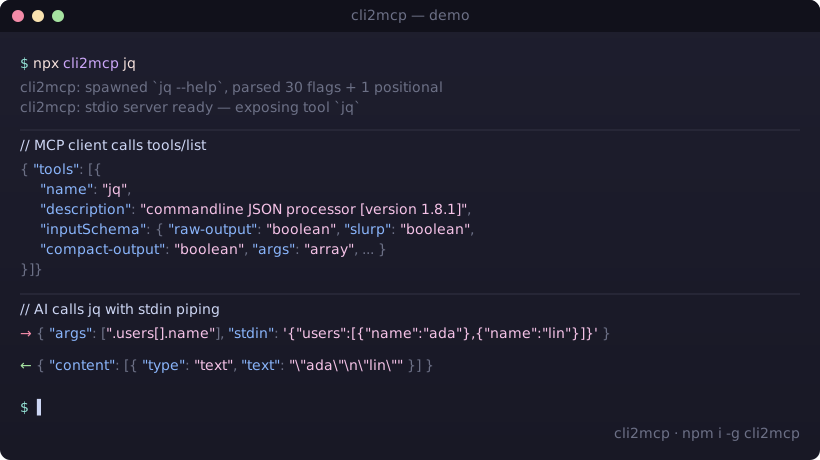
Terminal
npx cli2mcp <command>

cli2mcp demo


Why

Writing an MCP server for a CLI you already have is mechanical work: instantiate the SDK, register a tool, hand-write the input schema, marshal arguments, spawn the subprocess, format the output. Roughly 80–150 lines of TypeScript per binary, repeated forever as new tools come out.

cli2mcp does it in one command. The CLI's own --help is the source of truth for the schema β€” if rg adds a flag tomorrow, the AI sees it tomorrow without code changes.


Install

Terminal
npm install -g cli2mcp
# or invoke without installing
npx cli2mcp <command>

Requires Node.js 22+.


Configure your MCP client

cli2mcp is launched by your client as a stdio subprocess. Add an entry per CLI you want to expose.

Claude Desktop

Config file location:

OSPath
macOS~/Library/Application Support/Claude/claude_desktop_config.json
Windows%APPDATA%\Claude\claude_desktop_config.json
Linux~/.config/Claude/claude_desktop_config.json
config.json
{
  "mcpServers": {
    "ripgrep": {
      "command": "npx",
      "args": ["-y", "cli2mcp", "rg", "--name", "ripgrep"]
    },
    "jq": {
      "command": "npx",
      "args": ["-y", "cli2mcp", "jq"]
    }
  }
}

Restart Claude Desktop after editing.

Other clients

ClientConfig fileFormat
ChatGPT (OpenAI Agents SDK)MCPServerStdio parameter β€” see OpenAI Agents docscommand: "npx", args: ["-y", "cli2mcp", "<cli>"]
Cursor.cursor/mcp.json (project) or ~/.cursor/mcp.json (global)Same mcpServers block as above
ClineVS Code β†’ Cline β†’ MCP Settings β†’ cline_mcp_settings.jsonSame mcpServers block
Windsurf~/.codeium/windsurf/mcp_config.jsonSame mcpServers block
Gemini CLI~/.gemini/settings.jsonSame mcpServers block
Continue~/.continue/config.json β†’ experimental.modelContextProtocolServersSame launcher
Zed~/.config/zed/settings.json β†’ context_serversSame launcher
Any stdio-capable MCP clientper the client's docsSame launcher: npx -y cli2mcp <command>

Refer to each client's documentation for the exact config path on your platform β€” they evolve and are not guaranteed to match the table above.


Quick wins β€” copy-paste configs

Drop any of these into your client's mcpServers block (paths shown above per client). Each one wraps a popular CLI as an MCP tool an AI can call directly.

config.json
{
  "mcpServers": {
    "ripgrep": {
      "command": "npx",
      "args": ["-y", "cli2mcp", "rg", "--name", "ripgrep",
               "--description", "Recursively search files with regex"]
    },
    "jq": {
      "command": "npx",
      "args": ["-y", "cli2mcp", "jq",
               "--description", "Query and transform JSON via stdin"]
    },
    "pandoc": {
      "command": "npx",
      "args": ["-y", "cli2mcp", "pandoc",
               "--description", "Convert documents between markup formats"]
    },
    "sqlite3": {
      "command": "npx",
      "args": ["-y", "cli2mcp", "sqlite3",
               "--description", "Run SQL against a SQLite database file",
               "--cwd", "/path/to/safe/dir"]
    },
    "yt-dlp": {
      "command": "npx",
      "args": ["-y", "cli2mcp", "yt-dlp",
               "--description", "Download media from URLs",
               "--cwd", "/path/to/downloads",
               "--timeout", "300000"]
    }
  }
}

Each CLI must already be installed and on PATH. cli2mcp does not install them for you.


How it compares

ApproachLOC per CLINew flag handlingMaintenance
Hand-written MCP server (TypeScript SDK)~80–150manual schema editper-CLI release cycle
OpenAPI β†’ MCP generatorsn/arequires an OpenAPI specdoes not cover arbitrary CLIs
Wrapping bash / sh as a tool~10n/a β€” gives the AI a shellunsafe, no schema, no sandbox
cli2mcp <command>0automatic at next startnone β€” re-reads --help

The closest neighbor is FastMCP's from_openapi β€” it does not cover arbitrary CLI binaries. As of April 2026 there is no other published tool that turns an arbitrary --help output into a typed MCP tool in one command.


Verified targets

These CLIs are covered by the test suite or have been manually exercised end-to-end:

CLIStatusNotes
jqβœ… testedhelp-on-stderr correctly captured; stdin piping works
ripgrep (rg)βœ… tested90+ flags inferred; args positional handled
curlβœ… fixtureshape extraction validated against bundled fixture
nodeβœ… integration testend-to-end MCP handshake + tools/call

Other POSIX-style CLIs (e.g. ffmpeg, yt-dlp, pandoc, sqlite3, imagemagick) are expected to work but are not yet covered by tests. Report bugs in issues.


How --help becomes a JSON Schema

Help fragmentMCP property
--flagboolean
--flag <value> / <file> / <path>string
--flag <n> / <ms> / <size>number
--flag <a|b|c>string enum with choices
Repeatable flagarray<string>
Positional argsargs: array<string>
Reserved input stdinstring piped to subprocess stdin

When parsing fails on an unconventional --help, cli2mcp falls back to a single variadic args positional so the tool is still usable β€” the model just gets a free-form argument list instead of typed flags.


Options

Code
cli2mcp <command> [options]

  --name <name>         Tool name shown to the AI           (default: <command>)
  --description <text>  Tool description shown to the AI    (default: first --help line)
  --timeout <ms>        Subprocess timeout per call         (default: 60000)
  --cwd <path>          Working directory for subprocess    (default: process.cwd())
  --env <KEY=VALUE>     Extra environment variables         (repeatable)
  --stderr <mode>       stderr handling:
                          include  β†’  appended to tool output (default)
                          drop     β†’  discarded
                          error    β†’  any stderr β†’ isError: true
  -h, --help            Show help

Piping stdin

Reserved input property stdin is piped to the subprocess:

config.json
{ "args": [".name"], "stdin": "{\"name\": \"cli2mcp\"}" }

How it works

Code
cli2mcp rg
   β”‚
   β”œβ”€ 1. spawn: rg --help          β†’  capture stdout + stderr
   β”œβ”€ 2. parse help text           β†’  CliShape { flags, positionals, description }
   β”œβ”€ 3. synthesize JSON Schema    β†’  inputSchema
   β”œβ”€ 4. register one MCP tool     β†’  name: "rg", schema: <above>
   └─ 5. start stdio MCP server    β†’  await client connection

On tools/call:
   { args, flags, stdin? }  β†’  argv builder  β†’  execa(rg, argv, { stdin })
                                                           β”‚
                                          stdout (+ stderr) β†’ content[text]

Non-zero exit β†’ { isError: true, content: [{ type: "text", text: <stderr> }] } (unless --stderr drop).


Security

cli2mcp lets an AI agent invoke the CLIs you expose, with the arguments the agent chooses. You are responsible for what those CLIs can do on your machine.

Practical guidance:

  • Only expose CLIs whose blast radius you accept. jq, rg, pandoc are mostly safe (read-only, deterministic). curl, ffmpeg --output, sqlite3, rm, kubectl, aws are not.
  • The AI is not sandboxed. A prompt injection attack could cause an exposed curl to fetch evil.example.com, an exposed rm to delete files, etc.
  • Use --cwd to constrain filesystem scope when wrapping CLIs that touch files.
  • Use --env deliberately. Do not pass through credentials the model shouldn't reach.
  • Never expose sh, bash, zsh, python -c, or anything with eval semantics β€” that bypasses every safeguard cli2mcp provides.

The schema-from-help design reduces the risk of malformed argv but does not eliminate the risk of misuse. Treat each exposed CLI as a delegated capability, not a sandbox.


Troubleshooting

The CLI has no --help flag. cli2mcp will still start with a single args positional. The AI can pass arguments freely; you lose typed flag inference.

The schema came out empty / wrong. Run cli2mcp <command> manually and inspect the tools/list response (use npx @modelcontextprotocol/inspector). The most common cause is non-standard help formatting (no --long-form flags, columns misaligned). Open an issue with the <command> --help output attached.

The subprocess hangs. The default 60s timeout will kill it. Raise via --timeout. If your CLI is interactive (waits for a TTY), cli2mcp cannot help β€” pipe input via stdin instead.

Flag not being passed. Set --stderr include (the default) and inspect the content[].text. If the flag isn't appearing in argv, the help parser failed to extract it β€” file an issue.


Contributing

Bug reports and patches welcome. Fixtures for new CLIs (test/fixtures/help/<cli>.txt + a shape test) are the highest-leverage contributions.

sh
pnpm install
pnpm test         # vitest
pnpm typecheck    # tsc --noEmit
pnpm lint         # biome check

Star history

Star History Chart

If cli2mcp saved you an afternoon of writing MCP boilerplate, a star helps other people find it.


Author

Built by Ronie Neubauer β€” Principal Engineer, 22+ years shipping production systems.

  • GitHub: @RonieNeubauer
  • Blog: ronieneubauer.com
  • Issues & ideas: github.com/RonieNeubauer/cli2mcp/discussions

License

MIT Β© 2026 Ronie Neubauer.

Related MCP Servers

View all in Developer Tools View all alternatives
  • A
    Ai Netcafe

    Compare LLM cost & latency on one prompt, translate PDF keeping layout, cited research, make PPTX

    πŸ’» Developer Tools0 views
    Compare vs Ai Netcafe β†’
  • Claude Task Master logoClaude Task Master

    AI-powered task management system for AI-driven development. Features PRD parsing, task expansion, multi-provider support (Claude, OpenAI, Gemini, Perplexity, xAI), and selective tool loading for optimized context usage.

    πŸ’» Developer Tools7 views
    Compare vs Claude Task Master β†’
  • W
    Windows MCP

    An MCP Server for computer-use in Windows OS

    πŸ’» Developer Tools1 views
    Compare vs Windows MCP β†’
  • C
    Cli

    Slide decks locally: templates, checks, HTML to editable PowerPoint, .pptx rescue. No AI inside.

    πŸ’» Developer Tools0 views
    Compare vs Cli β†’

Frequently Asked Questions about Cli2mcp

Add the following block to your claude_desktop_config.json under mcpServers: "mcpServers": { "cli2mcp": { "command": "npx", "args": ["-y", "cli2mcp"] } }

AllMCPs Directory Badge

Full Badge Customizer

Showcase your server listing on GitHub or your project documentation. Embed this dynamic SVG badge to highlight official listing status and live engagement.

Badge Style:
Live Dynamic SVG PreviewCli2mcp AllMCPs Directory Badge

Markdown (GitHub README)
[![AllMCPs](https://allmcps.com/api/badge/cli2mcp?style=directory)](https://allmcps.com/mcp/cli2mcp)
HTML Embed
<a href="https://allmcps.com/mcp/cli2mcp"><img src="https://allmcps.com/api/badge/cli2mcp?style=directory" alt="Cli2mcp on AllMCPs" /></a>

Technical Specs & Signals

CategoryπŸ’»Developer Tools
More technical detailsExpand β–Ύ
TransportSTDIO
RuntimeNode.js
Views0
Unique ViewsTotal visits recorded for this listing page on AllMCPs.
Installs0
Installs & Copy ActionsTotal times users copied install commands or configuration snippets for this server.
27Quality signal: Emerging Β· 27/100How this signal is calculated β–Ύ
Server availabilityNot measured

Not scored for repo-hosted servers β€” we can't reach the running server, only its GitHub page. Hosted MCP endpoints are health-checked live.

Verified ownership8/20
Documentation & tools11/30
Adoption & activity1/15
Community engagement0/10

A guidance signal from public completeness & health data β€” not a user rating. New listings start lower and rise as they add docs, get verified, and grow adoption. Signals we can't observe for a listing are skipped, not counted against it.

β˜… FeaturedAllMCPs Server logo

AllMCPs Server

The official MCP server for AllMCPs.com - submit and manage tools directly from your AI. The open directory for MCP servers. Connect Claude, Cursor, Windsurf, and AI agents to databases, tools, files, and APIs. Explore 3,181+ servers. AllMCPs is the premier, open directory for discovering, evaluating, and installing Model Context Protocol (MCP) servers to equip AI agents and LLMs with real-world superpowers.

Explore Server β†’

Own this project?

This directory is pre-filled from public sources. Claim via GitHub README, site badge, or DNS TXT to get the verified badge and attach your website.

Free dofollow backlink: after claiming, verify your product site and place a dofollow AllMCPs badge β€” we recheck it stays live.

Claim & get free dofollow

Share & Embed

Add our SVG badge (dark/light directory styles) or embeddable widget to your site.

Explore more

More in πŸ’» Developer Tools β†’Best MCP servers for Developers β†’Alternatives to Cli2mcp β†’Install in Claude DesktopInstall in CursorInstall in VS Code

