MCP package manager with trust scoring. Search, install, and audit MCP servers.
Quick Install
Automated & IDE SetupCopy the AI prompt to install this server into Claude Code, Cursor, or another agent — or use 1-click editor setup below.
Manual Client & Custom JSON ConfigExpand JSON ▾
Client Config & Setup
Choose your client or environment
Target File:
💡 Paste the JSON block into your client's configuration file under mcpServers, then restart the application.
Documentation Overview

mcpm
A runtime security guard for your AI's tools -- and the package manager to install them. Blocks prompt injection, tool poisoning, and credential exfiltration in live MCP traffic. Local-first, deterministic, no LLM in the enforcement path.


The risky part of an MCP server doesn't show up at install -- it shows up while your agent is running: prompt injection hidden in a tool's output, a server that quietly rewrites its tools after you approved them, a sampling request that smuggles instructions into your model. Being listed in a registry is not a safety signal -- in 2026 a proof-of-concept poisoned server was accepted by 9 of 11 public registries and marketplaces. So mcpm scores every install for hardcoded secrets, prompt injection, and typosquatting -- then runs a live guard between your AI client and each server, pinning tool definitions against rug-pulls and blocking injection before it reaches the model.
You don't have to take our word for any of that. Guards are easy to claim and hard to check, so the measuring stick is public: mcp-guardbench is a guard-agnostic benchmark -- versioned attack and benign cases, an open schema, and a runner that scores any MCP guard through its own published CLI. mcpm is scored the same way as everyone else, by shelling out to mcpm guard inspect, never by importing its own engine.
mcpm currently scores 100% recall at a 0% false-positive rate on that corpus -- which is by construction, since the corpus was extracted from mcpm's own test fixtures. That is a baseline, not a boast. It gets interesting when someone scores a second guard, or contributes a case mcpm misses.
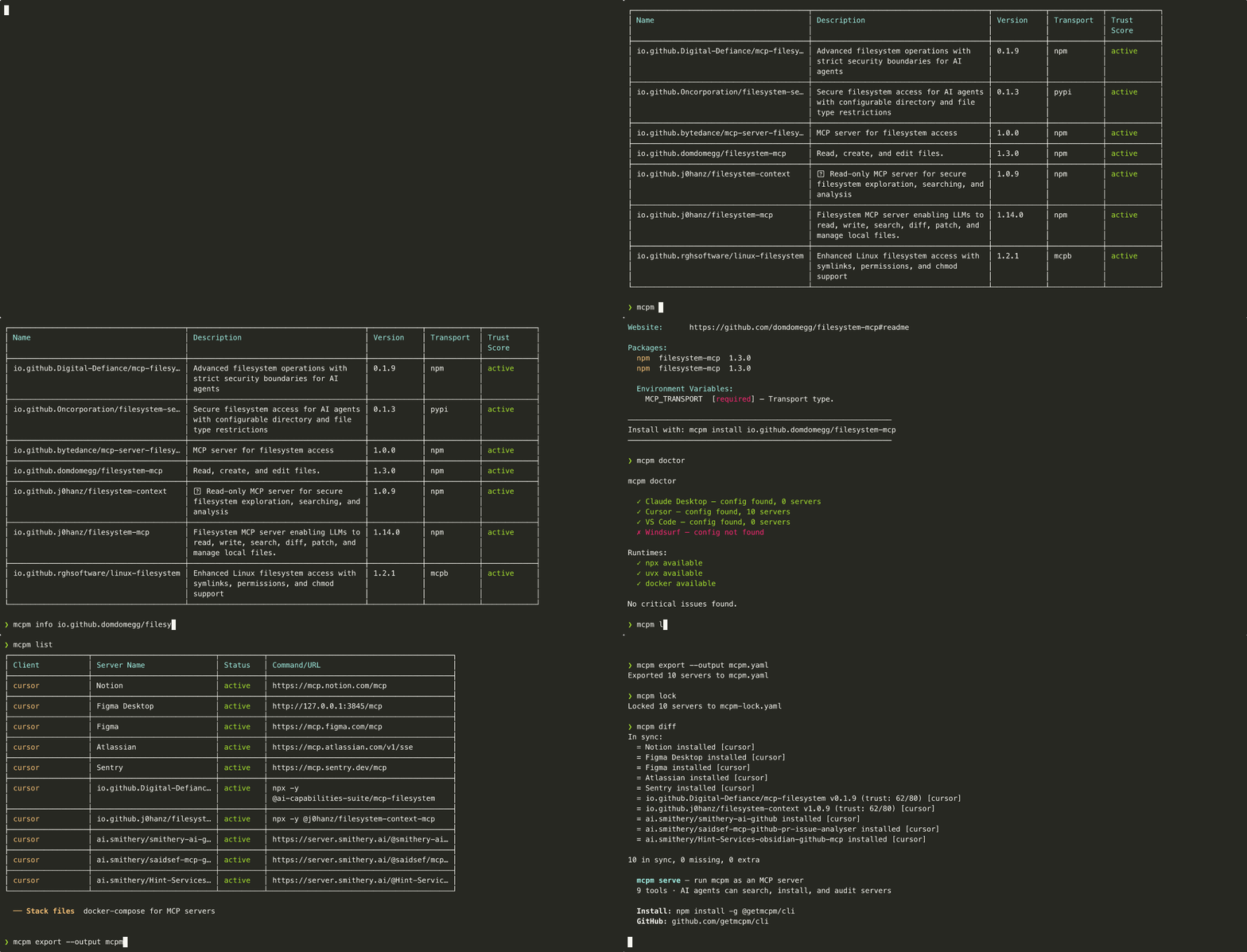
Quick start
Install with the package manager you already use:
| Method | Command |
|---|---|
| npm (global) | npm install -g @getmcpm/cli |
| npx (no install) | npx @getmcpm/cli <command> |
| pnpm | pnpm add -g @getmcpm/cli |
| mise | mise use -g npm:@getmcpm/cli |
Requires Node ^22.22.2 || ^24.15.0 || >=26.0.0 — that is 22.22.2+, 24.15.0+ or
26+, the intersection of what every runtime dependency itself supports. Everything
else is excluded, 23.x and 25.x included. npm warns EBADENGINE and fails outright
under --engine-strict; pnpm installs silently and exits 0 unless you set
engine-strict=true, so there an unsupported Node surfaces as a runtime error rather
than an install one.
The binary is mcpm. Heads up: the mcpm Homebrew formula is a different,
unrelated project (mcpm.sh) — install this mcpm via
npm/npx/pnpm/mise above (all resolve the scoped @getmcpm/cli package, so there's
no name collision). A dedicated Homebrew tap is deferred; see
docs/DISTRIBUTION.md.
Features
Search the MCP registry
Query the official MCP Registry and see results with trust indicators.
Search shows registry lifecycle status, not a trust score -- it is a fast discovery list and does not run the scanner per result. Computed trust lives in mcpm why, info, install, and audit.
Install with trust assessment
Every install runs a metadata-based trust assessment before writing config.
Audit installed servers
Scan everything you have installed. Get a trust report.
Cross-IDE support
One tool for all your AI clients. mcpm reads and writes the correct config format for each.
Doctor: check your MCP setup health
Find misconfigurations, missing runtimes, broken servers, and plaintext secrets pasted into client config.
The plaintext-secret scan reports the key name and label only — never the value — and skips values already stored as mcpm:keychain: placeholders. It's advisory (never fails doctor).
Stack files: docker-compose for MCP
Declare your project's MCP servers in mcpm.yaml, lock versions with trust snapshots, and let every team member replicate the setup with one command.
Stack files include a trust policy. If a server's trust score drops below the threshold, mcpm up blocks it.
Scaffold a stack file
Start a new project's MCP setup in one command. mcpm init writes a starter mcpm.yaml you fill in with servers from mcpm search.
It refuses to clobber an existing mcpm.yaml (pass --force to overwrite). mcpm deliberately doesn't ship curated packs — blessing specific community servers is a trust decision a security tool shouldn't bake in.
Trust score
The trust score is a 0-100 assessment based on publicly available metadata. It is not a source code audit.
What it checks:
| Component | Points | What it measures |
|---|---|---|
| Health check | 0-30 | Can the server start and respond to list_tools? |
| Static scan | 0-40 | Regex-based detection of hardcoded secrets, prompt injection patterns in tool descriptions, typosquatting in package names, suspicious argument schemas |
| External scanner | 0-20 | Results from a third-party scanner you have installed, opt-in via MCPM_EXTERNAL_SCANNER (off by default) |
| Registry metadata | 0-10 | Verified publisher, publish date, download count (capped to 0 when critical findings present) |
Levels are a ratio of the points available, not absolute: safe at 80% of maxPossible or better, caution at 50-79%, risky below 50%. With no external scanner (maxPossible 80) that puts safe at 64 points, not 80.
mcpm audit shows clean · not run where the server cleared every check that actually ran and the only unmeasured component is the health check — audit never executes servers, so that bucket scores a flat 15/30 and would otherwise drag every flawless server into caution. It is a statement about what mcpm did (found nothing, ran nothing), deliberately weaker than safe, which is reserved for servers whose health check really ran.
Without an external scanner, the maximum possible score is 80/100 and the bucket is dropped from the total rather than counted as a failure. The static scan catches common patterns but cannot detect all vulnerabilities. Treat the score as a signal, not a guarantee.
Related MCP Servers
Reviews
No reviews yet — be the first to share how this listing worked for you.
Frequently Asked Questions about Cli
AllMCPs Directory Badge
Showcase your server listing on GitHub or your project documentation. Embed this dynamic SVG badge to highlight official listing status and live engagement.
Badge Style:
Live Dynamic SVG Preview
Markdown (GitHub README)
[](https://allmcps.com/mcp/cli-3)HTML Embed
<a href="https://allmcps.com/mcp/cli-3"><img src="https://allmcps.com/api/badge/cli-3?style=directory" alt="Cli on AllMCPs" /></a>Technical Specs & Signals
CategoryDeveloper Tools
27Quality signal: Emerging · 27/100How this signal is calculated ▾
Server availabilityNot measured
Not scored for repo-hosted servers — we can't reach the running server, only its GitHub page. Hosted MCP endpoints are health-checked live.
Verified ownership8/20
Documentation & tools11/30
Adoption & activity1/15
Community engagement0/10
A guidance signal from public completeness & health data — not a user rating. New listings start lower and rise as they add docs, get verified, and grow adoption. Signals we can't observe for a listing are skipped, not counted against it.
Own this project?
This directory is pre-filled from public sources. Claim via GitHub README, site badge, or DNS TXT to unlock edit access and the Official badge and attach your website — proof is checked automatically, then reviewed by our team.
Free dofollow backlink: add your website and place the AllMCPs badge on it — no claim needed. We detect it automatically and keep it verified as long as the badge stays live.
Claim & get free dofollowShare & Embed
Add our SVG badge (dark/light directory styles) or embeddable widget to your site.