Local MCP server to sync, clean, and index AI chat logs locally. Saves up to 40% context tokens.
Quick Install
Automated & IDE SetupCopy the AI prompt to install this server into Claude Code, Cursor, or another agent — or use 1-click editor setup below.
Not yet automatically verified
We haven't yet run this listing's install command through our automated sandbox check. This isn't a red flag — we're steadily working through the catalog.
Manual Client & Custom JSON ConfigExpand JSON ▾
Client Config & Setup
Choose your client or environment
Target File:
💡 Paste the JSON block into your client's configuration file under mcpServers, then restart the application.
Capabilities & Tool Schemas (27)
Inspect callable tools, capabilities, and parameters exposed to AI agents by Chronicle MCP.
DescriptionUnified search and filter interface for local chat transcripts. Supports keyword, Okapi BM25 semantic, date range, and related chat lookups.
semanticStandard semantic retrieval using Okapi BM25 scoring with exponential temporal decay.
keywordExact string matching against terms in files.
date_rangeFilters files modified within a date interval (requires `start_date` and `end_date`).
relatedFinds archives semantically close to a reference file.
contentMessage text slice within specified index ranges.
Documentation Overview
Chronicle (Universal Chat Connector)





Why · CLI Mechanics · Setup Wizard · Tool Catalog · Installation · Auto-Save · Tests · Comparison · FAQ · License
Chronicle is a production-grade Model Context Protocol (MCP) server designed to sync, clean, format, and index local artificial intelligence chat transcripts. By bridging the gap between local editor history and large language model contexts, Chronicle allows agents to search, compare, retrieve, and reference past conversation logs. It features optimized token-saving heuristics that compress code blocks and limit message lengths, reducing context window utilization by up to 40 percent.
Key Architectural Capabilities
Format Normalization Engine
AI providers and editor clients save conversation logs in diverse formats. Chronicle normalizes these structures into a standard role-and-content message format:
- ChatGPT Exports: ChatGPT exports conversation histories in recursive mapping node structures. Chronicle traverses and flattens these maps, sorts messages chronologically by creation timestamp, and extracts the plain-text message threads.
- Claude Exports: Claude structures messages as flat lists nested under the chat_messages field. Chronicle parses these lists, maps custom sender roles (such as human and assistant) to standard roles, and cleans the text strings.
- Generic and Markdown Formats: Chronicle includes parsers for flat JSON message lists (such as Cline or Continue) and structured Markdown logs (mapping headers like User and Assistant to message boundaries).
Context Token Optimization
Large chat logs can quickly exhaust context windows and increase API costs. Chronicle implements proactive token-saving mechanisms:
- Code Block Summarization: Automatically replaces verbose code blocks with metadata summaries indicating the programming language and line count. This behavior can be disabled on demand to read full code snippets.
- Length Limiting: Truncates extremely long individual messages at a configurable character threshold, appending a notice that the user can re-run the tool with expanded limits if necessary.
Context Window Token Savings Graph
To verify these savings, we executed multi-turn conversation benchmarks. The graph below displays total token usage over a sequence of message turns:
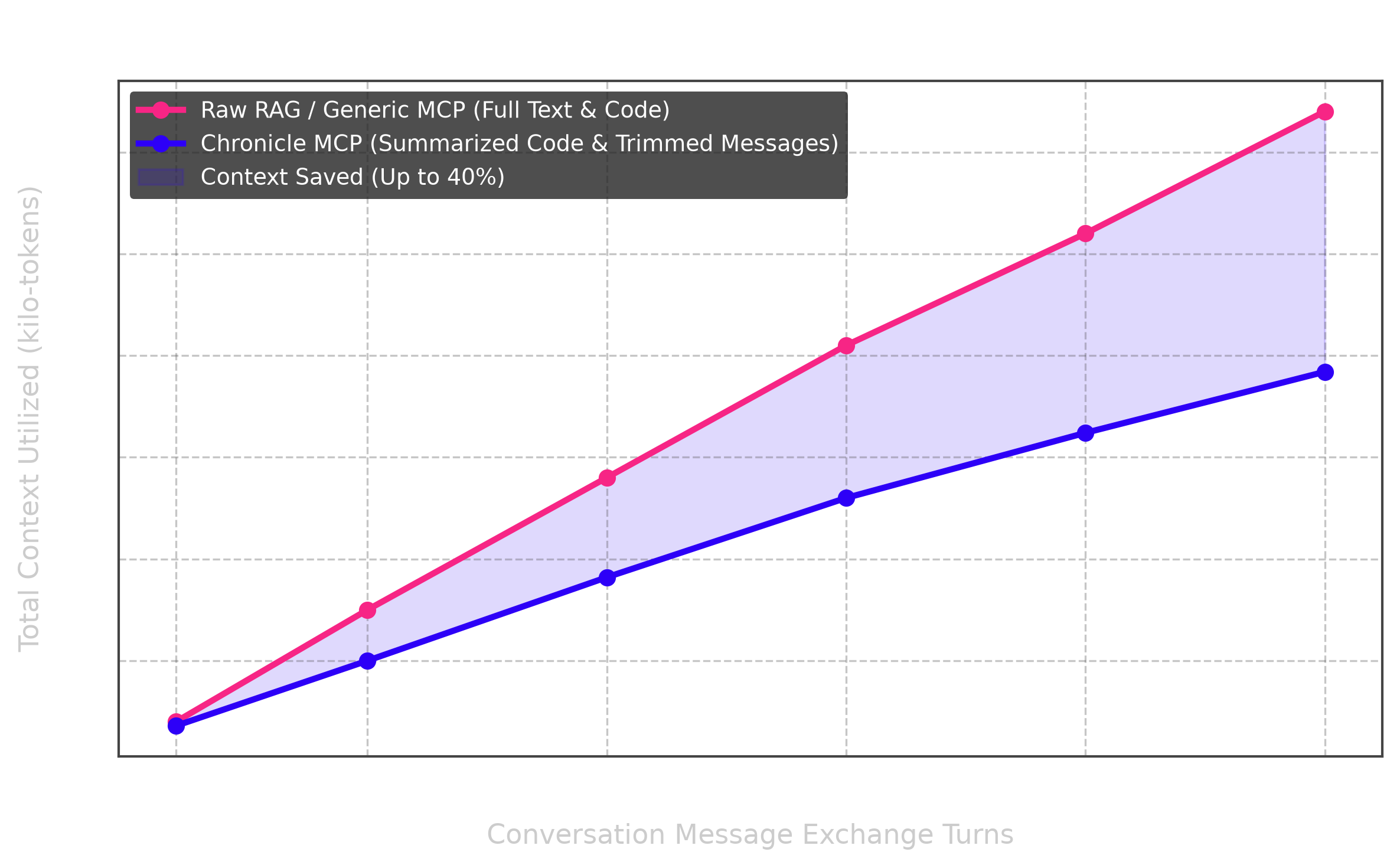
By condensing repetitive syntax and large raw code snippets, Chronicle achieves up to 40 percent token savings, directly lowering API usage costs and preventing context-window exhaustion.
Hybrid Splitting & BM25 Scoring Search Engine
To make workspace searches extremely sharp and retrieve context-aware answers, Chronicle incorporates a state-of-the-art retrieval pipeline:
- Hybrid Document Splitting: Slices long conversations into logical parts at indexing time. Splits are triggered temporally if a gap of more than 1800 seconds (30 minutes) occurs between consecutive messages, or lexically if the Jaccard similarity of vocabulary sliding groups of 4 messages drops below 0.12. Each split is stored and queried as a virtual document (
filename__chunk_idx). - Okapi BM25 Scorer: Replaces naive keyword matching and raw TF-IDF with Okapi BM25 scoring (
k1 = 1.5andb = 0.85). The parameterb = 0.85enforces an aggressive length penalty, which ensures long, rambling chat logs do not overshadow short, precise bug fixes. - Handoff Receipts Prioritization: Integrates a direct tool to save compact agent state files documenting modified paths, commitments, skipped tests, and next actions. Active handoff receipts are automatically prioritized and bubbled to the very top of search results.
Command Line Interface Mechanics
The cli.py file serves as the system's entry point, registering a unified chronicle command on the system path via the pyproject.toml configuration (chronicle = "cli:main").
1. Interactive Setup Wizard
Chronicle features an interactive, zero-dependency TTY setup wizard. Running chronicle setup or executing chronicle without arguments in an interactive terminal starts the setup flow:
[!TIP] The setup wizard is styled with a premium purple theme, supporting arrow-key navigation, spacebar toggles, inline input editing, and real-time path validation!
Keyboard Navigation & Controls
Use the following controls when interacting with the select menu:
| Command / Action | Key Control | Description |
|---|---|---|
| Move Highlight | ▲ Up / ▼ Down Arrow Keys | Navigates the interactive list focus |
| Toggle Checkbox | Spacebar | Selects or deselects the highlighted app |
| Enter Custom IDE | Navigate to Other & type | Type custom app directory directly inline |
| Erase Character | Backspace | Removes characters inside the custom entry |
| Confirm & Inject | Enter | Validates target existence and runs config injection |
| Cancel Setup | Ctrl + C or Escape | Aborts setup process cleanly |
Wizard Phases & Actions
The wizard guides you through the following phases:
| Step | Phase Name | What You Do | Result & Behavior |
|---|---|---|---|
| Step 1 | Monolithic Split Engine | Input JSON file path (or press Enter to skip) | Automatically partitions unified chat history exports |
| Step 2 | Storage Directory Configuration | Specify directory path (or press Enter for default) | Creates local storage folder for transcripts |
| Step 3 | Interactive IDE Selection | Toggle checkboxes, navigate submenus, type custom targets | Performs TTY selection and checks path validation |
| Step 4 | Config Injection & Live Dashboard | Review final summary configuration | Injects server configs into target IDE settings |
[!IMPORTANT] HOW TO USE THE WIZARD — A STEP-BY-STEP SHOWCASE GUIDE
- Start the Process: Launch the wizard with
chronicle setupin your terminal.- Split Monolithic Files: Paste the path to your exported
conversations.json(from ChatGPT or Claude). This splits them into clean individual threads inside your chats folder.- Define Your Chats Directory: Keep the default
~/universal-chatsfolder or type a custom path.- Select Your Target IDEs:
- Press
Down Arrowto scroll down to VS Code, Trae, etc.- Press
Spaceto toggle selections.- If you select Antigravity, checking it will automatically expand sub-choices (Antigravity IDE, Antigravity 2.0, Antigravity CLI) right underneath!
- Scroll down to Other (Enter custom entry) and type any system-specific folder name to add emerging editors.
- Real-time Path Validation: If the custom configuration path parent doesn't exist, a warning alerts you at the bottom:
⚠ App/IDE "<name>" was not found on your system.. Erase it withBackspaceor type a valid path to proceed.- Complete and Launch: Press
Enterto write the JSON configuration file for all selected apps. The Live Environment Dashboard will display a complete summary of your workspace configs.
Click to expand step-by-step Setup Walkthrough
Step 1: Launch the Setup Wizard
Run the setup command:
Step 2: The Monolithic Split Engine
The wizard asks if you want to partition any monolithic chat logs (such as the single conversations.json from ChatGPT/Claude exports) into separate files in your new storage folder:
Step 3: Configure Storage Path
Define the folder path where Chronicle will clean and store all conversation history:
Related MCP Servers
Adoption & maintenance
Factual signals from GitHub, npm, and our automated checks — not a rating.
GitHub stars
2
Stargazers on the source repository.
Last commit
2mo ago
Most recent push to the default branch.
Tools exposed
27
Callable tools this server registers over MCP.
Directory activity
2 views
Config copies, upvotes, and views on AllMCPs.
Reviews
No reviews yet — be the first to share how this listing worked for you.
Frequently Asked Questions about Chronicle MCP
AllMCPs Directory Badge
Showcase your server listing on GitHub or your project documentation. Embed this dynamic SVG badge to highlight official listing status and live engagement.
Badge Style:
Live Dynamic SVG Preview
Markdown (GitHub README)
[](https://allmcps.com/mcp/chronicle-mcp)HTML Embed
<a href="https://allmcps.com/mcp/chronicle-mcp"><img src="https://allmcps.com/api/badge/chronicle-mcp?style=directory" alt="Chronicle MCP on AllMCPs" /></a>Technical Specs & Signals
CategoryDeveloper Tools
10/14 checks healthy over the last 45d
51Quality signal: Good · 51/100How this signal is calculated ▾
Server availabilityNot measured
Not scored for repo-hosted servers — we can't reach the running server, only its GitHub page. Hosted MCP endpoints are health-checked live.
Verified ownership10/20
Documentation & tools25/30
Adoption & activity3/15
Community engagement0/10
A guidance signal from public completeness & health data — not a user rating. New listings start lower and rise as they add docs, get verified, and grow adoption. Signals we can't observe for a listing are skipped, not counted against it.
Supply-chain signal
No high-severity advisories surfaced by our automated scan.
Critical 0High 0Medium 0Low 0
Scanned 2d ago via OSV.dev · chronicle-mcp-server (PyPI)
Own this project?
This directory is pre-filled from public sources. Claim via GitHub README, site badge, or DNS TXT to unlock edit access and the Official badge — proof is checked automatically, then reviewed by our team.
Free dofollow backlink: add your website and place the AllMCPs badge on it — no claim needed. We detect it automatically and keep it verified as long as the badge stays live.
Claim & get free dofollowShare & Embed
Add our SVG badge (dark/light directory styles) or embeddable widget to your site.