Calibre ebook library server: search, read content, curate metadata, semantic search, gated writes.
Quick Install
Automated & IDE SetupCopy the AI prompt to install this server into Claude Code, Cursor, or another agent — or use 1-click editor setup below.
Not yet automatically verified
We haven't yet run this listing's install command through our automated sandbox check. This isn't a red flag — we're steadily working through the catalog.
Manual Client & Custom JSON ConfigExpand JSON ▾
Client Config & Setup
Choose your client or environment
Target File:
💡 Paste the JSON block into your client's configuration file under mcpServers, then restart the application.
Documentation Overview
📚 calibre-mcp






The most capable Calibre MCP server in existence — connect Claude (or any MCP client) to your Calibre ebook library and search it by meaning, not just keywords.
Ask your AI assistant “which of my books explain consumer-group rebalancing?” and get the exact chapter — across 800+ books or inside one. Curate metadata, dedupe, and safely edit your library, all through natural language.
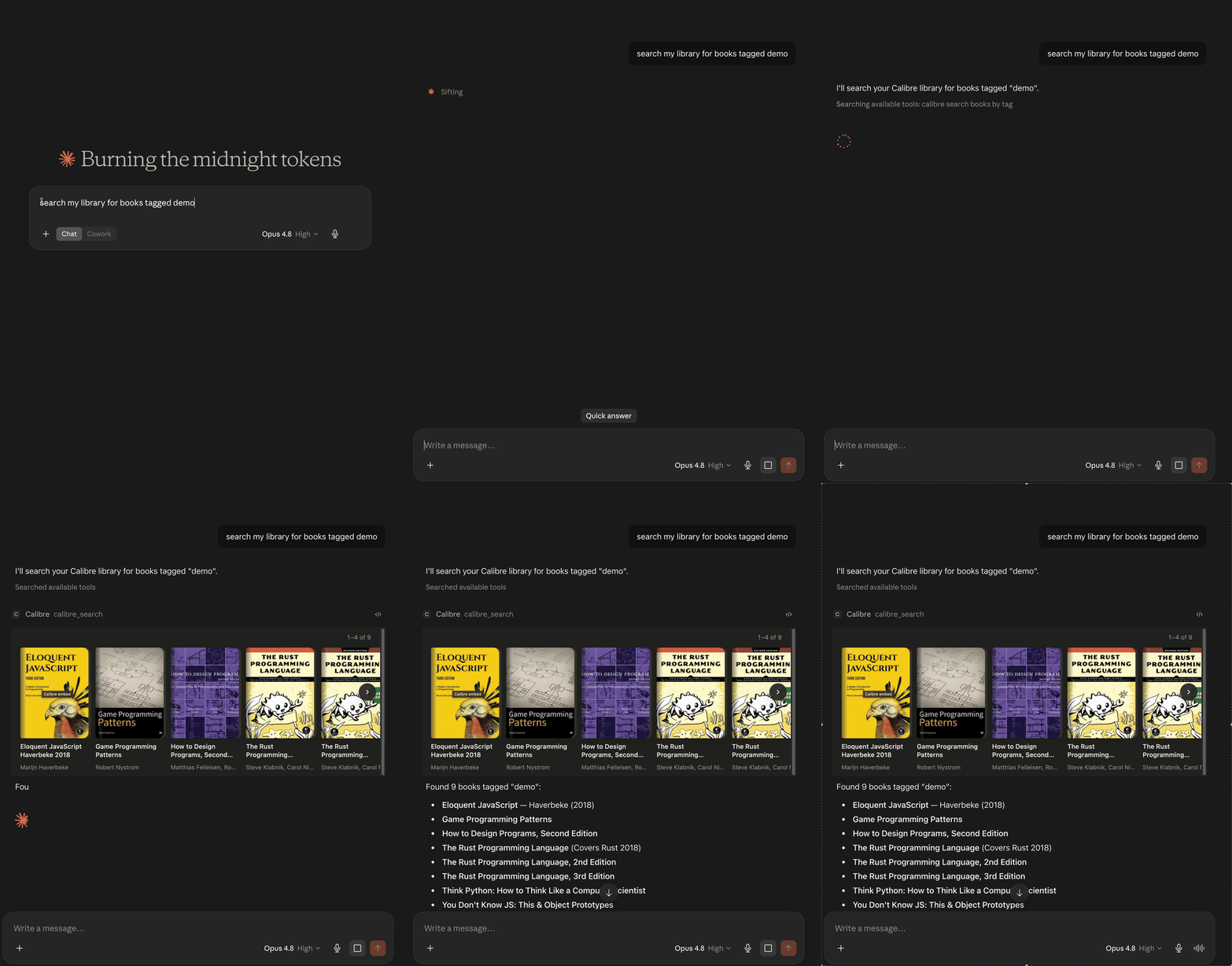
One question → semantic search → 3D cover flow → book card → exact passage → figure viewer, all inside Claude Desktop (MCP Apps)
✨ Highlights
- 19 tools covering the full surface: search, read content, browse categories, curate, and (opt-in) write — update metadata, bulk-edit, merge duplicates, import, delete, and manage bundles (named topical filters).
- Semantic search — meaning-based, hybrid vector + keyword retrieval over your whole library or inside a single book. Multilingual (English + Russian verified, cross-lingual queries work). No other Calibre MCP server has this.
- In-chat UI (MCP Apps) — in hosts that support MCP Apps (Claude Desktop), library
searches render an interactive cover carousel,
calibre_get_booka book detail card with cover, rating, and read/similar actions, andcalibre_get_figuresa figure viewer that shows you the same diagrams the assistant fetched. Text-only hosts are unaffected. - Curation tools — find duplicates with merge-safety scoring, audit metadata quality,
and recover real metadata for books with raw filenames (
795731065.pdf→ Fundamentals of Software Engineering) via Open Library / Google Books. - Safe by default — read-only unless you explicitly enable writes; destructive operations preview first and require confirmation; all writes route through the Content Server so they never race the Calibre GUI.
📋 Requirements
- Calibre with the Content Server running (in Calibre: Connect/share → Start Content server). Tested against Calibre 9.x; any recent version should work.
- Node.js ≥ 22.5 for the npm/npx install (not needed for the Claude Desktop one-click bundle — Desktop ships its own runtime).
- Optional, for best PDF text extraction: poppler's
pdftotext(brew install poppler) or Python 3 with PyMuPDF (pip install pymupdf). Without them the server falls back to Calibre'sebook-convert.
🚀 Quick start
Easiest — let your agent install it for you
Grab the guided-installer skill and hand the whole job to your agent:
Then tell your agent: "set up calibre-mcp". The calibre-mcp-setup skill drives
everything below — preflight (Node, calibredb, Content Server), the Calibre-side
config, the right install for your client (macOS/Windows/Linux), and a calibre_ping
verification — asking you only the questions that are yours to answer (which client,
writes on/off). Works in any Agent-Skills-compatible harness (Claude Code, Copilot,
Amp, …). Prefer doing it by hand? Pick your client below.
Claude Code
MCP server only:
Or install the plugin — server and the companion skills in one step, with a settings dialog (server URL, library, write gate) at install time:
Claude Desktop (one-click)
Download the .mcpb bundle from the
latest release and open it —
Claude Desktop installs it and prompts for settings (server URL, library, writes on/off).
No terminal needed.
About the install warning. Claude Desktop shows “Installing will grant this extension access to everything on your computer… developer information has not been verified by Anthropic” for every extension installed from a file rather than the built-in directory — it’s not specific to this one. The server runs as a local Node process under your user account, exactly like the
npxinstall below; the bundle is built and published by CI from this repository, so you can audit what you’re running. Click Install to proceed.
The bundle ships without the optional embeddings dependency to stay small, so the two semantic-search tools report themselves unavailable. Metadata and full-text search work fully. For semantic search, use the npx install below instead.
Claude Desktop (JSON config)
Add to claude_desktop_config.json:
Cowork
Configure the server in Claude Desktop (either method above) — Desktop bridges local MCP servers into Cowork automatically. No extra setup.
Skills only — any agent (Claude Code, Codex, Cursor, …)
The repo's Agent Skills — a guided installer (calibre-mcp-setup), the calibre-mcp usage
guide, and the two distill skills — install into any Agent-Skills-compatible harness with
the skills.sh installer:
Pick the skills and target agents interactively. Two philosophies, same as
mattpocock/skills: skills.sh copies the files
into your setup so you can hack on them; the Claude Code plugin (above) keeps them as a
managed, auto-updating bundle. Either way the skills drive this MCP server's tools, so
install the server too — or let the calibre-mcp-setup skill do it: it walks any agent
through preflight, per-client install (macOS/Windows/Linux), and verification.
First contact — a five-prompt tour
The server auto-detects your default library; if the Content Server isn’t reachable it logs an actionable hint to stderr. Then try, in order:
- “list my calibre libraries” — connectivity sanity check.
- “find books about Rust” — metadata search; in Claude Desktop the results render as the cover carousel above.
- “show me The Rust Programming Language” — full metadata; renders as a book card with cover, rating, and per-format read buttons.
- “show me figure 2.3 from the JWT Handbook” — the figure arrives as an image for the assistant and, in Claude Desktop, in a figure viewer you can zoom and pan. If the first description doesn’t match what you see, ask “look at the image — what does it actually show?”: models sometimes answer figure questions from memory before reading the pixels (the tool result nudges them to look; see Troubleshooting).
- “build the semantic index for my Kafka books” — one-time prep for meaning-based search (see below).
- “which of my books explain consumer-group rebalancing?” — semantic search; answers with ranked books, or exact passages when scoped to one book.
Bonus: “what’s wrong with my library?” runs the quality audit (missing metadata, raw-filename titles, invalid ISBNs).
✍️ Enabling writes
Write tools (calibre_update_book, calibre_bulk_update, calibre_add_book,
calibre_remove_book, calibre_merge_books, calibre_manage_bundles) are hidden by
default — including calibre_manage_bundles' read-only list action, since the gate works
per tool, not per action. Two independent switches must be on:
-
The MCP-side gate — set
CALIBRE_MCP_ENABLE_WRITE=1(or tick Enable writes in the Desktop bundle settings). Without it the write tools aren’t even registered. -
The Calibre-side gate — the Content Server must allow local writes. By default the server embedded in the Calibre GUI is read-only, so either enable the GUI option below or run a standalone server with
--enable-local-write:Or enable it on the GUI-embedded server without quitting the app: open Calibre → Preferences → Sharing over the net → Advanced and tick “Allow un-authenticated local connections to make changes to the library” (i.e. permit local write access), then restart the Content Server from the GUI. This is the
--enable-local-writeequivalent for the embedded server.
With only the first switch on, write tools appear but Calibre refuses the write — the error message tells you exactly that. Reads work fine against the GUI-embedded server.
Related MCP Servers
Reviews
No reviews yet — be the first to share how this listing worked for you.
Frequently Asked Questions about Calibre MCP
AllMCPs Directory Badge
Showcase your server listing on GitHub or your project documentation. Embed this dynamic SVG badge to highlight official listing status and live engagement.
Badge Style:
Live Dynamic SVG Preview
Markdown (GitHub README)
[](https://allmcps.com/mcp/calibre-mcp)HTML Embed
<a href="https://allmcps.com/mcp/calibre-mcp"><img src="https://allmcps.com/api/badge/calibre-mcp?style=directory" alt="Calibre MCP on AllMCPs" /></a>Technical Specs & Signals
CategoryDeveloper Tools
39Quality signal: Fair · 39/100How this signal is calculated ▾
Server availabilityNot measured
Not scored for repo-hosted servers — we can't reach the running server, only its GitHub page. Hosted MCP endpoints are health-checked live.
Verified ownership10/20
Documentation & tools16/30
Adoption & activity3/15
Community engagement0/10
A guidance signal from public completeness & health data — not a user rating. New listings start lower and rise as they add docs, get verified, and grow adoption. Signals we can't observe for a listing are skipped, not counted against it.
Own this project?
This directory is pre-filled from public sources. Claim via GitHub README, site badge, or DNS TXT to unlock edit access and the Official badge — proof is checked automatically, then reviewed by our team.
Free dofollow backlink: add your website and place the AllMCPs badge on it — no claim needed. We detect it automatically and keep it verified as long as the badge stays live.
Claim & get free dofollowShare & Embed
Add our SVG badge (dark/light directory styles) or embeddable widget to your site.