Compile OpenSCAD, read computed values, preview and measure the mesh, without a GUI.
Quick Install
Automated & IDE SetupCopy the AI prompt to install this server into Claude Code, Cursor, or another agent — or use 1-click editor setup below.
Manual Client & Custom JSON ConfigExpand JSON ▾
Client Config & Setup
Choose your client or environment
Target File:
💡 Paste the JSON block into your client's configuration file under mcpServers, then restart the application.
Documentation Overview
cadloop
A closed loop from parametric source to G-code, with the verification step in the middle that neither the CAD tool nor the slicer can do.
Two MCP servers. A model writes OpenSCAD, compiles it, reads computed values back out, looks at a render, checks it fits the bed, slices it and pulls out the G-code, with every plate proven against the printable area. No GUI at any point.
The verify step in the middle is yours to write. cadloop makes everything around it cheap enough that you get to run it often; it cannot tell you whether the part works.
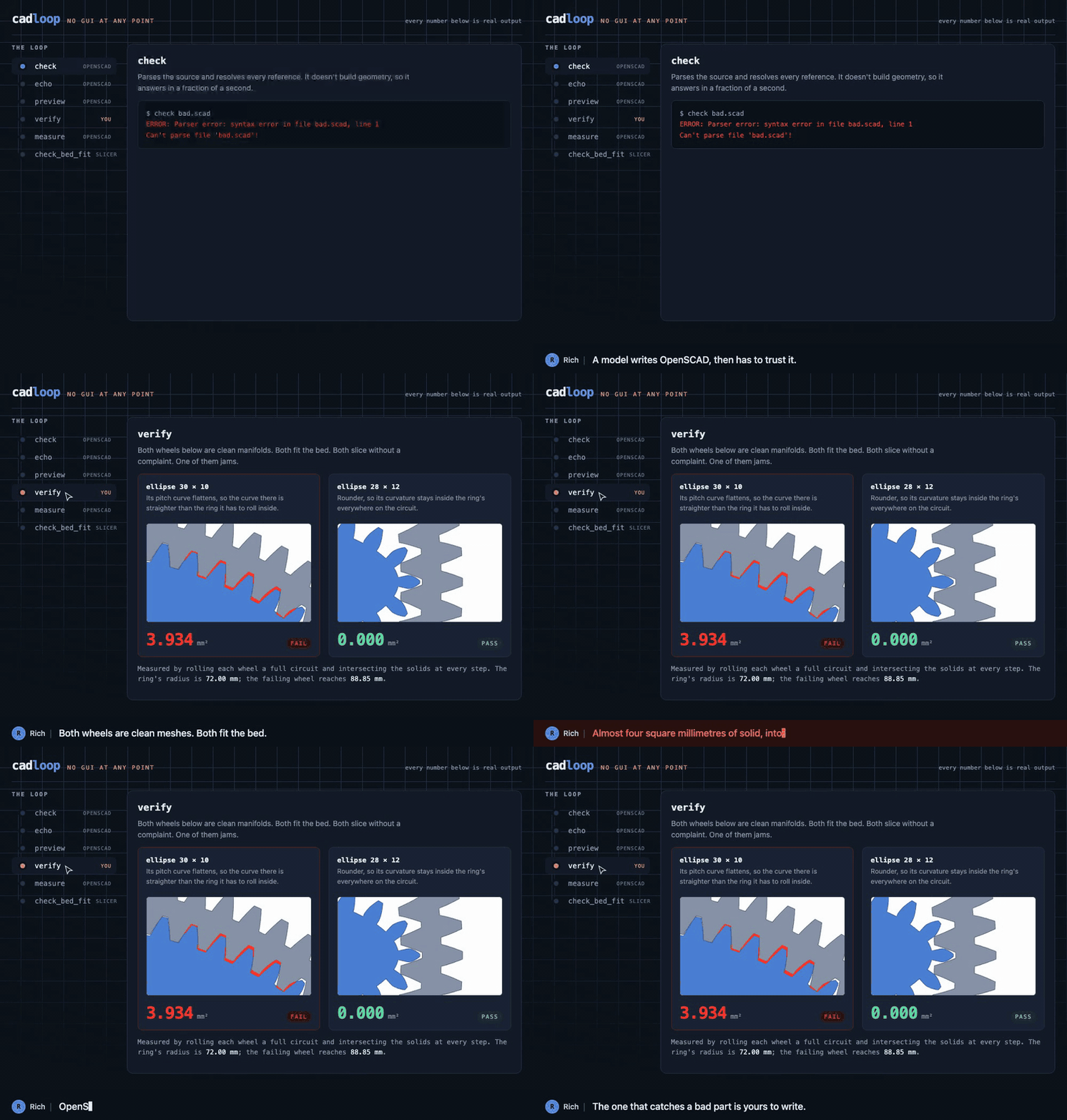
Every number in that walkthrough is real output. The failing wheel is a real measurement, not an illustration. How it's built and where each number comes from is in docs/walkthrough.
The ordering is the point. check and echo skip geometry evaluation
entirely, so they cost a second against models where a full render takes
minutes. Pay for the expensive steps only once the cheap ones pass.
Everything from the bed check down is also one call, make_printable, which
renders, packs, slices and proves the result on the bed and reports what it
did in a screen of text. See the worked example.
Install
The only dependency is mcp. Or from a checkout, which is what you want if you
intend to run the worked example or the tests — the verify extra is shapely,
needed by the example's own checker rather than by cadloop:
Needs OpenSCAD on PATH or at OPENSCAD_BIN, and for slicing, OrcaSlicer,
Bambu Studio, ElegooSlicer or Creality Print. They share a CLI, so any of them
works, and all four are auto-detected along with the profiles they ship.
No slicer is preferred over another here. setup_printer probes each one it
finds and then proves the winner by slicing a 20mm cube with your profiles, so
which one you get is decided by which one works on your machine rather than by
the order of a list in this repository. Creality Print's CLI is broken headless
on macOS today, and that is something this discovers rather than something it
asserts, so it corrects itself when upstream ships a fix; see testing status
below. SLICER_BIN overrides the choice.
Configure
Copy mcp.json into your client's config and fix the paths. Both servers
should point at the same workspace directory, which is the only place either
one reads or writes.
| Variable | Default | Meaning |
|---|---|---|
OPENSCAD_BIN, SLICER_BIN | auto-detected | binary paths |
OPENSCAD_WORKSPACE, SLICER_WORKSPACE | ~/cad | the sandbox |
SLICER_PROFILE_DIRS | auto-detected | extra profile roots |
CADLOOP_MACHINE | $XDG_CONFIG_HOME/cadloop/machine.json | where the machine record lives |
OPENSCAD_TIMEOUT, SLICER_TIMEOUT | 300, 600 | seconds before a kill |
The servers
openscad exposes check, echo, render, measure, preview and
workspace file access. preview returns the PNG as an MCP image, so the model
can look at what it built rather than inferring from numbers. render returns
OpenSCAD's manifold report alongside a bounding box and volume, where
simple: yes with a sensible volume count is the signal the mesh is printable.
The two split on what happens to the picture. preview hands it back and keeps
nothing; render writes it to the workspace when the output ends in .png,
taking the same camera, imgsize, projection and full_render options. Use
render when the image is the artefact rather than the answer. Since render
also takes source as text rather than a path, the before half of a comparison
is git show <rev>:model.scad piped straight in — no checkout, no temp file.
slicer exposes setup_printer, machine_info, make_printable,
slicer_info, list_profiles, check_bed_fit, slice_model,
slice_summary and extract_gcode.
make_printable is the whole chain in one call. Give it a .scad and the
parts you want out of it, and it renders each one, measures it, packs what
fits onto as few plates as it can, slices them, and then reads the finished
G-code back to prove every extruding move lands on the bed. It never edits
the model: a part that cannot print as designed is reported, not quietly
shrunk or split. The one thing it changes is which plate a part lands on, and
turning a part ninety degrees when it will not fit square, which it names in
the report. It answers with every fact it established and, in summary, the
one screen of text those facts add up to, ending in what to do next.
Call setup_printer() once, with no arguments. It reads what your slicer is
already configured with, resolves that to a machine, process and filament
profile from one install, proves the combination by slicing a 20mm cube, and
remembers it. It reports the printer, the quality and the filament it settled
on, and stores nothing at all if the test slice fails. Pass printer,
filament or process only to override one of those fields; the rest still
come from your slicer's own settings. A profile you name is either used or
refused by name, never quietly swapped for a different one.
After that, check_bed_fit and slice_model need no profile arguments, which
is the point: a caller cannot supply three profiles that disagree if it
supplies none. Explicit arguments still win where you pass them.
machine_info says which printer this workspace is set up for and whether it
is still current. The record is a cache, not a source of truth. If the slicer
moves, a profile is edited, or the slicer's version changes, every tool that
would have used it refuses with the reason instead - ok: null, nothing
written - until you run setup_printer again. A setup that no longer matches
reality is never used to produce G-code.
Call slicer_info before doing anything unusual: the Orca-family CLI is
undocumented, changes between releases, and Creality's fork diverges, so the
flag list it reads off your install is more trustworthy than anything assumed.
slice_model has an extra_args escape hatch and a dry_run mode.
check_bed_fit is where the two meet. The slicer will emit out-of-bounds
G-code without complaining, so this measures the STL, reads printable_area
out of the machine profile, and compares. It checks the 45 degree diagonal too,
since a part that misses square-on often fits rotated.
Reading printable_area back out is fiddlier than it looks. Stock profiles
write it both as a list of "XxY" strings and as one comma-separated string,
and most Bambu machines carry no bed of their own at all, inheriting it through
inherits from a common base. So the lookup parses both forms and walks the
inheritance chain. Of the 473 concrete machine profiles shipped with Creality
Print 7.1.1, 469 resolve; the remaining four define no bed anywhere in their
chain, and those report ok: null with a reason rather than guessing.
The verification step
This is the part cadloop does not do for you, and the reason it is a worked
example rather than a feature. models/verify_spirograph.py ships beside the
model, not inside the package: every project's version of "does it actually
work" is different, and none of them generalise. Yours will look nothing like
this one.
It runs two checks. For the spirograph the first lays each wheel's pitch curve onto the ring's pitch circle, walks a full circuit, and measures overlap between the two solids at every position. Zero overlap across the whole circuit at some meshing phase is the pass condition. The second checks the parts are not laid on top of each other on the sheet.
The second check is the same idea one level up. A sheet that lays two parts
on top of each other still renders as a clean manifold, still fits the bed,
and still slices without a word; it just prints as one fused object. So it
renders the sheet and each of its groups and compares the union against the
sum, which is the only place the collision shows up. It needs OpenSCAD and
skips without one; --skip-layout and --skip-mesh run one half alone.
What the tooth counts decide
A pen in a wheel of r teeth rolling in a ring of R traces a figure with
R / gcd(R, r) lobes, closing after r / gcd(R, r) circuits. The pattern is
settled by the tooth counts before any geometry exists, so the checker's
--patterns mode reads it straight off the set:
Related MCP Servers
Reviews
No reviews yet — be the first to share how this listing worked for you.
Frequently Asked Questions about Cadloop OpenSCAD
AllMCPs Directory Badge
Showcase your server listing on GitHub or your project documentation. Embed this dynamic SVG badge to highlight official listing status and live engagement.
Badge Style:
Live Dynamic SVG Preview
Markdown (GitHub README)
[](https://allmcps.com/mcp/cadloop-openscad)HTML Embed
<a href="https://allmcps.com/mcp/cadloop-openscad"><img src="https://allmcps.com/api/badge/cadloop-openscad?style=directory" alt="Cadloop OpenSCAD on AllMCPs" /></a>Technical Specs & Signals
CategoryDeveloper Tools
27Quality signal: Emerging · 27/100How this signal is calculated ▾
Server availabilityNot measured
Not scored for repo-hosted servers — we can't reach the running server, only its GitHub page. Hosted MCP endpoints are health-checked live.
Verified ownership8/20
Documentation & tools11/30
Adoption & activity1/15
Community engagement0/10
A guidance signal from public completeness & health data — not a user rating. New listings start lower and rise as they add docs, get verified, and grow adoption. Signals we can't observe for a listing are skipped, not counted against it.
Own this project?
This directory is pre-filled from public sources. Claim via GitHub README, site badge, or DNS TXT to unlock edit access and the Official badge and attach your website — proof is checked automatically, then reviewed by our team.
Free dofollow backlink: add your website and place the AllMCPs badge on it — no claim needed. We detect it automatically and keep it verified as long as the badge stays live.
Claim & get free dofollowShare & Embed
Add our SVG badge (dark/light directory styles) or embeddable widget to your site.