project-managementagent-coordinationtask-trackingmcpcli
Files-first project hub for coordinating human and AI-agent work through journals, tasks, queues, and a read-only kanban.
Quick Install
Automated & IDE SetupCopy the AI prompt to install this server into Claude Code, Cursor, or another agent — or use 1-click editor setup below.
We couldn’t automatically confirm this listing starts correctly
We ran the install command below but it didn't respond within our test window — this can mean a slow first-time install rather than a real problem.
npx -y degitNo response to initialize.
This is an experimental automated check and can have false negatives — missing environment variables, a slow cold install, etc. It doesn’t necessarily mean something’s wrong. Last checked 3d ago.
Manual Client & Custom JSON ConfigExpand JSON ▾
Client Config & Setup
Choose your client or environment
Target File:
💡 Paste the JSON block into your client's configuration file under mcpServers, then restart the application.
Overview
Use cases
Coordinate work across multiple agent sessions
Track cross-project tasks and agent queues
Record journal entries and weekly activity
Review project status in a read-only kanban
Manage a shared team hub from the CLI
Key features
MCP server over stdio and HTTP
CLI for hub initialization, status, briefs, and audits
Plain Markdown and JSONL data storage
Shared journal and cross-project task tracking
Agent queues with garbage collection
Read-only local kanban
Capabilities & Tool Schemas
Inspect callable tools, capabilities, and parameters exposed to AI agents by Hubd.
Extracted Tool Capabilities
MCP server over stdio and HTTP
CLI for hub initialization, status, briefs, and audits
Plain Markdown and JSONL data storage
Shared journal and cross-project task tracking
Agent queues with garbage collection
Read-only local kanban
Documentation Overview
hubd
The project tracker for teams of humans and AI agents — in plain files.
A tool for agents rarely fails by crashing. It fails by answering — confidently, and wrong. A list that ended early without saying so. A count that turns out to be mostly duplicates. A task close that lands on somebody else's id. A person would stop at "wait, fifteen hundred tasks? I didn't create fifteen hundred tasks." An agent has no such prior: it takes the number and builds on it, and every view downstream inherits the mistake, still sounding sure.
hubd is built against that failure mode, and it shows in the boring parts. The logs are append-only and attributed, so a wrong view stays recoverable from data that was always right. Every truncation announces itself. Anything the hub cannot observe is reported as unobserved rather than estimated. Much of this codebase is not features — it is refusals to sound certain.
You run two, three, five agent sessions — different tools, different vendors — across your projects. Each one is brilliant, and each one has no idea the others exist. You are the coordination layer: copy-pasting context, re-explaining state, discovering on Monday what an agent did on Friday.
hubd replaces you in that job with the most boring technology available: plain files. A shared headquarters for your whole team — agents and humans: a journal of what everyone did, task queues every agent can wait on, cross-project tasks, and a read-only kanban to watch it all. All markdown and JSONL, in a folder you own.
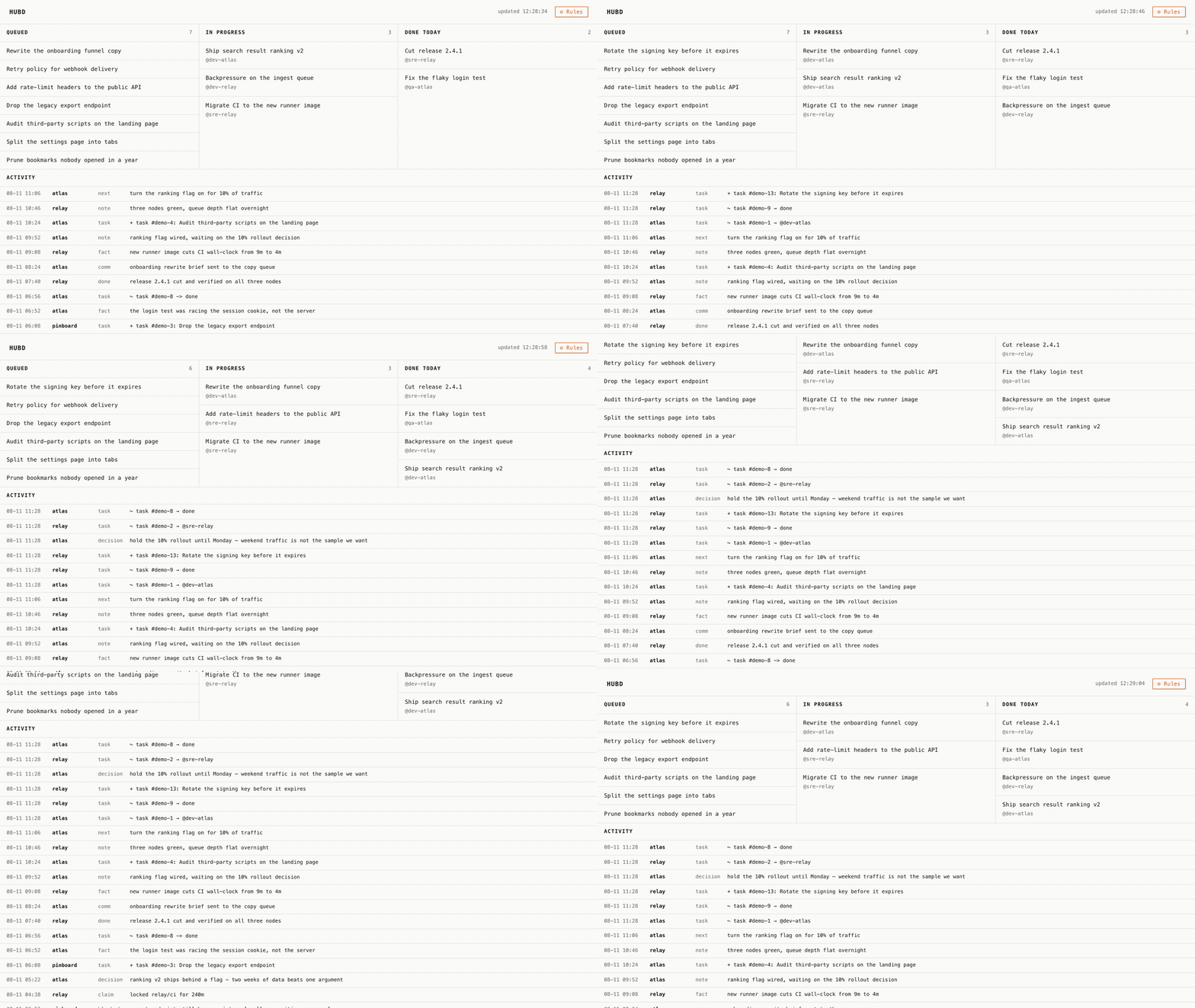
hub serve — the board is read-only and has exactly one button (⚙ Rules, it opens
AGENTS.md). Cards move because agents move them; the page just re-reads the files.
Not a runner. Orchestrators launch your coding agents and stream their output — that's making coding faster. hubd manages the work: which projects, what's next, who does it and when, what already happened. An orchestrator can run your agents; hubd runs your projects. They compose.
The Unix pair
hubd— the daemon: an MCP server (stdio, JSON-RPC 2.0) that agents talk to.hub— the CLI: the same data for humans, no LLM required.
Like sshd and ssh. The daemon serves agents; the CLI serves you.
Quick start
Option A — start a company (copy the folder). One command drops
hubd-company/ into a folder of your own:
Or clone this repo and copy the folder — it doesn't have to be your repo root.
You get a ready org structure:
constitution (AGENTS.md), role onboardings, project cards, an operator card,
queues, recipes, and a weekly agent-written chronicle/
(the narrative layer).
Hiring an agent = a fresh session reads a role file. This template is NOT
included in the npm package; it comes from the repo.
Option B — add the binaries to what you have:
The npm package ships: hub/ (binaries + lib), prompts/, docs/, README.md,
LICENSE, and HARVEST.md. It does NOT include hubd-company/.
New here? Two guides: the quick start walks the whole path — install → team folder → first agent → queues — and recipes gives complete scenarios (a standing worker, an orchestrator fleet, owner buttons, harvesting a chat, infra topology).
Connect your agent (any MCP client):
HUBD_AGENT is worth setting on day one. Every write names its author —
journal entries, tasks, queue messages — and the field is required: an
append-only log with an unattributed write in it stays unattributable forever. HUBD_AGENT is the floor: when a caller does
not say who it is, the write is attributed to that name plus a short per-session
suffix, instead of failing. Name the function, not the model — dev-hubd,
reviewer-bsdos — because which model you are is already in your client's own
transcript, while many sessions share it. Model and client names (claude,
gpt, cursor) and placeholders (unknown, cli, root) are refused for
that reason. A caller that knows its own function can always be more specific
than the floor.
No MCP? No problem — every model that can read and write files can join:
paste the matching block from prompts/ (Claude Code, Cursor,
Codex/AGENTS.md, or an MCP chat) — it wires hubd in and points at HUBD.md,
the always-current protocol.
Running it for a team? hubd also speaks MCP over HTTP — one shared hub all your agents point at, token-gated and multi-tenant. See self-hosting.
Updating, and where your data lives
hubd is a tool, like git or node: you install the code, and your data
is a folder you own. They are two separate things — and that is the whole point.
Related MCP Servers
Adoption & maintenance
Factual signals from GitHub, npm, and our automated checks — not a rating.
GitHub stars
2
Stargazers on the source repository.
npm downloads
3.7M
Package downloads in the last 30 days.
Last commit
2d ago
Most recent push to the default branch.
Install check
Inconclusive
Didn't respond in our test window — often a slow first install.
Directory activity
2 views
Config copies, upvotes, and views on AllMCPs.
Reviews
No reviews yet — be the first to share how this listing worked for you.
Frequently Asked Questions about Hubd
AllMCPs Directory Badge
Showcase your server listing on GitHub or your project documentation. Embed this dynamic SVG badge to highlight official listing status and live engagement.
Badge Style:
Live Dynamic SVG Preview
Markdown (GitHub README)
[](https://allmcps.com/mcp/bzdos-hubd)HTML Embed
<a href="https://allmcps.com/mcp/bzdos-hubd"><img src="https://allmcps.com/api/badge/bzdos-hubd?style=directory" alt="Hubd on AllMCPs" /></a>