Bult README
The full upstream README, mirrored here for reference. Install config, tool schemas, adoption signals, and an original overview live on the Bult listing page.
@bultcloud/mcp-server

Official Model Context Protocol (MCP) server for Bult.ai, a DevOps platform and cloud hosting Platform-as-a-Service for deploying apps, GitHub repositories, Docker images, databases, and services with AI agents.
Use Bult MCP with Claude Desktop, Claude Code, Cursor, Codex, and other MCP-compatible clients to deploy apps, manage cloud infrastructure, inspect logs, and troubleshoot deployments through the Bult API.
Demo
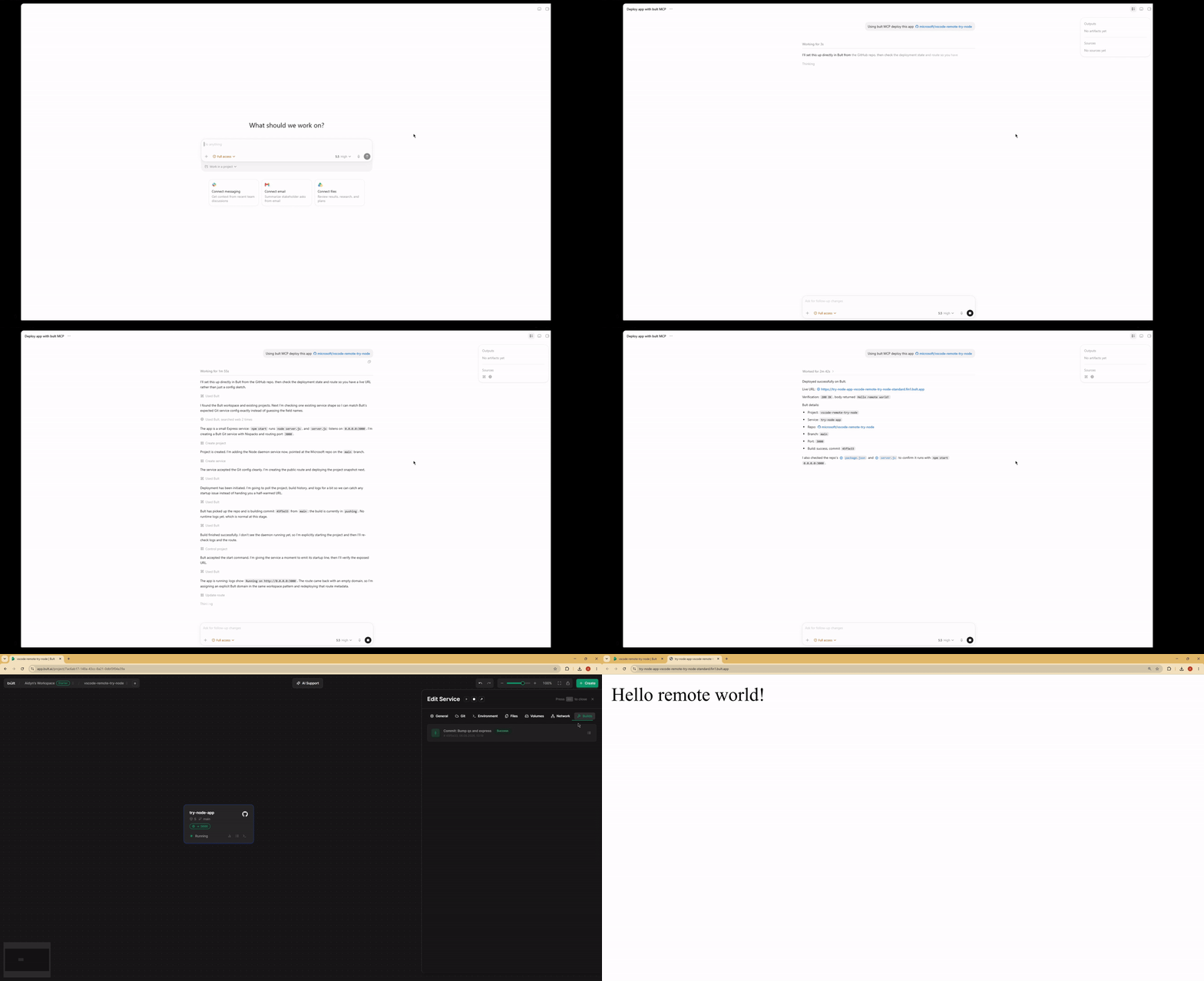
Features
- Deploy GitHub repositories, Docker images, databases, and app services from MCP-compatible AI agents.
- Project lifecycle tools: list, inspect, create, update, delete, deploy, start, stop, and discard changes.
- Service management for daemon and database services, including Docker image and Git-based deployments.
- Persistent volumes, route/domain mappings, templates, service logs, and build history.
- MCP tool annotations for read-only, idempotent, and destructive operations where supported.
- Works over stdio with Claude Desktop, Claude Code, Cursor, Google Antigravity and other MCP-compatible clients.
When to use Bult MCP
Use Bult MCP when you want an AI coding agent to deploy and operate cloud hosting resources for you. Common workflows include deploying a GitHub repo from Cursor, deploying the current project from Claude Code, launching a Docker image, creating a database service, adding a public route, checking build logs, and debugging failed deployments.
Requirements
- Node.js 18 or newer.
- Bult API token.
Installation
If you install the package globally, use the bult-mcp binary:
You can also run it with npx from MCP client configs:
Configuration
The server reads its configuration from environment variables.
| Variable | Required | Description |
|---|---|---|
BULT_API_URL | Yes | Bult API base URL, https://app.bult.ai. |
BULT_API_TOKEN | Yes | API token used for Bearer authentication. |
The server exits during startup if either variable is missing.
MCP Client Setup
Claude Desktop
Add the server to claude_desktop_config.json.
Using npx:
Claude Code
Using npx:
Codex CLI
Using npx:
Available Tools
Projects
| Tool | Description |
|---|---|
list-projects | List all projects in the workspace. |
get-project | Get a project overview with services, volumes, and routes. |
create-project | Create a new project. |
update-project | Update a project name. |
delete-project | Delete a project and all of its resources. |
deploy-project | Deploy project changes and create a version snapshot. |
control-project | Start, stop, or discard project changes. |
Services
| Tool | Description |
|---|---|
list-services | List all services in a project. |
get-service | Get service details and configuration. |
create-service | Create a daemon or database service. |
update-service | Update service configuration. |
delete-service | Delete a service. |
control-service | Start, stop, or rebuild a service. |
Volumes
| Tool | Description |
|---|---|
create-volume | Create a persistent storage volume. |
update-volume | Update a volume name or size. |
delete-volume | Delete a volume. |
wipe-volume | Irreversibly wipe all data from a volume. |
Routes
| Tool | Description |
|---|---|
create-route | Create a domain or path mapping for a service. |
update-route | Update route configuration. |
delete-route | Delete a route. |
Templates
| Tool | Description |
|---|---|
list-templates | List available project templates. |
apply-template | Apply a template to a project. |
Logs and Builds
| Tool | Description |
|---|---|
get-service-logs | Read service logs with cursor-based pagination. |
list-builds | List build history for a service. |
Example Prompts
- Deploy this GitHub repo to Bult and give me the public URL.
- Deploy the current project to Bult.
- Check why my deployment failed.
- Show the latest logs for my app.
- Set DATABASE_URL and restart the service.
- Deploy this Docker image to Bult.
- List my Bult projects and services.
Development
Project layout:
Security
BULT_API_TOKEN grants access to your Bult resources. Keep it out of
source control, shell history, issue reports, and screenshots. Prefer scoped or
rotatable tokens when available.
Some tools can create, delete, deploy, stop, or wipe resources. Review tool calls from your MCP client before approving destructive actions.
Privacy Policy
This MCP server connects your MCP client to Bult.ai using the API token you provide. Requests are sent to Bult.ai to perform actions such as listing projects, deploying services, managing routes and volumes, and reading logs.
The server does not store your API token. Tokens are passed through your MCP client configuration or extension settings. For Bult.ai data handling practices, see the Bult.ai Privacy Policy.
Contributing
Issues and pull requests are welcome at github.com/bultcloud/mcp-server.
Before opening a pull request, run:
License
This project is licensed under the MIT License.