Local tools for planning and validating focused browser-game prototypes.
Quick Install
Automated & IDE SetupCopy the AI prompt to install this server into Claude Code, Cursor, or another agent — or use 1-click editor setup below.
Not yet automatically verified
We haven't yet run this listing's install command through our automated sandbox check. This isn't a red flag — we're steadily working through the catalog.
Manual Client & Custom JSON ConfigExpand JSON ▾
Client Config & Setup
Choose your client or environment
Target File:
💡 Paste the JSON block into your client's configuration file under mcpServers, then restart the application.
Documentation Overview
OpenGame Showcases
Public browser-game showcases from OpenGame.
Website: https://opengame.app/
Featured preview
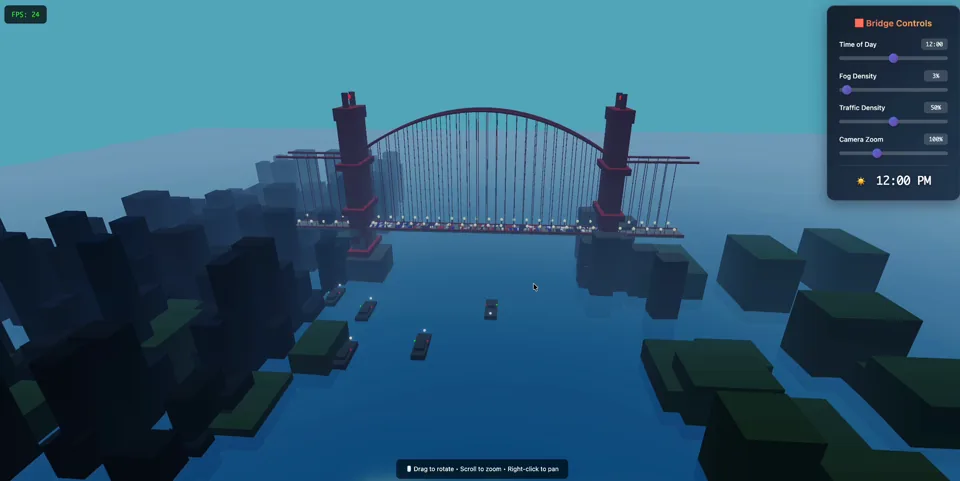
Golden Gate Bridge — 3D Cinematic
Click the poster to play the live demo, or watch the video preview.
This repository is intentionally small. It contains public showcase material only: playable static HTML examples, prompts, and links to the matching OpenGame pages. It does not contain OpenGame production runtime code, deployment configuration, credentials, user data, billing data, or analytics exports.
Showcases
| Showcase | Type | Play | Video | Prompt | OpenGame page |
|---|---|---|---|---|---|
| Golden Gate Bridge — 3D Cinematic | 3D / Three.js / WebGL | Live demo | Video preview | Prompt | OpenGame page |
| Vaporwave Platformer — Night City | 2D / Platformer / Canvas | Live demo | — | Prompt | OpenGame page |
Run locally
Open the HTML files directly in a browser:
The Golden Gate Bridge showcase imports Three.js from jsDelivr. The Vaporwave Platformer is self-contained.
OpenGame Skills
Reusable public Skills now have a dedicated canonical repository: opengameapp/OpenGame-skills. Install them from that source:
The legacy skills/ folder is retained temporarily so existing
marketplace source links do not break during migration. New Skills and future
versions are maintained only in the dedicated repository. See its
Skill catalog.
OpenGame MCP servers
The mcp/ directory contains independently installable Model Context
Protocol servers. The first server, OpenGame Browser Game
MCP, gives AI clients deterministic tools to
scope a browser-game vertical slice, choose Canvas/DOM or Three.js/WebGL,
validate a brief, and discover these public showcases. It is local, read-only,
requires no API key, and never connects to OpenGame production systems.
Install it from the
public npm package
or find io.github.opengameapp/browser-game in the
Official MCP Registry.
It is also listed on
LobeHub Market.
See the MCP publishing guide for the versioned
release process.
Remix with OpenGame
Use the prompt files in prompts/ as starting points, then remix them with OpenGame on the official website:
Repository scope
Included:
- Public playable HTML showcases.
- Original prompts used to guide generation.
- Links to the dedicated public OpenGame Skills catalog.
- Links to matching OpenGame live demos and detail pages.
Not included:
- Proprietary OpenGame app/runtime source.
- Production secrets, API keys, cookies, user records, analytics, payments, or deployment config.
- Private prompts or customer-generated content.
License
MIT for the showcase material in this repository. Third-party runtime libraries loaded by examples remain under their own licenses.
Contact
Product support: support@opengame.app
General contact: hello@opengame.app
Related MCP Servers
Reviews
No reviews yet — be the first to share how this listing worked for you.
Frequently Asked Questions about Browser Game
AllMCPs Directory Badge
Showcase your server listing on GitHub or your project documentation. Embed this dynamic SVG badge to highlight official listing status and live engagement.
Badge Style:
Live Dynamic SVG Preview
Markdown (GitHub README)
[](https://allmcps.com/mcp/browser-game)HTML Embed
<a href="https://allmcps.com/mcp/browser-game"><img src="https://allmcps.com/api/badge/browser-game?style=directory" alt="Browser Game on AllMCPs" /></a>Technical Specs & Signals
CategoryDeveloper Tools
36Quality signal: Fair · 36/100How this signal is calculated ▾
Server availabilityNot measured
Not scored for repo-hosted servers — we can't reach the running server, only its GitHub page. Hosted MCP endpoints are health-checked live.
Verified ownership10/20
Documentation & tools15/30
Adoption & activity2/15
Community engagement0/10
A guidance signal from public completeness & health data — not a user rating. New listings start lower and rise as they add docs, get verified, and grow adoption. Signals we can't observe for a listing are skipped, not counted against it.
Own this project?
This directory is pre-filled from public sources. Claim via GitHub README, site badge, or DNS TXT to unlock edit access and the Official badge and attach your website — proof is checked automatically, then reviewed by our team.
Free dofollow backlink: add your website and place the AllMCPs badge on it — no claim needed. We detect it automatically and keep it verified as long as the badge stays live.
Claim & get free dofollowShare & Embed
Add our SVG badge (dark/light directory styles) or embeddable widget to your site.