AllMCPs
BrowseBestCategoriesStackCompareToolsGuidesBlog
Log in Submit MCP

Stay in the loop

Get new MCP servers and top picks in your inbox.

AllMCPs

The open directory for discovering and installing Model Context Protocol servers.

AllMCPs on GitHub (opens in a new tab)
Launched onTiny Startupstinystartups.com
Explore
  • Browse servers
  • Best MCP servers
  • Categories
  • MCP clients
  • Agent prompts
  • Stack Builder
  • Compare servers
  • Random discovery New
  • Submit a server
  • Pricing & Boost Boost
Learn
  • Guides hub
  • What is MCP?
  • Install guide
  • Build an MCP server
  • Deploy an MCP server
  • Security guide
  • Troubleshooting
  • MCP for SEO & AEO
  • Protocol versioning
  • Blog & updates
Tools
  • All developer tools
  • Config generator
  • Config validator
  • Config auditor
  • MCP playground
  • Token calculator
  • OpenAPI β†’ MCP
  • Badge generator
For agents
  • REST API docs
  • Trust & traffic Live
  • Remote MCP server SSE β†— (opens in a new tab)
  • llms.txt β†— (opens in a new tab)
  • Catalog JSON β†— (opens in a new tab)
Company
  • About
  • Advertise Sponsor
  • Contact
  • GitHub β†— (opens in a new tab)
  • Terms
  • Privacy
AllMCPs VerifiedAllMCPs VerifiedFeatured on Nick LaunchesFeatured on Nick LaunchesLaunch Llama NewsletterLaunch Llama NewsletterVerified DR - allmcps.comVerified DR - allmcps.comFeatured on SaaSGrowFeatured on SaaSGrowFeatured on Twelve ToolsFeatured on Twelve ToolsFeatured on Saaspa.geFeatured on Saaspa.geFeatured on Findly.toolsFeatured on Findly.toolsFeatured on Startup FameFeatured on Startup FameFeatured on LaunchKiwiFeatured on LaunchKiwiFeatured on ScrollLaunchFeatured on ScrollLaunchFeatured on DailyPingsFeatured on DailyPingsFazier badgeFazier badgeFeatured on NewTool.siteFeatured on NewTool.siteFeatured on saasfame.comFeatured on saasfame.comDR Checker - Domain RatingDR Checker - Domain RatingListed on Turbo0Listed on Turbo0Launched on LaunchBoard - Product Launch PlatformLaunched on LaunchBoard - Product Launch PlatformList on SimilarlabsList on Similarlabshttps://codetrendy.comhttps://codetrendy.comListed on DevTool.ioFeatured on BuildlistFeatured on BuildlistLaunched on Tiny StartupsFeatured on ShowMeBestAIFeatured on ShowMeBestAIFind us on LaunchZoneFind us on LaunchZoneAllMCPs VerifiedAllMCPs VerifiedFeatured on Nick LaunchesFeatured on Nick LaunchesLaunch Llama NewsletterLaunch Llama NewsletterVerified DR - allmcps.comVerified DR - allmcps.comFeatured on SaaSGrowFeatured on SaaSGrowFeatured on Twelve ToolsFeatured on Twelve ToolsFeatured on Saaspa.geFeatured on Saaspa.geFeatured on Findly.toolsFeatured on Findly.toolsFeatured on Startup FameFeatured on Startup FameFeatured on LaunchKiwiFeatured on LaunchKiwiFeatured on ScrollLaunchFeatured on ScrollLaunchFeatured on DailyPingsFeatured on DailyPingsFazier badgeFazier badgeFeatured on NewTool.siteFeatured on NewTool.siteFeatured on saasfame.comFeatured on saasfame.comDR Checker - Domain RatingDR Checker - Domain RatingListed on Turbo0Listed on Turbo0Launched on LaunchBoard - Product Launch PlatformLaunched on LaunchBoard - Product Launch PlatformList on SimilarlabsList on Similarlabshttps://codetrendy.comhttps://codetrendy.comListed on DevTool.ioFeatured on BuildlistFeatured on BuildlistLaunched on Tiny StartupsFeatured on ShowMeBestAIFeatured on ShowMeBestAIFind us on LaunchZoneFind us on LaunchZone
Β© 2026 Jackalope Digital LLC. All rights reserved.
  1. Home
  2. πŸ’» Developer Tools
  3. Blender Optics Simulator
Blender Optics Simulator logo
Health: ActiveRecent health check succeeded.Last checked 9/7/2026, 7:50:34 PM

Blender Optics Simulator

User RatingsBe the first to rate and review this MCP server! Enrichment pendingWe haven’t run our AI enrichment pass on this listing yet, so the overview, use cases, and FAQ below may be sparse or missing. We work through the catalog over time β€” check back soon.
View Repository20 GitHub StarsTotal stargazers on GitHub for the source repository (20 stars).Visit Website

Build, align & render a real optical bench in Blender; drivable by an AI agent over MCP.

Quick Install

Automated & IDE Setup

Copy the AI prompt to install this server into Claude Code, Cursor, or another agent β€” or use 1-click editor setup below.

Add to CursorAdd to VS Code
Manual Client & Custom JSON ConfigExpand JSON β–Ύ

Client Config & Setup

Choose your client or environment
Target File:~/Library/Application Support/Claude/claude_desktop_config.json
claude_desktop_config.json
{
  "mcpServers": {
    "blender-optics-simulator": {
      "command": "npx",
      "args": [
        "-y",
        "blender-optics-simulator"
      ]
    }
  }
}

πŸ’‘ Paste the JSON block into your client's configuration file under mcpServers, then restart the application.

Install Directory Badge Claim listing AlternativesπŸ’» More in Developer Tools

Documentation Overview

Blender Optics Simulator

CI Release License: GPL-3.0-or-later Blender 4.2+ DOI

An optical bench an AI agent can build, inspect, align, and render β€” over MCP.

"See a need, fill a need." β€” Bigweld, Robots (2005)

60-second tour β€” Lay out lasers, mirrors, beamsplitters, lenses, waveplates, gratings and detectors in Blender; a live beam engine traces them (ray + Gaussian-q ABCD + Jones/Stokes polarization + wave-optics overlays), all physics-verified against textbook answers in CI. Everything mounts on real opto-mechanics and renders in Cycles. The whole optical state is exposed over a localhost MCP bridge, so an AI agent reads ground-truth geometry and beam data and drives the bench β€” aligning, closing an AO loop, nulling fringes. Install: drag the one-click link from the releases page into Blender 4.2+ (it also subscribes you to updates β€” see Install & stay updated).

Blender becomes a physics-checked optical bench: lasers, mirrors, beamsplitters, lenses, waveplates, polarizers, gratings, deformable mirrors, detectors β€” laid out in 3-D, traced by a live beam engine, mounted on real opto-mechanics, and rendered in Cycles. The twist: the entire optical state is exposed as JSON over a localhost MCP bridge, so an AI agent (e.g. Claude) doesn't guess geometry β€” it reads every element's pose, port normals, beam path, mount limits, and wavefront error as ground truth, then drives the bench toward design intent and watches the beam update live.

This is the one place Blender Γ— optics Γ— MCP/AI-agents actually overlap. Most Blender-MCP work is geometry and animation. This is a physics-grounded digital twin of a real optical table that an agent can see and close the loop on.

A Michelson interferometer on a tapped breadboard, built and traced in Blender β€” kinematic mounts, posts and bases on real opto-mechanics, both arms' beams glowing, rendered in Cycles

A real bench, traced live. Every mount, post, base and beam above is placed and computed by the add-on β€” then rendered in Cycles. Build it by hand in the UI, from a script, or let an AI agent drive it over MCP.
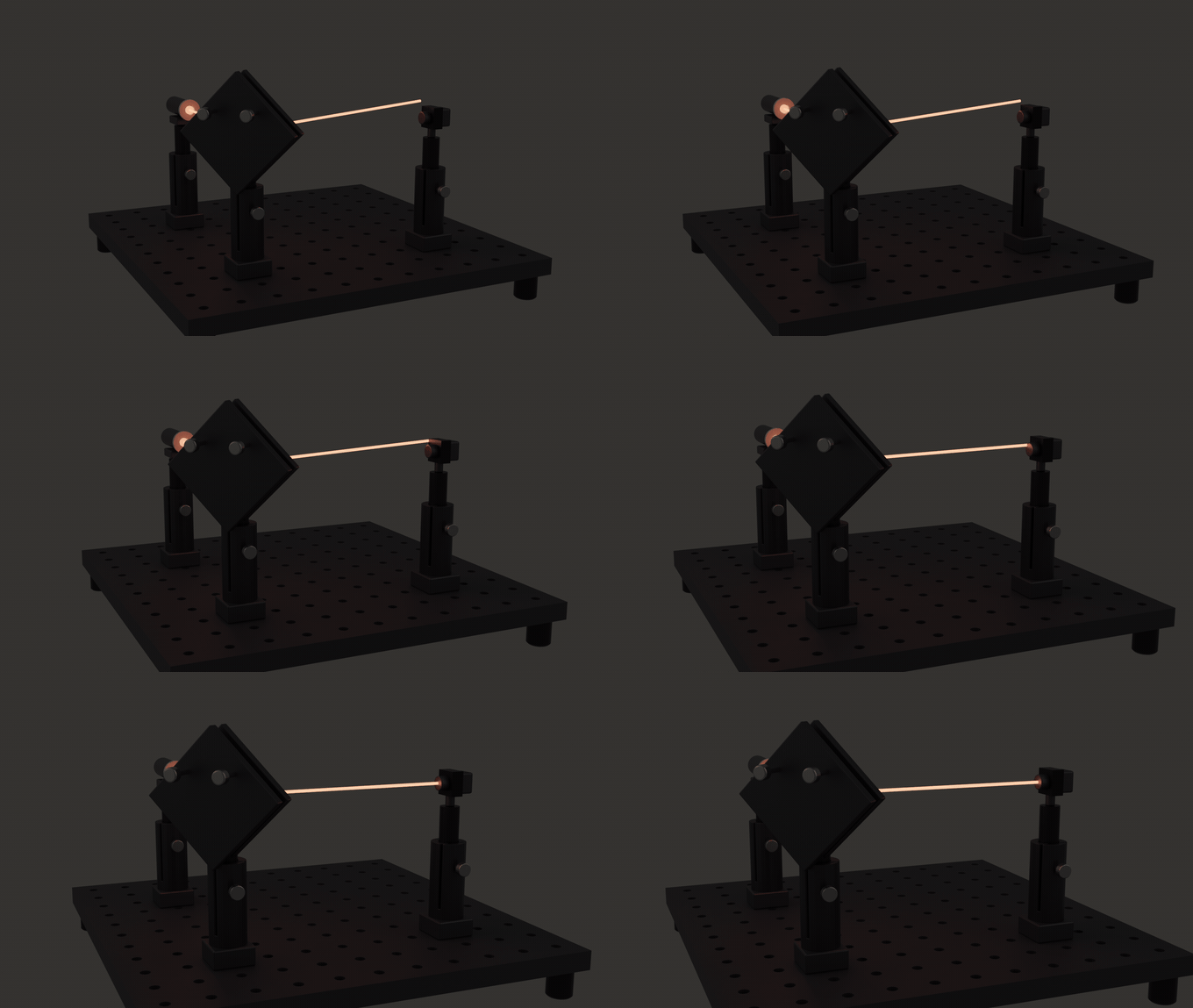
A laser beam steered by a kinematic mirror lands well off the detector centre, then auto-alignment walks the mount until the beam is re-centred on the sensor β€” rendered live in Blender

Alignment, solved. A kinematic mirror is knocked 2Β° out of alignment, throwing the beam well off the sensor centre β€” then one optics_api.align_element() call collapses the pointing residual (7.02 β†’ 0.0008 mrad) and re-centres it. See examples/agent_align.py, which reproduces those numbers headlessly in one command.


The core loop

An agent doesn't fly blind β€” it has the optical truth and iterates against it:

text
get_state()  β†’  read every element's world pose, port positions+normals, mount DOFs,
                 traced beam path, detector readings, wavefront error  (full JSON)
   ↓ decide
action()     β†’  align a mirror Β· scan OPD Β· place a part on a grid hole Β· close the AO loop
   ↓
beam re-traces live  β†’  next iteration

get_state() returns the whole bench as JSON β€” elements, sources, detectors, beam path, bench grid, cages/tubes/rails, and mechanical-limit warnings β€” so the agent always knows where things are and where the light goes. 30 functions are exposed over MCP; the bridge whitelists only the curated optics_api facade.


Drive it with an AI agent (MCP)
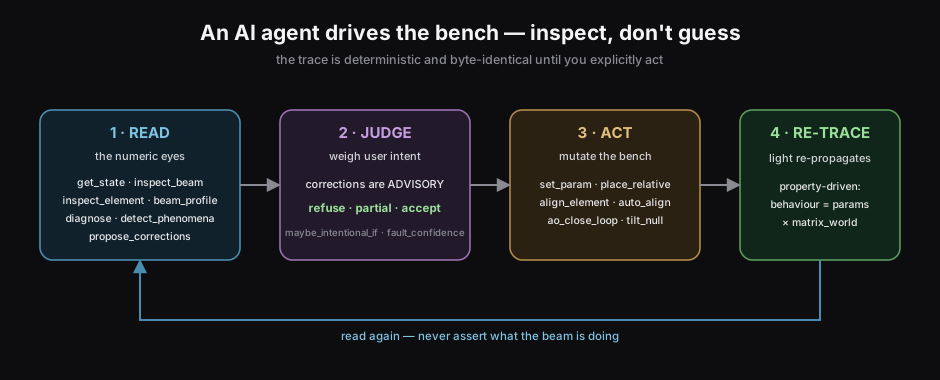
The agent loop: READ the bench (get_state, inspect_beam, inspect_element, diagnose, detect_phenomena, propose_corrections) β†’ JUDGE advisory corrections by user intent (refuse / partial / accept) β†’ ACT (set_param, align, ao_close_loop) β†’ RE-TRACE β†’ read again. The trace is byte-identical until you act.

  1. In Blender: Optics β–Έ Simulation β–Έ Start MCP Bridge (exposes every public optics_api function on 127.0.0.1:9765).
  2. Run the bridge server in mcp/ and wire it into your MCP client.

Then the agent can READ the bench, WRITE changes, and COMPOSE subsystems:

server.ts
import optics_api

# COMPOSE β€” bootstrap a canonical bench in one call
optics_api.build_example("michelson")        # full setup + live beam

# READ β€” the agent's numeric eyes: ground truth, not guesses
state = optics_api.get_state()               # poses, port normals, beam path, mounts, detectors
optics_api.inspect_beam("MI_BS")             # power, w, R(z), MΒ², divergence, polarization, coherence here
optics_api.inspect_element("MI_BS")          # what this optic DOES + its live in/out by kind, throughput
optics_api.beam_profile("MI_D")              # Gaussian w(z), waist, aperture clipping
optics_api.detect_phenomena()                # flags interference / off-axis-hologram conditions the trace meets
optics_api.propose_corrections()             # advisory fixes you JUDGE (refuse / partial / accept)

# WRITE β€” act, then the beam re-traces
optics_api.align_all()                       # auto-tune every kinematic knob toward its target
optics_api.set_param("MI_BS", "split_ratio", 0.5)
optics_api.place_on_grid("MI_M_fixed", 6, 2) # slide a part to a real breadboard hole
optics_api.scan(kind="STAGE", lo=0, hi=2e-3, steps=120, element="MI_M_stage")  # interferogram PNG+CSV

# Adaptive optics: sense the wavefront, then close the loop
optics_api.build_example("adaptive_optics")
optics_api.ao_measure("AO_WFS")                                 # {zernike:[...], rms: 0.559} (incl. beam defocus)
optics_api.pyramid_wfs("AO_WFS")                                # same wavefront read as a SLOPE sensor
optics_api.ao_close_loop("AO_WFS", "AO_DM", gain=0.5, iters=15) # rms 0.559 β†’ ~0

# RENDER β€” photorealistic Cycles, or a turntable movie
optics_api.bake_beams()
optics_api.render(preset="final", camera="HERO", filepath="/tmp/michelson.png")

The full surface (each also an MCP tool): capabilities, get_state, diagnose, propose_corrections, detect_phenomena, inspect_beam, inspect_element, beam_profile, sensor_capture, ao_measure, get_wavefront, pyramid_wfs, zonal_render, coupling_efficiency, check_mechanics, build_example, trace_beam, path_statistics, tag_element, add_component, swap_part, place_relative, set_mount, set_param, align_element, align_all, auto_align, tilt_null, design_telescope, design_4f, mode_match, scan, render, render_sequence, bake_beams, clear_beams, export_svg, dress_bench, set_grid, place_on_grid, make_cage, make_tube, make_rail, place_on_rail, ao_command, ao_close_loop. Call capabilities() first β€” it returns a self-describing manifest (read mcp/AGENT_GUIDE.md for the conventions and the refuse / partial / accept judgement model).

Five repeatable /optics-* skills ship in .claude/skills/ (build Β· align Β· inspect Β· correct Β· sensor-render) β€” model-invoked workflows that sequence these tools and carry the disciplines (inspect-first, byte-identical, advisory-corrections-you-judge).

For headless pipelines, optics_api is importable directly inside Blender (blender --background --python your_script.py).

Detector path length, shutters, and custom meshes

path_statistics() reports every source-to-detector arrival separately. It reconstructs the parent-indexed route and returns both its geometric length and the tracer's accumulated phase OPL:

python
stats = optics_api.path_statistics()                 # all detector terminals
one = optics_api.path_statistics("MyDetector")      # one detector

The result deliberately says group_delay_available: false. The current tracer carries phase-index OPL; it does not model group index, group delay, or GDD, so the number must not be presented as an ultrafast time-of-flight result. In the UI the same phase OPL/geometric range appears under Inspect β†’ Optical Report.

A binary shutter is available from the component library under the key SHUTTER:

python
created = optics_api.add_component("SHUTTER", location=(0, 0, 0))
optics_api.set_param(created["name"], "shutter_open", False)  # block
optics_api.set_param(created["name"], "shutter_open", True)   # transmit

Read the full README β†’View source on GitHub β†’

Related MCP Servers

View all in Developer Tools View all alternatives
  • AgentPhone logoAgentPhone

    Give AI agents real phone numbers, messages, and voice calls via MCP.

    πŸ’» Developer Tools0 views
    Compare vs AgentPhone β†’
  • PDF Reader MCP logoPDF Reader MCP

    Evidence-first PDF MCP. Agent Document Twin with citeable page+bbox evidence.

    πŸ’» Developer Tools1 views
    Compare vs PDF Reader MCP β†’
  • PraisonAI logoPraisonAI

    AI Agents Framework with Self Reflection and MCP support

    πŸ’» Developer Tools1 views
    Compare vs PraisonAI β†’
  • Three.js DevTools MCP logoThree.js DevTools MCP

    Inspect and edit Three.js scenes, materials, shaders, lights in real time from any AI agent

    πŸ’» Developer Tools0 views
    Compare vs Three.js DevTools MCP β†’

Reviews

No reviews yet β€” be the first to share how this listing worked for you.

Frequently Asked Questions about Blender Optics Simulator

Add the following block to your claude_desktop_config.json under mcpServers: "mcpServers": { "blender-optics-simulator": { "command": "npx", "args": ["-y", "blender-optics-simulator"] } }

AllMCPs Directory Badge

Full Badge Customizer

Showcase your server listing on GitHub or your project documentation. Embed this dynamic SVG badge to highlight official listing status and live engagement.

Badge Style:
Live Dynamic SVG PreviewBlender Optics Simulator AllMCPs Directory Badge

Markdown (GitHub README)
[![AllMCPs](https://allmcps.com/api/badge/blender-optics-simulator?style=directory)](https://allmcps.com/mcp/blender-optics-simulator)
HTML Embed
<a href="https://allmcps.com/mcp/blender-optics-simulator"><img src="https://allmcps.com/api/badge/blender-optics-simulator?style=directory" alt="Blender Optics Simulator on AllMCPs" /></a>

Technical Specs & Signals

CategoryπŸ’»Developer Tools
More technical detailsExpand β–Ύ
TransportSTDIO
RuntimeNode.js
Last updatedSep 7, 2026
Views0
Unique ViewsTotal visits recorded for this listing page on AllMCPs.
Installs0
Installs & Copy ActionsTotal times users copied install commands or configuration snippets for this server.
GitHub stars20
GitHub Star CountTotal stargazers on GitHub representing community popularity (20 stars).
32Quality signal: Emerging Β· 32/100How this signal is calculated β–Ύ
Server availabilityNot measured

Not scored for repo-hosted servers β€” we can't reach the running server, only its GitHub page. Hosted MCP endpoints are health-checked live.

Verified ownership10/20
Documentation & tools11/30
Adoption & activity3/15
Community engagement0/10

A guidance signal from public completeness & health data β€” not a user rating. New listings start lower and rise as they add docs, get verified, and grow adoption. Signals we can't observe for a listing are skipped, not counted against it.

β˜… Spotlight Slot

Feature Your MCP Server

Get maximum visibility for your server across our directory, search results, and detail pages.

Spotlight Your Server

Own this project?

This directory is pre-filled from public sources. Claim via GitHub README, site badge, or DNS TXT to unlock edit access and the Official badge β€” proof is checked automatically, then reviewed by our team.

Free dofollow backlink: add your website and place the AllMCPs badge on it β€” no claim needed. We detect it automatically and keep it verified as long as the badge stays live.

Claim & get free dofollow

Share & Embed

Add our SVG badge (dark/light directory styles) or embeddable widget to your site.

Explore more

More in πŸ’» Developer Tools β†’Best MCP servers for Developers β†’Alternatives to Blender Optics Simulator β†’Install in Claude DesktopInstall in CursorInstall in VS Code



