Let AI agents interact with real BLE hardware — scan, connect, read, write, and subscribe.
Quick Install
Automated & IDE SetupCopy the AI prompt to install this server into Claude Code, Cursor, or another agent — or use 1-click editor setup below.
Not yet automatically verified
We haven't yet run this listing's install command through our automated sandbox check. This isn't a red flag — we're steadily working through the catalog.
Manual Client & Custom JSON ConfigExpand JSON ▾
Client Config & Setup
Choose your client or environment
Target File:
💡 Paste the JSON block into your client's configuration file under mcpServers, then restart the application.
Documentation Overview
BLE MCP Server



A stateful Bluetooth Low Energy (BLE) Model Context Protocol (MCP) server for developer tooling and AI agents. Works out of the box with Claude Code, VS Code with Copilot, and any MCP-compatible runtime. Defaults to stdio (no HTTP, no open ports), with optional SSE and Streamable HTTP transports for remote access and multi-session use. Uses bleak for cross-platform BLE on macOS, Windows, and Linux.
Example: Let Claude Code scan for nearby BLE devices, connect to one, read characteristics, and stream notifications from real hardware.
Demo
7-minute video walkthrough — scanning a real BLE device, discovering services, reading values, and promoting flows into plugins.
Why this exists
You have a BLE device. You want an AI agent to talk to it — scan, connect, read sensors, send commands, stream data. This server makes that possible.
It gives any MCP-compatible agent a full set of BLE tools: scanning, connecting, reading, writing, subscribing to notifications — plus protocol specs and device plugins, so the agent can reason about higher-level device behavior instead of just raw UUIDs and bytes.
The agent calls these tools, gets structured JSON back, and reasons about what to do next — no human in the loop for each BLE operation.
What agents can do with it:
- Develop and debug — connect to your device, explore its services, read characteristics, test commands, and diagnose issues conversationally. "Why is this sensor returning zeros?" becomes a question you can ask.
- Iterate on new hardware — building a BLE device? Attach a protocol spec so the agent understands your commands and data formats as you evolve them.
- Automate testing — write device-specific plugins that expose high-level actions (e.g., device.start_stream, device.run_self_test), then let the agent run test sequences: enable a sensor, collect samples, validate values, report results.
- Explore — point the agent at a device you’ve never seen. It discovers services, probes characteristics, and builds up protocol documentation from scratch.
- Build BLE automation — agents controlling real hardware for real tasks: reading environmental sensors on a schedule, managing a fleet of BLE beacons, triggering actuators based on conditions.
Who is this for?
- Embedded engineers — faster iteration on BLE protocols, conversational debugging, automated test sequences
- Hobbyists and makers — explore BLE devices without writing boilerplate; let the agent help reverse-engineer simple protocols
- QA and test engineers — build repeatable BLE test suites with plugin tools, run them from CI or agent sessions
- Support and field engineers — diagnose BLE device issues interactively without specialized tooling
- Researchers — automate data collection from BLE sensors, explore device capabilities systematically
Quickstart (Claude Code)
Then in Claude Code, try:
"Scan for nearby BLE devices and connect to the one whose name starts with Arduino."
The server is read-only by default. Writes and plugins can control real hardware and execute code, and are opt-in via environment variables. See Safety for details.
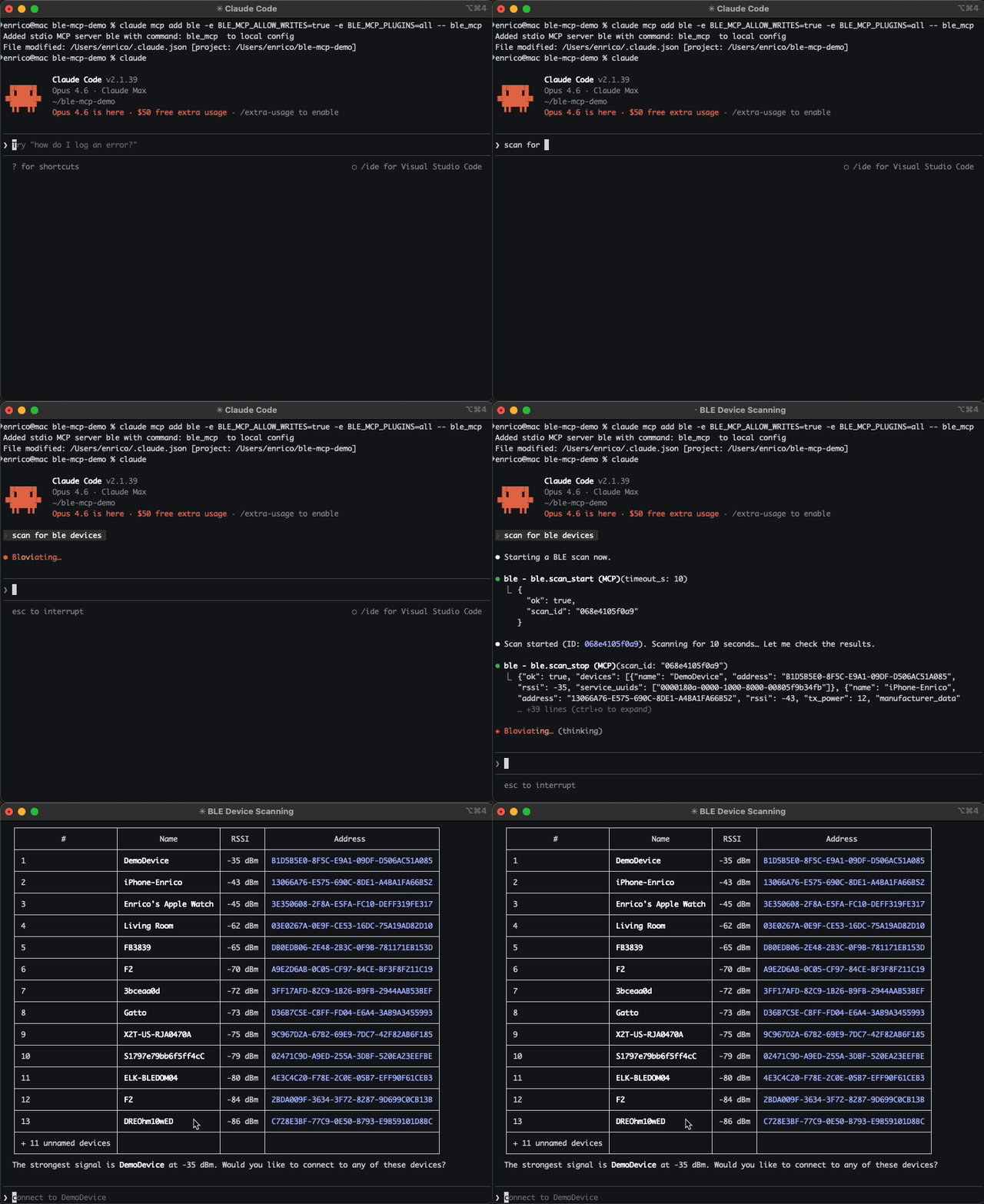
What the agent can do
Once connected, the agent has full BLE capabilities:
- Scan for nearby devices, with optional name or service UUID filters
- Connect to a device and discover its services and characteristics
- Read and write characteristic values (writes require
BLE_MCP_ALLOW_WRITES) - Subscribe to notifications and collect streaming data — single events, polling, or batch draining
- Attach protocol specs to understand device-specific commands and data formats
- Use plugins for high-level device operations (e.g.,
sensortag.read_temp) instead of raw reads/writes - Create specs and plugins for new devices, building up reusable knowledge across sessions
The agent handles multi-step flows automatically. For example, "read the temperature from my SensorTag" might involve scanning, connecting, discovering services, attaching a spec, enabling the sensor, and reading the value — without you specifying each step.
At a high level:
Raw BLE → Protocol Spec → Plugin
You can start with raw BLE tools, then move up the stack as your device protocol becomes understood and repeatable. See Concepts for how the pieces fit together.
Install (development)
MCP is a protocol — this server works with any MCP-compatible client. Below are setup instructions for the most common ones.
Add to Claude Code
Add to VS Code / Copilot
Add to your project's .vscode/mcp.json (or create it):
Adjust env to match your needs — remove BLE_MCP_ALLOW_WRITES for read-only mode, or set BLE_MCP_PLUGINS to specific plugin names.
Add to Cursor
Add to your project's .cursor/mcp.json (or create it):
Environment variables
| Variable | Default | Description |
|---|---|---|
BLE_MCP_ALLOW_WRITES | disabled | Set to true, 1, or yes to enable ble.write. |
BLE_MCP_WRITE_ALLOWLIST | empty | Comma-separated UUID allowlist for writable characteristics (checked only when writes are enabled). |
BLE_MCP_PLUGINS | disabled | Plugin policy: all to allow all, or name1,name2 to allow specific plugins. Unset = disabled. |
BLE_MCP_LOG_LEVEL | WARNING | Python log level (DEBUG, INFO, WARNING, ERROR). Logs go to stderr. |
BLE_MCP_TRACE | enabled | JSONL tracing of every tool call. Set to 0, false, or no to disable. |
BLE_MCP_TRACE_PAYLOADS | disabled | Include value_b64/value_hex in traced args (stripped by default). |
BLE_MCP_TRACE_MAX_BYTES | 16384 | Max payload chars before truncation (only applies when TRACE_PAYLOADS is on). |
BLE_MCP_TOOL_SEPARATOR | _ | Character used to separate tool name segments. Set to . if your client supports dots in tool names. Default changed to _ because most clients (Cursor, Claude Desktop) reject dots. |
BLE_MCP_MAX_SESSIONS | 1 | Maximum concurrent MCP sessions (only meaningful for SSE and Streamable HTTP transports). |
BLE_MCP_MAX_CONNECTIONS | 3 | Maximum active BLE connections per session. |
BLE_MCP_MAX_SCANS | 5 | Maximum active scans per session. |
BLE_MCP_MAX_SUBSCRIPTIONS_PER_CONN | 10 | Maximum notification subscriptions per connection. |
BLE_MCP_AUTH_TOKEN | unset | Password for OAuth approval page on HTTP transports. Required unless --no-auth is used. Ignored for stdio. |
Tools
See Concepts for how everything fits together, and the Tools Reference for detailed input/output schemas.
| Category | Tools |
|---|---|
| BLE Core | ble_scan_start, ble_scan_get_results, ble_scan_stop, ble_connect, ble_disconnect, ble_connection_status, ble_discover, ble_mtu, ble_read, ble_write, ble_read_descriptor, ble_write_descriptor, ble_subscribe, ble_unsubscribe, ble_wait_notification, ble_poll_notifications, ble_drain_notifications |
| Introspection | ble_connections_list, ble_subscriptions_list, ble_scans_list, ble_tasks_list, ble_tasks_cancel |
| Protocol Specs | ble_spec_template, ble_spec_register, ble_spec_list, ble_spec_attach, ble_spec_get, ble_spec_read, ble_spec_search |
| Tracing | ble_trace_status, ble_trace_tail |
| Plugins | ble_plugin_template, ble_plugin_list, ble_plugin_reload, ble_plugin_load |
Protocol Specs
Specs are markdown files that describe a BLE device's protocol — services, characteristics, commands, and data formats. They live in .ble_mcp/specs/ and teach the agent what a device can do beyond raw UUIDs and bytes.
Without a spec, the agent can still discover services and read characteristics. With a spec, it knows what the values mean and what commands to send.
Related MCP Servers
Reviews
No reviews yet — be the first to share how this listing worked for you.
Frequently Asked Questions about Ble MCP Server
AllMCPs Directory Badge
Showcase your server listing on GitHub or your project documentation. Embed this dynamic SVG badge to highlight official listing status and live engagement.
Badge Style:
Live Dynamic SVG Preview
Markdown (GitHub README)
[](https://allmcps.com/mcp/ble-mcp-server)HTML Embed
<a href="https://allmcps.com/mcp/ble-mcp-server"><img src="https://allmcps.com/api/badge/ble-mcp-server?style=directory" alt="Ble MCP Server on AllMCPs" /></a>