Octocode: agentic research platform






Evidence-first code research for AI agents and developers.
Octocode researches your local code and external code alike (GitHub repositories, PRs, npm) with one toolset: ripgrep + AST search, trees, precise reads, and LSP. Use it as a CLI or MCP server, backed by a Rust engine for fast, token-efficient results across single files or mega-repos.
Table of contents
- Quick start
- Why Octocode
- Built for research (benchmarks)
- Tools
- MCP
- CLI
- Configuration
- Authentication methods
- Security
- Language support
- Skills
- Architecture
- Documentation
- Troubleshooting
- Agent workflows
Quick start
Prerequisites: Node.js 20.12+
1. Run the Octocode CLI with npx
npx octocode --help
2. Authenticate with GitHub - optional, but unlocks private repositories and higher API rate limits:
npx octocode auth login
npx octocode status       # verify the active token source
3. Choose your interface. Same tools and Rust engine on both. (Clone is on by default in the CLI, opt-in for MCP.)
🖥️ CLI - research straight from your terminal:
npx octocode
🤖 MCP - one-click install:


Show more install options (Windsurf, Kiro, Goose, LM Studio, Claude Code)





Claude Code:
claude mcp add-json octocode --scope user '{"command":"npx","type":"stdio","args":["octocode-mcp@latest"]}'
Any other client: npx octocode install
Use it as an MCP server
Add to your MCP client config (or use a one-click install above):
{
  "octocode": {
    "command": "npx",
    "type": "stdio",
    "args": ["octocode-mcp@latest"]
  }
}
Put a GitHub token and options under env (see Configuration).
Use it as an agentic-friendly CLI
Run npx octocode and agents figure out the rest. The bare command prints built-in usage and the full tool catalog, so any coding agent knows how to drive it out of the box, no MCP client or extra wiring required.
npx octocode                                         # self-describing usage for agents
npx octocode tools                                   # list every tool
npx octocode tools localSearchCode --scheme          # inspect a tool's schema
Every MCP tool is also a plain command: JSON in, token-efficient YAML out. Local paths route to local tools; owner/repo[/path] routes to GitHub.
npx octocode tools localSearchCode \
  --queries '{"path":".","searchText":"authenticate","maxFiles":20}'
results:
  - id: localSearchCode-1
    data:
      files:
        - path: src/auth.ts
          matches:
            - line: 12
              value: "export async function authenticate(req: Request) {"
Learn more at octocode.ai.
Why Octocode
Agents code better from evidence than from guesses. Octocode researches two worlds with one flow, your local code and external code on GitHub and npm, and hands back compact, citable context before an agent changes, reviews, or explains code. Code is truth; context is the map.
Most tools do one slice (web search, or grep your repository) and hand back a fixed blob. Octocode covers the whole loop and lets the agent decide what data it needs next:
- Agent-driven, efficient flows. Instead of one-shot dumps, Octocode chains cheap steps into an optimized research flow: broad code search, then fetch only the exact matched lines/region, with smart pagination and out-of-the-box minification so the model never over-fetches. Every result carries next-step hints to the cheapest follow-up.
- Scales to monorepos. Spot a pattern in one repository, follow the PR that introduced it, then trace it across other repositories and your own files, without leaving the chat. Clone any repository and study it locally.
- Smart GitHub flow. Parallel bulk queries across code, PRs, commits, issues, and repositories, all with the same search-broad, read-narrow, trace-semantically discipline.
- Works without GitHub. Clone any repository and point the local tools (search, AST, LSP, content) at it, same evidence-first flow.
- Reads shape, not noise. On-the-fly minify/skeletonize across 70+ languages: a 100 KB file in a few hundred tokens, not walls of boilerplate.
- Fast, self-contained. Search, parsing, navigation, and redaction run in one prebuilt Rust engine: quick on a laptop or a mega-repo, nothing extra to install.
- Safe by default. Every byte to the model is scanned and secrets redacted first (see Security).
What you can do (whenever the next step needs proven context, not a guess):
| Need | Use Octocode to |
|---|---|
| Codebase questions | Search local or GitHub code, read exact regions, browse trees, and carry file/line anchors into the answer. |
| Implementation research | Compare patterns across repositories, npm packages, pull requests, commits, and local files before changing code. |
| Semantic navigation | Resolve definitions, references, callers/callees, call hierarchy, hovers, symbols, diagnostics, and type relationships through LSP. |
| Structural matching | Run AST-shaped searches with patterns or YAML rules so comments and strings do not become false positives. |
| Large-file context | Minify, skeletonize, or paginate code so agents spend tokens on relevant structure instead of boilerplate. |
| Agent workflows | Same engine through MCP, CLI, and Agent Skills. |
Built for research (benchmarks)
A blind, head-to-head test on research-oriented flows rather than plain lookups (multi-hop traces, dependency/call-graph chains, commit ranges, blast-radius, PR reviews across repositories).
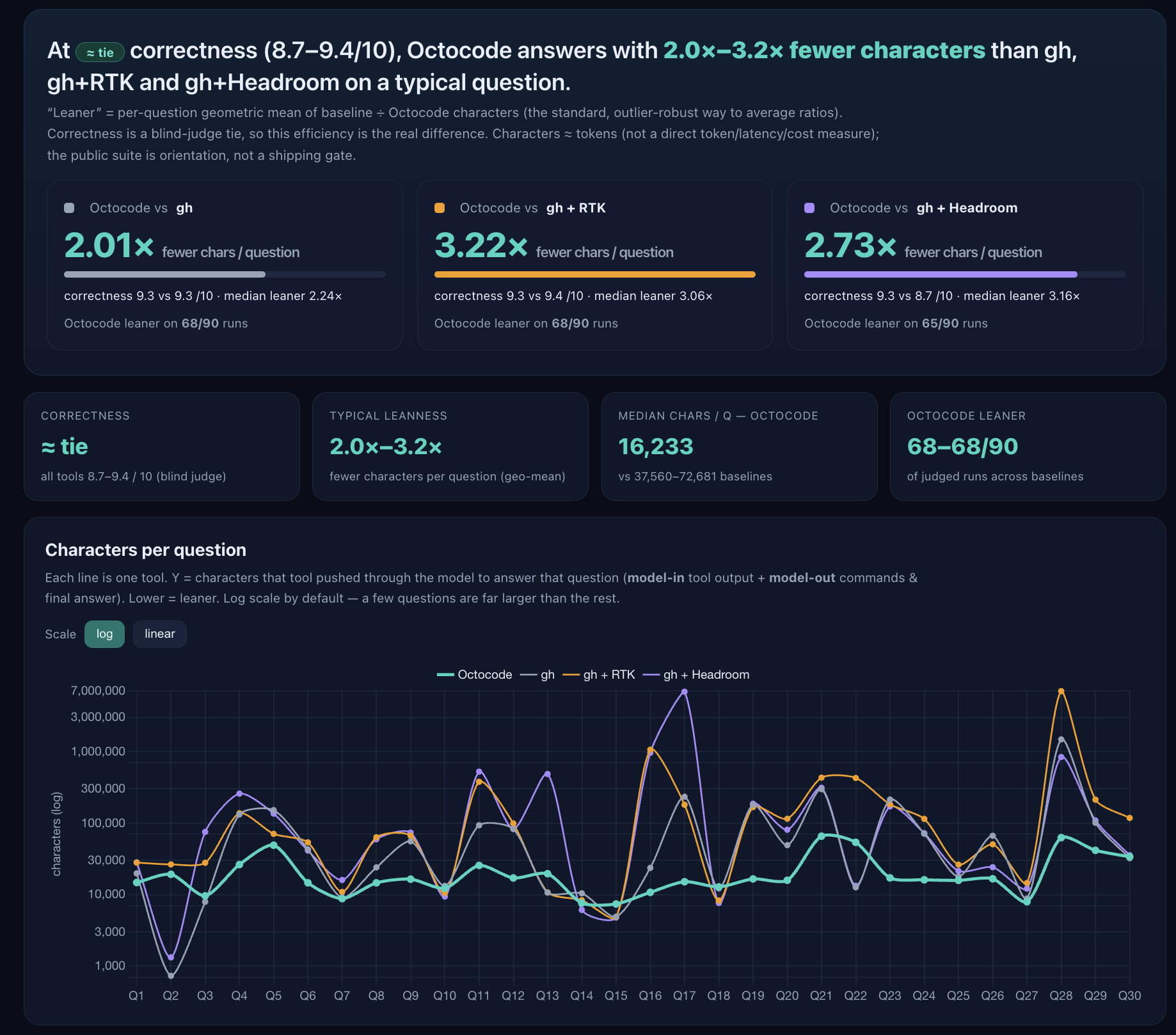
How it works: 30 GitHub questions × 3 passes; Octocode vs gh, gh+Headroom, and gh+RTK on
identical questions (only the CLI differs). A blind judge (gpt-5.5) grades correctness; the metric is
characters through the model, counted from instrumented logs (characters, not tokens). Result: at
near-parity correctness, Octocode answers with ~2.0× fewer characters than plain gh, ~2.6× fewer
than gh+Headroom, and ~3.2× fewer than gh+RTK in the local-build headline runs.
▶ Open the interactive report · run it / method · questions · all reports
Tools
17 tools in the full catalog. How many register depends on the surface and the flags you set:
| Surface | Registers | What that set is |
|---|---|---|
| MCP, no flags | 8 | GitHub search and read, plus npmSearch |
MCP, ENABLE_LOCAL=true | 14 | Adds the five local tools and lspGetSemantics |
MCP, + ENABLE_CLONE=true | 15 | Adds ghCloneRepo |
MCP, + ENABLE_TOOLS allowlist | 17 | Adds ghListReleases and ghSearchDiscussions |
| CLI, no flags | 15 | Local tools and clone are on by default |
CLI, + ENABLE_RELEASES=1 ENABLE_DISCUSSIONS=1 | 17 | Adds the same two GitHub tools |
ghListReleases and ghSearchDiscussions need two settings on MCP, not one:
ENABLE_RELEASES=1 or ENABLE_DISCUSSIONS=1 puts the tool in the catalog, and
ENABLE_TOOLS="ghListReleases,ghSearchDiscussions" registers it. Either setting
alone leaves the tool unregistered, because both carry isDefault: false and the
MCP registration filter admits only default or explicitly allowlisted tools. The
CLI needs only the ENABLE_RELEASES and ENABLE_DISCUSSIONS flags. ENABLE_LOCAL
and ENABLE_CLONE accept true or 1; ENABLE_RELEASES and ENABLE_DISCUSSIONS
also accept yes and on.
Flags: Configuration.
Token knobs. concise:true returns path/title-only lists. minify controls file read density: symbols = skeleton with line numbers, standard = comments/blanks stripped (default), none = exact bytes.
GitHub tools
| Tool | What it does | Knob |
|---|---|---|
ghSearchCode | Code and path search across GitHub by owner, repository, path, filename, extension, and match filters. Accepts 1 to 5 parallel queries. | concise |
ghGetFileContent | Read a GitHub file or region: full file, line range, match slice, or paginated chars. | minify |
ghViewRepoStructure | Browse a repository's directory tree, plus opt-in repository enrichments. | include |
ghSearchRepos | Discover repositories by keywords, owner, topic, language, stars, updated, license, visibility. | concise |
ghSearchPullRequests | Search pull requests, or deep-read one PR: files, patches, comments, reviews, commits. | content |
ghSearchIssues | Search issues, or read one issue's body and comments. | content |
ghSearchCommits | Walk a repository's commit history, or compare two refs (base+head). | includeDiff |
ghListReleases | List releases and the latest stable release, with opt-in assets. Opt-in (see Tools for the flags). | includeAssets |
ghSearchDiscussions | Search a repository's Discussions (Q&A, RFCs, announcements) through GraphQL. Opt-in (see Tools for the flags). | keywordsToSearch |
ghCloneRepo | Clone a repository or sparse subtree into the local cache for local and LSP analysis. Opt-in on MCP (ENABLE_CLONE=true); on by default in the CLI. | sparsePath |
Local tools
| Tool | What it does | Knob |
|---|---|---|
localSearchCode | Local code/text search returning file and line anchors. mode:"structural" runs Octocode AST shape queries (pattern or rule). | mode |
localViewStructure | Browse a local directory tree: depth, filters, pagination, metadata. | detail |
localFindFiles | Find local files and directories by name, path, regex, extension, size, time, permissions, type. | |
localFindDeadCode | Find likely-unreferenced exports and dead-code clusters using whole-repository reachability analysis. | entrypoints |
localGetFileContent | Read a local file or region: exact slice, match string, line range, or paginated chars. | minify |
Package search
| Tool | What it does | Knob |
|---|---|---|
npmSearch | npm package lookup and keyword search; returns metadata and the source repository for GitHub handoff. | concise |
LSP
| Tool | What it does |
|---|---|
lspGetSemantics | Typed semantic navigation: definition, references, callers, callees, callHierarchy, hover, documentSymbols, typeDefinition, implementation, workspaceSymbol, supertypes, subtypes, and diagnostic. From the CLI, invoke it directly: npx octocode tools lspGetSemantics --queries '<json>'. Navigation runs through installed language servers (see the LSP tools reference). |
Full schemas, fields, and examples for every tool live in docs/OCTOCODE_TOOLS.md (linked under Documentation).
MCP
The MCP server exposes the Octocode tool catalog directly to your AI assistant over stdio.
https://github.com/user-attachments/assets/de8d14c0-2ead-46ed-895e-09144c9b5071
Manual configuration
Add to your MCP client config, using octocode-mcp:
{
  "octocode": {
    "command": "npx",
    "type": "stdio",
    "args": [
      "octocode-mcp@latest"
    ]
  }
}
Add a GitHub token and options under env - see Authentication and Configuration.
CLI
Same research engine, no MCP client needed. Local paths route to local tools; owner/repo[/path] routes to GitHub. Authenticate once with npx octocode auth login (see Authentication); run npx octocode --help for full usage.
Commands
Tool commands
| Command | What it does |
|---|---|
npx octocode tools <name> --scheme | Show one tool's schema: fields, types, bounds, defaults |
npx octocode tools <name> --queries '<json>' | Run a tool (same tools as MCP), YAML output |
npx octocode tools <name> --queries '<json>' --json | Run a tool, full CallToolResult JSON |
npx octocode tools | List every available tool |
More commands
- Cache and clone —
npx octocode clone,npx octocode cache fetch|status|clear - Skills —
npx octocode skill list|install|check|info|removefor bundled Octocode skills - Language servers —
npx octocode lsp-server list|install|status|uninstall|clean - Setup and introspection —
npx octocode install,npx octocode auth,npx octocode status,npx octocode context
Full syntax, flags, and exit codes: Octocode CLI guide
Configuration
Everything is optional; Octocode runs on sensible defaults. Settings resolve from three sources, in priority order:
environment variables > <octocode-home>/.octocoderc > built-in defaults
- MCP / environment variables (highest): per client or per project, set in your MCP config
envor your shell. - Global config:
<octocode-home>/.octocoderc, machine-wide defaults read by both the CLI and the MCP server. - Built-in defaults: used when neither is set.
Octocode home (<octocode-home>) holds the global config, encrypted credentials, sessions, stats, and tmp materialization caches. On every platform it is .octocode inside the OS home directory — ~/.octocode on macOS and Linux, %USERPROFILE%\.octocode on Windows. Override it with OCTOCODE_HOME.
Set values as MCP env entries (per client; these win over .octocoderc) or globally in <octocode-home>/.octocoderc (JSON with comments). Tokens never go in .octocoderc — use env or npx octocode auth login.
Common settings
Most-used settings (both CLI and MCP unless noted):
| Env var | .octocoderc key | Default | What it does |
|---|---|---|---|
OCTOCODE_TOKEN / GH_TOKEN / GITHUB_TOKEN | env only | unset | GitHub token, in priority order. Never in .octocoderc. |
ENABLE_LOCAL | local.enabled | CLI true; on MCP set it explicitly | Local filesystem and LSP tools on or off. |
ENABLE_CLONE | local.enableClone | CLI true, MCP false | ghCloneRepo + directory fetch on/off. |
WORKSPACE_ROOT | local.workspaceRoot | cwd | Root for resolving relative local paths. |
ALLOWED_PATHS | local.allowedPaths | [] | Extra path allowlist for local access. |
OCTOCODE_OUTPUT_FORMAT | output.format | yaml | Response format: yaml or json. |
OCTOCODE_HOME, GitHub Enterprise (GITHUB_API_URL), MCP tool allowlisting (TOOLS_TO_RUN/ENABLE_TOOLS/DISABLE_TOOLS), and network timeouts/retries: see the Configuration Reference.
Example configuration
~/.octocode/.octocoderc:
{
  "github": {
    "apiUrl": "https://api.github.com"
  },
  "local": {
    "enabled": true,
    "enableClone": true
  },
  "output": {
    "format": "yaml"
  }
}
Per-project overrides and custom LSP servers live in a workspace .octocode/ folder. For the full .octocoderc schema, a ready-to-copy example, clone-cache tuning, GitHub Enterprise setup, and precedence details, see the Configuration Reference.
Authentication methods
GitHub-backed tools require authentication. Any one method is enough. Full details: Authentication Setup.
Option 1: Octocode CLI (recommended)
npx octocode auth login
npx octocode status       # verify the active token source
Interactive login lets you choose Octocode browser OAuth or gh auth login. Octocode OAuth credentials are stored encrypted on disk.
Option 2: GitHub CLI (also supported)
gh auth login
Octocode reads the gh token automatically — no further config needed.
Option 3: Personal access token (also supported)
Set OCTOCODE_TOKEN, GH_TOKEN, or GITHUB_TOKEN in your shell. Required scopes: repo, read:user, read:org.
Create a token at github.com/settings/tokens.
Note: Never commit tokens to version control. Use environment variables or secure secret management.
Security
Every byte to the model is scanned and redacted first. All content passes through the Rust engine's secret scanner on the way in and out, so secrets never reach the model. That covers local files, GitHub and npm responses, errors, and tool output. The behavior is identical under MCP and the CLI.
- Secret redaction, in and out. 300+ provider credential patterns (AWS, Azure, GCP, GitHub, OpenAI, Anthropic, Stripe, Slack, 1Password, and more) plus generic JWTs, PEM/private keys, bearer tokens, database connection strings, and high-entropy strings. Masked values surface a redaction warning so the agent knows.
- Content sanitized at the source. Local reads (
localGetFileContent, ripgrep, structural search, binary, file discovery, structure) and external fetches (GitHub code/files, npm) are scanned as they are read, not only at the boundary. - Path safety. Relative inputs resolve from
WORKSPACE_ROOT/ config /cwd, then local reads are bounded to the engine's allowed roots (home by default, plusALLOWED_PATHSand Octocode-registered roots). Symlinks are resolved and the real target is re-validated, so a link cannot escape into a blocked location. - Sensitive files blocked by default. Reads of known secret-bearing files and folders return a redacted error instead of contents: keys/certs,
.env*,.npmrc/.netrc, cloud/infra credentials (.aws/,.kube/,*.tfstate),.git/, browser logins, OS keychains, and wallets. Full list in SECURITY.md. - Command safety. Normal local search runs in-process inside
octocode-engine. External helpers are fixed per lane, command/argument allowlisted, and run throughspawnwith argument arrays: no shell strings, no injection. - Schema validation runs before any tool executes; untrusted input size and shape are bounded.
- Credentials. GitHub auth through env tokens, AES-256-GCM-encrypted on-disk OAuth, or the
ghCLI; tokens are never logged.
Full security model, pipeline, and threat coverage: SECURITY.md. Related: Configuration and authentication · Credentials
Language support
Four code-intelligence axes; three are native to the Rust engine and need no external tooling:
| Axis | What it does | How to use it |
|---|---|---|
| Structural AST | Tree-sitter shape queries (pattern or YAML rule) across 60+ extensions. | localSearchCode mode:"structural" · CLI tools localSearchCode --scheme |
| Signature outline | Body-free skeleton with line numbers from real tree-sitter parsing, no heuristics. An anti-growth guard returns the real file when a skeleton is not smaller. | minify:"symbols" · CLI tools localGetFileContent --scheme |
| Content minification | Comment/whitespace stripping for 70+ languages and config formats; HTML/Vue/Svelte also minify embedded <style>/<script>. | minify:"standard" (default) |
| LSP navigation | definition, references, callers/callees, callHierarchy, hover, typeDefinition, implementation, documentSymbols, through an installed language server; JS/TS also have a native, no-server path. | lspGetSemantics · CLI tools lspGetSemantics --scheme |
📋 Full support matrix: every extension with its exact AST, signature, LSP, and minify capability lives in the Full format support matrix.
Skills
Agent Skills are a lightweight, open format for extending AI agent capabilities. Browse and install on skills.sh/bgauryy/octocode-mcp
13 skills under skills/, bundled in the octocode package. Each is a lean SKILL.md that loads references only when needed, so they compose. Start with ⭐ Research for evidence-first code work.
npx octocode skill list
npx octocode skill install octocode-research --platform pi
npx octocode skill check --json
npx octocode skill help
Core research and extraction
| Skill | Use when |
|---|---|
| ⭐ octocode-research | Evidence-first research, review, debugging, refactors, prior-art validation. |
| octocode-scraping | Public page extraction and crawl triage: static corpus + graph v2 (pages/data/actions/risks/evidence), then CDP handoff for dynamic actions and blocked pages. |
| octocode-chrome-devtools | Browser/CDP evidence: network, console, performance, cookies/storage, screenshots, auth-gated pages, and live validation of scrape-graph actions. |
Planning and architecture
| Skill | Use when |
|---|---|
| octocode-brainstorming | Disciplined idea exploration before building: options, worth-building tests, prior-art maps. |
| octocode-rfc-generator | Evidence-backed RFCs, design docs, migration plans, option comparisons. |
| octocode-documentation | Writing or updating README, API docs, runbooks, AGENTS.md, ADRs. |
Evaluation and review
| Skill | Use when |
|---|---|
| octocode-roast | Blunt, evidence-backed code critique with severity ranking and repair paths. |
| octocode-graph-eval | Measuring whether a change helped: goal→KPI contracts, baselines, accept/revert loops, eval suites. |
| octocode-prompt-optimizer | Making prompts, tool schemas, and agent contracts clearer, safer, cheaper, measurable. |
Agent orchestration
| Skill | Use when |
|---|---|
| octocode-subagent | Spawning workers / Task / A2A / challenge techniques, or offloading token-heavy text to local Ollama under a verify gate. |
| octocode-skills | Agent-skill lifecycle: discover, review, create, improve, install, sync. |
Web automation workflow: octocode-scraping performs the safe static pass first (fetch/crawl/extract → local corpus → graph v2). When the graph exposes dynamic actions or static output is blocked/thin, octocode-chrome-devtools validates live actionability, cookies/storage, network/HAR bodies, screenshots, or auth-gated state; discovered URLs/data/artifacts can be fed back into the scraping corpus for continued proof.
Architecture
A yarn-workspaces monorepo. The MCP server and the CLI are thin front-ends over one shared TypeScript tool core, which delegates every CPU-heavy path to a single Rust engine (compiled through napi-rs to prebuilt .node binaries). One tool catalog, one security layer, one response shaper, reached two ways.
graph LR
    CLI["octocode<br/>CLI"]
    MCP["octocode-mcp<br/>MCP server, stdio"]
    VSC["VS Code extension<br/>OAuth + install"]
    CORE["octocode-tools-core<br/>tools, GitHub client, auth, pagination, security bridge"]
    ENGINE["octocode-engine (Rust)<br/>secrets, minify, AST, signatures, ripgrep/diff/YAML, LSP"]
    EXT["GitHub API, local FS + ripgrep, language servers"]

    CLI --> CORE
    MCP --> CORE
    VSC -. starts .-> MCP
    CORE --> ENGINE
    CORE --> EXT
    ENGINE --> EXT

    style ENGINE fill:#1a1a2e,stroke:#e75d2a,color:#fff
Request flow is identical whether a call arrives over MCP or the CLI:
client → sanitize inputs (Rust) → run tool (GitHub / FS / LSP) → sanitize + YAML-serialize + paginate (Rust) → result + next-step hints
One Rust engine owns secret detection, sanitization, path and command validation, minification (70+ languages), signature extraction, structural AST search, ripgrep parsing, diff filtering, YAML serialization, and LSP. The Node event loop therefore stays unblocked, and there is no duplicate native loader. The engine ships prebuilt for darwin (arm64/x64), linux (arm64/x64, gnu and musl), and win32-x64; no Rust toolchain is needed at runtime.
Packages
| Directory | npm package | Role |
|---|---|---|
packages/octocode | octocode | CLI: quick commands, raw tool runner, skill installs, auth/login/logout, install, status, context. |
packages/octocode-mcp | octocode-mcp | MCP server (stdio) that registers the tool catalog for AI assistants. |
packages/octocode-tools-core | @octocodeai/octocode-tools-core | Shared tool core: implementations, GitHub client, credentials and token resolution, session, pagination, security bridge. |
packages/octocode-engine | @octocodeai/octocode-engine | Rust/napi native engine: security scanning, minification, signatures, structural AST, ripgrep/diff/YAML, LSP. |
packages/octocode-config | @octocodeai/config | Zero-dep env + config loader: getOctocodeHome, .env parsing, .octocoderc reading. Single source used by every package and skill. |
packages/octocode-vscode | octocode-mcp-vscode | VS Code extension: GitHub OAuth + multi-editor MCP install. |
packages/octocode-benchmark (private, not published) holds benchmark methodology, evals, and run artifacts - see Documentation.
Documentation
Website: octocode.ai · Product docs: github.com/bgauryy/octocode/tree/main/docs. This section is the canonical documentation index; benchmark methodology, evals, and run artifacts live in packages/octocode-benchmark.
| Area | Docs |
|---|---|
| MCP server | Octocode MCP server · Configuration and authentication |
| Tools and workflows | Octocode tools reference · RDD manifest and workflows · Octocode research skill |
| CLI | Octocode CLI guide |
| Research model | Octocode research manifest · Routing and evidence position paper · MCP tool quality and agent workflow |
| Skills | Skills |
| Development and security | Security model · LSP server lifecycle |
| Benchmarks and evals | Benchmark results · Benchmark design · Benchmark runbook · Support matrix |
| Shared internals | Token priority order · Session persistence |
Troubleshooting
Node.js or environment issues? Run the built-in doctor command to check your environment:
npx node-doctor
Common pitfalls:
- GitHub auth failures: Ensure your Personal Access Token (PAT) has the
repoandread:userscopes. If using the CLI, runnpx octocode auth loginto refresh. - MCP connection issues: If your AI assistant (like Cursor or Windsurf) fails to connect, ensure you have run
npx octocode auth loginin your terminal first, or explicitly pass yourOCTOCODE_TOKENin the MCPenvconfiguration. - Native engine errors: Octocode uses a prebuilt Rust engine. If it fails to load on Linux, ensure your system has
glibcormuslcompatibility. On macOS/Windows, ensure you are on a supported architecture (x64 or arm64).
Agent workflows
Recommended dev mode: Pi + Octocode
Pi is a fast, local-first coding agent whose stated philosophy is "CLI tools with READMEs (Skills) over MCP." Pairing it with Octocode gives a lean, evidence-driven dev loop — Pi edits, Octocode researches. Two routes, pick by how much surface you need:
-
Skill route — recommended, leanest. Drop the
octocode-researchskill into Pi's global skills dir. It drives the Octocode CLI directly — no MCP transport, minimal token overhead — and Pi auto-discovers it:npx octocode skill install octocode-research --platform pi -
Adapter route — full tool surface. Install
pi-mcp-adapterto expose Octocode MCP tools behind a single ~200-token proxy tool, so servers stay disconnected until a tool is called. Enable clone tools withENABLE_CLONE=true.
Research-driven loop
Most agent failures happen before the edit: guessing who owns a behavior, trusting a snippet without reading the source, editing before proving blast radius. Run a cheaper loop instead: orient with trees, search, read exact evidence, use AST/LSP when identity matters, then patch and verify. The host edits, Octocode is the map, and skills encode the habit.
The Manifest
"Code is Truth, but Context is the Map." Read the Manifest of Octocode for Research Driven Development to understand the philosophy behind Octocode.