Monitor README
The full upstream README, mirrored here for reference. Install config, tool schemas, adoption signals, and an original overview live on the Monitor listing page.
BetterDB Monitor









The monitoring layer that Valkey deserves.
BetterDB persists what Valkey throws away - slowlogs, command patterns, client activity, anomaly signals - so you can debug what happened at 3am, not just what's happening now. Built for Valkey 8.x with native support for COMMANDLOG, CLUSTER SLOT-STATS, and per-thread I/O metrics. Redis 6+ compatible for everything else.
Website | Docker Hub | npm | Documentation | Blog
BetterDB is built by BetterDB Inc., a public benefit company operating under the OCV Open Charter.
Quick Start (Docker)
Point your browser to http://localhost:3001. To monitor a specific instance:
Connecting to a database on your host machine? Inside the container
localhostis the container itself, not your host — so usehost.docker.internalas the database host. On Docker Desktop (macOS/Windows) it works out of the box; on Linux add--add-host=host.docker.internal:host-gatewayto thedocker runcommand so the name resolves. The dashboard's one-click "connect to local instance" button auto-detects this and pre-fills the right host for you.
Two image variants are published, both multi-arch (linux/amd64, linux/arm64):
| Tag | What it is |
|---|---|
latest, X.Y.Z-no-ai | Default image - every monitoring feature included, without the dependencies for the experimental local-LLM AI Helper |
X.Y.Z | Adds the experimental AI Helper (bring your own Ollama; disabled by default via AI_ENABLED) |
See Docker Production Deployment for persistent storage, custom ports, licensing, and air-gapped setups.
Quick Start (Kubernetes / Helm)
Then kubectl port-forward -n betterdb svc/betterdb-monitor 3001:3001 and open http://localhost:3001, or enable the chart's ingress. PostgreSQL-backed history, bring-your-own Secrets, and air-gapped licensing are all covered in the Kubernetes guide and the chart README.
Quick Start (CLI)
Run BetterDB Monitor without Docker:
On first run, an interactive setup wizard guides you through database connection, storage backend (SQLite, PostgreSQL, or in-memory), and server settings. Configuration is saved to ~/.betterdb/config.json.
Requires Node.js >= 20.0.0 and a Valkey or Redis instance to monitor. For SQLite storage, also npm install -g better-sqlite3.
What You Get
See everything, keep everything
- Historical analytics - query slowlogs, command patterns, client activity, and latency across any time range. The data that used to disappear after a log rotation.
- COMMANDLOG support - Valkey 8.1+ exclusive. Large requests and large replies, not just the slow ones.
- MONITOR capture sessions - record real traffic on demand: live tail, filter, replay, export to JSON/CSV, and cross-reference against connection history.
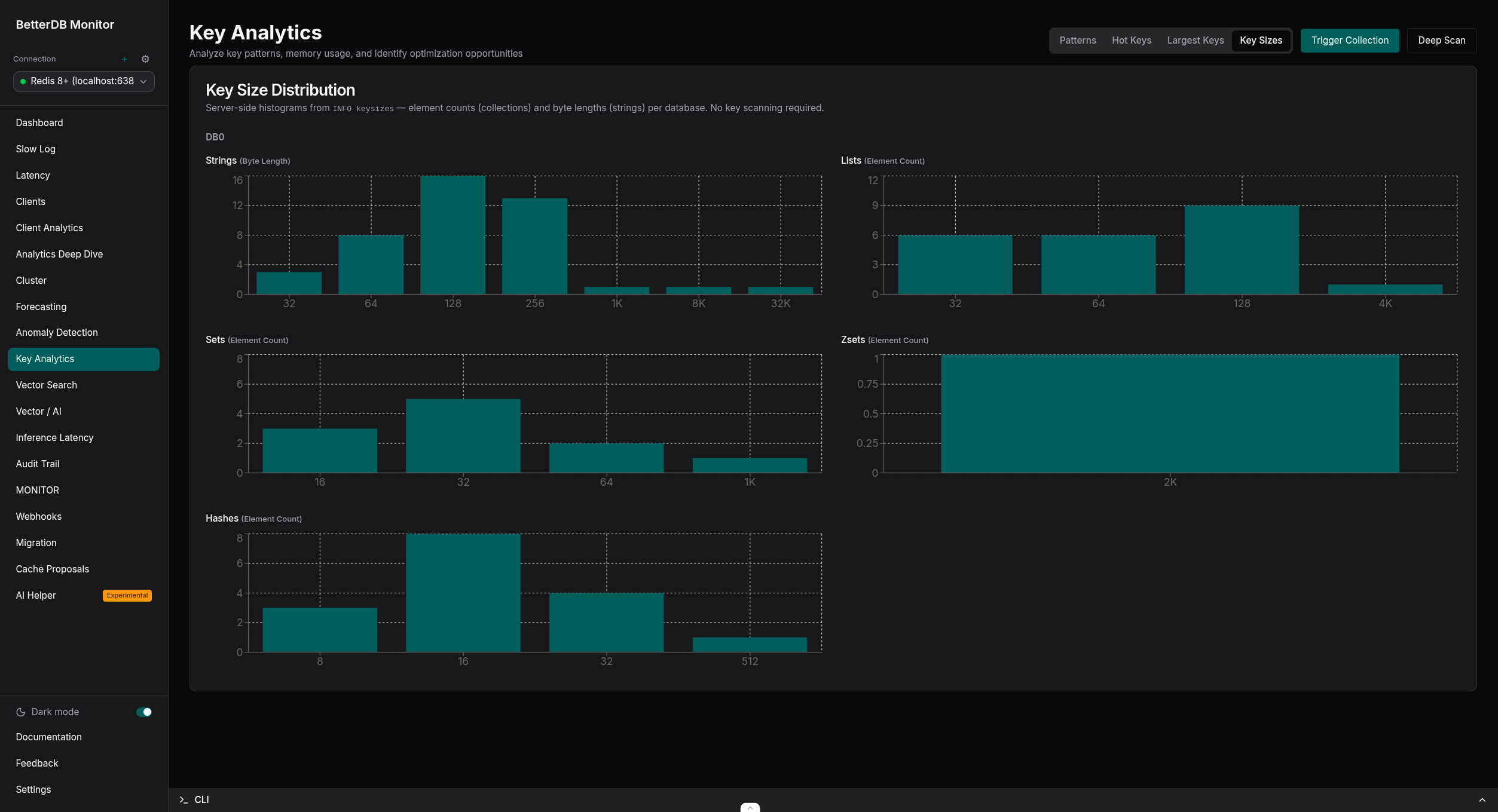
- Hot key tracking - top keys by access frequency with rank movement over time. Key Analytics (Pro, free in early access) adds type, TTL, and size distributions from live sampling.
- Cluster visibility - topology graphs, SLOT-STATS heatmaps, per-slot CPU and key distribution.
- CPU & I/O thread metrics - per-thread visibility that no Redis tool can provide.
- Client analytics - see exactly which service is responsible for what, attributed by client name and pattern.
- ACL audit trail - track who accessed what, persisted for compliance and post-incident debugging.
Understand and act
- Anomaly detection (Pro, free in early access) - automatic baseline learning with correlated events and plain-English diagnoses. 20+ detectors, no manual thresholds.
- Capacity forecasting - projected time-to-ceiling for memory, ops/sec, CPU, and fragmentation.
- Webhooks - HMAC-signed alert deliveries with retries and a full delivery log.
- Live migration - move between Redis and Valkey with a three-phase analysis, execution, and validation workflow.
Built for the AI era
- Vector search observability - FT.SEARCH ops/sec and latency with per-index health for valkey-search and RediSearch. See docs/vector-ai.
- Inference latency - p50/p95/p99 per index, with SLA breach alerts (Pro, free in early access).
- Semantic cache intelligence (Pro, free in early access) - hit-rate health, similarity-threshold recommendations, and an approve/reject proposal workflow. Agent memory observability included.
- AI traces - OTLP span waterfalls from your AI application, correlated with the live Valkey state underneath each request. See docs/opentelemetry.md.
Plugs into everything
- MCP server - 60 tools for Claude Code, Cursor, or any MCP client via
@betterdb/mcp. - Prometheus endpoint - 100+
betterdb_*metrics. See docs/prometheus-metrics.md. - OpenTelemetry - ingest OTLP traces, and mirror metrics and events to any OTLP backend. See docs/opentelemetry.md.
- REST API - everything in the UI is an API call, documented via OpenAPI.
Access Your Data Your Way
| Interface | Details |
|---|---|
| Web UI | http://localhost:3001 |
| MCP server | npx @betterdb/mcp (stdio) - create a token under Settings → MCP Tokens |
| Prometheus | http://localhost:3001/api/prometheus/metrics |
| REST API (OpenAPI) | http://localhost:3001/docs |
| Health check | http://localhost:3001/api/health |
Note: In production builds (Docker, CLI) API routes are served under the
/apiprefix. In local development (pnpm dev) there is no prefix - e.g.http://localhost:3001/health.
Supported Databases
| Database | Minimum Version | Supported Features |
|---|---|---|
| Valkey | 8.0+ | All features including COMMANDLOG (8.1+) and CLUSTER SLOT-STATS |
| Redis | 6+ | All features except the Valkey-exclusive COMMANDLOG and CLUSTER SLOT-STATS |
The backend uses a unified adapter over the wire-compatible iovalkey client and auto-detects Valkey vs Redis from the INFO response (DB_TYPE=auto). Capabilities like COMMANDLOG and SLOT-STATS are detected per version, and the UI gracefully degrades when a feature isn't available.
Managed services are supported too - guides for AWS ElastiCache, MemoryDB, Redis Cloud, and Upstash live in docs/providers, and @betterdb/agent reaches VPC-only instances over an outbound WebSocket.
Docker Production Deployment
The Docker image contains the monitoring application (backend + frontend). It requires:
- A Valkey/Redis instance to monitor
- A PostgreSQL instance for data persistence (or use memory storage)
Run with PostgreSQL Storage
Run on Custom Port
Set the PORT environment variable and match the -p mapping:
Run with Host Network (Access localhost services)
If your Valkey and PostgreSQL are running on the same host:
Environment Variables
| Variable | Required | Default | Description |
|---|---|---|---|
DB_HOST | Yes | localhost | Valkey/Redis host to monitor |
DB_PORT | No | 6379 | Valkey/Redis port |
DB_PASSWORD | No | - | Valkey/Redis password |
DB_USERNAME | No | default | Valkey/Redis ACL username |
DB_TYPE | No | auto | Database type: auto, valkey, or redis |
STORAGE_TYPE | No | memory | Storage backend: memory or postgres |
STORAGE_URL | Conditional | - | PostgreSQL connection URL (required if STORAGE_TYPE=postgres) |
PORT | No | 3001 | Application HTTP port |
NODE_ENV | No | production | Node environment |
ANOMALY_DETECTION_ENABLED | No | true | Enable anomaly detection |
ANOMALY_PROMETHEUS_INTERVAL_MS | No | 30000 | Prometheus summary update interval (ms) |
BETTERDB_LICENSE_KEY | No | - | Online license key (Pro/Enterprise), validated over the network |
BETTERDB_OFFLINE_LICENSE_FILE | No | - | Path to a signed offline license .jwt for air-gapped hosts (see below) |
BETTERDB_OFFLINE_LICENSE | No | - | Offline license token as an inline JWT string |
BETTERDB_DATA_DIR | No | /app/data | Directory for persisted license state (mount a writable volume) |
ENCRYPTION_KEY | No | - | Key (min 16 chars) used to envelope-encrypt stored connection passwords and SSH tunnel secrets at rest. Without it, secrets are stored in plaintext |
BETTERDB_SSH_KEY_DIR | No | - | Directory that server-side SSH private keys must live in. Enables the "server file path" key source for SSH tunnels; a connection's key path must resolve inside it. Unset disables file-based keys (inline pasted keys still work) |
BETTERDB_TELEMETRY | No | true | Set false to disable anonymous telemetry |
Full reference, including AI, webhook tuning, and health-gate thresholds: docs/configuration.md. For OTLP trace ingest and metrics/event export, see docs/opentelemetry.md.
SSH Tunnels
Connections can reach a database through an SSH bastion/jump host instead of connecting directly — useful for Valkey/Redis in a private subnet, ElastiCache, or MemoryDB. Enable Connect via SSH tunnel when adding a connection and provide the SSH host, port, and username. A single hop is supported.
Authentication is either a password or a private key. Private keys come from one of two sources:
- Paste key (inline): the PEM key content is submitted with the connection. It is stored encrypted at rest only when
ENCRYPTION_KEYis set (envelope encryption); without that key it is stored in plaintext, like connection passwords. Works everywhere, including managed/cloud deployments. - Server file path: the key already lives on the monitor server's filesystem and is referenced by path. This requires setting the
BETTERDB_SSH_KEY_DIRenvironment variable to the directory holding the allowed keys, and the referenced path must resolve inside it, so the API can never be coerced into reading arbitrary files. LeaveBETTERDB_SSH_KEY_DIRunset to disable this option.
Optionally pin the SSH server's host key fingerprint (SHA256:...) on the connection; when set, the tunnel is refused unless the server presents a matching key, preventing man-in-the-middle attacks on the bastion path. Left blank, the server identity is not verified (a warning is logged).
The tunnel forwards to the database over 127.0.0.1; when TLS is enabled the certificate is still validated against the real database hostname. Set ENCRYPTION_KEY so SSH passwords, key passphrases, and inline keys are encrypted at rest.
Known limitation — cluster/Sentinel topologies: only the connection you configure is tunnelled. Cluster and Sentinel monitoring fan out to the other nodes using the addresses those nodes advertise (CLUSTER NODES / Sentinel), and those per-node connections are made directly, not through the tunnel. If the other nodes are only reachable via the bastion (e.g. ElastiCache/MemoryDB in a private subnet), per-node views will be unavailable. Use SSH tunnels for single-node/primary monitoring, or place the monitor where it can reach the cluster nodes directly.
Licensing & Air-Gapped Support
BetterDB Monitor unlocks Pro/Enterprise features in one of two ways, depending on whether the host has internet access:
- Online license key - set
BETTERDB_LICENSE_KEY. The monitor validates it againstbetterdb.comand caches a locally-verified signed token, so your tier keeps working through short outages and restarts. - Offline / air-gapped license token - for hosts with no internet access at all (see below).
How air-gapped licensing works
Every entitlement is a signed RS256 JWT. The monitor verifies it locally against public keys embedded in the image - it never has to reach a license server to trust a token. So an air-gapped host can run paid tiers with zero connectivity:
- On an internet-connected machine, sign in at
betterdb.com/account/licenses and
download your offline license token (
.jwt, Pro/Enterprise). It contains no secrets and can't be tampered with - any edit breaks the signature. - Transfer it to the air-gapped host however you like (USB, config management, a Docker/Kubernetes secret mount).
- Provide it via
BETTERDB_OFFLINE_LICENSE_FILE(path),BETTERDB_OFFLINE_LICENSE(inline string), or paste it in the UI under Settings → License → "Air-gapped environment? Activate an offline license."
When an offline token is configured and no BETTERDB_LICENSE_KEY is set, the
monitor makes zero outbound requests - license checks, telemetry, and update
pings are all disabled. It runs the granted tier until the token expires (perpetual
licenses re-download yearly), then reverts to Community.
Verify with GET /api/license/status → source: offline-token, mode: offline,
airGapped: true.
Persistence: mount a writable volume at
/app/dataso the offline license and the online outage-grace token survive restarts. The container runs as UID 1001, so a freshly-created volume must bechowned to it (shown above) - otherwise persistence fails withEACCES … license.jwt.
For the full flow, verification precedence, and key-rotation runbook see Offline & Air-Gapped Licenses and the Configuration reference.
Docker Image Details
- Base Image:
node:20-alpine - Compressed size: ~360MB (
latest/-no-ai) / ~640MB (versioned image with the experimental AI Helper's local-LLM dependencies) - Platforms:
linux/amd64,linux/arm64 - Contains: Backend API + Frontend static files (served by Fastify)
- Excluded: SQLite support (use PostgreSQL or Memory storage)
Container Operations
Storage Backends
BetterDB Monitor persists audit trail, analytics, captures, and anomaly data to one of four backends:
| Backend | Use case | Notes |
|---|---|---|
memory | Testing, ephemeral environments | Default in Docker; all data lost on restart |
postgres | Production | STORAGE_TYPE=postgres + STORAGE_URL=postgresql://user:pass@host:port/db |
turso | Production / serverless SQLite | STORAGE_TYPE=turso + STORAGE_URL=libsql://... + STORAGE_AUTH_TOKEN; works in Docker |
sqlite | Local development / CLI | Native module stripped from the latest Docker image; STORAGE_SQLITE_FILEPATH optional |
Prometheus Metrics
Metrics are exposed at GET /api/prometheus/metrics in Prometheus text format: ACL audit, client connections, slowlog/commandlog patterns, memory, throughput, keyspace, replication, cluster slot stats, and Node.js runtime metrics - all prefixed betterdb_.
Full metric reference: docs/prometheus-metrics.md and docs/prometheus-integration.md.
Development
Project Structure
Packages
This monorepo ships several standalone packages. See packages/ for the full list.
| Package | Language | Registry |
|---|---|---|
@betterdb/monitor | TypeScript | npm |
@betterdb/mcp | TypeScript | npm |
@betterdb/agent | TypeScript | npm |
@betterdb/semantic-cache | TypeScript | npm |
betterdb-semantic-cache | Python | PyPI |
@betterdb/agent-cache | TypeScript | npm |
betterdb-agent-cache | Python | PyPI |
cache-benchmark | Python | Replay harness for benchmarking semantic caches |
Tech Stack
- Backend: NestJS with Fastify adapter,
iovalkeyfor Valkey/Redis connections, TypeScript strict mode. Port 3001. - Frontend: React + TypeScript, Vite, TailwindCSS, Recharts. Dev server on port 5173.
- Monorepo: pnpm workspaces + Turborepo.
Local Setup
Prerequisites: Node.js >= 20.0.0, pnpm >= 9.0.0, Docker.
To connect to Redis instead of Valkey, set DB_PORT=6382 in .env.
Docker image builds:
Adding New Features
- Add new endpoints in
apps/api/src/ - Add corresponding API calls in
apps/web/src/api/ - Add shared types in
packages/shared/src/types/
Code Style
- TypeScript strict mode, explicit return types, no
any - ESLint + Prettier configured
License
- Content under
docs/is licensed under CC BY-SA 4.0. - Content under
proprietary/is covered by a commercial license (seeproprietary/LICENSE). These features are free during early access. - Everything else is MIT.