Better Call Claude README
The full upstream README, mirrored here for reference. Install config, tool schemas, adoption signals, and an original overview live on the Better Call Claude listing page.
Better Call Claude

Bi-directional communication for Claude Code via Voice Calls, SMS, and WhatsApp.
Call Claude from your phone to start tasks, and receive callbacks when Claude needs input or wants to share status.
📞 "Hey Claude, refactor the auth module and call me when you're done or need a decision."
[20 minutes later, phone rings]
🤖 "I've finished the refactor but found a security issue. Should I fix it now or create a ticket?"
💬 Or via SMS/WhatsApp:
You: "Claude, how's the deployment going?"
Claude: "Deployment complete. 3 services updated, all health checks passing."
Features
- 📱 Inbound calls - Call Claude Code from your phone to start tasks
- 📲 Outbound calls - Claude calls you when done, stuck, or needs decisions
- 💬 SMS messaging - Send and receive text messages with Claude
- 📱 WhatsApp - Full WhatsApp Business integration
- 🔄 Cross-channel context - Start on voice, continue on WhatsApp seamlessly
- 🔗 Persistent sessions - Claude stays alive listening for WhatsApp messages
- 🔒 Secure transport - Tailscale Funnel with guided auto-setup
- 🗣️ Natural conversations - Multi-turn interactions across all channels
- 🔧 Tool composable - Claude can use other tools while communicating
- ⚡ Auto-webhook updates - Twilio webhooks auto-update when URL changes
- 🆓 Free WhatsApp via Baileys - Personal WhatsApp with zero API costs, no business verification
- ⌚ Works anywhere - Phone, smartwatch, or any device
⚠️ Testing Status
Channel Provider Status Voice Twilio ✅ Tested & Working Twilio Sandbox ✅ Tested & Working SMS Twilio ⏳ Pending A2P 10DLC verification Voice Telnyx 🔬 Not yet tested SMS Telnyx 🔬 Not yet tested Telnyx 🔬 Not yet tested Baileys (free) 🔬 New - testing welcome Contributions welcome for testing other provider/channel combinations!
Quick Start
1. Choose Your Setup
| Setup | What You Get | Cost | Accounts Needed |
|---|---|---|---|
| Baileys only | WhatsApp messaging | Free | None |
| Twilio/Telnyx | Voice + SMS + WhatsApp | ~$1/mo + usage | Twilio/Telnyx + OpenAI |
| Hybrid | Voice + SMS (Twilio) + WhatsApp (Baileys) | ~$1/mo + voice usage | Twilio/Telnyx + OpenAI |
Just want WhatsApp? Skip to Option C: Baileys — no accounts, no API keys, completely free.
2. Set Up Phone Provider
Option A: Telnyx (Recommended - 50% cheaper)
- Create account at portal.telnyx.com and verify identity
- Buy a phone number (~$1/month)
- Create a Voice API application:
- Set webhook URL to your tunnel URL +
/webhook/telnyx/inbound - Set API version to v2
- Set webhook URL to your tunnel URL +
- Enable SMS on your phone number:
- Go to Messaging and create a Messaging Profile
- Assign your phone number to the profile
- Set SMS webhook URL to your tunnel URL +
/webhook/telnyx/sms
- Enable WhatsApp (optional):
- Go to WhatsApp in portal
- Complete WhatsApp Business verification
- Set webhook URL to your tunnel URL +
/webhook/telnyx/whatsapp
- Verify your phone number for outbound calls
- Get your Connection ID (or Messaging Profile ID) and API Key
Option B: Twilio
- Create account at twilio.com/console
- Buy a phone number
- Configure webhooks for your number:
- Voice webhook: your tunnel URL +
/webhook/twilio/inbound - SMS webhook: your tunnel URL +
/webhook/twilio/sms
- Voice webhook: your tunnel URL +
- Enable WhatsApp (optional):
- Go to WhatsApp Senders
- Complete WhatsApp Business setup
- Set webhook URL to your tunnel URL +
/webhook/twilio/whatsapp
- Get your Account SID and Auth Token
Option C: Baileys (Free WhatsApp — no API provider needed)
Baileys connects directly to WhatsApp's Web protocol via WebSocket. It uses your personal WhatsApp account — no business verification, no API costs, no Twilio/Telnyx required.
How it works: Same as WhatsApp Web — you link a device by scanning a QR code.
Step 1: Clone and install
Step 2: Pair your WhatsApp
- A QR code will appear in your terminal
- Open WhatsApp on your phone > Settings > Linked Devices > Link a Device
- Scan the QR code
- Wait for "Paired successfully!" message
Your session is saved in data/baileys-auth/ — you won't need to scan again.
Step 3: Add to Claude Code (~/.claude.json or ~/.claude/settings.json):
That's it! No Tailscale, no Twilio, no OpenAI keys needed.
Step 4: Restart Claude Code and test
Send a WhatsApp message to yourself (or have someone message you) — Baileys receives it and spawns a Claude task. Or ask Claude to send you a WhatsApp:
"Send me a WhatsApp saying hello"
Option D: Hybrid (Twilio/Telnyx voice + Baileys WhatsApp)
Get the best of both worlds: Twilio/Telnyx handles voice calls and SMS, Baileys handles WhatsApp for free.
- Set up Twilio or Telnyx (Options A/B above)
- Run
bun run baileys:pairto pair your WhatsApp - Add to your MCP config:
Voice calls and SMS go through Twilio. WhatsApp goes through Baileys (free).
3. Set Up Tailscale Funnel (for webhooks)
Skip this step if you're using Baileys-only mode (Option C). Baileys doesn't need webhooks.
Tailscale Funnel provides free, stable public URLs for receiving webhooks from your phone provider.
Why Tailscale? Free unlimited tunnels, stable URLs (no random subdomains), enterprise-grade security.
Path: Better Call Claude uses
/bccpath (e.g.,https://your-hostname.ts.net/bcc) to avoid conflicts with other services.
First-time setup (automated):
When you first start the MCP server, it will guide you through setup:
-
Install Tailscale (if not installed):
-
Authenticate - The server will auto-run
tailscale upand open your browser -
Enable Funnel - Visit the URL shown in the terminal to enable Funnel on your tailnet (one-time admin step)
That's it! The server handles the rest automatically.
4. Install Better Call Claude
5. Add to Claude Code
Add to ~/.claude/settings.json:
Note: Tailscale setup is automatic on first run. The server will guide you through installation and authentication if needed.
Restart Claude Code. Done!
Environment Variables
Required Variables
| Variable | Description |
|---|---|
BETTERCALLCLAUDE_PHONE_PROVIDER | telnyx or twilio |
BETTERCALLCLAUDE_PHONE_ACCOUNT_SID | Provider account/connection ID |
BETTERCALLCLAUDE_PHONE_AUTH_TOKEN | Provider API key/auth token |
BETTERCALLCLAUDE_PHONE_NUMBER | Your Telnyx/Twilio phone number (E.164) |
BETTERCALLCLAUDE_WHATSAPP_NUMBER | WhatsApp number if different (e.g., Twilio Sandbox) |
BETTERCALLCLAUDE_USER_PHONE_NUMBER | Your personal phone number |
BETTERCALLCLAUDE_OPENAI_API_KEY | OpenAI API key for TTS/STT |
Baileys (Free WhatsApp)
| Variable | Default | Description |
|---|---|---|
BETTERCALLCLAUDE_WHATSAPP_PROVIDER | (unset) | Set to baileys to enable free WhatsApp |
BETTERCALLCLAUDE_BAILEYS_AUTH_DIR | data/baileys-auth | Session credential directory |
Baileys-only mode: When
WHATSAPP_PROVIDER=baileysand no Twilio/Telnyx credentials are set, onlyUSER_PHONE_NUMBERis required. No Tailscale, no OpenAI key needed.
Tailscale (Optional)
| Variable | Default | Description |
|---|---|---|
TAILSCALE_HOSTNAME | auto-detected | Override Tailscale hostname |
Optional Variables
| Variable | Default | Description |
|---|---|---|
BETTERCALLCLAUDE_TTS_VOICE | onyx | OpenAI voice (alloy, echo, fable, onyx, nova, shimmer) |
BETTERCALLCLAUDE_PORT | 3333 | Local HTTP server port |
BETTERCALLCLAUDE_TRANSCRIPT_TIMEOUT_MS | 180000 | Speech timeout (3 min) |
BETTERCALLCLAUDE_STT_SILENCE_DURATION_MS | 800 | End-of-speech detection |
Usage
Voice Calls
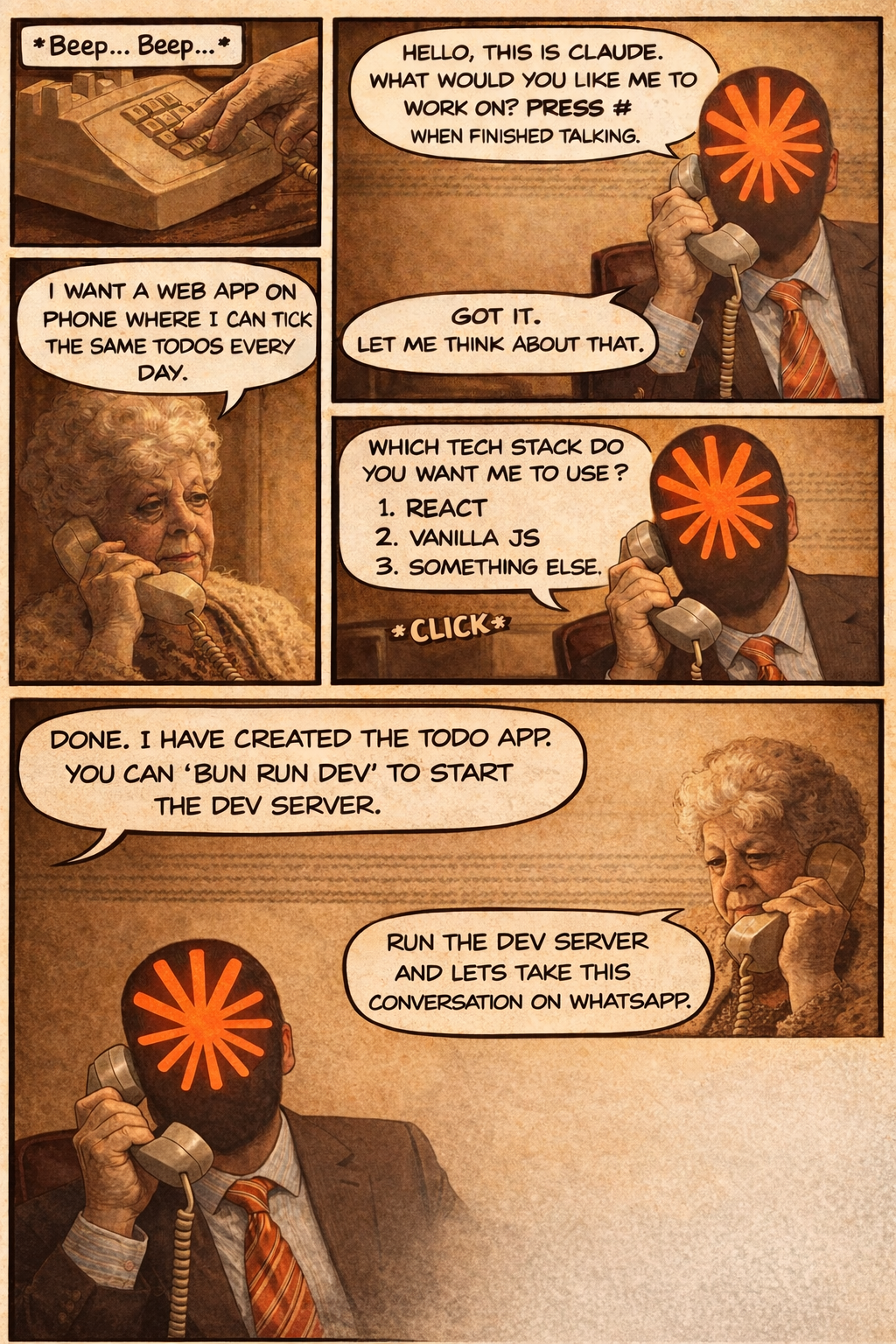
You → Claude (Inbound Calls)
Call your Telnyx/Twilio phone number from your personal phone:
📱 "Hey Claude, I need you to write unit tests for the payment module. Call me when you're done."
Claude will acknowledge and start working. When done, it calls you back.
Claude → You (Outbound Calls)
Claude can initiate calls when it needs your input:
🤖 "I found 3 different approaches for the caching layer. Want me to explain them so you can choose?"
Voice Commands During Calls
- "Hang up" or "Goodbye" - End the call
- "Hold on" - Claude waits for you to continue
- "Go ahead" - Claude continues with the task
- "Cancel that" - Abort current action
SMS Messaging
You → Claude (Inbound SMS)
Text your Telnyx/Twilio number:
💬 "Hey Claude, what's the status of the deployment?"
Claude will respond via SMS:
🤖 "Deployment is 80% complete. Running integration tests now. ETA: 5 minutes."
Claude → You (Outbound SMS)
Claude can send you text updates:
🤖 "Build failed on line 42 of auth.ts. Reply with 'fix' to auto-fix or 'skip' to continue."
You → Claude (Inbound WhatsApp)
Send a WhatsApp message to your business number:
💬 "Show me the error logs from the last hour"
Claude responds in WhatsApp:
🤖 "Found 3 errors:\n1. Connection timeout at 14:32\n2. Auth failure at 14:45\n3. Rate limit at 15:01\n\nWant me to investigate any of these?"
Claude → You (Outbound WhatsApp)
Claude can send rich WhatsApp messages:
🤖 "Code review complete! Found 2 issues:\n• Line 23: Unused variable\n• Line 67: Missing error handling\n\nReply 'fix' to auto-fix or 'details' for more info."
Cross-Channel Context
Start a task on voice and seamlessly continue on WhatsApp - Claude remembers everything.
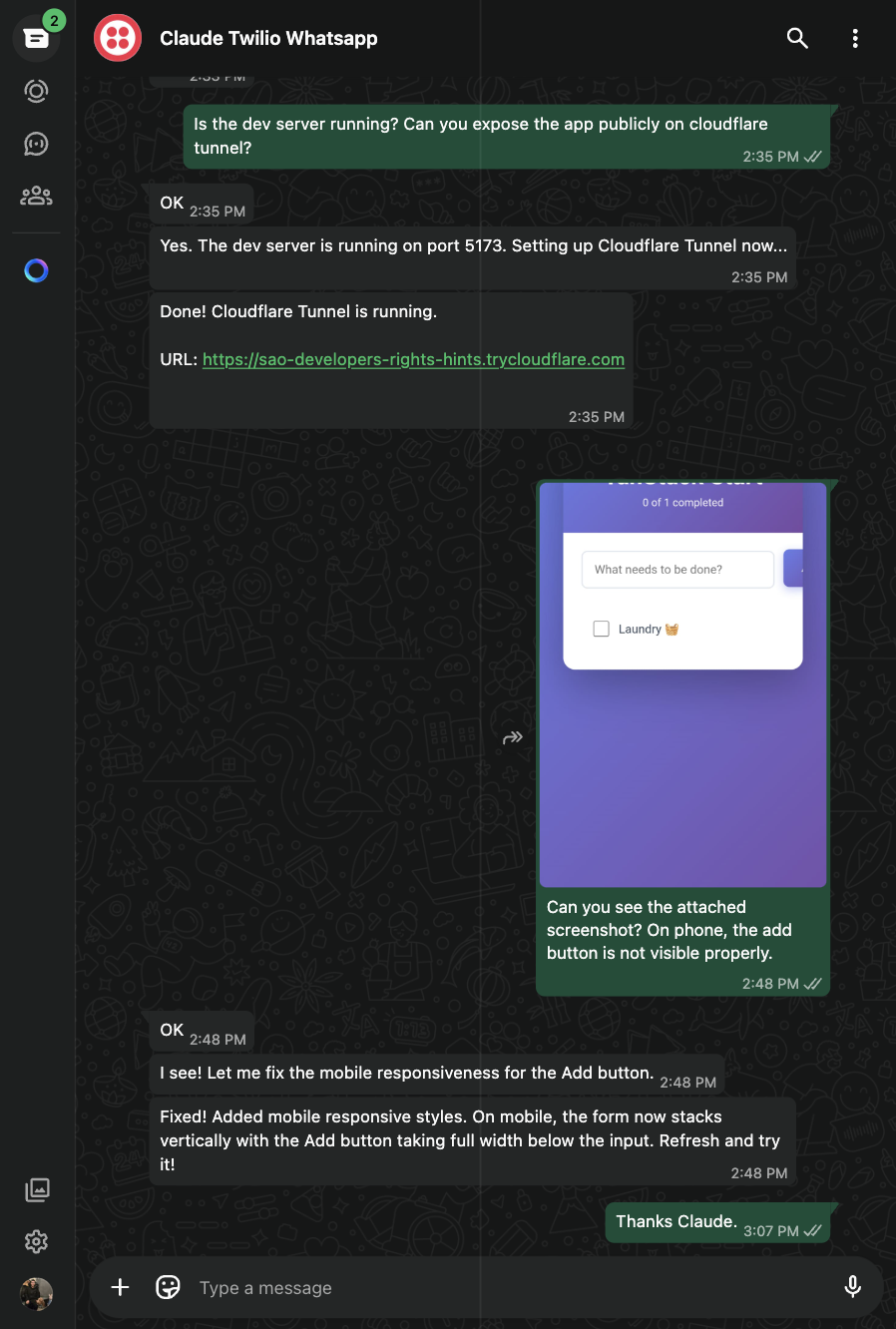
Example Flow
-
Call Claude:
📞 "Hey Claude, run the todo app in dev mode and let's continue on WhatsApp"
-
Claude starts the app and enters WhatsApp listening mode:
🤖 "Todo app running on port 5173. Send me WhatsApp messages for more instructions."
-
Send WhatsApp message:
💬 "Expose it via localtunnel and add the URL to allowed hosts"
-
Claude responds via WhatsApp:
🤖 "Done! Localtunnel URL: https://xyz.loca.lt - I've added it to vite.config.ts allowedHosts"
-
Continue the conversation:
💬 "What's the public IP so I can access it remotely?"
🤖 "Your public IP is 203.0.113.42. Access the app at https://xyz.loca.lt"
Key phrases to trigger WhatsApp listening:
- "Continue on WhatsApp"
- "Let's talk on WhatsApp"
- "Listen for my WhatsApp messages"
WhatsApp Sandbox (Twilio)
For testing, you can use Twilio's WhatsApp Sandbox instead of a full WhatsApp Business account.
- Go to Twilio Console > Messaging > WhatsApp Sandbox
- Send the join code to the sandbox number (+1 415 523 8886)
- Set the webhook URL to
{your-tailscale-url}/bcc/webhook/twilio/whatsapp - Add to your config:
Note: Sandbox requires re-joining every 72 hours.
How It Works
Communication Flows
Voice:
- Inbound: You call → Provider → Webhook → MCP Server → Claude Code
- Outbound: Claude Code → MCP Server → Provider → Your phone rings
- Speech: Your voice → Whisper STT → Text → Claude → TTS → Audio playback
SMS:
- Inbound: You text → Provider → Webhook → MCP Server → Claude Code
- Outbound: Claude Code → MCP Server → Provider API → SMS delivered
WhatsApp:
- Inbound: You message → Provider → Webhook → MCP Server → Claude Code
- Outbound: Claude Code → MCP Server → Provider API → WhatsApp delivered
MCP Tools
Voice Tools
receive_inbound_call
Accept and process an incoming call from the user.
initiate_call
Start a phone call to the user.
continue_call
Continue an active call with follow-up messages.
speak_to_user
Speak without waiting for a response (for acknowledgments).
end_call
End an active call.
get_call_status
Check status of current or recent calls.
Messaging Tools
receive_inbound_message
Check for incoming SMS or WhatsApp messages.
send_sms
Send an SMS message to the user.
send_whatsapp
Send a WhatsApp message to the user.
reply_to_conversation
Reply to an existing conversation (works for voice, SMS, or WhatsApp).
get_conversation_history
Get the full message history for any conversation.
Costs
Voice Calls
| Service | Cost |
|---|---|
| Telnyx outbound calls | ~$0.007/min |
| Twilio outbound calls | ~$0.014/min |
| OpenAI Whisper (STT) | ~$0.006/min |
| OpenAI TTS | ~$0.015/1K chars |
Typical voice conversation: ~$0.03-0.05/minute
SMS
| Service | Cost |
|---|---|
| Telnyx SMS (US) | ~$0.004/message |
| Twilio SMS (US) | ~$0.0079/message |
Typical SMS exchange: ~$0.01-0.02/exchange
| Service | Cost |
|---|---|
| Baileys (personal WhatsApp) | Free |
| Telnyx WhatsApp | ~$0.005/message |
| Twilio WhatsApp | ~$0.005/message + conversation fees |
Typical WhatsApp exchange: Free (Baileys) or ~$0.01-0.02 (Twilio/Telnyx)
Infrastructure
| Service | Cost |
|---|---|
| Phone number | ~$1/month |
| Tailscale Funnel | Free |
Security Considerations
Tailscale Funnel Security
- Funnel creates a public endpoint but traffic routes through Tailscale's secure network
- Integrates with SSO/SCIM for enterprise use
- Audit logs available in Tailscale admin console
- Webhook signatures verified by default
General
- Phone numbers are never logged
- Call transcripts are ephemeral (cleared on restart)
- Use environment variables, never hardcode credentials
Capability attestation
This repo ships a smithmark capability manifest, smithmark.yaml, at the repo root. It is a "trust as code" declaration of everything this server touches outside its own process: the network hosts it egresses to (Twilio, Telnyx, OpenAI, WhatsApp/Baileys infrastructure, and, transitively, api.anthropic.com via the spawned claude subprocess), the filesystem paths it reads/writes (Baileys auth state, spawn debug logs), the binaries it executes (claude, tailscale, which, open, sudo), the environment variables it reads, and the secret types it handles (Twilio, Telnyx, and OpenAI API keys).
On every GitHub release, .github/workflows/smithmark-attest.yml produces a keyless Sigstore attestation over the published npm tarball: GitHub's OIDC token is exchanged for a short-lived Fulcio signing certificate, the attestation is signed with it, and the signature is recorded in the public Rekor transparency log. There are no signing keys and no secrets involved. The resulting smithmark-attestation.sigstore.json is attached to the GitHub release.
Verify a published version with:
(substitute the actual release tag for v3.1.1)
smithmark.yaml is the authoritative declaration of this server's capability surface. smithmark lint (and verify in strict mode) is deliberately host-unaware: it flags every network/exec/filesystem call site as a generic "undeclared" finding regardless of what the manifest declares at the host level, so it will report advisory findings against any real MCP server that talks to the network. Those findings are expected noise, not a sign the manifest is out of date; the manifest above is the record to trust.
Troubleshooting
Voice Issues
Claude doesn't answer calls
- Check the MCP server is running:
claude --debug - Verify webhook URL is configured in provider dashboard
- Ensure Tailscale Funnel is active
Can't make outbound calls
- Verify
BETTERCALLCLAUDE_USER_PHONE_NUMBERis correct - Check phone number is verified with provider
- Ensure sufficient balance in provider account
Audio quality issues
- Check network connectivity
- Try different TTS voice:
BETTERCALLCLAUDE_TTS_VOICE=nova - Adjust silence detection:
BETTERCALLCLAUDE_STT_SILENCE_DURATION_MS=1000
SMS Issues
SMS not being received
- Verify SMS is enabled on your phone number in provider dashboard
- Check SMS webhook URL is set:
/webhook/telnyx/smsor/webhook/twilio/sms - Verify Messaging Profile is assigned to phone number (Telnyx)
Can't send outbound SMS
- Check phone number has SMS capability
- Verify destination number format (E.164: +15551234567)
- Check provider account balance
WhatsApp Issues
WhatsApp messages not received
- Verify WhatsApp Business is set up in provider portal
- Check webhook URL:
/webhook/telnyx/whatsappor/webhook/twilio/whatsapp - Ensure WhatsApp Business verification is complete
Can't send WhatsApp messages
- User must have messaged you first (WhatsApp 24-hour rule)
- Check WhatsApp Business approval status
- Verify message template compliance (for outbound-first messages)
Baileys Issues
QR code doesn't appear
The QR code cannot display inside the MCP server (stdout is reserved for MCP protocol). Run the pairing script separately:
Once paired, the session is saved and the MCP server connects automatically.
"Baileys configured but no session found"
Run bun run baileys:pair to pair your WhatsApp first, then restart Claude Code.
WhatsApp logged out
Delete the auth directory and re-pair:
Messages not being received
- Check that Baileys is connected (look for
[Baileys] Connectedin stderr) - Ensure messages are from individual chats (group messages are filtered out)
- Verify the sender is not the linked account itself (own messages are filtered)
Tailscale Issues
"Tailscale not running"
- macOS: Open the Tailscale app from Applications
- Linux:
sudo systemctl start tailscaled && tailscale up
"Funnel not enabled"
- Visit the URL shown in the terminal to enable Funnel
- Or go to https://login.tailscale.com/admin/acls and add Funnel capability
Funnel starts but webhooks don't work
- Check
tailscale funnel statusshows/bccpointing to your port - Verify your phone provider webhook URL matches the Tailscale URL (with
/bccpath) - Test with
curl https://your-hostname.ts.net/bcc/health
Development
Testing locally
Tech Stack
- Runtime: Bun - Fast JavaScript runtime
- Web Framework: Hono - Lightweight, fast web framework
- Phone: Telnyx / Twilio - Telephony APIs
- WhatsApp: Baileys - Free WhatsApp Web protocol
- Speech: OpenAI Whisper - STT/TTS
- Transport: Tailscale Funnel - Public URL tunneling
- Protocol: MCP - Model Context Protocol
Contributing
PRs welcome! Please see CONTRIBUTING.md for guidelines.
License
MIT