AllMCPs
BrowseBestCategoriesStackCompareToolsGuidesBlog Log in Submit MCP

Stay in the loop

Get new MCP servers and top picks in your inbox.

AllMCPs

The open directory for discovering and installing Model Context Protocol servers.

Explore

  • Browse servers
  • Best MCP servers
  • Categories
  • MCP clients
  • Agent prompts
  • Stack Builder
  • Compare servers
  • Tags index
  • Submit a server
  • Pricing

Learn

  • Guides hub
  • What is MCP?
  • Install guide
  • Troubleshooting
  • Security
  • Blog
  • Blog RSS

Tools

  • All tools
  • Config generator
  • Config validator
  • MCP playground
  • OpenAPI → MCP
  • Badge generator

For agents

  • API docs
  • Trust & traffic
  • llms.txt ↗ (opens in a new tab)
  • Catalog JSON ↗ (opens in a new tab)
  • Remote MCP ↗ (opens in a new tab)

Company

  • About
  • Contact
  • X (@AllMCPs) ↗ (opens in a new tab)
  • GitHub ↗ (opens in a new tab)
  • Terms
  • Privacy
AllMCPs VerifiedAllMCPs VerifiedFeatured on Nick LaunchesFeatured on Nick LaunchesLaunch Llama NewsletterLaunch Llama NewsletterVerified DR - allmcps.comVerified DR - allmcps.comFeatured on SaaSGrowFeatured on SaaSGrowFeatured on Twelve ToolsFeatured on Twelve ToolsFeatured on Saaspa.geFeatured on Saaspa.geFeatured on Findly.toolsFeatured on Findly.toolsFeatured on Startup FameFeatured on Startup FameFeatured on LaunchKiwiFeatured on LaunchKiwiFeatured on ScrollLaunchFeatured on ScrollLaunchFeatured on DailyPingsFeatured on DailyPingsFazier badgeFazier badgeFeatured on NewTool.siteFeatured on NewTool.siteFeatured on saasfame.comFeatured on saasfame.comDR Checker - Domain RatingDR Checker - Domain RatingListed on Turbo0Listed on Turbo0Launched on LaunchBoard - Product Launch PlatformLaunched on LaunchBoard - Product Launch PlatformList on SimilarlabsList on Similarlabshttps://codetrendy.comhttps://codetrendy.comListed on DevTool.ioFeatured on BuildlistFeatured on BuildlistAllMCPs VerifiedAllMCPs VerifiedFeatured on Nick LaunchesFeatured on Nick LaunchesLaunch Llama NewsletterLaunch Llama NewsletterVerified DR - allmcps.comVerified DR - allmcps.comFeatured on SaaSGrowFeatured on SaaSGrowFeatured on Twelve ToolsFeatured on Twelve ToolsFeatured on Saaspa.geFeatured on Saaspa.geFeatured on Findly.toolsFeatured on Findly.toolsFeatured on Startup FameFeatured on Startup FameFeatured on LaunchKiwiFeatured on LaunchKiwiFeatured on ScrollLaunchFeatured on ScrollLaunchFeatured on DailyPingsFeatured on DailyPingsFazier badgeFazier badgeFeatured on NewTool.siteFeatured on NewTool.siteFeatured on saasfame.comFeatured on saasfame.comDR Checker - Domain RatingDR Checker - Domain RatingListed on Turbo0Listed on Turbo0Launched on LaunchBoard - Product Launch PlatformLaunched on LaunchBoard - Product Launch PlatformList on SimilarlabsList on Similarlabshttps://codetrendy.comhttps://codetrendy.comListed on DevTool.ioFeatured on BuildlistFeatured on Buildlist
© 2026 Jackalope Digital LLC. All rights reserved.
  1. Home
  2. 💻 Developer Tools
  3. Best Cad Mcp
B
Health: Not checked yetWe have not completed a health check for this listing yet.Last checked 8/11/2026, 12:05:52 AM

Best Cad Mcp

Enrichment pendingWe haven’t run our AI enrichment pass on this listing yet, so the overview, use cases, and FAQ below may be sparse or missing. We work through the catalog over time — check back soon.
View Repository

Windows AutoCAD MCP server for handle-first CAD automation, validation, and drawing exports.

Quick Install

Automated & IDE Setup

Copy the AI prompt to install this server into Claude Code, Cursor, or another agent — or use 1-click editor setup below.

Add to CursorAdd to VS Code
Manual Client & Custom JSON ConfigExpand JSON â–¾

Install Config Generator

Choose your client
claude_desktop_config.json
{
  "mcpServers": {
    "best-cad-mcp": {
      "command": "npx",
      "args": [
        "-y",
        "best-cad-mcp"
      ]
    }
  }
}

💡 Paste into ~/Library/Application Support/Claude/claude_desktop_config.json (macOS) or %APPDATA%\Claude\claude_desktop_config.json (Windows)

Install Directory Badge Claim listing Alternatives💻 More in Developer Tools

Documentation Overview

best-cad-mcp

PyPI Python Platform License

A local, handle-first MCP server for agents that work with real AutoCAD drawings.

Inspect a DWG, reason over structured geometry, plan guarded edits, validate the result, and export visual evidence without hiding agent state inside the drawing.

简体中文 · Live demo · Install · Workflow · Tool profiles · Safety

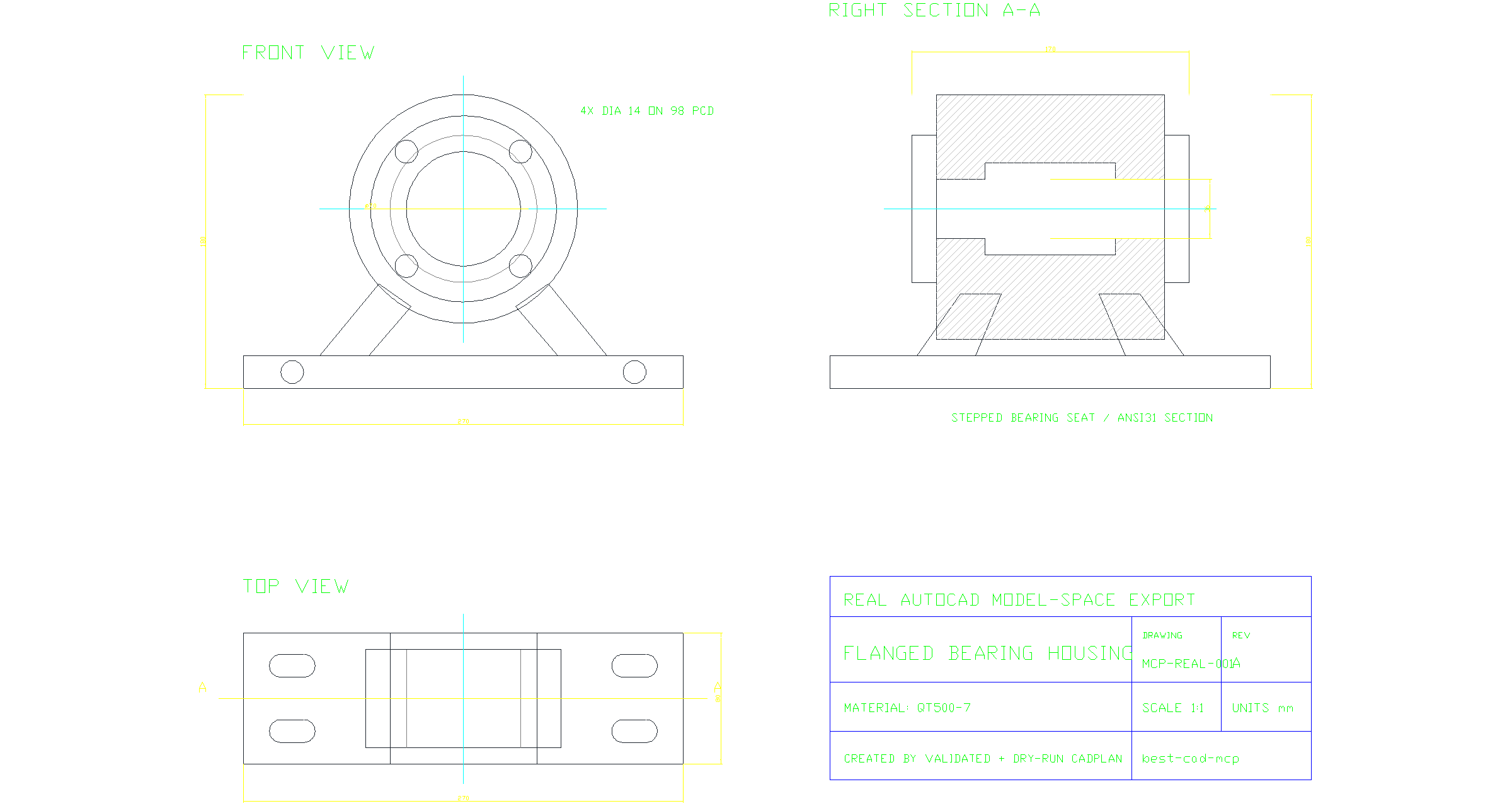
Real AutoCAD three-view drawing of a flanged bearing housing

A real AutoCAD model-space export created by a validated, dry-run CADPlan: front and top projections, a sectioned side view, centerlines, dimensions, feature callouts, hatches, and a title block. Download the source DWG or inspect the executed CADPlan.

[!IMPORTANT] best-cad-mcp is beta software. It is designed for controlled local workflows where an operator can review plans and evidence, not unattended changes to valuable production drawings.

Why best-cad-mcp

Most CAD automation stops at drawing primitives. Useful agent workflows also need to know exactly what they are changing, why a target was selected, and whether the result is correct.

Handle-first controlDrawing understandingEvidence before trust
Scan real AutoCAD handles, query exact entities, and edit those handles instead of guessing from labels or pixels.Build CAD-IR, semantic objects and graphs, dimension bindings, constraints, and validation reports in a local workspace.Validate and dry-run CADPlans, execute explicitly, rescan, and compare structured and visual results.

The server runs on the same Windows account as AutoCAD and communicates over MCP stdio. It runs natively on the official MCP Python SDK 2.x, negotiates the 2026-07-28 protocol, and retains legacy client negotiation. AutoCAD remains the source of truth; SQLite stores model-private context, scan results, and review artifacts alongside the workspace. AutoCAD-facing tool calls are intentionally serialized on one event-loop thread to preserve COM apartment safety.

Live AutoCAD demo

Prompt: Create a production-style A3 landscape bolted flange-coupling assembly drawing at true 1:1 size, with a longitudinal half-section, aligned end view, exploded schematic, true dimensions, differentiated hatching, an eight-item BOM, matching item leaders, technical requirements, and a controlled title block.

Bolted flange-coupling assembly generated in a live AutoCAD session

This is the result of a live AutoCAD session, not a hand-authored SVG. The MCP client loaded the shipped precise_draw_from_spec prompt, then ran 18 bounded generation phases (162 steps). Its autonomous visual-repair loop used two layout-repair plans (4 steps); three separately recorded, operator-authorized presentation-only release-QA plans added 10 steps. Every plan was validated and dry-run before transactional execution. The final rescan indexed 91 entities; structured verification detected 129 semantic objects, processed 7 true dimension annotations, and checked 134 constraints (127 satisfied, 7 unknown, and none violated). Post-repair geometry validation reported zero issues. The release plot was independently checked as a one-page landscape A3 PDF.

For reproducibility, the checked-in MCP client builds the deterministic CADPlans used for this recorded run. The demo shows live execution of the optimized prompt's guarded workflow, not an unscripted one-shot LLM generation.

DXF · A3 PDF · Exact prompt · CADPlan bundle · Verification report · MCP client

The drawing follows the repository's generic mechanical assembly practice and is marked DEMO - NOT FOR MANUFACTURE; it does not claim formal ISO, GB, ASME, or other standards compliance.

Quick start

Requirements

  • Windows
  • AutoCAD 2020 or newer recommended, installed and licensed
  • AutoCAD and the MCP client running as the same Windows user
  • Python 3.11 or newer
  • An MCP-compatible local client

Install the package

powershell
python -m pip install --upgrade best-cad-mcp
cad-mcp-doctor --check-autocad

For rendered overlays and visual-review helpers:

powershell
python -m pip install --upgrade "best-cad-mcp[visual]"
cad-mcp-doctor --check-autocad --require-visual-export

Keep AutoCAD open, then configure your MCP client to launch cad-mcp.

Codex

Codex supports both global ~/.codex/config.toml and trusted, project-scoped .codex/config.toml files. This minimal installed-package configuration uses the curated core tool profile:

toml
[mcp_servers.best-cad-mcp]
command = "cad-mcp"
cwd = 'C:\CAD\your-project'
enabled = true
startup_timeout_sec = 30
tool_timeout_sec = 120
default_tools_approval_mode = "writes"

[mcp_servers.best-cad-mcp.env]
CAD_MCP_TOOL_PROFILE = "core"
CAD_MCP_WORKSPACE_ROOT = 'C:\CAD\your-project'

Restart Codex after editing the file, then inspect the connected server with /mcp. See the official Codex MCP configuration guide for configuration scopes and current options.

Claude Code and other JSON-configured clients

config.json
{
  "mcpServers": {
    "best-cad-mcp": {
      "command": "cad-mcp",
      "env": {
        "CAD_MCP_TOOL_PROFILE": "core",
        "CAD_MCP_WORKSPACE_ROOT": "C:\\CAD\\your-project"
      }
    }
  }
}

Save this as .mcp.json in the CAD project root and start the client from that project. CAD_MCP_WORKSPACE_ROOT should point to the CAD project being worked on, not to this repository. With an installed package, setting both the process cwd and workspace root to the project keeps runtime files together.

Install from source
powershell
git clone https://github.com/LokmenoWer/best-cad-mcp.git
cd best-cad-mcp
python -m venv .venv
.\.venv\Scripts\Activate.ps1
python -m pip install --upgrade pip
python -m pip install -e ".[visual]"
.\.venv\Scripts\python.exe -m src.doctor --check-autocad

For a source checkout, start python -m src.server from the repository or set the MCP server cwd to the repository. Keep CAD_MCP_WORKSPACE_ROOT pointed at the separate CAD project you want to index.

The guarded workflow
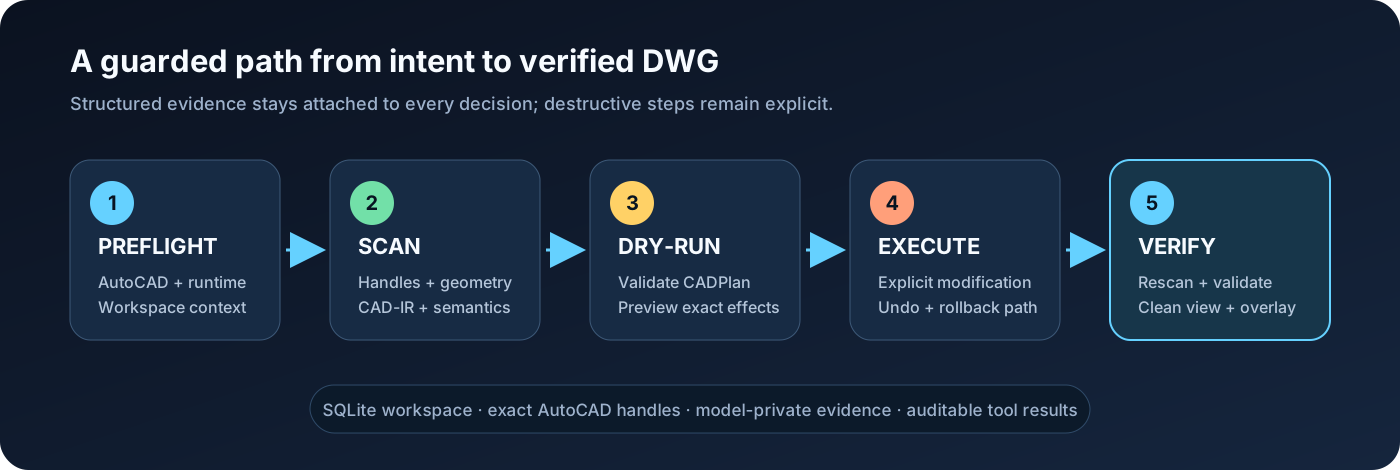
Preflight, scan, dry-run, execute, and verify workflow

  1. Preflight — run check_runtime_environment(check_autocad=true) or cad-mcp-doctor --check-autocad; stop when the result reports ok=false.
  2. Scan — run scan_all_entities before reasoning about an existing DWG. Use topology_detail="full" for primitive grounding or cross-entity profiles.
  3. Understand — build CAD-IR, summarize the drawing, query semantics, and confirm important targets with explain_entity.
  4. Plan — express multi-step changes as a CADPlan, then call validate_cad_plan and dry_run_cad_plan.
  5. Execute explicitly — only after authorization and an acceptable dry-run, call execute_cad_plan(..., allow_modify=true, transactional=true).
  6. Verify — rescan, run geometric validation, export a clean view and overlay, and save only when the operator intends to persist the DWG.

For precise edits, prefer handles returned by AutoCAD over names inferred from screenshots. For visual findings, treat grounding as evidence: confirm the candidate entity and its geometry before changing it.

What it can do

AreaRepresentative capabilities
2D draftingLines, polylines, curves, circles, regions, hatches, text, dimensions, leaders, tables, layers, blocks, and attributes
EditingMove, copy, rotate, scale, mirror, offset, trim, extend, fillet, chamfer, arrays, properties, selections, and handle-targeted changes
Drawing understandingSQLite scan, CAD-IR v2, summaries, semantic objects/graphs, constraints, dimension binding, validation, and repair proposals
Guarded automationCADPlan variables, dependencies, captured handles, preconditions, postconditions, dry-runs, transactional execution, undo, and rollback attempts
Visual groundingClean exports, adaptive numeric overlays, pixel/world mapping, path and polygon grounding, tile crops, and VLM finding reconciliation
Image-to-CADImageDrawingSpec tracing, calibration, fidelity checks, staged execution, and visual comparison against the source image
Mechanical drawingsOrthographic views, sections, hatches, centerlines, dimensions, BOMs, balloons, layouts, and assembly-oriented prompt/skill assets
3D and output3D solids and operations, layouts, plotting, PDF/DXF/DWF/image export, and direct in-result image content

Tool profiles

The shipped client configs and examples recommend core because it keeps tool selection reliable while covering normal guarded workflows. When the profile environment variable is omitted, the Python server falls back to full for backward compatibility.

ProfileToolsIntended use
lean114Smallest dependable surface for common drawing and inspection tasks
core215Recommended default for full guarded CAD workflows
full322Every registered tool, including specialized and legacy operations

Select a profile with CAD_MCP_TOOL_PROFILE=lean|core|full. Fine-grained allow/deny controls are also available through CAD_MCP_TOOLS_INCLUDE and CAD_MCP_TOOLS_EXCLUDE.

From visual understanding to grounded CAD evidence

The hero is not an explanatory mockup. It was drawn in a new AutoCAD document through a 90-step CADPlan, scanned as 81 real entities, validated with zero geometry issues, exported as WMF, and rasterized to the PNG shown above. The source DWG, plan, dry-run, validation output, pixel/world mapping, and VLM review are retained as reviewable artifacts.

A VLM review should return more than a caption. Below are real artifacts from the same snapshot: the clean AutoCAD tile inspected by the model and its actual handle overlay. They are raster crops produced by the mapping tool, not redrawn documentation graphics.

Clean AutoCAD raster tileHandle overlay from the same snapshot
Actual front-view tile supplied to visual reviewActual mapped AutoCAD handles over the front-view tile

The overlay is registered to the WMF selection-export frame, not to the active viewport. AutoCAD's measured proportional frame margin is preserved while the old generic viewport padding is excluded. In this capture the mapped front-view origin is (734.870, 331.032) px and the cyan centerline intersection observed in the real raster is (735, 331) px: a maximum error of 0.13 px.

The real vlm_review_drawing/v3 result was schema-validated and submitted without pre-claiming handles. Its four regions are authored from the raster and locked to that raster's dimensions and SHA-256; the capture script rejects them if AutoCAD produces a different image. Grounding resolved the central bore to handle 8A, the rounded mounting-slot profile to 115, and the title-block semantic group to 236. The section hatch correctly remained ambiguous because two real hatch candidates had a narrow score margin.

config.json
{
  "central_bore":  {"status": "grounded",  "handles": ["8A"]},
  "mounting_slot": {"status": "grounded",  "handles": ["115"]},
  "section_hatch": {"status": "ambiguous", "handles": []},
  "title_block":   {"status": "grounded",  "handles": ["236"]}
}

Inspect the hash-locked visual observation, submitted VLM return, grounded result, pixel/world alignment check, CADPlan dry-run, and zero-issue geometry validation.

Copy a mechanical drawing from one image

The full path separates non-mutating understanding from the one explicitly authorized DWG modification stage, then closes with a rescan and visual diff. This README does not present a generated flow illustration as trace evidence; a real run should retain the source raster, ImageDrawingSpec, validated and dry-run CADPlan, resulting DWG, and final AutoCAD export.

A typical tracing loop is:

  1. call prepare_image_trace(image_path, domain="mechanical");
  2. use prepare_visual_semantic_context and get_trace_source_image to inspect global and tiled source images;
  3. produce ImageDrawingSpec/v1, echoing each observed image's source_ref_template for measured coordinates;
  4. call validate_image_drawing_spec, then submit_image_drawing_spec;
  5. call compile_image_spec_to_cad_plan;
  6. call validate_image_fidelity_contract(spec, cad_plan);
  7. call validate_cad_plan, then dry_run_cad_plan;
  8. only after authorization, call execute_cad_plan(..., allow_modify=true, transactional=true);
  9. rescan, validate, and compare the final AutoCAD export with the source.

Do not execute a trace just because its JSON is valid. Check view count, symmetry, dimensions, centerlines, hole placement, and source/render fidelity first.

Visual grounding in v1.6

Version 1.6 adds drawing-level topology for boundaries assembled across multiple entities, including line-line and supported line-curve intersections plus closed-loop profiles. Use scan_all_entities(topology_detail="full") when primitive relations are required. Grounding now carries real path/polygon geometry, multiple-handle candidates, adaptive overlays, and tile-aware pixel/world contracts.

This improves selection quality on mechanical profiles, but it does not make vision infallible. Important edits should still follow:

text
visual finding -> grounding candidates -> explain_entity -> handle-targeted edit

The default VLM review prompt is vlm_review_drawing/v3. Snapshot schema versions are returned in tool results; overlay schema versions are stored in the referenced sidecars so strict consumers can detect contract changes.

Safety model

  • Read and scan before editing an existing drawing.
  • Keep raw command execution, deletion, purge, audit, save, close, and execute_cad_plan behind explicit client approval.
  • Validate and dry-run plans before modification.
  • Use returned handles and structured geometry for exact targets.
  • Rescan after modifications; do not rely on stale SQLite rows.
  • Keep model-private notes and spatial annotations in .cad_mcp/, not in visible DWG geometry, XData, or hidden layers.
  • Treat saving and closing as separate operator decisions.
  • Treat top/plan model-space views as the strongest grounding case. View twist, custom UCS, 3D geometry, and complex layout viewports can reduce confidence.

Transaction and rollback support reduce risk but cannot guarantee recovery from every AutoCAD or COM failure. Work on copies when the drawing is valuable.

Workspace and data

CAD_MCP_WORKSPACE_ROOT controls <workspace>/.cad_mcp/workspace.db. The default log, visual exports, and image trace assets are written relative to the MCP process cwd as cad_mcp.log, cad_visual_exports/, and cad_image_traces/.

External CAD projects are not ignored automatically. Add these entries to the project's .gitignore when it is a Git repository:

gitignore
.cad_mcp/
cad_mcp.log
cad_visual_exports/
cad_image_traces/

The database helps connect turns and tools, but AutoCAD remains authoritative. If a drawing changes outside the server, scan it again before using stored entities. A warning about a legacy root autocad_data.db means an older database exists; verify migration, then archive it separately.

Troubleshooting

SymptomCheck
Server fails to import after upgradingRun cad-mcp-doctor --json with the same Python environment used by the client. best-cad-mcp 1.7+ requires MCP Python SDK >=2,<3; upgrade the package/environment and restart the client if mcp_sdk_version is blocked.
AutoCAD is open but unavailableRun cad-mcp-doctor --check-autocad; make sure both processes use the same Windows account and privilege level.
Server starts with too many toolsSet CAD_MCP_TOOL_PROFILE=core or lean, then restart the client.
Visual export is unavailableThe [visual] extra provides Pillow for raster overlays. On Windows, AutoCAD WMF uses the native GDI+ fallback; ImageMagick/Wand, Inkscape, or LibreOffice provide alternate paths. Check get_vision_capabilities() and wmf_to_png_available; PDF can also be rasterized externally.
Queries return stale entitiesActivate the intended drawing and rerun scan_all_entities.
MCP server starts in the wrong folderSet server cwd to the source checkout only when developing; set CAD_MCP_WORKSPACE_ROOT to the CAD project.
A plan is rejectedRun validate_cad_plan, inspect the exact failing step, and dry-run again after correcting it.

For machine-readable diagnostics:

powershell
cad-mcp-doctor --json

Development

powershell
git clone https://github.com/LokmenoWer/best-cad-mcp.git
cd best-cad-mcp
python -m venv .venv
.\.venv\Scripts\Activate.ps1
python -m pip install -e ".[dev,visual]"
python -m pytest -q -m "not autocad_com"

Release publication validates the version, runs the non-COM suite (reserving the autocad_com marker for local live-CAD checks), verifies native modern and legacy MCP stdio, builds and clean-installs the wheel, checks it with Twine, publishes to PyPI, and then publishes the MCP server metadata. Live AutoCAD preflight and CADPlan checks must be run locally because hosted runners do not have AutoCAD.

Contributions are welcome. Please keep changes scoped, add regression tests for behavior changes, and preserve the scan → plan → validate → verify safety model.

Acknowledgements

The model-private annotation and pointer-style CAD context design was informed by the public Pointer-CAD project and paper. No Pointer-CAD source code is copied into this repository.

License

MIT. See LICENSE.

Related MCP Servers

View all in Developer Tools View all alternatives
  • W
    Windows MCP

    An MCP Server for computer-use in Windows OS

    💻 Developer Tools1 views
    Compare vs Windows MCP →
  • R
    Raycast

    Raycast workflow automation MCP server with 9 tools

    💻 Developer Tools1 views
    Compare vs Raycast →
  • A
    Ai Netcafe

    Compare LLM cost & latency on one prompt, translate PDF keeping layout, cited research, make PPTX

    💻 Developer Tools0 views
    Compare vs Ai Netcafe →
  • Claude Task Master logoClaude Task Master

    AI-powered task management system for AI-driven development. Features PRD parsing, task expansion, multi-provider support (Claude, OpenAI, Gemini, Perplexity, xAI), and selective tool loading for optimized context usage.

    💻 Developer Tools7 views
    Compare vs Claude Task Master →

Frequently Asked Questions about Best Cad Mcp

Add the following block to your claude_desktop_config.json under mcpServers: "mcpServers": { "best-cad-mcp": { "command": "npx", "args": ["-y", "best-cad-mcp"] } }

AllMCPs Directory Badge

Full Badge Customizer

Showcase your server listing on GitHub or your project documentation. Embed this dynamic SVG badge to highlight official listing status and live engagement.

Badge Style:
Live Dynamic SVG PreviewBest Cad Mcp AllMCPs Directory Badge

Markdown (GitHub README)
[![AllMCPs](https://allmcps.com/api/badge/best-cad-mcp?style=directory)](https://allmcps.com/mcp/best-cad-mcp)
HTML Embed
<a href="https://allmcps.com/mcp/best-cad-mcp"><img src="https://allmcps.com/api/badge/best-cad-mcp?style=directory" alt="Best Cad Mcp on AllMCPs" /></a>

Technical Specs & Signals

Category💻Developer Tools
More technical detailsExpand â–¾
TransportSTDIO
RuntimeNode.js
0/4 checks healthy over the last 6h
Views0
Unique ViewsTotal visits recorded for this listing page on AllMCPs.
Installs0
Installs & Copy ActionsTotal times users copied install commands or configuration snippets for this server.
27Quality signal: Emerging · 27/100How this signal is calculated ▾
Server availabilityNot measured

Not scored for repo-hosted servers — we can't reach the running server, only its GitHub page. Hosted MCP endpoints are health-checked live.

Verified ownership8/20
Documentation & tools11/30
Adoption & activity1/15
Community engagement0/10

A guidance signal from public completeness & health data — not a user rating. New listings start lower and rise as they add docs, get verified, and grow adoption. Signals we can't observe for a listing are skipped, not counted against it.

★ FeaturedAllMCPs Server logo

AllMCPs Server

The official MCP server for AllMCPs.com - submit and manage tools directly from your AI. The open directory for MCP servers. Connect Claude, Cursor, Windsurf, and AI agents to databases, tools, files, and APIs. Explore 3,181+ servers. AllMCPs is the premier, open directory for discovering, evaluating, and installing Model Context Protocol (MCP) servers to equip AI agents and LLMs with real-world superpowers.

Explore Server →

Own this project?

This directory is pre-filled from public sources. Claim via GitHub README, site badge, or DNS TXT to get the verified badge and attach your website.

Free dofollow backlink: after claiming, verify your product site and place a dofollow AllMCPs badge — we recheck it stays live.

Claim & get free dofollow

Share & Embed

Add our SVG badge (dark/light directory styles) or embeddable widget to your site.

Explore more

More in 💻 Developer Tools →Best MCP servers for Developers →Alternatives to Best Cad Mcp →Install in Claude DesktopInstall in CursorInstall in VS Code