Local-first open-source AI media workbench with Canvas, video editor, Assets, and MCP tools.
Quick Install
Automated & IDE SetupCopy the AI prompt to install this server into Claude Code, Cursor, or another agent — or use 1-click editor setup below.
Manual Client & Custom JSON ConfigExpand JSON ▾
Client Config & Setup
Remote HTTPChoose your client or environment
Target File:
💡 Paste the JSON block into your client's configuration file under mcpServers, then restart the application.
Documentation Overview
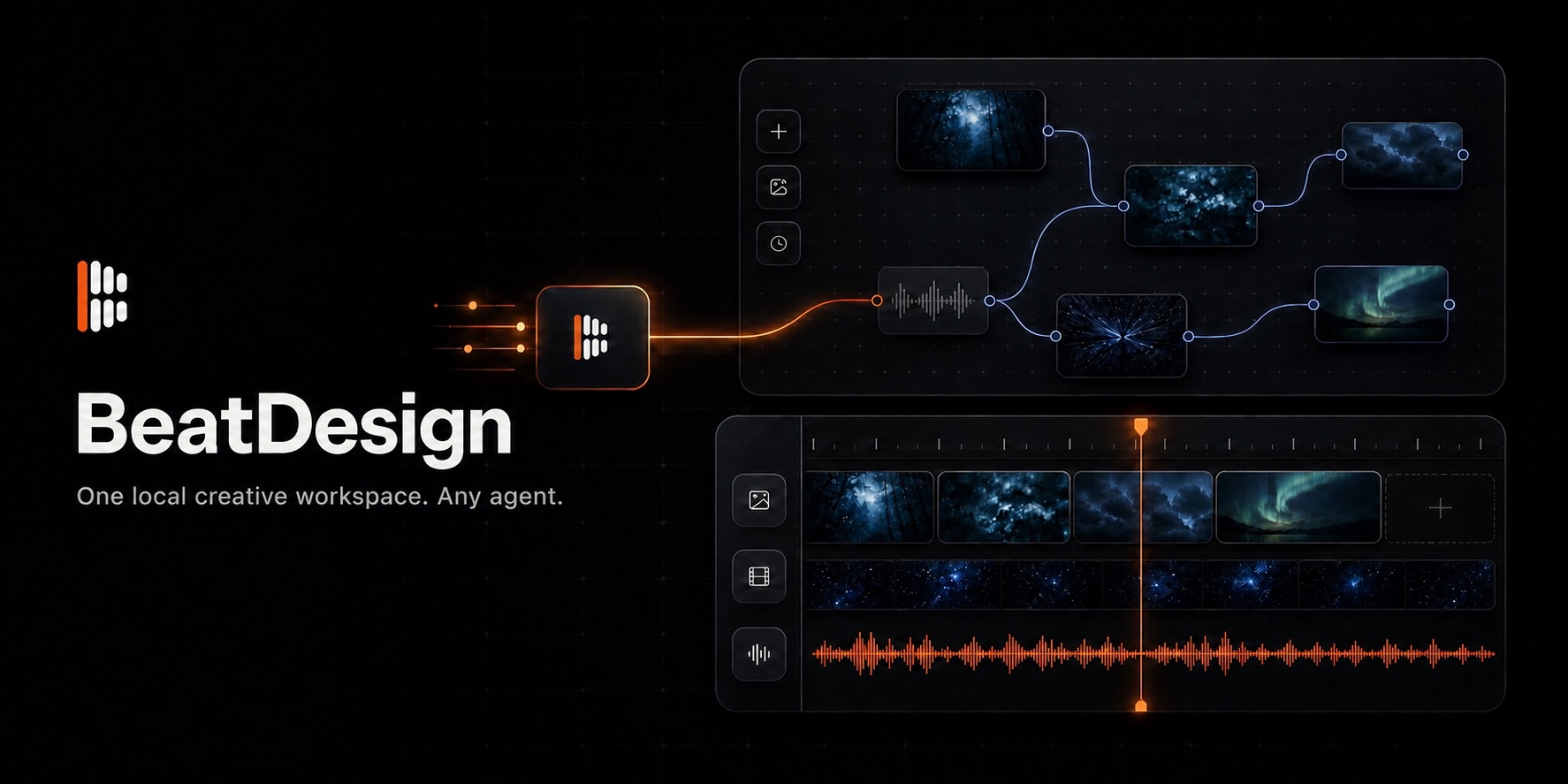
BeatDesign
Your local Higgsfield alternative.
Build image and video workflows on an infinite Canvas, finish them in a browser-native Editor, and let any MCP-capable Agent work in the same Project.
Website · Quick start · MCP · Product status
BeatDesign is an independent, open-source, local-first workspace for AI image and video creation. It is built for people who want the connected creative flow of tools such as Higgsfield, with a workspace they can run, inspect, and extend on their own machine.
Two creative modes, one Project
Infinite Canvas
Drop in prompts, images, video, and audio. Connect nodes, branch ideas, compare generations, reuse outputs, and keep the full visual workflow inside one project.
Video Editor
Turn Canvas results into a local timeline. Trim, split, move, mix audio, place and transform image overlays, style SRT captions, create alternate AI Takes, preview, and export MP4 in the browser.
Studio provides a focused generation surface. Assets keeps every imported and generated file available across Canvas, Editor, and MCP.
Why BeatDesign
- Local by default. Projects, media, Canvas state, timelines, and generation history stay in your local workspace.
- Canvas and Editor stay connected. A generated result becomes a reusable project Asset instead of disappearing inside one tool.
- Bring your own Agent. Codex, Claude Code, Cursor, and other MCP hosts can inspect and update the same Project you see in the browser.
- Bring your own generation access. BeatAPI is the built-in provider. Local importing, arranging, editing, previewing, and exporting do not require an API key.
- Fork-friendly foundations. Provider adapters, project storage, and the command layer are explicit extension points.
From idea to finished video
Quick start
Requirements include Node.js 22+, pnpm 10+, and a current Chrome browser on macOS or Windows.
Open http://127.0.0.1:3020.
Add your own BeatAPI API key only when you want to generate or analyze media, or use AI redo. Selecting a local file does not upload it to a provider.
Choose how to run BeatDesign
| Command | Starts |
|---|---|
pnpm dev | The visual workspace |
pnpm dev:agent | The visual workspace and local HTTP MCP endpoint |
pnpm mcp | The stdio MCP server for coding Agents |
Use BeatDesign with an Agent
BeatDesign exposes 29 local MCP tools for Skills, Projects, Assets, Canvas, generation, and Editor operations, including built-in Skill discovery and authoritative MP4 timeline rendering. Agent changes use the same project services and become visible in the browser workspace.
After connecting your MCP host, you can ask:
Open my latest BeatDesign project, add these clips to a timeline, place the logo overlay, adjust the subtitles, and leave the Editor open for review.
Platform compatibility
| Coding Agent / platform | Status | Quick setup |
|---|---|---|
| Claude Code | ✅ Supported | Plugin or MCP config |
| Codex | ✅ Supported | Plugin setup |
| ZCode | ✅ Supported | MCP config |
| OpenCode | ✅ Supported | MCP config |
| Cursor | ✅ Supported | MCP config |
| Windsurf | ✅ Supported | MCP config |
| VS Code + GitHub Copilot | ✅ Supported | MCP config |
| Cline / Roo Code | ✅ Supported | MCP config |
| Qwen Code | ✅ Supported | MCP config |
| Gemini CLI | ✅ Supported | MCP config |
| Hermes Agent | ✅ Supported | MCP config |
| Kiro | ✅ Supported | MCP config |
| Trae | ✅ Supported | MCP config |
| WorkBuddy | ✅ Supported | Connector setup |
| QwenWork | ✅ Supported | HTTP connector |
| Doubao Work | ✅ Supported | HTTP connector |
Open the full Agent integration guide →
What works today
- Image and video generation plus Standard and Deep video analysis.
- Image, video, audio, generation, timeline, and text nodes on the Canvas.
- Project Assets shared across Studio, Canvas, Editor, and MCP.
- Non-destructive timeline editing with image, video, audio, movable image overlays, and styled SRT caption tracks.
- Local preview and browser-side H.264/AAC MP4 export with WebCodecs and Mediabunny.
- English, Chinese, and Japanese interfaces.
- Local stdio and Streamable HTTP MCP transports.
BeatDesign currently focuses on local, short-form creative workflows. Hosted collaboration, multiple named timelines, advanced transitions, speed controls, waveforms, and desktop packaging remain outside the current release.
See the complete shipped and planned scope →
Project guides
License
BeatDesign is licensed under Apache License 2.0. BeatAPI and BeatDesign trademarks, third-party model access, and bundled third-party components remain subject to their respective terms. See third-party notices and trademark policy.
Related MCP Servers
Reviews
No reviews yet — be the first to share how this listing worked for you.
Frequently Asked Questions about BeatDesign
AllMCPs Directory Badge
Showcase your server listing on GitHub or your project documentation. Embed this dynamic SVG badge to highlight official listing status and live engagement.
Badge Style:
Live Dynamic SVG Preview
Markdown (GitHub README)
[](https://allmcps.com/mcp/beatdesign)HTML Embed
<a href="https://allmcps.com/mcp/beatdesign"><img src="https://allmcps.com/api/badge/beatdesign?style=directory" alt="BeatDesign on AllMCPs" /></a>