Let your coding agent write to your work tracker: issues, branches, PRs and CI, one contract.
Quick Install
Automated & IDE SetupCopy the AI prompt to install this server into Claude Code, Cursor, or another agent — or use 1-click editor setup below.
Not yet automatically verified
We haven't yet run this listing's install command through our automated sandbox check. This isn't a red flag — we're steadily working through the catalog.
Manual Client & Custom JSON ConfigExpand JSON ▾
Client Config & Setup
Choose your client or environment
Target File:
💡 Paste the JSON block into your client's configuration file under mcpServers, then restart the application.
Documentation Overview
Baron
Let your coding agent write to your work tracker — and keep the same flow when you change trackers. Baron is an open-source layer that turns issues, branches, PRs, CI runs, and deployments into one normalized contract, so your agent never learns a vendor's API, states, or column names.
The problem
AI coding agents bake one vendor's API and one team's process into prompts. The moment your issues live in Azure DevOps but your code is on GitHub, or your board columns aren't literally "To Do / Done", or you switch trackers next quarter — the prompts break, and the agent falls back to raw, vendor-specific tools. You've hardcoded vendor lock-in into the way you work.
What Baron does
Plenty of tools let an agent read your tracker. Baron is about the other direction: writing — creating work items, moving them, cutting branches, opening and merging PRs — which is where an agent does damage when it guesses a vendor's state machine wrong.
The agent speaks one abstract vocabulary in terms of roles (backlog → ready → in_progress → in_review → done; blocking is an orthogonal flag, so a blocked item keeps the role the work is
actually in), and Baron translates to each provider's real API, states, and
quirks. You confirm that mapping once, at baron init, and it is committed to your repo as
configuration — not re-guessed by the model on every call.
Each port binds to a provider independently, so issues on Azure DevOps, scm on GitHub, and
notify on Slack is a normal setup rather than a special case.
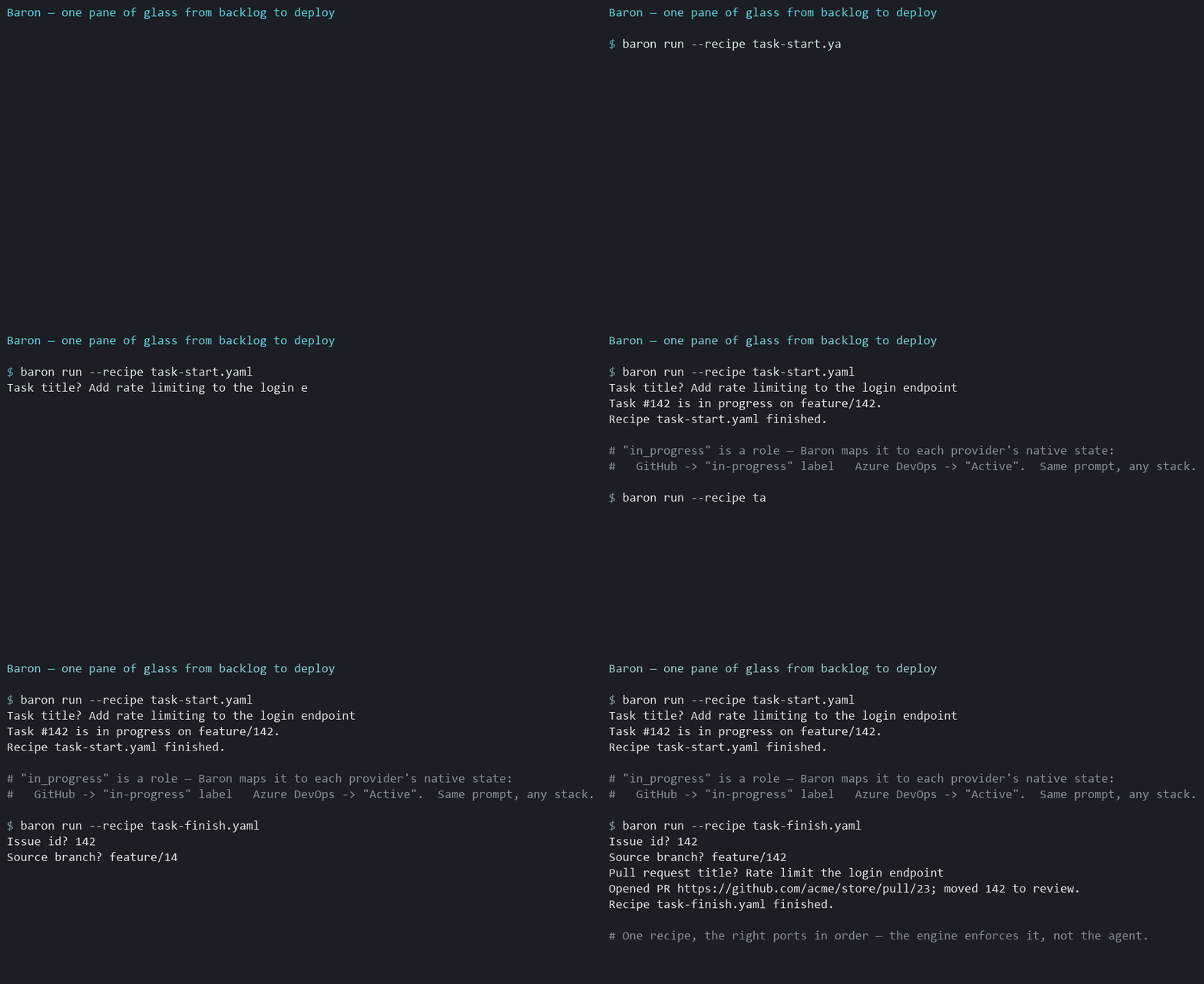
What it looks like
That same prompt on Azure DevOps sets the work item state to Active; on GitHub it applies an
in-progress label — because in_progress is a role, not a vendor state.
The checks matter as much as the actions: if the item is already done, belongs to someone else, or is a container that should never be branched, the run stops before anything is created. The branch name is derived by Baron from the item's type role, so every agent and every recipe derives the same name for the same item instead of inventing one.
Why it's different
- Capability ports, not "a tracker."
issues/scm/ci/deploy/notify, each bound to a provider independently — so a consumer mixes providers rather than betting on one vendor spanning everything. - Normalize, don't raw-proxy. New capabilities become first-class normalized ports; a clearly labeled provider-native escape hatch is the explicit last resort, never the default path.
- Capability gaps are never silent. When a provider lacks something (say, native issue hierarchy), Baron either emulates it (e.g. labels), degrades with a warning, or errors loudly — decided by policy, never swallowed.
- Workflows are recipes, not prompts. Multi-step flows (
task-start,task-finish,task-land,ship) are declarative YAML executed as a single call, with guards that stop a run before it mutates anything. The order lives in the recipe rather than being improvised per run.
The first of those is the one worth reading about rather than being told: You can't set a status in Jira walks through why a work tracker cannot be normalized by mapping four states onto everything — Jira refuses to set a status at all and makes you discover the permitted transitions first, Linear's workflow states belong to a team rather than the workspace, GitHub has no hierarchy to map. It is the argument this design answers.
Quick start
Published to npm — no clone, no build. From inside your project:
On GitHub, step 1 opens the approval page and you confirm a short code — no permission list to read,
no boxes to tick, no token to paste. Pasting a fine-grained token is still offered, because it is a
narrower credential than any OAuth scope and an install that wants the tighter one should not have to
fight the friendlier path to get it. Either way baron doctor verifies what the credential can
actually do before you start work.
Or drive it from an agent — install the Claude Code plugin (MCP server + workflow skills in one):
See Getting started for the full walkthrough. Contributing to Baron
itself? Run from source with pnpm baron … — see CONTRIBUTING.
Or wire the MCP server into your agent and call the tools directly across every port —
baron_issue_write op=create, baron_scm_write op=pr_create, baron_ci_read op=runs, baron_deploy_read op=deployments,
baron_notify_send, plus baron_recipe_run for whole workflows. In Claude Code, the plugin also
ships per-recipe skills (/baron:task-start, /baron:ship). See docs/mcp.md.
The server is listed in the official MCP Registry as io.github.loncadev/baron, and runs as a
container for anyone who would rather not have Node on the host — see
docs/mcp.md.
New to it? The Azure DevOps setup walkthrough is copy-paste from
scratch (PAT scopes, init → doctor → MCP, troubleshooting).
Providers
| Provider | Ports |
|---|---|
| Azure DevOps | issues · scm · ci · deploy |
| GitHub | issues · scm · ci · deploy |
| Jira | issues |
| Linear | issues |
| Slack | notify |
GitLab is on the roadmap — adding a provider never changes how the agent talks to Baron, which is the whole point. Until it lands, that name describes intent, not support.
Documentation
| Guide | What it covers |
|---|---|
| Getting started | Install, prerequisites, first init → doctor → run. |
| Setup walkthrough — Azure DevOps | From-scratch, copy-paste setup on Azure DevOps + Claude Code. |
| Setup walkthrough — Linear | From-scratch setup on Linear: per-team scoped states, branches from GitHub. |
| Setup walkthrough — Jira | From-scratch setup on Jira Cloud: workflow-gated transitions and transition screens. |
| Concepts | Ports, roles, capability gaps, the knowledge loop — the mental model. |
| Configuration | .baron/policy.json, role/type/gap maps, credentials. |
| CLI | baron init / doctor / run reference. |
| Recipes | Writing YAML recipes: ask / do / message, interpolation, the op table. |
| MCP server & plugin | The MCP tools and the Claude Code plugin. |
| Trying it with Claude Code | Hands-on: wire the MCP server to a real project + a verification checklist. |
| Providers | Which provider supports which port and capability. |
| Demo script | Ready-to-record 60-second demo (Claude Code or CLI). |
The full design decision record is in ARCHITECTURE.md; the contributor working contract is CLAUDE.md, contribution terms are in CONTRIBUTING.md, and the publish playbook is RELEASING.md.
Status
v1 is built end-to-end: the issues, scm, ci, and deploy ports across Azure DevOps and
GitHub plus notify via Slack, the config engine (baron init / doctor), a multi-port MCP
server, the YAML recipe engine + baron run, the knowledge loop, and a Claude Code plugin. Every
adapter passes a network-free conformance suite; the Azure DevOps ports are additionally
live-validated against a real project.
Baron now also runs this repository — its issues, branches, and pull requests move through its own GitHub adapter. That is a working proof, not adoption: Baron is young and has not yet been put through a stack it did not grow up on. If you run it against yours, the resulting bug report is the most useful thing you could send. What is planned next, and what is deliberately out of scope, is in ROADMAP.md.
License
Open-core. The core, the adapters (Azure DevOps, GitHub, Linear, Slack), the recipes, and the CLI/MCP server are licensed under Apache-2.0. Future commercial-tier features (SSO, secret-manager integrations, multi-team governance, audit) will ship under a separate commercial license — see ARCHITECTURE.md decision #20.
Related MCP Servers
Reviews
No reviews yet — be the first to share how this listing worked for you.
Frequently Asked Questions about Baron
AllMCPs Directory Badge
Showcase your server listing on GitHub or your project documentation. Embed this dynamic SVG badge to highlight official listing status and live engagement.
Badge Style:
Live Dynamic SVG Preview
Markdown (GitHub README)
[](https://allmcps.com/mcp/baron)HTML Embed
<a href="https://allmcps.com/mcp/baron"><img src="https://allmcps.com/api/badge/baron?style=directory" alt="Baron on AllMCPs" /></a>