Run long shell commands as background tasks: start them, keep working, collect the results later
Quick Install
Automated & IDE SetupCopy the AI prompt to install this server into Claude Code, Cursor, or another agent — or use 1-click editor setup below.
Not yet automatically verified
We haven't yet run this listing's install command through our automated sandbox check. This isn't a red flag — we're steadily working through the catalog.
Manual Client & Custom JSON ConfigExpand JSON ▾
Client Config & Setup
Choose your client or environment
Target File:
💡 Paste the JSON block into your client's configuration file under mcpServers, then restart the application.
Documentation Overview
Put your AI agent's slow work on the back burner. Keep cooking.
Background tasks for AI agents that outlive the conversation — start a long job, close the client, and the result is still waiting when you come back.
Durable & Restart-Proof ◦ Zero Infrastructure ◦ MCP Tasks (2026-07-28) ◦ Windows & Unix
📦 PyPI • 🗂️ MCP Registry • 🐛 Issues • 📄 MIT
📢 Updates
- v1.0 — implements the official MCP Tasks extension
(SEP-2663,
io.modelcontextprotocol/tasks). A Tasks-capable client can turn astart_taskcall into a durable task and drive it withtasks/get,tasks/update, andtasks/cancel— the standard async-job protocol — while the five plain tools keep working for every other client. Built against the 2026-07-28 spec (mcp2.0). - v0.2.1 — output with non-ASCII characters (✓, emoji, any non-English text) no longer crashes tasks on Windows.
- v0.2.0 —
exit_codeis no longer reported for cancelled/timed-out tasks (it was an artifact of the kill, not a real result); new animated demo below. - v0.1.x — first release: 5 tools, task timeouts, command allow/deny policy.
Listed on the official MCP Registry as
io.github.RohitYajee8076/backburner.
backburner is an MCP server that gives any AI assistant — Claude, ChatGPT,
Gemini, GitHub Copilot, Cursor, and any other MCP client — the ability to run
long shell commands as background tasks — start a test suite, a build, a
scrape, a batch job — then keep working and check back for the results, instead
of sitting frozen until it finishes.
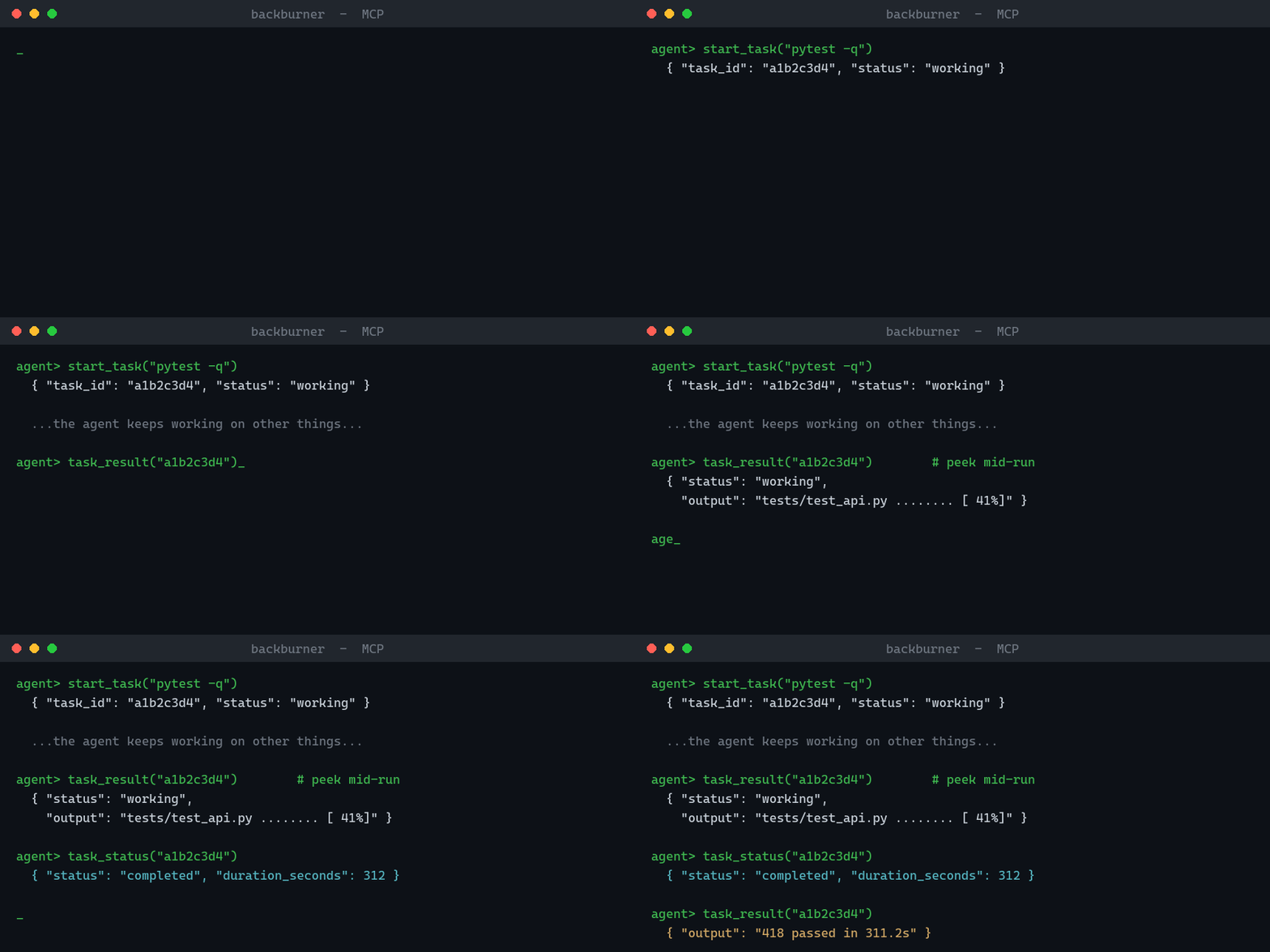
🔥 Why not just use my client's built-in background mode?
Because that lives inside the conversation — it disappears the moment the session ends. Close the chat, restart the client, reboot the laptop, and any in-session background work (and its output) is gone.
backburner keeps every task and its full output on disk (SQLite +
per-task log files under ~/.backburner/), so your work outlives the session
that started it:
- Start now, collect later — even in a different chat. A task you launch today is still listed, with its result, in a brand-new session tomorrow.
- Restart-proof. State survives the server, the client, and the machine
restarting. Finished tasks keep their output; a task cut off by a crash is
honestly marked
interrupted, never silently dropped. - No waiting, no blocking. A 10-minute tool call no longer freezes the conversation or times out and loses the work.
See it for yourself — a real two-process proof (no mock-ups):
It starts a job in one process, exits, then a separate process — which never saw the task id — finds the finished work waiting on disk.
Built on the MCP Tasks pattern, formalized in the 2026-07-28 spec release
(SEP-2663):
backburner speaks it natively (tasks/get / tasks/update / tasks/cancel)
and exposes the same engine as plain tools, so it works with every client
today.
🧰 Tools
| Tool | What it does |
|---|---|
start_task(command, cwd?, timeout_seconds?) | Run a shell command in the background, returns a task id immediately |
task_status(task_id) | working / completed / failed / cancelled / timed_out / interrupted |
task_result(task_id, tail_lines?) | Captured output — works mid-run too, so you can peek at progress |
cancel_task(task_id) | Kill the task and its whole process tree |
list_tasks(limit?) | Recent tasks, newest first |
✨ Features
-
Survives restarts — tasks are tracked in SQLite under
~/.backburner/; output is captured to per-task log files. If the server dies mid-task, orphaned tasks are honestly markedinterrupted, never silently lost. -
Real cancellation — kills the full process tree (worker processes included), on Windows and Unix.
-
Peek at live progress —
task_resulton a running task returns the output so far. -
Timeouts — pass
timeout_secondsand a runaway task is killed and honestly markedtimed_outinstead of hanging forever. -
Command policy — restrict what the AI may run with environment variables (regexes, comma-separated; deny always wins):
-
Zero infrastructure — stdlib only (SQLite, subprocess, threads). No Redis, no Celery, no Docker.
-
Tested — a pytest suite covers the full job lifecycle: completion, failure, cancellation, timeouts, crash recovery, and the command policy.
🚀 Install
backburner is a standard stdio MCP server — it works with any MCP-compatible
client, including:
Claude Code · Claude Desktop · OpenAI (ChatGPT desktop / Agents SDK) · Google Gemini (Gemini CLI) · GitHub Copilot (VS Code) · Cursor · Windsurf · Cline · Zed — and any other client that speaks MCP.
First install the package:
Claude Code
Everything else (Claude Desktop, Cursor, VS Code / Copilot, Windsurf, Gemini CLI, …)
Most clients use the same standard config block — add backburner to your
client's MCP config (see your client's docs for where that file lives):
🔒 Security note
backburner executes the shell commands the AI sends it, with your user's
permissions. That is its job — but treat it like giving your agent a
terminal. Run it only with clients whose tool-use you review/approve,
prefer permission modes that require confirmation for start_task, and
use BACKBURNER_ALLOW / BACKBURNER_DENY to scope what may run.
🗺️ Roadmap
- Task timeouts and max-runtime limits
- Allowlist/denylist for commands
- PyPI release —
pip install backburner-mcp - Listed on the official MCP Registry
- MCP Tasks extension (spec 2026-07-28, SEP-2663) — native
tasks/get/tasks/update/tasks/cancelalongside the plain tools - Task push updates (
notifications/tasks) — live status without polling - Local web dashboard — watch tasks live in the browser
- Structured progress reporting (parse % / step markers from output)
📄 License
MIT
Related MCP Servers
Adoption & maintenance
Factual signals from GitHub, npm, and our automated checks — not a rating.
GitHub stars
2
Stargazers on the source repository.
Last commit
1mo ago
Most recent push to the default branch.
Directory activity
2 views
Config copies, upvotes, and views on AllMCPs.
Reviews
No reviews yet — be the first to share how this listing worked for you.
Frequently Asked Questions about Backburner
AllMCPs Directory Badge
Showcase your server listing on GitHub or your project documentation. Embed this dynamic SVG badge to highlight official listing status and live engagement.
Badge Style:
Live Dynamic SVG Preview
Markdown (GitHub README)
[](https://allmcps.com/mcp/backburner)HTML Embed
<a href="https://allmcps.com/mcp/backburner"><img src="https://allmcps.com/api/badge/backburner?style=directory" alt="Backburner on AllMCPs" /></a>Technical Specs & Signals
CategoryCommand Line
11/13 checks healthy over the last 45d
39Quality signal: Fair · 39/100How this signal is calculated ▾
Server availabilityNot measured
Not scored for repo-hosted servers — we can't reach the running server, only its GitHub page. Hosted MCP endpoints are health-checked live.
Verified ownership10/20
Documentation & tools16/30
Adoption & activity3/15
Community engagement0/10
A guidance signal from public completeness & health data — not a user rating. New listings start lower and rise as they add docs, get verified, and grow adoption. Signals we can't observe for a listing are skipped, not counted against it.
Supply-chain signal
No high-severity advisories surfaced by our automated scan.
Critical 0High 0Medium 0Low 0
Scanned 1d ago via OSV.dev · backburner-mcp (PyPI)
Own this project?
This directory is pre-filled from public sources. Claim via GitHub README, site badge, or DNS TXT to unlock edit access and the Official badge — proof is checked automatically, then reviewed by our team.
Free dofollow backlink: add your website and place the AllMCPs badge on it — no claim needed. We detect it automatically and keep it verified as long as the badge stays live.
Claim & get free dofollowShare & Embed
Add our SVG badge (dark/light directory styles) or embeddable widget to your site.