Awareness Local
Languages: English | 简体中文







Give your AI agent persistent memory. One command. No account. Works offline.
Awareness Local is a local-first MCP memory server for AI coding agents. It gives Cursor, Claude Code, Copilot, Cline, and other MCP IDEs persistent memory, hybrid semantic + keyword retrieval, and reusable knowledge cards for long-running software projects.
It runs a lightweight daemon on your machine, stores memory as Markdown, indexes recall with SQLite FTS5 + embeddings, and keeps your AI workflow fast, explainable, and offline-ready.
That's it. Your AI agent now remembers everything across sessions.
Why Awareness Local
AI coding agents lose context between sessions. Awareness Local provides cross-session memory recall so agents can continue work without re-explaining architecture, past decisions, pending tasks, and implementation constraints.
- Persistent memory for AI coding agents
- Local-first MCP server with offline support
- Hybrid retrieval (keyword + semantic)
- Knowledge card extraction for decisions, solutions, and risks
Quick Start
Then open your IDE and start coding. Awareness tools become available for recall, record, and session initialization.
Popular Use Cases
- Long-running codebase migrations across many sessions
- Team handoffs where AI should remember prior implementation context
- Personal coding workflows that need durable preferences and conventions
- Multi-agent setups that share decision history and task memory
FAQ
Does Awareness Local work offline?
Yes. Local mode works fully offline with memory stored on your machine.
Where is data stored?
Memory is stored as Markdown in .awareness/, with a local SQLite index for retrieval.
Do I need a cloud account?
No. Cloud sync is optional and can be enabled later.
Which IDEs are supported?
Any MCP-compatible IDE, including Cursor, Claude Code, Copilot, Cline, Windsurf, and others. ChatGPT Desktop: Settings → MCP servers → Add server → Streamable HTTP → http://127.0.0.1:37800/mcp (local daemon only, no auth needed).
Navigation
Benchmark: LongMemEval (ICLR 2025)
Evaluated on LongMemEval — the industry standard benchmark for long-term conversational memory. 500 human-curated questions across 5 core capabilities.
Zero LLM calls on retrieval (daemon path). Reproducible benchmark scripts →
What It Does
Before: Every session starts from scratch. You re-explain the codebase, re-justify decisions, watch the agent redo work.
After: Your agent says "I remember you were migrating from MySQL to PostgreSQL. Last session you completed the schema changes and had 2 TODOs remaining..."
Supported IDEs (13+)
| IDE | Auto-detected | Plugin |
|---|---|---|
| Claude Code | ✅ | awareness-memory |
| Cursor | ✅ | via MCP |
| Windsurf | ✅ | via MCP |
| OpenClaw | ✅ | @awareness.market/openclaw-memory |
| Cline | ✅ | via MCP |
| GitHub Copilot | ✅ | via MCP |
| Codex CLI | ✅ | via MCP |
| Kiro | ✅ | via MCP |
| Trae | ✅ | via MCP |
| Zed | ✅ | via MCP |
| JetBrains (Junie) | ✅ | via MCP |
| Augment | ✅ | via MCP |
| AntiGravity (Jules) | ✅ | via MCP |
| ChatGPT Desktop | ✅ | via MCP (Streamable HTTP, see FAQ) |
How It Works
Your Data
All memories stored as Markdown files in .awareness/ — human-readable, editable, git-friendly:
Features
MCP Tools (available in your IDE)
| Tool | What it does |
|---|---|
awareness_init | Load session context — recent knowledge, tasks, rules |
awareness_recall | Search memories — progressive disclosure (summary → full) |
awareness_record | Save decisions, code changes, insights — with knowledge extraction |
awareness_lookup | Fast lookup — tasks, knowledge cards, session history, risks |
awareness_get_agent_prompt | Get agent-specific prompts for multi-agent setups |
Progressive Disclosure (Smart Token Usage)
Instead of dumping everything into context, Awareness uses a two-phase recall:
Web Dashboard
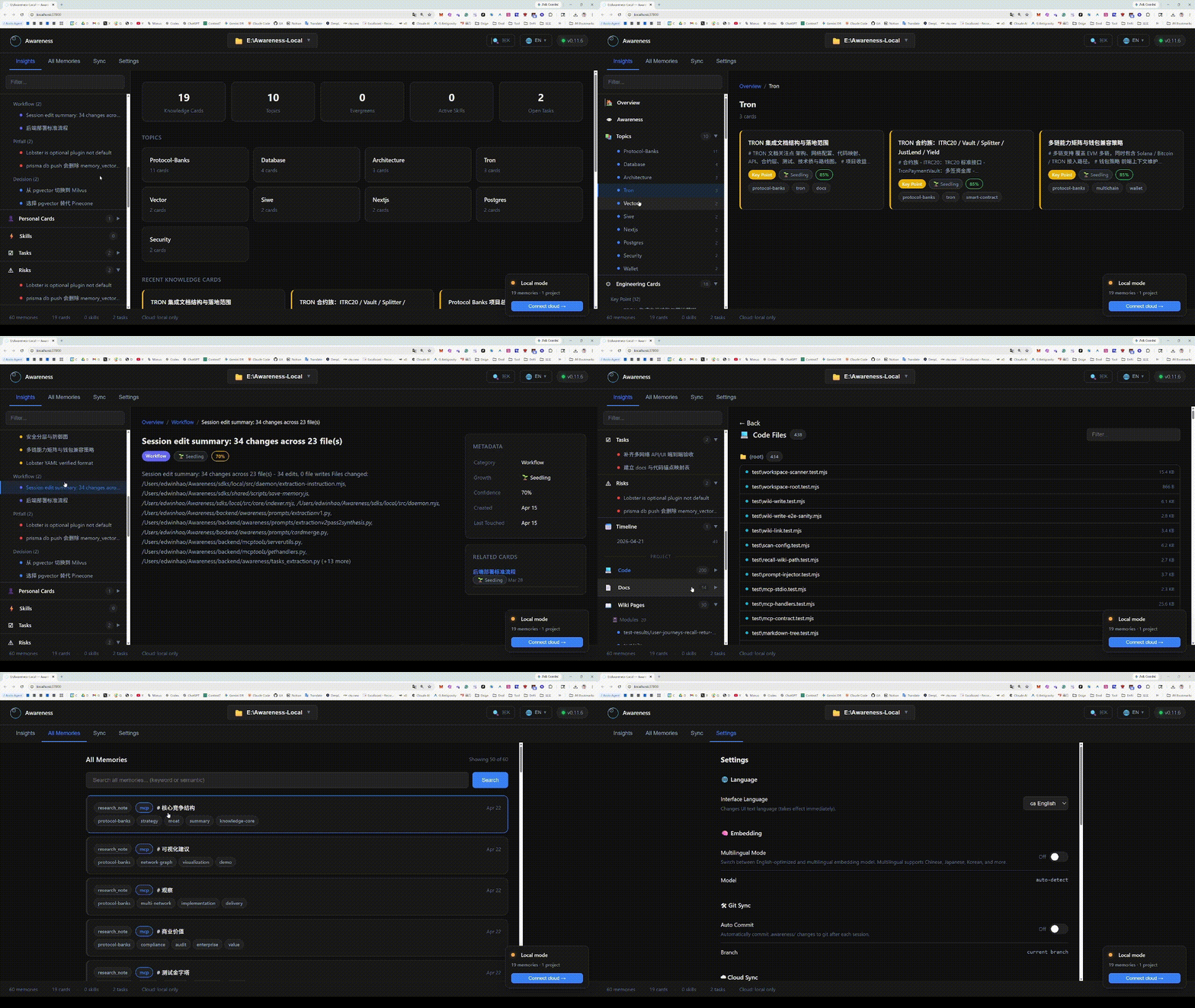
Visit http://localhost:37800/ to browse memories, knowledge cards, tasks, and manage cloud sync.
Cloud Sync (Optional)
Connect to Awareness Cloud for:
- Semantic vector search (100+ languages)
- Cross-device real-time sync
- Team collaboration
- Memory marketplace
SDK & Plugin Ecosystem
Awareness Local is part of the Awareness ecosystem:
| Package | For | Install |
|---|---|---|
| Awareness Local | Local daemon + MCP server | npx @awareness.market/setup |
| Python SDK | wrap_openai() / wrap_anthropic() interceptors | pip install awareness-memory-cloud |
| TypeScript SDK | wrapOpenAI() / wrapAnthropic() interceptors | npm i @awareness-sdk/memory-cloud |
| OpenClaw Plugin | Auto-recall + auto-capture | openclaw plugins install @awareness.market/openclaw-memory |
| Claude Code Plugin | Skills + hooks | /plugin marketplace add everest-an/Awareness-SDK → /plugin install awareness-memory@awareness |
| Setup CLI | One-command setup for 13+ IDEs | npx @awareness.market/setup |
Full SDK docs: awareness.market/docs
Requirements
- Node.js 18+
- Any MCP-compatible IDE
No Python, no Docker, no cloud account needed.
⭐ Support the project
If Awareness Local saves you from re-explaining your codebase to your AI agent, give it a ⭐ — it helps more developers discover the project and pushes it toward GitHub Trending.
License
MIT
Tags & Integration
IDE Support: Cursor, Windsurf, Trae, Zed, VS Code, JetBrains. Compatible with: OpenClaw, AutoGPT, LangChain, MetaGPT. Key Technology: OMP (Open Memory Protocol), LatentMAS, Shared Thought Space, One-click Deployment. Focus: Solving AI "Lobster Memory" (Long-term memory loss), Automating complex workflows, Simplifying Agent setup.