Content Distribution MCP vs Ms 365 MCP Server
A side-by-side look at the Content Distribution MCP and Ms 365 MCP Server MCP servers: transport, auth, tools, quality signals, and the config to install either one in Claude, Cursor, Windsurf or VS Code.
Verdict: choose Content Distribution MCP for communication work as a local process; choose Ms 365 MCP Server for communication as a local process. You can also run both side by side in one mcpServers block.
Which MCP server should you choose?
 Choose Content Distribution MCP when
- You need dedicated capabilities in the Communication domain.
- You prefer a local stdio subprocess transport.
- Its auth model fits you: API key required.
- You want tools like
post_publish, post_schedule, post_drain.
 Choose Ms 365 MCP Server when
- You need dedicated capabilities in the Communication domain.
- You prefer a local stdio subprocess transport.
- Its auth model fits you: OAuth 2.0.
- You want tools like
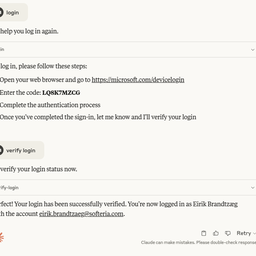
login, logout, verify-login.
Feature & specification comparison
Rows where the two servers differ are marked.
| Spec | ||
|---|---|---|
| Category | Communication | Communication |
| Quality signal | 60/100 · Good | 73/100 · Great |
| Install command | Confirmed | Confirmed |
| Transport | Local subprocess (stdio) | Local subprocess (stdio) |
| Auth | API key required | OAuth 2.0 |
| Pricing | Free | Free |
| Required env vars | None listed | None listed |
| Verified owner | Community listing | Community listing |
| GitHub stars | 5 | 1,071 |
| Directory activity | 3 views 0 installs 0 upvotes | 7 views 0 installs 0 upvotes |
| Tools | 8 | 19 |
| Full listing | View Content Distribution MCP | View Ms 365 MCP Server |
Tools & capabilities
Content Distribution MCP tools 8
post_publishPublish one or more channel variants immediately. Side effects: makes external HTTP requests to each channel platform; writes publish state to the local YAML backend; requires valid credentials in the named profile. Idempotent on (content.id, channel) — re-running with the same IDs returns cached state without re-posting. Use post_publish for immediate-only delivery; use post_schedule when any variant needs a future schedule_at; use post_drain to flush a previously built queue.post_scheduleEnqueue channel variants with schedule_at for future publishing; variants without schedule_at are published immediately. Side effects: writes entries to the local YAML schedule store; makes external HTTP requests for any immediately-published variants; requires credentials in the named profile. Idempotent on (content.id, channel). Use post_schedule when any variant needs a future publish time; use post_publish for all-immediate delivery; use post_drain to process the scheduled queue later.post_drainFire all scheduled posts due at or before the given time boundary. Side effects: makes external HTTP requests for each due entry; writes results to the YAML backend. Idempotent — already-published (content.id, channel) pairs are skipped; no-op when no entries are due. Safe to call from cron. Use post_drain on a recurring schedule to flush the queue; use post_publish or post_schedule to add new content; use post_status to inspect results after drain runs.post_statusReturn publish state for content pieces. Filters by content_id, channel, or both; returns all entries when neither is given. Side effects: read-only; no external HTTP calls; no auth needed. Deterministic given unchanged backend state. Use post_status to inspect what has been published, what is queued, or what errored; use post_publish, post_schedule, or post_drain to change state.post_unpublishBest-effort delete of a published post on the target platform. Side effects: makes an external HTTP DELETE or update request; DEV.to sets published=false (soft delete); platforms without a delete API return success=false without error. Non-idempotent — calling on an already-deleted URL may return a platform 404. Use post_unpublish to retract a live post; use post_status first to obtain the live_url; use post_publish to re-publish after an unpublish.channel_hintsReturn static per-channel metadata: character limits, Markdown support flags, tag vocabulary, and CTA placement rules. Side effects: read-only; no external HTTP calls; no auth needed. Fully deterministic — returns compile-time adapter constants. Use channel_hints before composing a variant body to understand channel constraints; use post_publish or post_schedule once you have a valid variant.profile_listReturn all distribution profile names configured in the YAML backend. Side effects: read-only; no external HTTP calls. Deterministic given backend state. Use profile_list to discover available profiles before calling post_publish, post_schedule, or subreddit_list; then pass the chosen name as profile_name.subreddit_listReturn all subreddits in the Subreddit Catalog with cooldown windows, flair vocabulary, and last-posted metadata. Optionally filtered to subreddits allowed by the named profile. Side effects: read-only; no external HTTP calls. Deterministic given backend state. Use subreddit_list to select a subreddit and obtain flair IDs before composing a reddit: channel variant; pass flair in variant.extras.flair.
Ms 365 MCP Server tools 19
loginAuthenticate with Microsoft accountlogoutLog out from Microsoft accountverify-loginCheck current Microsoft authentication statuslist-accountsList all Microsoft accounts configured in this server. Use this to discover available account emails before making tool calls. Reflects accounts added mid-session via --login.select-accountSelect a Microsoft account as the default. Accepts email address (e.g. user@outlook.com) or account ID. Use list-accounts to discover available accounts.remove-accountRemove a Microsoft account from the cache. Accepts email address (e.g. user@outlook.com) or account ID. Use list-accounts to discover available accounts.graph-batchCombine up to 20 Graph requests into a single HTTP call. Body: { requests: [{ id: '1', method: 'GET'|'POST'|'PATCH'|'DELETE', url: '/me/messages?$top=5', headers?: {...}, body?: {...}, dependsOn?: ['1'] }, ...] }. Returns { responses: [{ id, status, body, headers }] } in arbitrary order — match by id. Use cases: (1) parallelize many small reads (e.g. fetch 15 mail messages by id in one round-trip); (2) sequence dependent writes via dependsOn; (3) batch many Excel range writes into one call to dramatically reduce latency on large workbook builds. Note: each sub-request URL is relative to the Graph version root (/me/..., /drives/..., NOT https://graph.microsoft.com/v1.0/...). 💡 TIP: Combine up to 20 Graph requests into a single HTTP call. Body: { requests: [{ id: '1', method: 'GET'|'POST'|'PATCH'|'DELETE', url: '/me/messages?$top=5', headers?: {...}, body?: {...}, dependsOn?: ['1'] }, ...] }. Returns { responses: [{ id, status, body, headers }] } in arbitrary order — match by id. Use cases: (1) parallelize many small reads (e.g. fetch 15 mail messages by id in one round-trip); (2) sequence dependent writes via dependsOn; (3) batch many Excel range writes into one call to dramatically reduce latency on large workbook builds. Note: each sub-request URL is relative to the Graph version root (/me/..., /drives/..., NOT https://graph.microsoft.com/v1.0/...).list-subscriptionsRetrieve the properties and relationships of webhook subscriptions, based on the app ID, the user, and the user's role with a tenant. The content of the response depends on the context in which the app is calling; for details, see the scenarios in the Permissions section. 💡 TIP: Lists webhook subscriptions owned by the current app/user. Returns id, resource, changeType, notificationUrl, expirationDateTime, clientState. Use $filter=resource eq '/me/messages' to find subscriptions for a specific resource. No dedicated 'Subscription.*' scope exists — the caller must already have a read permission for the subscribed resource (e.g. Mail.Read for /me/messages), which is supplied by the tool that reads that resource.create-subscriptionSubscribes a listener application to receive change notifications when the requested type of changes occur to the specified resource in Microsoft Graph. To identify the resources for which you can create subscriptions and the limitations on subscriptions, see Set up notifications for changes in resource data: Supported resources. Some resources support rich notifications, that is, notifications that include resource data. For more information about these resources, see Set up change notifications that include resource data: Supported resources. 💡 TIP: Creates a webhook subscription for change notifications. Required body: { changeType (comma-separated: 'created,updated,deleted'), notificationUrl (HTTPS, must validate with token echo), resource (e.g. '/me/mailFolders/inbox/messages', '/users/{id}/events', '/teams/{id}/channels/{id}/messages'), expirationDateTime (ISO 8601, max varies by resource type — 1 hour for calls, 24h for messages, 3 days for mail), clientState (opaque string returned in notifications, for validation) }. Optional: includeResourceData (true enables rich notifications, requires encryptionCertificate + encryptionCertificateId). No dedicated scope — caller must have a read permission for the target resource (e.g. Mail.Read, Calendars.Read, ChannelMessage.Read.All, Files.Read.All).get-subscriptionRetrieve the properties and relationships of a subscription. See the table in the Permissions section for the list of resources that support subscribing to change notifications. 💡 TIP: Gets a specific webhook subscription by id. Use list-subscriptions to find the id. Returns full subscription details including resource, changeType, notificationUrl, expirationDateTime, applicationId.update-subscriptionRenew a subscription by extending its expiry time. The table in the Permissions section lists the resources that support subscribing to change notifications. Subscriptions expire after a length of time that varies by resource type. In order to avoid missing change notifications, an app should renew its subscriptions well in advance of their expiry date. See subscription for maximum length of a subscription for each resource type. 💡 TIP: Renews a webhook subscription by extending its expiration. Body: { expirationDateTime (ISO 8601, new expiry) }. Call before the current expirationDateTime to avoid missing notifications. Max extension varies by resource type — check Microsoft Graph docs for subscription limits.delete-subscriptionDelete a subscription. For the list of resources that support subscribing to change notifications, see the table in the Permissions section. 💡 TIP: Deletes a webhook subscription. No further change notifications will be sent. Use this to clean up stale subscriptions or stop receiving notifications. Use list-subscriptions to find the id.- +7 more on the listing page
Ready-to-paste client configs
Paste either block (or both) into your client config, e.g. claude_desktop_config.json or ~/.cursor/mcp.json. We only show a config when the install command is confirmed.
Content Distribution MCP
{
  "mcpServers": {
    "automatelab-tech-content-distribution-mcp": {
      "command": "npx",
      "args": [
        "-y",
        "@automatelab/content-distribution-mcp"
      ]
    }
  }
}
Ms 365 MCP Server
{
  "mcpServers": {
    "softeria-ms-365-mcp-server": {
      "command": "npx",
      "args": [
        "-y",
        "@softeria/ms-365-mcp-server"
      ]
    }
  }
}
Frequently asked questions
Content Distribution MCP is categorized under Communication and uses a local stdio subprocess. Ms 365 MCP Server belongs to Communication and uses a local stdio subprocess. Pick Content Distribution MCP for communication work and Ms 365 MCP Server for communication.
Copy the mcpServers block from the config section on this page into your client's config (for example claude_desktop_config.json or ~/.cursor/mcp.json), then fully restart the client.
Content Distribution MCP is listed as free. Auth: api key required. Ms 365 MCP Server is listed as free. Auth: oauth 2.0. If a server needs environment variables such as API keys, define them under the env key in your client's MCP config.
Yes. MCP clients support multiple servers: add automatelab-tech-content-distribution-mcp and softeria-ms-365-mcp-server as separate keys in the same mcpServers object, and your assistant will call tools from either one.
On AllMCPs, Content Distribution MCP has a quality signal of 60/100 (Good) with 3 views, 0 installs and 5 GitHub stars. Ms 365 MCP Server has 73/100 (Great) with 7 views, 0 installs and 1,071 GitHub stars.