Record AI decisions to a tamper-evident audit ledger from any MCP-compatible agent.
Quick Install
Automated & IDE SetupCopy the AI prompt to install this server into Claude Code, Cursor, or another agent — or use 1-click editor setup below.
Manual Client & Custom JSON ConfigExpand JSON ▾
Client Config & Setup
Choose your client or environment
Target File:
💡 Paste the JSON block into your client's configuration file under mcpServers, then restart the application.
Documentation Overview
audit-ledger-mcp
Connect Claude, Cursor, LangGraph, or your own agent to the AI Audit Ledger. This MCP server gives an agent the tools to record, check, and list decisions in a tamper-evident log with one line of config.
It is built for teams that need a clear record of AI decisions: EU AI Act Article 12 logging, FCA SS1/23 model risk evidence, and GDPR data minimisation. Raw personal data is hashed locally before anything is sent, so the ledger only sees fingerprints.



The AI Audit Ledger family. This MCP server writes decisions to the ledger, which proves what happened and whether the record was changed. The AI Decision Evidence Hub sits above the ledger, read-only. It turns each lightweight decision record into an audit case file by showing what evidence is present, what is still missing, who owns each gap, and the current readiness score. Family: audit-ledger · audit-ledger-mcp · evidence-hub.
Try the live dashboard → · 30 synthetic decisions written via this MCP server, queryable and verifiable.
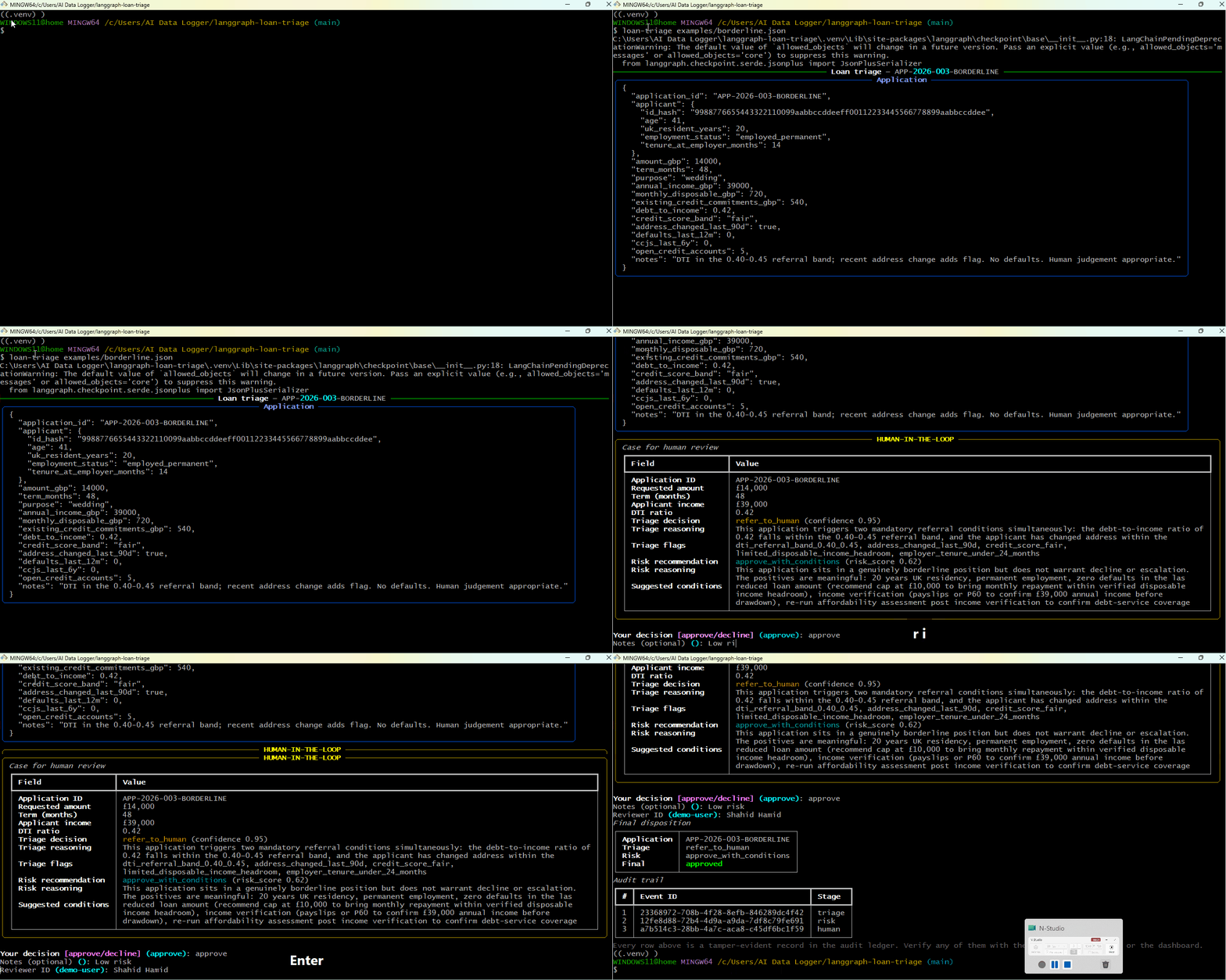
A LangGraph workflow calls
record_decisionafter each agent step. Three audit events written to the live ledger; every one independently verifiable.
What it does
Exposes four tools to any MCP-compatible agent:
| Tool | What it does |
|---|---|
record_decision | Log an AI decision. Hashes inputs locally, then writes through to the ledger. Returns an event ID. |
verify_decision | Cross-check a stored record against the immutable S3 Object Lock copy. Returns integrity_verified: true/false. |
verify_completeness | Detect deleted or missing records. Compares the ledger's per-tenant counter against the rows actually present and returns any sequence numbers that are gone. The answer to "can you prove the log is complete?" |
list_decisions | Query recent decisions, optionally filtered by time window. Tenant-scoped by API key. |
Each call ends up as a regulator-grade audit record in your deployed ledger — DynamoDB for query, S3 Object Lock COMPLIANCE mode for the immutable copy, 7-year retention by default.
Quick start — zero configuration
That's it. With no environment variables, the server boots into sandbox mode and writes records to a shared public tenant on a hosted ledger. You can try every tool — record_decision, verify_decision, verify_completeness, list_decisions — without provisioning anything.
When sandbox mode is active, you'll see a banner on stderr:
Sandbox properties
| Hosted by | github.com/shahidh68/audit-ledger (same AWS deployment) |
| Tenant | sandbox-public (shared, public) |
| Rate limit | 100 requests/minute per IP |
| Retention | 7 years (records cannot be deleted) |
| Audience | Tyre-kickers, integration tests, framework demos |
| NOT for | Production data, customer PII, real compliance records |
Wire it into Claude Desktop with zero config
Restart Claude Desktop. The four tools appear in the MCP menu immediately. Try asking Claude to "record this decision: should X be approved?" and watch a record land in the sandbox dashboard.
Production install
For real workloads, deploy your own audit ledger and point the MCP server at it:
Configure with the API URL plus your tenant keys (any of them being set switches off sandbox mode). AUDIT_HMAC_KEY is technically optional for backwards compatibility but strongly recommended — see the note above the value below:
The full template lives in .env.example.
Wire it into an agent
Claude Desktop
Edit your claude_desktop_config.json (macOS: ~/Library/Application Support/Claude/claude_desktop_config.json, Windows: %APPDATA%\Claude\claude_desktop_config.json):
AUDIT_HMAC_KEY is the tenant secret used to keyed-hash PII locally before any payload leaves the MCP server process. Generate it once with node -e "console.log(require('crypto').randomBytes(32).toString('hex'))" and store the result in the env block above. The MCP never transmits this value, only reads it.
Restart Claude Desktop. You'll see "audit-ledger" in the MCP tools menu. Ask Claude something like "Record this decision: I declined the application because…" and watch it call record_decision automatically.
Cursor
In Cursor settings → MCP → add server:
LangGraph (Python)
Using langchain-mcp-adapters:
Custom client (raw MCP)
The server speaks MCP over stdio. Send initialize, tools/list, and tools/call requests per the MCP specification.
How a record_decision call flows
Storage on the AWS side happens asynchronously through SQS → Processor Lambda → DynamoDB + S3 Object Lock. See the main repo's ARCHITECTURE.md for the full path.
Tool reference
record_decision
Record an AI decision to the ledger.
Related MCP Servers
Reviews
No reviews yet — be the first to share how this listing worked for you.
Frequently Asked Questions about Audit Ledger MCP
AllMCPs Directory Badge
Showcase your server listing on GitHub or your project documentation. Embed this dynamic SVG badge to highlight official listing status and live engagement.
Badge Style:
Live Dynamic SVG Preview
Markdown (GitHub README)
[](https://allmcps.com/mcp/audit-ledger-mcp)HTML Embed
<a href="https://allmcps.com/mcp/audit-ledger-mcp"><img src="https://allmcps.com/api/badge/audit-ledger-mcp?style=directory" alt="Audit Ledger MCP on AllMCPs" /></a>