A
Audio Studio MCP
Local AI BGM and sound effects for Claude Code and any MCP client. Stable Audio 3 on Apple Silicon (MLX) and Windows NVIDIA GPUs (PyTorch). No cloud, no API key.
Install Audio Studio MCP
Pick your client, then add it in one click or paste the config.
No confirmed install command yet
We only publish a config when the install details come from the project itself — its README, its docs, or a verified owner. We haven’t found those for audio-studio-mcp, and we’d rather show nothing than a guess you’d paste into your client.
Open setup steps on GitHubOverview
From the project README









Audio Studio MCP gives Claude Code, Claude Desktop, Cursor and any other MCP client a sound studio that runs on your own Mac or Windows PC. Ask for background music or a sound effect in plain language; the model generates it locally with Stable Audio 3. Then it can loop it, normalize the loudness and export it for your game engine or video editor. There is no cloud service and no API key, and generating doesn't cost anything.
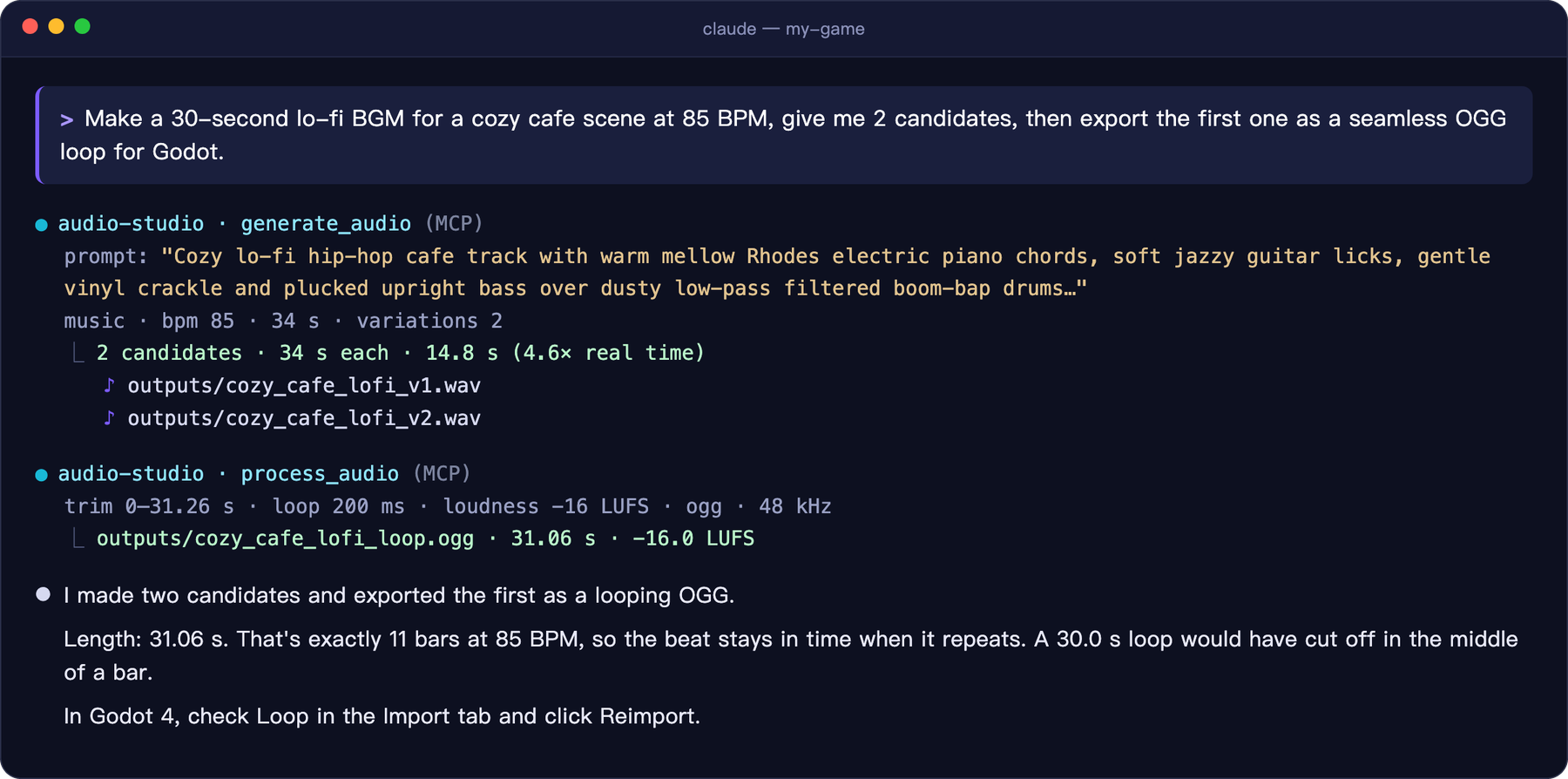
A real session, shortened. Claude picked a loop length of exactly 11 bars so the beat stays in time when it repeats.
✨ Highlights
 Generate BGM, instrument loops and sound effects from one sentence, 1–4 candidates per call |  Edit Re-style a whole clip, regenerate a time range, or extend a track |  Finish Seamless loops, fades, loudness (LUFS), 48 kHz WAV / OGG / FLAC |  Local Runs on Apple Silicon (MLX) or an NVIDIA GPU (PyTorch). Nothing is uploaded |
- Reproducible: every file gets a
.jsonsidecar with its prompt, seed and settings. - Prompting built in: the server teaches the client the official Stable Audio 3 prompt format, so a request like "make it sound like a creaky door" becomes a prompt the model understands.
- Same output as upstream: on a Mac, results for the same seed are bit-for-bit identical to the official
sa3CLI. On Windows it calls the official Stable Audio 3 PyTorch API.
🎧 Hear it
All of these were generated by this server on an M1 Mac and were not edited by hand. Open the sample page →
| Sample | Prompt | |
|---|---|---|
 | Lo-fi cafe music · 30 s · 85 BPM | Lo-fi hip-hop chill track with mellow electric piano, soft vinyl crackle, low-pass filtered drums… |
 | Epic orchestral music · 30 s | Epic cinematic orchestral trailer music with thundering taiko drums, soaring French horns… |
 | Chiptune adventure music · 20 s · 150 BPM | Upbeat 8-bit chiptune adventure theme with a bright square wave lead… |
 | Glass shatter sfx · 3 s | source: glass bottle · action: shattering on impact · material: thick green glass · space: concrete floor |
 | Rain & thunder sfx · 12 s | source: heavy rain and distant thunder · space: outdoor forest at night, wide stereo |
 | Synthwave, extended edit · 20 s → 40 s | edit_audio continue: a 20-second track extended to 40 seconds |
MP3s are in docs/samples/, with prompts and seeds in samples.json.
🧭 How it works
flowchart LR
    U["You<br/>“make a cozy cafe BGM”"] --> C["Claude Code · Desktop<br/>Cursor · any MCP client"]
    C -- "MCP" --> S["audio-studio-mcp<br/>generate · edit · process"]
    S --> M["Stable Audio 3<br/>MLX on Apple Silicon<br/>PyTorch on NVIDIA GPUs"]
    M --> F["WAV / OGG / FLAC + .json<br/>ready for game & video"]
🚀 Quick start
macOS (Apple Silicon)
Requirements:
- Apple Silicon Mac (M1 or later), 16 GB RAM recommended
- About 6 GB of disk for the model
gitandffmpeg(brew install ffmpeg)
git clone https://github.com/kanaworksai-hue/audio-studio-mcp.git
cd audio-studio-mcp
./install.sh
The installer sets up uv if needed, clones the official Stable Audio 3 runtime into vendor/ at a tested commit, creates .venv/, and downloads the medium model (1.4B, ~5.9 GB) from Hugging Face. It finishes by printing the exact command to register the server:
claude mcp add --scope user audio-studio -- /path/to/audio-studio-mcp/.venv/bin/audio-studio-mcp
Windows (NVIDIA GPU)
Requirements:
- 64-bit Windows 10 or 11 with an NVIDIA GPU (8 GB of VRAM or more) and a current driver. Tested on an RTX 3060 12 GB
- About 14 GB of disk for the model and PyTorch
git(winget install Git.Git) andffmpeg(winget install Gyan.FFmpeg)- A free Hugging Face account. The PyTorch weights are gated: open stabilityai/stable-audio-3-medium and accept the license once
git clone https://github.com/kanaworksai-hue/audio-studio-mcp.git
cd audio-studio-mcp
powershell -ExecutionPolicy Bypass -File install.ps1
The installer does the same steps as on macOS, but installs PyTorch with CUDA and downloads the official PyTorch checkpoint of the medium model (~10.4 GB). If you aren't logged in to Hugging Face yet, it asks for an access token with read permission (create one here). When it runs without a console (for example, started by an AI agent), it never asks: it prints the steps to log in and stops, and you re-run it after logging in. It finishes by printing the command to register the server:
claude mcp add --scope user audio-studio -- "C:\path\to\audio-studio-mcp\.venv\Scripts\audio-studio-mcp.exe"
Flash Attention is not needed. Without it, the runtime falls back to PyTorch's built-in attention.
Claude Desktop, Cursor and other clients
Add this to claude_desktop_config.json, .cursor/mcp.json or your client's MCP config:
{
  "mcpServers": {
    "audio-studio": {
      "command": "/path/to/audio-studio-mcp/.venv/bin/audio-studio-mcp"
    }
  }
}
On Windows the command is C:\\path\\to\\audio-studio-mcp\\.venv\\Scripts\\audio-studio-mcp.exe (backslashes doubled in JSON).
Installer options
| macOS | Windows | Effect |
|---|---|---|
--model all | -Model all | Also download the small, fast sm-music and sm-sfx models (+2.6 GB on macOS, +7 GB on Windows) |
--skip-weights | -SkipWeights | Don't download now; the first generation downloads them |
-y | -Yes | Install uv without asking |
On macOS, downloads are anonymous; logging in with hf auth login raises Hugging Face's rate limit. On Windows, the PyTorch weights are gated: accept the license on each model page you download (medium, small-music, small-sfx) and log in.
Security & health
What it can reach and how reliably it runs — from our own checks, not the maintainer’s claims.
ActiveLast checked 2d ago
Recent health check succeeded.
Adoption & maintenance
Factual signals from GitHub, npm, and our automated checks — not a rating.
GitHub stars128Stargazers on the source repository.
Last commit2d agoMost recent push to the default branch.
Directory activity1 viewsConfig copies, upvotes, and views on AllMCPs.
Reviews
No reviews yet — be the first to share how it worked for you.
Frequently Asked Questions about Audio Studio MCP
audio-studio-mcp is an MCP server that runs Stable Audio 3 locally on Apple Silicon Macs with MLX or Windows PCs with NVIDIA GPUs using PyTorch. It lets MCP clients such as Claude Code, Claude Desktop, and Cursor generate BGM and sound effects, then edit, process, and export audio without cloud services or API keys.
It can generate background music, instrument loops, and sound effects from natural-language prompts, with 1–4 candidates per call. It can also re-style clips, regenerate a time range, extend tracks, create seamless loops, apply fades, normalize loudness, and export finished audio.
No, audio-studio-mcp runs locally on your Apple Silicon Mac or Windows PC with an NVIDIA GPU, so audio generation does not upload files to a cloud service or require an API key.
It exports audio as 48 kHz WAV, OGG, or FLAC and creates a JSON sidecar for every file containing the prompt, seed, and settings. The server also supports loudness processing and seamless loops.
It supports macOS Apple Silicon through MLX and Windows NVIDIA GPUs through PyTorch. It is designed for Claude Code, Claude Desktop, Cursor, and other MCP-compatible clients.
Related MCP servers
Add a badge to your READMEShow it’s listed — live SVG, Markdown or HTML.
AllMCPs Directory Badge
Showcase your server listing on GitHub or your project documentation. Embed this dynamic SVG badge to highlight official listing status and live engagement.
Badge Style:
Live Dynamic SVG Preview
Markdown (GitHub README)
[](https://allmcps.com/mcp/audio-studio-mcp)HTML Embed
<a href="https://allmcps.com/mcp/audio-studio-mcp"><img src="https://allmcps.com/api/badge/audio-studio-mcp?style=directory" alt="Audio Studio MCP on AllMCPs" /></a>