One place for every AI agent's pages and docs: versioned links to share, search and update.
Quick Install
Automated & IDE SetupCopy the AI prompt to install this server into Claude Code, Cursor, or another agent — or use 1-click editor setup below.
One-click editor setup isn’t available for this listing yet — we don’t have a confirmed install command, and we’d rather show nothing than point your editor at the wrong package or host. Follow the project’s own setup instructions, linked above.
Manual Client & Custom JSON ConfigExpand JSON ▾
No confirmed setup config for this listing yet. We only publish a config block when the install details come from the project itself — its README, its docs, or a verified owner. We haven’t found those for artifact-site, and we’d rather show nothing than a guess you’d paste into your client. Follow the project’s own setup instructions for the current steps.
Documentation Overview

artifact-site
English | 简体中文 | 日本語 | Deutsch | Français | Español






There are now so many AI agents to choose from, but their output is scattered across your computer, chat histories and different platforms’ clouds, making it hard to organize, share and revisit.
artifact-site is a self-hosted workspace for individuals and teams, similar to Claude Artifacts or OpenAI Sites. Your various agents create the work; artifact-site brings it together, turning pages and documents into links for sharing, comments and feedback, access control and version history. The agents you already use can keep editing, publishing, searching and updating that work through the CLI or MCP.
You can self-host artifact-site or use the cloud version hosted by Lexmount.
Use the cloud version — hosted by Lexmount, with no deployment required. Drag and drop a file to publish it and get a shareable link. Upload without signing in, or sign in with Google or GitHub to keep your sites, organize them in folders and control who can open each link.
Anonymous uploads expire after a few days.
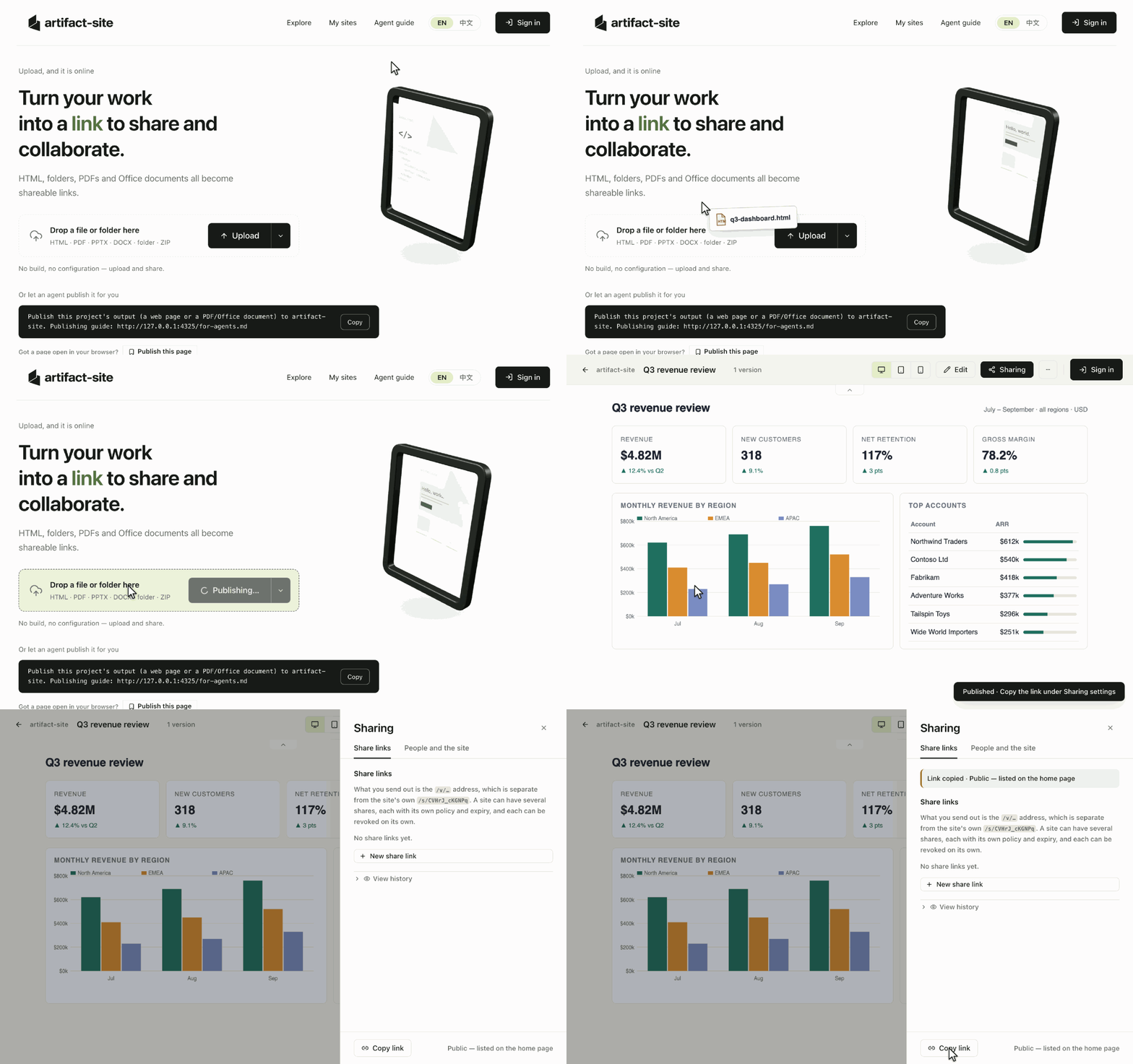
Drop a file, get a link, share it. View your published work online and choose who can open it in the sharing settings.
Why artifact-site
- Keep work in one place. Organize pages and documents in folders and find them with full-text search, including Chinese. Team members and agents can find the work they have permission to access.
- Drop it in and share it. Upload HTML, a build folder, a ZIP or a document to get a link. Large sites upload in chunks. Share with everyone, signed-in users, named people or passcode holders.
- Keep improving published work. Edit HTML text or source in the browser, or let an agent update the whole site. Each change keeps a version, with rollback and the option to save a copy.
- Let agents pick up where they left off. Publish and update through the guide, CLI or MCP, then search by content and read extractable text. For example, find a previous report and update it at the same address for your team to view.
How it compares
| For your team | Claude Artifacts / Claude Code Artifacts | ChatGPT Sites (OpenAI) | artifact-site |
|---|---|---|---|
| Hosting | Anthropic-managed | OpenAI-managed | Your server, with local or S3-compatible file storage |
| Publishing workflow | Within Claude / Claude Code | Within ChatGPT Sites | Any tool via file upload, CLI or remote MCP |
| Content focus | Interactive artifacts | Hosted websites and apps | Static HTML, build folders, ZIPs, PDF and Office documents¹ |
| Identity | Claude accounts | ChatGPT accounts | Your OIDC provider, such as Google, Keycloak or Okta |
¹ Office online preview requires Gotenberg. artifact-site hosts finished files; it does not run application backends or build jobs.
Claude Artifacts and ChatGPT Sites combine creation and hosted sharing. artifact-site complements those workflows with a shared home on your own infrastructure for pages and documents produced by different tools.
Product scope and sharing vary by plan and evolve; see the official Claude Artifacts and ChatGPT Sites guides.
Contents
- What you can publish
- Quick start (local deployment)
- Connect a coding agent
- Deploy for your team
- How it works
- Documentation
- Contributing
- License
What you can publish
| Content | What you can do |
|---|---|
| HTML, static site folders, ZIPs | Upload and preview single-page or multi-page sites, including build output such as dist/. HTML pages support visual text editing and source editing. |
| Read online, search and extract text. | |
| Office documents, such as PPTX and DOCX | Store and download originals; enable Gotenberg for online preview. |
Build web projects into static files before uploading; the platform does not run application backends or build jobs. PDF and Office documents do not support visual HTML editing, and scanned images are not automatically OCRed.
Hosted pages run in a sandbox and cannot use the platform's login session. External API connections require an origin allowlist. See the runtime limits and security design.
Quick start (local deployment)
You can use the cloud version without installing anything. To deploy locally, run the three commands below. You need Git, Make, Bash, Docker 24+ and the Compose plugin 2.24+. On macOS, use Docker Desktop; on Windows, run the commands inside WSL2 with Docker Desktop’s WSL integration enabled. No Node installation, domain or identity provider is needed.
Once started, open http://127.0.0.1:4300 and drop in HTML, a static site folder or a PDF to view your work. New sites are private by default; create a link with the desired access in Sharing before sending it to someone else.
The first run downloads dependencies and builds the image, then starts the app and Postgres. Use these commands in a fresh clone. The service is local-only by default; make down stops it and retains data. To make it reachable by your team, follow Deploy for your team.
Need a file to try? Create a sample page
Drop hello.html onto the home page (or choose Upload). You should see “Hello, artifact-site!”. Copy a link from the sharing settings; local-deployment links only open on the same machine.
Connect a coding agent
Choose the entry point that fits your agent:
- Skill:
npx skills add lexmount/artifact-site— install the agent skill and give your agent your server URL. - CLI:
npm install -g @artifact-site/cli— requires Node 24+; use the commands below. - MCP:
https://your-server/mcp— connect ChatGPT, Claude or another MCP client through the server’s OAuth sign-in; no CLI installation required. A client that only starts local MCP servers can run the CLI’sartifact-site mcpinstead.
CLI and MCP publishing create a public share by default. Use --share none (CLI) or share: false (MCP) to publish without sharing.
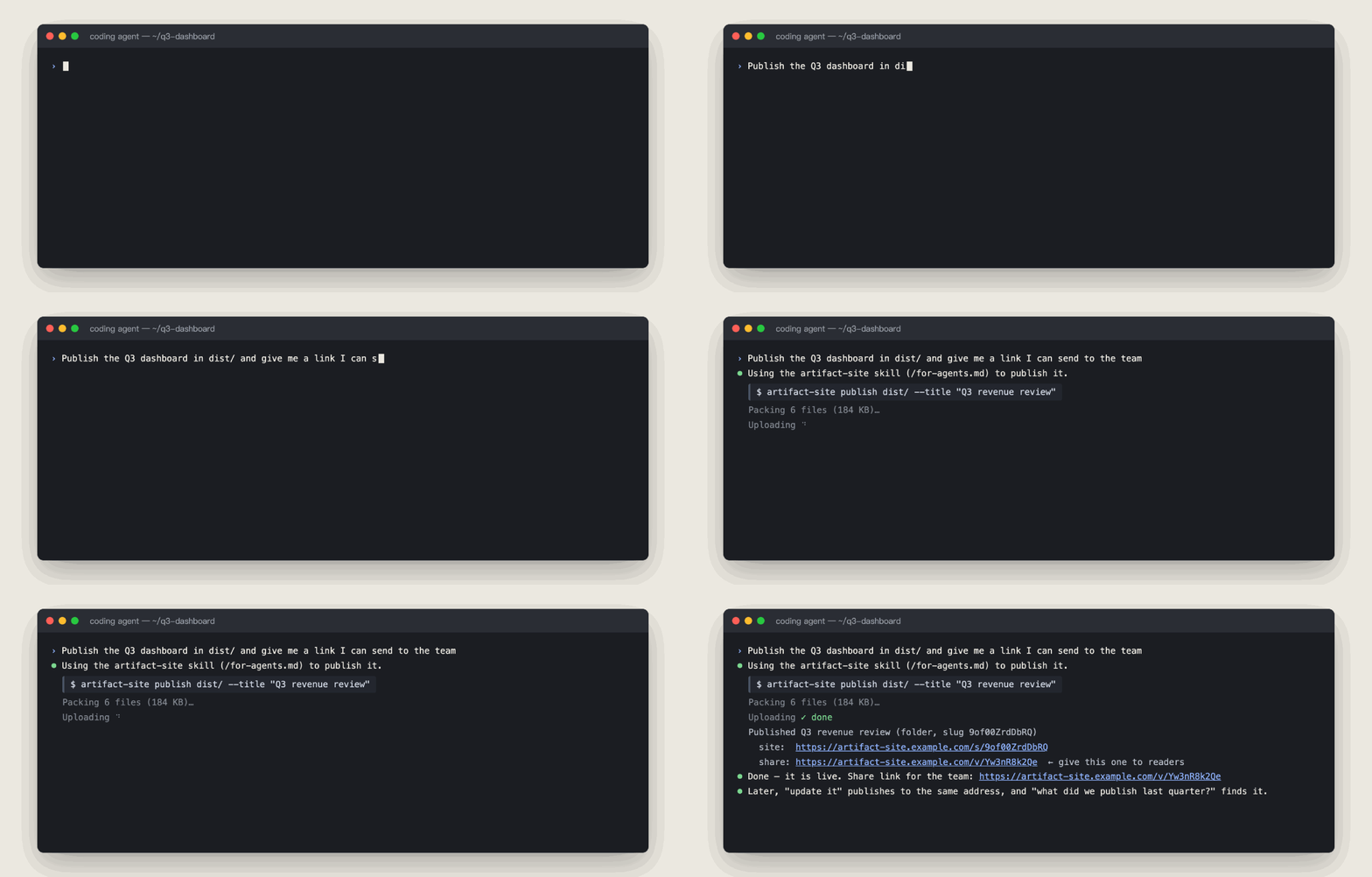
Or let your coding agent do it. With the agent guide (/for-agents.md), the CLI or the MCP server, "publish this and give me a link" is one instruction — and the site can be updated, searched and read the same way.
Give this instruction to Claude Code, Cursor, Codex or another coding agent that can read URLs, using a server address it can reach. The home page also provides a copy button with your server address filled in:
CLI examples (login requires OIDC):
Authentication details
Related MCP Servers
Reviews
No reviews yet — be the first to share how this listing worked for you.
Frequently Asked Questions about Artifact Site
AllMCPs Directory Badge
Showcase your server listing on GitHub or your project documentation. Embed this dynamic SVG badge to highlight official listing status and live engagement.
Badge Style:
Live Dynamic SVG Preview
Markdown (GitHub README)
[](https://allmcps.com/mcp/artifact-site)HTML Embed
<a href="https://allmcps.com/mcp/artifact-site"><img src="https://allmcps.com/api/badge/artifact-site?style=directory" alt="Artifact Site on AllMCPs" /></a>Technical Specs & Signals
CategoryDeveloper Tools
27Quality signal: Emerging · 27/100How this signal is calculated ▾
Server availabilityNot measured
Not scored for repo-hosted servers — we can't reach the running server, only its GitHub page. Hosted MCP endpoints are health-checked live.
Verified ownership8/20
Documentation & tools11/30
Adoption & activity1/15
Community engagement0/10
A guidance signal from public completeness & health data — not a user rating. New listings start lower and rise as they add docs, get verified, and grow adoption. Signals we can't observe for a listing are skipped, not counted against it.
Own this project?
This directory is pre-filled from public sources. Claim via GitHub README, site badge, or DNS TXT to unlock edit access and the Official badge — proof is checked automatically, then reviewed by our team.
Free dofollow backlink: add your website and place the AllMCPs badge on it — no claim needed. We detect it automatically and keep it verified as long as the badge stays live.
Claim & get free dofollowShare & Embed
Add our SVG badge (dark/light directory styles) or embeddable widget to your site.