workplaceattendancecalifornia-labor-lawwage-hour-compliancerostering
Provides deterministic tools for California wage-hour compliance, attendance audits, and shift rostering via MCP.
Quick Install
Automated & IDE SetupCopy the AI prompt to install this server into Claude Code, Cursor, or another agent — or use 1-click editor setup below.
Automated check passed— started and listed 8 tools correctly (1mo ago).
Manual Client & Custom JSON ConfigExpand JSON ▾
Client Config & Setup
Choose your client or environment
Target File:
💡 Paste the JSON block into your client's configuration file under mcpServers, then restart the application.
Overview
Use cases
Audit meal and rest break compliance under California labor rules
Calculate overtime and premium hours for complex shifts including overnight
Build and manage rotating shift rosters like 2-2-3 or DuPont schedules
Validate and triage suspicious or incomplete punch time streams
Generate multi-day wage-and-hour audit reports with compliance flags
Key features
Deterministic, repeatable compliance answers with citations
Supports California Labor Code §§ 226.7, 512 and Donohue v. AMN rules
Handles overnight shifts and explicit time zone offsets
Rounding worked time without losing exact-minute accuracy
Rotating roster builders for common shift patterns
Multi-day wage-hour audit with premium hours and risk heatmaps
Capabilities & Tool Schemas (8)
Inspect callable tools, capabilities, and parameters exposed to AI agents by Attendance Engine MCP.
resolve_dayResolve a single duty day from raw clock punches and a shift definition. Returns a structured DayResult with status, worked minutes, lateness, early-out, overtime, overnight handling, breaks-deducted minutes, data-integrity flags, and the resolved in/out segments.
resolve_periodResolve a sequence of duty days (a week, a pay period, a month). Returns per-day DayResult entries; optionally include an aggregated PeriodSummary with attendance rate and flag counts.
evaluate_break_complianceAnalyse meal & rest period compliance for a duty day under a jurisdiction rule pack. v0.1 ships the California pack (Labor Code §§ 226.7, 512; IWC wage orders). Returns per-meal/rest analysis, premium hours owed at the regular rate, waiver issues, and rebuttable-presumption risk per Donohue v. AMN.
apply_roundingProduce a rounded view of a resolved day's worked & overtime minutes without losing the exact-minute result. Useful for the California-style 'exact-minute is the baseline; rounding must be provably neutral' pattern — keep both views and compare across populations.
generate_rosterGenerate a rotating roster from a built-in pattern ('2-2-3', '4-on-4-off', 'dupont', 'pitman') or a custom day cycle. Returns one assignment per calendar date with shift label and HH:MM window, or null on rest days.
list_rule_packsList bundled jurisdiction rule packs (meal/rest compliance). Returns each pack with id, human label, citation source, and full rule definitions.
Documentation Overview
🕒 attendance-engine MCP
Wage-and-hour answers your AI agent can actually trust.
Ask Claude "Did anyone miss a meal break last Tuesday?" — and have it actually be right.




🤔 The problem
Every HR / payroll / time-tracking team eventually asks Claude (or Cursor, or Windsurf) something like:
"Rahim's punches yesterday were 09:00, 13:00, 14:00, and 18:00. Did he get his meal break under California rules?"
And the LLM does what LLMs do: it eyeballs the timestamps, mumbles something about "yes probably, his lunch looks fine," and moves on. Sometimes it's right. Sometimes it forgets that California requires the meal to start before the end of the 5th hour. Sometimes it counts a 25-minute break as compliant. Sometimes, for an overnight shift that crosses midnight, it just gives up.
You can't put that in front of an auditor. You can't ship it inside a payroll product. You can't trust it with overtime calculations that turn into back-pay liability if they're wrong.
💡 What this is
A small Model Context Protocol server that gives your AI agent deterministic, tested, fixture-backed tools for:
- Resolving a duty day from raw clock punches (overnight, breaks, OT, all of it).
- Auditing meal/rest compliance under the California rule pack (Labor Code §§ 226.7, 512; IWC wage orders), including Donohue v. AMN rebuttable-presumption signals.
- Rounding worked time without losing the exact-minute baseline (so you can prove your rounding is neutral).
- Building rotating rosters: 2-2-3, 4-on-4-off, DuPont, Pitman.
- Triaging suspicious punch streams before you trust them.
- Running a multi-day wage-and-hour audit across a whole pay period and rolling up premium hours owed, days at risk, and the flag heatmap.
The math lives in @attendance-engine/core — a pure-function, zero-deps TypeScript library with 100% test coverage. This MCP server is the thin agent surface on top.
🧠 How it actually works
Two important properties:
- Claude doesn't do the math. It picks a tool, fills the arguments, and forwards the answer. If the engine says "this was a late meal," the agent says "this was a late meal." If you re-ask the same question, you get the same answer — every time.
- Time zones are explicit, not guessed. Every timestamp carries its own offset. The engine never reads the host clock, never assumes UTC, never silently converts. DST days work because you told it the offset, not because it inferred it.
🚀 Install — pick your host
Pick the MCP host you're already using. Same one-liner everywhere:
Claude Desktop (macOS / Windows)
Edit ~/Library/Application Support/Claude/claude_desktop_config.json on macOS or %APPDATA%\Claude\claude_desktop_config.json on Windows:
Fully quit and relaunch Claude Desktop (Cmd-Q on macOS — closing the window isn't enough).
Cursor
~/.cursor/mcp.json:
Windsurf
~/.codeium/windsurf/mcp_config.json:
Any other MCP host
Launch the stdio binary directly:
The server speaks JSON-RPC over stdin/stdout — that's the whole contract.
🎬 See it in action
🖼️ Scenario cards below are publish-ready SVG mockups (render inline on GitHub, npm, LinkedIn). Real-product screenshots can replace them when you capture them — see
docs/screenshots/README.md.
Scenario 1 — Did the night-shift nurse get her meal break?
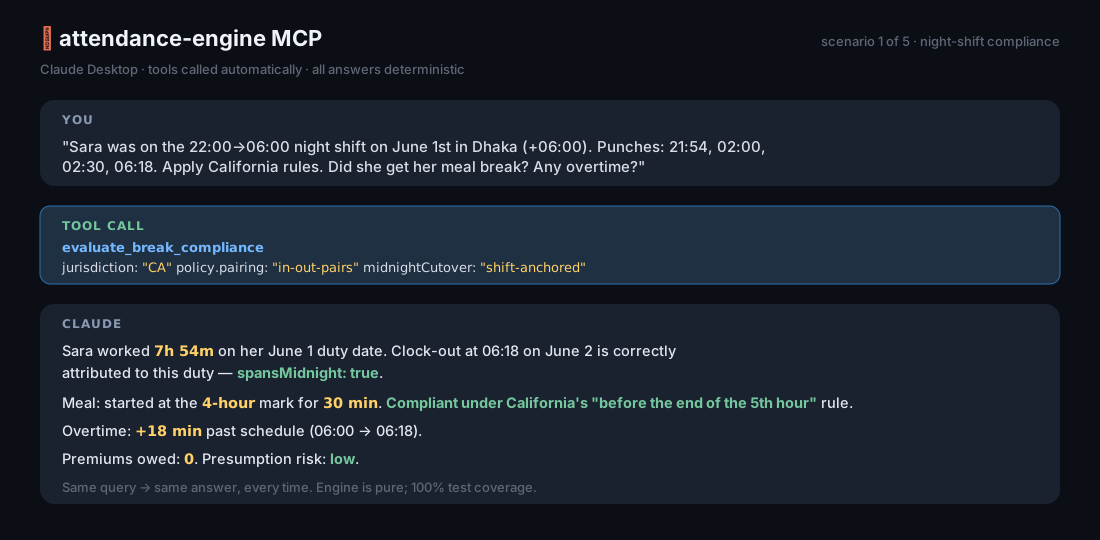
You: "Sara was on the 22:00→06:00 shift on June 1st. Punches: 21:54, 02:00, 02:30, 06:18. Apply California rules."
Claude (calls
evaluate_break_compliance): "Sara worked 7h54m on her duty date of June 1st (her clock-out fell on June 2nd but belongs to this shift). She took a 30-minute meal beginning at her 4-hour mark, which is compliant under California's mandate to start the first meal before the end of the 5th hour. Worked time spans midnight; flagged accordingly. She left 18 minutes past schedule — that 18m counts as overtime."
Scenario 2 — Find every late-meal day this month
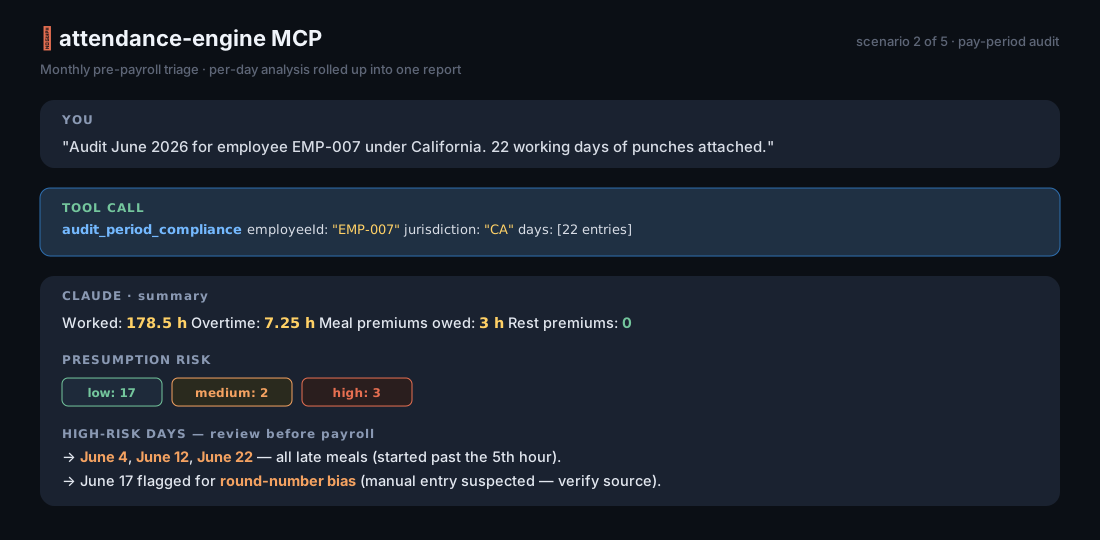
You: "Run an
audit_period_compliancefor employee EMP-007 across June 2026. Here are 30 days of punches and shifts. Use California."Claude: "3 days at high presumption risk — June 4, June 12, June 22. All three are late meals (started past the 5th hour). Total meal-period premium hours owed: 3. June 22 also drops below the 12-hour second-meal threshold. No rest-period violations detected."
Scenario 3 — Are these punches even usable?
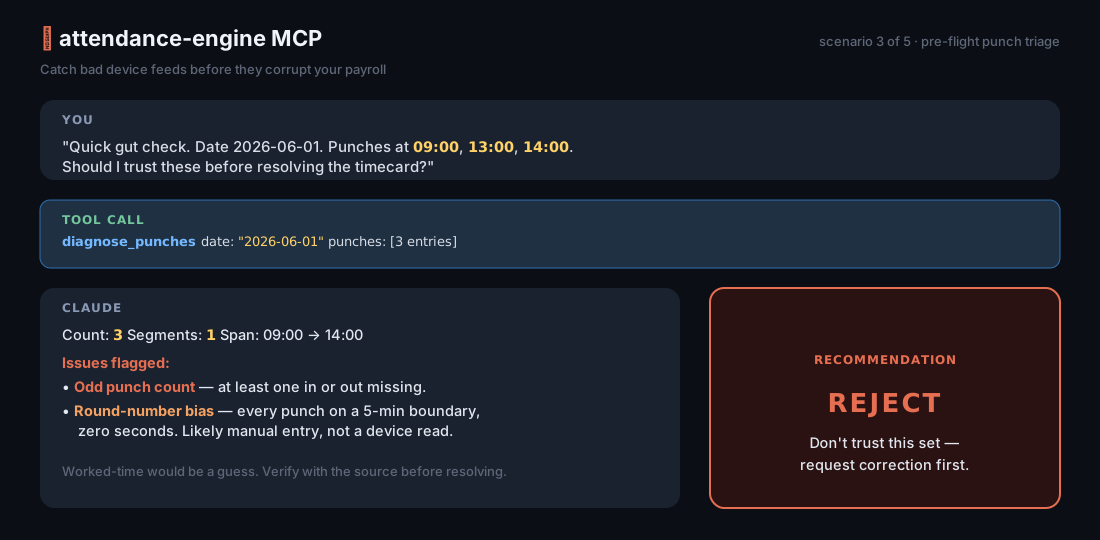
You: "I have punches 09:00, 13:00, 14:00 for June 1st. Can I trust these?"
Claude (calls
diagnose_punches): "Recommendation: reject. The punch count is odd — one in or out is missing. Without that, worked-time and overtime would be guesses. Also: every punch falls on a 5-minute boundary, which often indicates manual entry rather than a device read. Worth verifying with the source system before resolving."
Scenario 4 — Plan a 4-on-4-off roster for next month
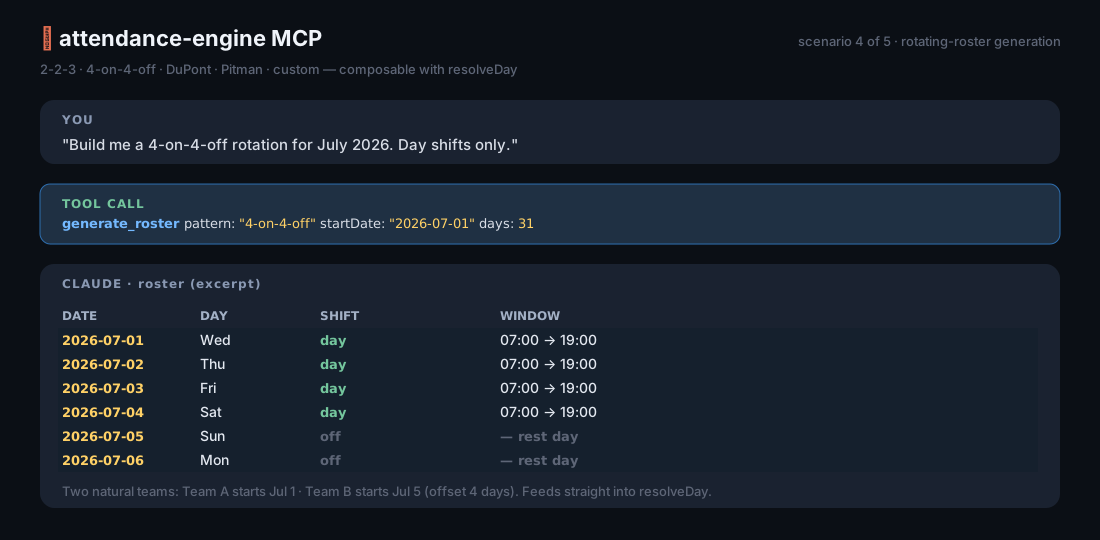
You: "Build me a 4-on-4-off roster for July 2026."
Claude (calls
generate_roster): "31 days — work days on July 1–4, 9–12, 17–20, 25–28 (12h day shifts, 07:00–19:00). Rest days fill the gaps. Want me to assign team rotations across this pattern?"
🛠️ Tools at a glance
| Tool | When you'd use it |
|---|---|
resolve_day | "What happened on this single day? Lateness, OT, segments, flags." |
resolve_period | "Roll up a week or a month: per-day results plus an aggregated summary." |
evaluate_break_compliance | "Did this person get their meal/rest breaks under California law? Is any premium owed?" |
audit_period_compliance | "Audit a whole pay period. Show me total premium hours, high-risk days, and the flag heatmap." |
apply_rounding | "Round worked/OT minutes to a unit — and keep the exact view alongside it so I can prove neutrality." |
diagnose_punches | "Triage this raw punch stream. Should I trust it?" |
generate_roster | "Build a 2-2-3 / 4-on-4-off / DuPont / Pitman / custom rotation." |
list_rule_packs | "What jurisdictions are supported?" (currently CA; more arrive in minor releases) |
📚 Resources & prompts
Resources you can paste into a chat:
| URI | What it is |
|---|---|
attendance://docs/overview | One-pager about the engine, time-zone rules, and how the tools compose. |
attendance://docs/api | Compact field-by-field API reference. |
attendance://rules/CA | The California rule pack as JSON — meal/rest thresholds, waiver limits, premium caps, the citation source. |
Guided prompts (the host's / menu, or prompts/get):
analyse_timecard— walks the model through the right tool calls to analyse a single duty day.roster_planner— generates a roster and renders it as a Markdown table.
🕰️ The time-zone rule (read this once and you're fine)
Every ISO timestamp must carry its own offset:
- ✅
2026-06-01T08:57:00+06:00 - ✅
2026-06-01T08:57:00Z - ❌
2026-06-01T08:57:00(rejected — the engine won't guess)
The engine reduces everything to absolute instants on a single timeline. DST works because the offsets are explicit. The duty date and shift HH:MM are worksite local wall-clock — match them to your business calendar, not to UTC.
For days with no punches (an absence, a holiday), pass policy.tzOffsetMinutes explicitly so the engine has something to anchor the shift window to.
🤝 Embedding (advanced)
Building your own host? Skip the CLI:
Related MCP Servers
Adoption & maintenance
Factual signals from GitHub, npm, and our automated checks — not a rating.
GitHub stars
1
Stargazers on the source repository.
npm downloads
60
Package downloads in the last 30 days.
Last commit
3mo ago
Most recent push to the default branch.
Availability
100%
Our rolling endpoint + install checks that succeeded.
Install check
Passed
Our sandbox started it and listed its tools.
Tools exposed
8
Callable tools this server registers over MCP.
Directory activity
2 views
Config copies, upvotes, and views on AllMCPs.
Reviews
No reviews yet — be the first to share how this listing worked for you.
Frequently Asked Questions about Attendance Engine MCP
AllMCPs Directory Badge
Showcase your server listing on GitHub or your project documentation. Embed this dynamic SVG badge to highlight official listing status and live engagement.
Badge Style:
Live Dynamic SVG Preview
Markdown (GitHub README)
[](https://allmcps.com/mcp/arifur9993-attendance-engine-mcp)HTML Embed
<a href="https://allmcps.com/mcp/arifur9993-attendance-engine-mcp"><img src="https://allmcps.com/api/badge/arifur9993-attendance-engine-mcp?style=directory" alt="Attendance Engine MCP on AllMCPs" /></a>Technical Specs & Signals
CategoryWorkplace & Productivity
PricingFree
10/10 checks healthy over the last 33d
68Quality signal: Great · 68/100How this signal is calculated ▾
Server availability25/25
Verified ownership10/20
Documentation & tools30/30
Adoption & activity3/15
Community engagement0/10
A guidance signal from public completeness & health data — not a user rating. New listings start lower and rise as they add docs, get verified, and grow adoption. Signals we can't observe for a listing are skipped, not counted against it.
Supply-chain signal
No high-severity advisories surfaced by our automated scan.
Critical 0High 0Medium 0Low 0
Scanned 24d ago via OSV.dev · @attendance-engine/mcp (npm)
Own this project?
This directory is pre-filled from public sources. Claim via GitHub README, site badge, or DNS TXT to unlock edit access and the Official badge — proof is checked automatically, then reviewed by our team.
Free dofollow backlink: add your website and place the AllMCPs badge on it — no claim needed. We detect it automatically and keep it verified as long as the badge stays live.
Claim & get free dofollowShare & Embed
Add our SVG badge (dark/light directory styles) or embeddable widget to your site.