financetradingmetatrader5mcpai-integration
Bridge AI assistants to MetaTrader 5 for natural language trading and account management.
Quick Install
Automated & IDE SetupCopy the AI prompt to install this server into Claude Code, Cursor, or another agent — or use 1-click editor setup below.
We couldn’t automatically confirm this listing starts correctly
We ran the install command below but it didn't respond within our test window — this can mean a slow first-time install rather than a real problem.
uvx metatrader-mcp-serverNo response to initialize.
This is an experimental automated check and can have false negatives — missing environment variables, a slow cold install, etc. It doesn’t necessarily mean something’s wrong. Last checked 1mo ago.
Manual Client & Custom JSON ConfigExpand JSON ▾
Client Config & Setup
Choose your client or environment
Target File:
💡 Paste the JSON block into your client's configuration file under mcpServers, then restart the application.
Overview
Use cases
Execute trades via natural language commands
Retrieve real-time and historical market data
Manage MetaTrader 5 account information and statistics
Automate order placement, modification, and closing
Integrate AI assistants with MetaTrader 5 for trading automation
Key features
Natural language trading commands
Multi-AI assistant support (Claude Desktop, ChatGPT, etc.)
Access to real-time prices, historical data, and symbol info
Full account control including balance, equity, and margin
Order management: place, modify, and close orders
Supports stdio, REST API, and WebSocket interfaces
Capabilities & Tool Schemas
Inspect callable tools, capabilities, and parameters exposed to AI agents by Metatrader MCP Server.
Extracted Tool Capabilities
Natural language trading commands
Multi-AI assistant support (Claude Desktop, ChatGPT, etc.)
Access to real-time prices, historical data, and symbol info
Full account control including balance, equity, and margin
Order management: place, modify, and close orders
Supports stdio, REST API, and WebSocket interfaces
Documentation Overview
MetaTrader MCP Server


Let AI assistants trade for you using natural language
📑 Table of Contents
- What is This?
- Features
- Who Is This For?
- Important Disclaimer
- Prerequisites
- Quick Start
- Trading Assistant Skill
- Usage Examples
- Available Operations
- WebSocket Quote Server
- Advanced Configuration
- Roadmap
- Development
- Contributing
- Documentation
- Getting Help
- License
🌟 What is This?
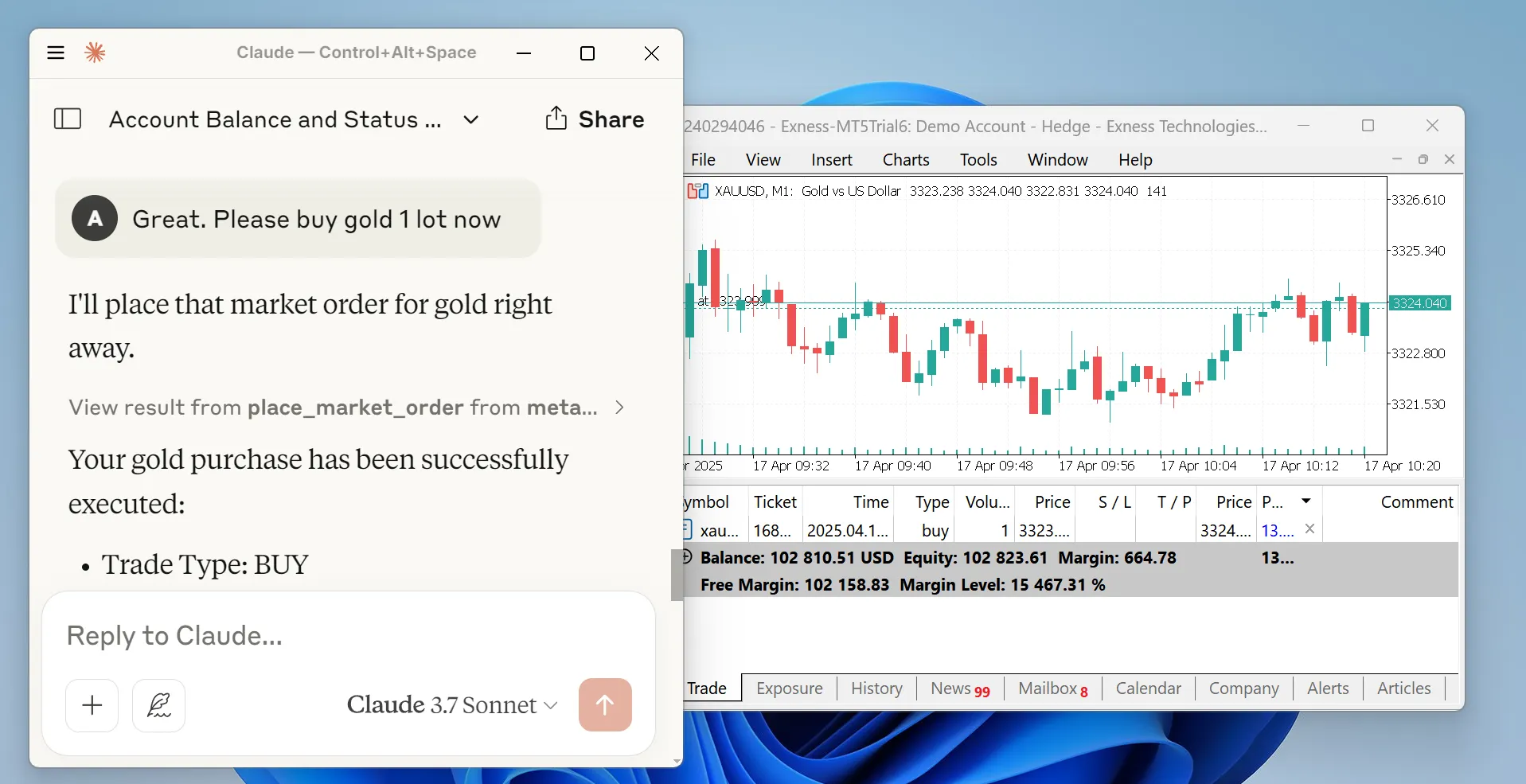
MetaTrader MCP Server is a bridge that connects AI assistants (like Claude, ChatGPT) to the MetaTrader 5 trading platform. Instead of clicking buttons, you can simply tell your AI assistant what to do:
"Show me my account balance" "Buy 0.01 lots of EUR/USD" "Close all profitable positions"
The AI understands your request and executes it on MetaTrader 5 automatically.
How It Works
✨ Features
- 🗣️ Natural Language Trading - Talk to AI in plain English to execute trades
- 🤖 Multi-AI Support - Works with Claude Desktop, ChatGPT (via Open WebUI), and more
- 📊 Full Market Access - Get real-time prices, historical data, and symbol information
- 💼 Complete Account Control - Check balance, equity, margin, and trading statistics
- ⚡ Order Management - Place, modify, and close orders with simple commands
- 🔒 Secure - All credentials stay on your machine
- 🌐 Flexible Interfaces - Use as MCP server, REST API, or WebSocket stream
- 📖 Well Documented - Comprehensive guides and examples
🎯 Who Is This For?
- Traders who want to automate their trading using AI
- Developers building trading bots or analysis tools
- Analysts who need quick access to market data
- Anyone interested in combining AI with financial markets
⚠️ Important Disclaimer
Please read this carefully:
Trading financial instruments involves significant risk of loss. This software is provided as-is, and the developers accept no liability for any trading losses, gains, or consequences of using this software.
By using this software, you acknowledge that:
- You understand the risks of financial trading
- You are responsible for all trades executed through this system
- You will not hold the developers liable for any outcomes
- You are using this software at your own risk
This is not financial advice. Always trade responsibly.
📋 Prerequisites
Before you begin, make sure you have:
- Python 3.10 or higher - Download here
- MetaTrader 5 terminal - Download here
- MT5 Trading Account - Demo or live account credentials
- Login number
- Password
- Server name (e.g., "MetaQuotes-Demo")
🚀 Quick Start
Step 1: Install the Package
Open your terminal or command prompt and run:
Step 2: Enable Algorithmic Trading
- Open MetaTrader 5
- Go to
Tools→Options - Click the
Expert Advisorstab - Check the box for
Allow algorithmic trading - Click
OK
Step 3: Choose Your Interface
Pick one based on how you want to use it:
Option A: Use with Claude Desktop (Local STDIO)
-
Find your Claude Desktop config file:
- Windows:
%APPDATA%\Claude\claude_desktop_config.json - Mac:
~/Library/Application Support/Claude/claude_desktop_config.json
- Windows:
-
Open the file and add this configuration:
Optional: Specify Custom MT5 Terminal Path
If your MT5 terminal is installed in a non-standard location, add the --path argument:
-
Replace
YOUR_MT5_LOGIN,YOUR_MT5_PASSWORD, andYOUR_MT5_SERVERwith your actual credentials -
Restart Claude Desktop
-
Start chatting! Try: "What's my account balance?"
Option B: Use with Open WebUI (For ChatGPT and other LLMs)
- Start the HTTP server:
Optional: Specify Custom MT5 Terminal Path
If your MT5 terminal is installed in a non-standard location, add the --path argument:
-
Open your browser to
http://localhost:8000/docsto see the API documentation -
In Open WebUI:
- Go to Settings → Tools
- Click Add Tool Server
- Enter
http://localhost:8000 - Save
-
Now you can use trading tools in your Open WebUI chats!
Option C: Real-Time Quotes via WebSocket
Stream live tick data (bid, ask, spread, volume) over WebSocket for dashboards, bots, or monitoring:
Connect with any WebSocket client:
You'll receive a connected message followed by continuous tick updates as JSON. See WebSocket Quote Server for full details.
Option D: Remote MCP Server (SSE)
Run the MCP server on a Windows VPS (where MT5 is installed) and connect to it remotely from Claude Desktop or Claude Code.
Server-side (on the Windows VPS):
This starts the SSE server on 0.0.0.0:8080 by default. Customize with --host and --port:
Client-side (Claude Desktop config on your local machine):
Replace VPS_IP with your server's IP address.
Security Warning: The MCP protocol does not include authentication. When exposing the SSE server over a network, use a firewall to restrict access by IP, or place it behind a reverse proxy with authentication, or use an SSH tunnel.
🤖 Trading Assistant Skill (Claude Code / Claude Desktop)
A pre-built Trading Terminal Assistant skill is included in the claude-skill/ directory. It provides Claude with structured knowledge about all 32 trading tools, output formatting, and MetaTrader 5 domain expertise.
Installing for Claude Code
Option 1: Symlink (recommended)
Create a symlink from the standard Claude Code skills directory to claude-skill/:
The skill will be auto-discovered and available as /trading.
Option 2: Copy
Copy the skill files into the Claude Code skills directory:
Installing for Claude Desktop
For Claude Desktop, copy the skill to the global Claude skills directory:
What the Skill Does
- Direct Execution: Executes trades immediately when requested, no extra confirmation needed
- Workflows: Knows how to chain tools for complex operations (e.g., place market order then set SL/TP)
- Formatting: Presents account data, positions, orders, and prices in clean terminal-style tables
- Domain Knowledge: Understands MT5 order types, timeframes, symbol formats, and filling modes
Usage
Once installed, invoke with /trading or just ask trading-related questions naturally:
📡 WebSocket Quote Server
The WebSocket Quote Server streams real-time tick data from MetaTrader 5 to any WebSocket client. It's ideal for live dashboards, algorithmic trading frontends, and real-time monitoring.
Starting the Server
The server starts on ws://0.0.0.0:8765 by default.
Customization
Related MCP Servers
Adoption & maintenance
Factual signals from GitHub, npm, and our automated checks — not a rating.
GitHub stars
795
Stargazers on the source repository.
Last commit
5mo ago
Most recent push to the default branch.
Install check
Inconclusive
Didn't respond in our test window — often a slow first install.
Directory activity
1 views
Config copies, upvotes, and views on AllMCPs.
Reviews
No reviews yet — be the first to share how this listing worked for you.
Frequently Asked Questions about Metatrader MCP Server
AllMCPs Directory Badge
Showcase your server listing on GitHub or your project documentation. Embed this dynamic SVG badge to highlight official listing status and live engagement.
Badge Style:
Live Dynamic SVG Preview
Markdown (GitHub README)
[](https://allmcps.com/mcp/ariadng-metatrader-mcp-server)HTML Embed
<a href="https://allmcps.com/mcp/ariadng-metatrader-mcp-server"><img src="https://allmcps.com/api/badge/ariadng-metatrader-mcp-server?style=directory" alt="Metatrader MCP Server on AllMCPs" /></a>