Evidence-first exploratory browser testing and reproducible bug reporting for coding agents.
Quick Install
Automated & IDE SetupCopy the AI prompt to install this server into Claude Code, Cursor, or another agent — or use 1-click editor setup below.
Not yet automatically verified
We haven't yet run this listing's install command through our automated sandbox check. This isn't a red flag — we're steadily working through the catalog.
Manual Client & Custom JSON ConfigExpand JSON ▾
Client Config & Setup
Choose your client or environment
Target File:
💡 Paste the JSON block into your client's configuration file under mcpServers, then restart the application.
Documentation Overview
Argus
An MCP server that tests apps like a real testing engineer—exploring user journeys, discovering unscripted bugs, and proving each finding before reporting it.
Argus is an MCP server. It adds evidence-first browser QA to Claude Code, Codex, Cursor, or any MCP host without taking over the host agent's identity or broader coding task. The agent explores, inspects, verifies persistence, and records reproducible bugs. Every certified finding is independently re-confirmed from a clean page load before it's reported.





Product page · Quick start · Why Argus · Compared · Tools · Benchmarks
The output
Give it a URL; get a report of bugs — each tagged with whether Argus independently reproduced it or only observed it:
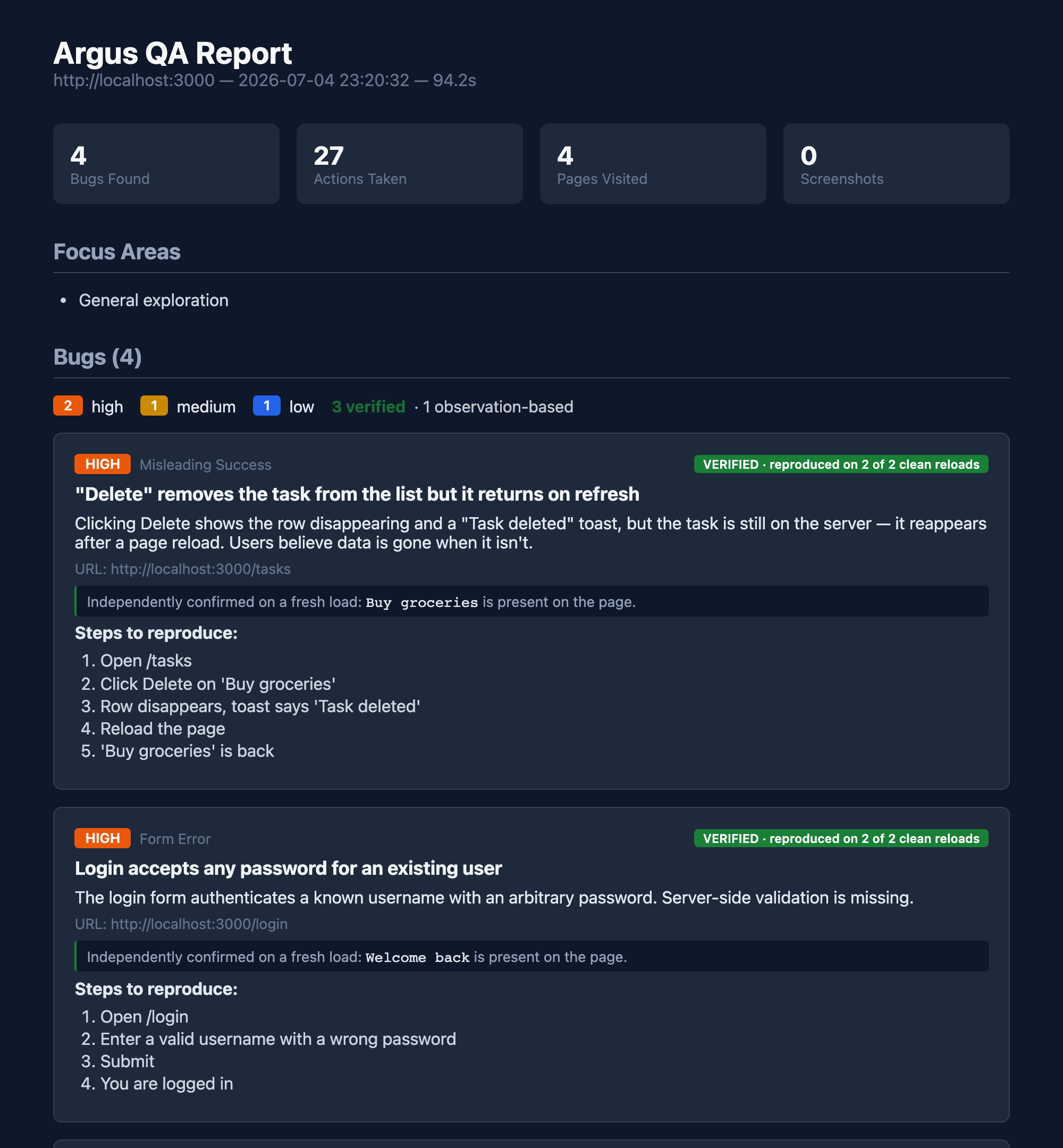
The green badge is the whole point. Anyone can have an LLM claim a bug. Argus re-loads the page from scratch and re-checks the symptom before it says VERIFIED — so the report is a list of bugs you can trust, not a list of guesses to triage.
How it works
The agent is the intelligence. Argus supplies concise QA guidance, a description-keyed tool surface (click_what("Login button"), not click(7)), a goal coverage ledger, and a reproduction-receipt engine that turns "the model thinks this is a bug" into "this bug is real, here's the proof."
Quick start
With uv installed, no global Python package install is required. Install Chromium once:
Then connect Argus to your MCP client.
Claude Code
Codex and the ChatGPT desktop app
Codex CLI, the Codex IDE extension, and the ChatGPT desktop app share the same local MCP configuration:
Cursor

The button adds Argus to Cursor; run the Chromium installation command above once before the first test.
Any stdio MCP client
The default core profile exposes the primary web-testing workflow without flooding the host with every specialist tool. Use uvx --from argus-testing argus-mcp --list-tools to inspect the selected profile, --tool-profile screen for native macOS testing, or --tool-profile full for the entire advanced surface. ARGUS_TOOL_PROFILE provides the same setting through the environment.
Then just ask, in your agent session:
"Test my app at http://localhost:3000 — find real bugs."
That's it. The agent drives; Argus keeps it honest and writes the report.
For a scoped review, the host can give start_session explicit goals, constraints, and an advisory time_budget_minutes. Argus returns the full testing protocol once and keeps outstanding goals and discovered pages visible in later observations. Mark a goal in_progress before its journey; when coverage_update marks it exercised or blocked, Argus requires a concrete explanation and automatically links the URLs, value-redacted actions, screenshots, persistence checks, bugs, and observations produced in that testing window. The final HTML and JSON reports preserve both completed and unfinished coverage instead of implying that an incomplete pass was comprehensive.
pip installation
CLI mode (no MCP host — bring your own LLM)
Screen mode (macOS) — test any native app, not just the web
Same description-keyed tools, but the target is whatever app is foreground on macOS — Notes, Cursor, Safari, your in-progress feature. No headless Chrome, no scripted Playwright. Argus sees what you see, via the Accessibility tree.
Artifact and resource limits
Argus writes each run's screenshots into its own run directory so later tests cannot overwrite earlier evidence. Long browser sessions also keep bounded in-memory event logs and only read response bodies for inspectable API traffic; binary and oversized bodies are skipped before they enter Python memory.
Report cleanup is explicit and dry-run by default. The newest 20 complete runs
are protected in this example; .argus journals and state capsules are never
deleted:
Use --older-than-days and --max-size-mb for stricter policies. Advanced
limits can be adjusted with ARGUS_MAX_NETWORK_EVENTS,
ARGUS_MAX_ERROR_EVENTS, ARGUS_MAX_DOWNLOAD_EVENTS,
ARGUS_MAX_DIALOG_EVENTS, ARGUS_MAX_RESPONSE_BODY_BYTES, and
ARGUS_MAX_RESPONSE_READ_BYTES. Responses without a declared length are skipped
by default; ARGUS_CAPTURE_UNKNOWN_LENGTH_BODY=1 opts into reading them. When a
limit discards old evidence, Argus says so in tool output and the final session
summary.
Why Argus is different
Existing testing tools only test what you script. Playwright and Cypress run the assertions you wrote. Argus discovers bugs you didn't think to test for — and then does the thing an LLM alone can't be trusted to do: proves them.
| Autonomous & black-box | You give it a URL, not a test plan. It explores like a real user — no repo access, no scripted steps. |
| Coverage contract | Optional natural-language goals, user constraints, discovered pages, and time budget stay visible throughout the session and in the final report. |
| Reproduction receipts | Before certifying a bug, it re-loads the page from a clean state and re-confirms the symptom. Engineered for zero false-certifications. |
| Finds human-eye bugs | Fake "Only 3 left!" scarcity, a "Saved" toast that doesn't save, a sale badge where the price didn't drop, a stale navbar after a rename. Static analysis catches none of these. |
| Discover → guard | Findings are journaled; argus-regression re-checks them on every build with zero LLM cost and a non-zero exit — a real CI gate against known bugs coming back. |
| Machine-readable | Every report also emits JSON, JUnit, and SARIF — so findings gate a pipeline and surface as inline GitHub PR annotations. |
How it compares
On the axis that matters for finding bugs — autonomously discover, independently verify, and report — Argus occupies a different slot from the browser-MCP crowd:
| Argus | Playwright MCP | Chrome DevTools MCP | browser-use | |
|---|---|---|---|---|
| Autonomously finds unknown bugs | Yes | No (driver) | No (debugger) | Partial (task-scoped) |
| Independently verifies each finding | Yes (receipt) | No | No | No (LLM score) |
| Evidence-rich bug report | Yes | No | No | Partial |
| Black-box (no repo / source access) | Yes | Yes | Yes | Yes |
| Zero-LLM CI regression gate | Yes | Partial | No | Partial |
These aren't "worse" tools — they're a different job. Playwright MCP gives an agent excellent hands; Chrome DevTools MCP gives it deep network/perf/memory inspection Argus doesn't have. Argus is the layer that decides what's a bug and proves it. Use them together.
Benchmarks
Related MCP Servers
Reviews
No reviews yet — be the first to share how this listing worked for you.
Frequently Asked Questions about Argus
AllMCPs Directory Badge
Showcase your server listing on GitHub or your project documentation. Embed this dynamic SVG badge to highlight official listing status and live engagement.
Badge Style:
Live Dynamic SVG Preview
Markdown (GitHub README)
[](https://allmcps.com/mcp/argus)HTML Embed
<a href="https://allmcps.com/mcp/argus"><img src="https://allmcps.com/api/badge/argus?style=directory" alt="Argus on AllMCPs" /></a>Technical Specs & Signals
CategoryDeveloper Tools
37Quality signal: Fair · 37/100How this signal is calculated ▾
Server availabilityNot measured
Not scored for repo-hosted servers — we can't reach the running server, only its GitHub page. Hosted MCP endpoints are health-checked live.
Verified ownership10/20
Documentation & tools16/30
Adoption & activity2/15
Community engagement0/10
A guidance signal from public completeness & health data — not a user rating. New listings start lower and rise as they add docs, get verified, and grow adoption. Signals we can't observe for a listing are skipped, not counted against it.
Own this project?
This directory is pre-filled from public sources. Claim via GitHub README, site badge, or DNS TXT to unlock edit access and the Official badge — proof is checked automatically, then reviewed by our team.
Free dofollow backlink: add your website and place the AllMCPs badge on it — no claim needed. We detect it automatically and keep it verified as long as the badge stays live.
Claim & get free dofollowShare & Embed
Add our SVG badge (dark/light directory styles) or embeddable widget to your site.