Local-first Apple Notes backup control room for macOS with a read-only MCP surface.
Quick Install
Automated & IDE SetupCopy the AI prompt to install this server into Claude Code, Cursor, or another agent — or use 1-click editor setup below.
Manual Client & Custom JSON ConfigExpand JSON ▾
Client Config & Setup
Choose your client or environment
Target File:
💡 Paste the JSON block into your client's configuration file under mcpServers, then restart the application.
Documentation Overview
Apple Notes Snapshot
Apple Notes Snapshot is the backup control room for Apple Notes on
macOS. Keep the upstream notes-exporter engine, then add path-aware exports,
launchd scheduling, visible health checks, and a calmer recovery path when
the local backup loop drifts.
🤝 Sister repo: looking to recover deleted notes after the fact, not back them up beforehand? See notes-recover — the forensic-grade reader for Apple Notes'
NoteStore.sqlite(recover deleted notes, browse the raw store, ship audit-ready bundles).notebackupcovers the before;notes-recovercovers the after. Together they cover the full Apple Notes lifecycle on macOS.
After the control room already makes sense, the repo also ships extra builder and diagnostics surfaces so humans and coding agents can inspect the same backup state without turning the workflow into a hosted service.
Start the 3-step quickstart | First-run troubleshooting | Open the proof page | Compare with upstream | Browse release history | Get support or routing help



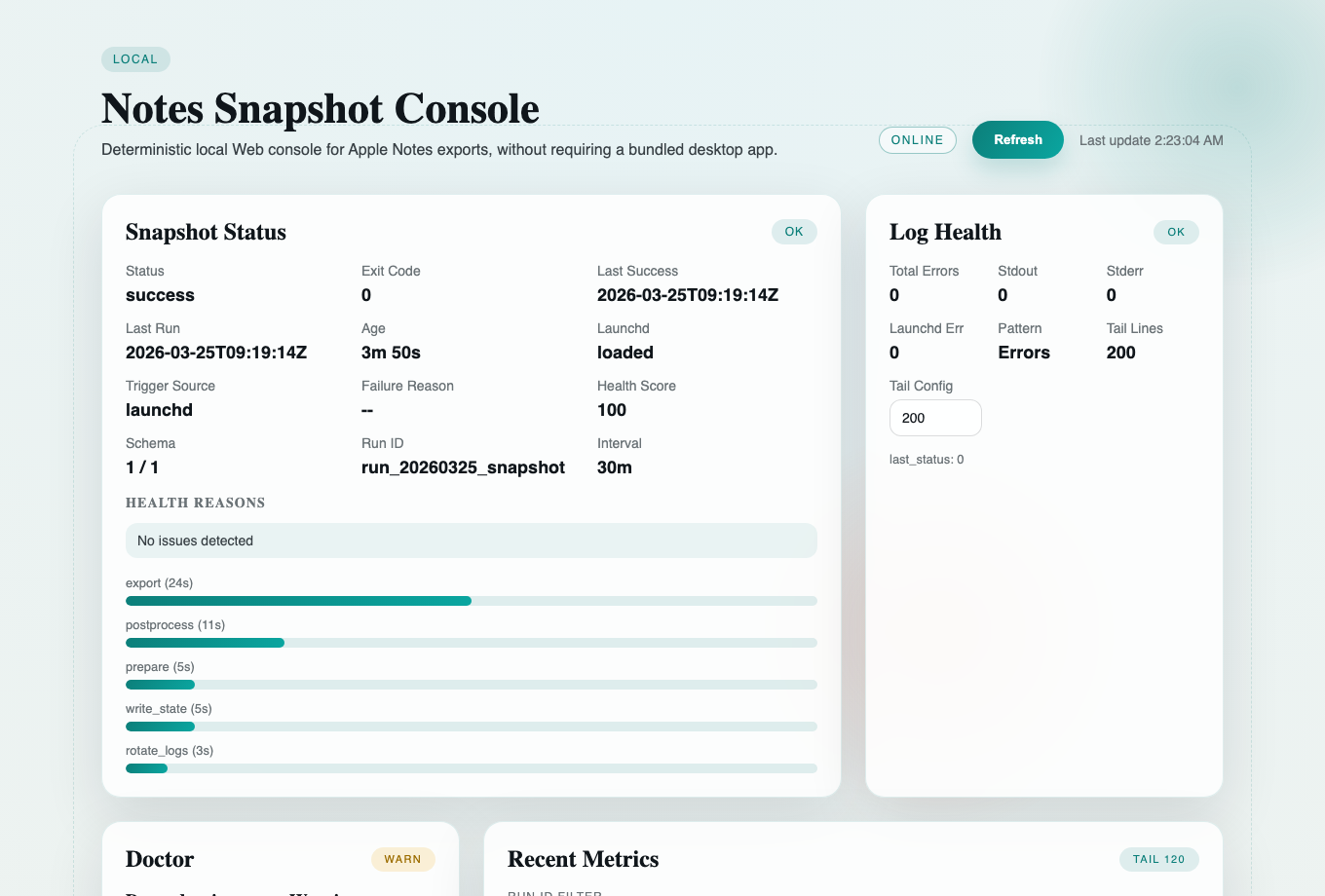
- Keep the path obvious Review or override the export destination before the first snapshot writes.
- Turn one-off exports into a local loop
Use
launchdto schedule repeatable snapshots instead of babysitting manual exports. - See health before you guess Check freshness, failure reasons, logs, and recovery clues when the loop drifts.
- Read the next safe move first The Web console now surfaces an operator focus deck above the raw transcript so you can see the next move, the reason, and the reading order before diving into action output.
Category: Apple Notes backup control room. AI/agent hook: AI-assisted diagnostics plus optional coding-agent access once the operator workflow is already clear. Result: a calmer, more reviewable backup workflow on your own Mac.
Best fit: people who already rely on Apple Notes and want a calmer, reviewable backup routine on their own Mac.
Not the goal: cloud sync, team collaboration, or two-way write-back into Apple Notes.
At A Glance
If you only want the shortest truthful filter before reading deeper, use this table first:
| What you need to know | Current answer |
|---|---|
| Product thesis | an Apple Notes backup control room for macOS |
| First success | ./notesctl run --no-status -> ./notesctl install --minutes 30 --load -> ./notesctl verify |
| First proof surface | the proof page after one healthy local loop exists |
| Second ring only | AI Diagnose, Local Web API, and MCP come after the operator path already makes sense |
| What it must never be reduced to | a hosted Notes service, cloud sync product, or generic AI dashboard |
What you can prove in one local pass
- The destination is obvious: you can review or override the snapshot path before anything writes.
- The loop is real: one manual run plus
launchdturns a one-off export into a repeatable local rhythm. - The control room is inspectable:
status,verify,doctor, logs, and proof pages all stay on the same local facts. - Integration surfaces are optional: AI Diagnose, the Local Web API, and MCP all stay behind the operator story instead of replacing it.
If you want the shortest public evidence trail after that first pass, open the proof page. It collects the repo-owned gates, the GitHub-controlled release and Pages evidence, and the current access boundary in one place.
Start with Run -> Install -> Verify
Treat the first healthy loop like a three-stop checklist, not like a dashboard to decode all at once.
- Run
Use
./notesctl run --no-statusonce so macOS can surface permissions and the local ledger can record a first successful baseline. - Install
Use
./notesctl install --minutes 30 --loadafter that first run so the workflow becomes a repeatablelaunchdloop instead of a manual chore. - Verify
Use
./notesctl verifyfirst, then./notesctl doctoronly if warnings or empty state remain.
After that verified loop exists, the Web console, proof page, AI Diagnose, Local Web API, and MCP surfaces become much easier to read because they are all describing a baseline you already proved.
Integration and maintainer routes after the operator path
The public product front door is still the local backup control room. The lanes
below are for builders after the first healthy loop exists; they do not replace
Run -> Install -> Verify.
- Public product front door: backup control room
- the main story is still the local path review, the first snapshot run, the
launchdloop, and the health check surface on your own Mac
- the main story is still the local path review, the first snapshot run, the
- Second ring builder protocol lane: pure MCP
- the repo's main machine-facing surface is the local stdio MCP flow behind
./notesctl mcpand the rootserver.json
- the repo's main machine-facing surface is the local stdio MCP flow behind
- Second ring builder packet lane: pure skills
- the public skill packet at
examples/public-skills/notes-snapshot-control-room/teaches hosts how to attach to that same local control room
- the public skill packet at
- Companion later lanes: plugin shell and
.mcpbpackagingplugins/apple-notes-snapshot-control-room/andpackaging/mcpb/are host-shaped packaging surfaces around the same local workflow- they matter, but they are not the first story a new reviewer should read
- Current non-claims
- no hosted Notes service
- no cloud sync product
- no official skill or plugin marketplace listing without fresh host-side read-back
- no cross-machine attach guarantee
Use the integration links below only after the operator loop already makes sense.
Secondary integration reads after the first healthy loop: AI Diagnose | Local Web API | MCP Provider | Distribution and listing boundaries | For Codex / Claude Code integrations
Quickstart
Start here if you want the shortest honest path from manual export to a repeatable local snapshot loop. The first-successful-run promise is 3 steps and about 3 minutes, not a zero-click install.
- Review
config/notes_snapshot.envand keep or change the default export path. - Run one snapshot so macOS can show Apple Notes / AppleScript permission prompts.
- Install the scheduler, then verify health.
Fail fast:
- If
./notesctl verifysaysFAIL: no last_success record; run ./notesctl run, you have not completed the first manual export yet. - If macOS permissions block the first run, use
./notesctl permissionsand the public troubleshooting guide. - The full, authoritative guide lives at docs/quickstart.
- The public proof page shows the repo-side gates, live-surface checks, and trust boundary in one place.
- Maintainer-grade verification lives later in Proof and verification; it is not required for the first successful snapshot.
Choose the right lane
Keep the operator lane and the maintainer lane separate.
- Operator lane
./notesctl run --no-status./notesctl install --minutes 30 --load./notesctl verify./notesctl doctor./notesctl status --full- optional after the local state exists:
./notesctl ai-diagnose,./notesctl web, and./notesctl mcp
- Maintainer lane
./notesctl clean-cache --dry-run./notesctl clean-cache./notesctl rebuild-dev-env./notesctl update-vendor./notesctl setup/./notesctl self-heal
If your goal is a healthy backup loop, stay in the operator lane first. The maintainer lane is for repo upkeep and contributor verification after the local workflow already makes sense.
Why this exists
The upstream notes-exporter
project is great when you want to export Apple Notes right now. This repository
exists for the moment when "run it once" turns into "keep it healthy every
day."
Apple Notes Snapshot wraps the upstream exporter with:
Related MCP Servers
Reviews
No reviews yet — be the first to share how this listing worked for you.
Frequently Asked Questions about Apple Notes Snapshot
AllMCPs Directory Badge
Showcase your server listing on GitHub or your project documentation. Embed this dynamic SVG badge to highlight official listing status and live engagement.
Badge Style:
Live Dynamic SVG Preview
Markdown (GitHub README)
[](https://allmcps.com/mcp/apple-notes-snapshot)HTML Embed
<a href="https://allmcps.com/mcp/apple-notes-snapshot"><img src="https://allmcps.com/api/badge/apple-notes-snapshot?style=directory" alt="Apple Notes Snapshot on AllMCPs" /></a>