AllMCPs
BrowseBestCategoriesStackCompareToolsGuidesBlog Log in Submit MCP

Stay in the loop

Get new MCP servers and top picks in your inbox.

AllMCPs

The open directory for discovering and installing Model Context Protocol servers.

Explore

  • Browse servers
  • Best MCP servers
  • Categories
  • MCP clients
  • Agent prompts
  • Stack Builder
  • Compare servers
  • Tags index
  • Submit a server
  • Pricing

Learn

  • Guides hub
  • What is MCP?
  • Install guide
  • Troubleshooting
  • Security
  • Blog
  • Blog RSS

Tools

  • All tools
  • Config generator
  • Config validator
  • MCP playground
  • OpenAPI β†’ MCP
  • Badge generator

For agents

  • API docs
  • Trust & traffic
  • llms.txt β†— (opens in a new tab)
  • Catalog JSON β†— (opens in a new tab)
  • Remote MCP β†— (opens in a new tab)

Company

  • About
  • Contact
  • X (@AllMCPs) β†— (opens in a new tab)
  • GitHub β†— (opens in a new tab)
  • Terms
  • Privacy
AllMCPs VerifiedAllMCPs VerifiedFeatured on Nick LaunchesFeatured on Nick LaunchesLaunch Llama NewsletterLaunch Llama NewsletterVerified DR - allmcps.comVerified DR - allmcps.comFeatured on SaaSGrowFeatured on SaaSGrowFeatured on Twelve ToolsFeatured on Twelve ToolsFeatured on Saaspa.geFeatured on Saaspa.geFeatured on Findly.toolsFeatured on Findly.toolsFeatured on Startup FameFeatured on Startup FameFeatured on LaunchKiwiFeatured on LaunchKiwiFeatured on ScrollLaunchFeatured on ScrollLaunchFeatured on DailyPingsFeatured on DailyPingsFazier badgeFazier badgeFeatured on NewTool.siteFeatured on NewTool.siteFeatured on saasfame.comFeatured on saasfame.comDR Checker - Domain RatingDR Checker - Domain RatingListed on Turbo0Listed on Turbo0Launched on LaunchBoard - Product Launch PlatformLaunched on LaunchBoard - Product Launch PlatformList on SimilarlabsList on Similarlabshttps://codetrendy.comhttps://codetrendy.comListed on DevTool.ioFeatured on BuildlistFeatured on BuildlistAllMCPs VerifiedAllMCPs VerifiedFeatured on Nick LaunchesFeatured on Nick LaunchesLaunch Llama NewsletterLaunch Llama NewsletterVerified DR - allmcps.comVerified DR - allmcps.comFeatured on SaaSGrowFeatured on SaaSGrowFeatured on Twelve ToolsFeatured on Twelve ToolsFeatured on Saaspa.geFeatured on Saaspa.geFeatured on Findly.toolsFeatured on Findly.toolsFeatured on Startup FameFeatured on Startup FameFeatured on LaunchKiwiFeatured on LaunchKiwiFeatured on ScrollLaunchFeatured on ScrollLaunchFeatured on DailyPingsFeatured on DailyPingsFazier badgeFazier badgeFeatured on NewTool.siteFeatured on NewTool.siteFeatured on saasfame.comFeatured on saasfame.comDR Checker - Domain RatingDR Checker - Domain RatingListed on Turbo0Listed on Turbo0Launched on LaunchBoard - Product Launch PlatformLaunched on LaunchBoard - Product Launch PlatformList on SimilarlabsList on Similarlabshttps://codetrendy.comhttps://codetrendy.comListed on DevTool.ioFeatured on BuildlistFeatured on Buildlist
Β© 2026 Jackalope Digital LLC. All rights reserved.
  1. Home
  2. πŸ’» Developer Tools
  3. Api
A
Health: Not checked yetWe have not completed a health check for this listing yet.Last checked 8/10/2026, 11:23:19 PM

Api

Enrichment pendingWe haven’t run our AI enrichment pass on this listing yet, so the overview, use cases, and FAQ below may be sparse or missing. We work through the catalog over time β€” check back soon.
View Repository

AI document intelligence: extract, summarize, claim-check, and notarize with on-chain proofs.

Quick Install

Automated & IDE Setup

Copy the AI prompt to install this server into Claude Code, Cursor, or another agent β€” or use 1-click editor setup below.

Add to CursorAdd to VS Code
Manual Client & Custom JSON ConfigExpand JSON β–Ύ

Install Config Generator

Choose your client
claude_desktop_config.json
{
  "mcpServers": {
    "api-4": {
      "command": "npx",
      "args": [
        "-y",
        "api-4"
      ]
    }
  }
}

πŸ’‘ Paste into ~/Library/Application Support/Claude/claude_desktop_config.json (macOS) or %APPDATA%\Claude\claude_desktop_config.json (Windows)

Install Directory Badge Claim listing AlternativesπŸ’» More in Developer Tools

Documentation Overview

DocImprint

Document memory agents can prove.
PDFs & URLs β†’ cited answers Β· evidence bundles Β· on-chain attestation

npm version npm downloads PyPI version PyPI downloads smithery badge Glama MCP OpenAPI docs MIT license GitHub stars


Table of contents

  • At a glance
  • Choose your integration
  • See what you get
  • How it works
  • Why not plain OCR or RAG?
  • Use cases
  • Install
  • Quick start
  • Examples
  • Features
  • Why DocImprint?
  • Agent-native features
  • CrewAI integration
  • MCP server
  • API reference
  • Error handling
  • Authentication
  • TypeScript
  • Pricing
  • Community
  • Links

At a glance

DocImprint turns any PDF or URL into a tamper-evident evidence bundle β€” structured data, AI-cited answers, and a cryptographic proof your agents can verify independently.

InputPDF or URL
Outputev_... evidence bundle β€” cited answers, artifact hashes, EIP-191 signature
Verifyclient.verify() β€” free, no auth; optional Base L2 notarization via EAS

Choose your integration

PathBest forStart here
TypeScript SDKNode agents, typed appsQuick start
Python SDKCrewAI, scriptsQuick start Β· CrewAI
MCP serverClaude, CursorMCP server
x402 USDCAutonomous agents, no accountx402 USDC payments

See what you get

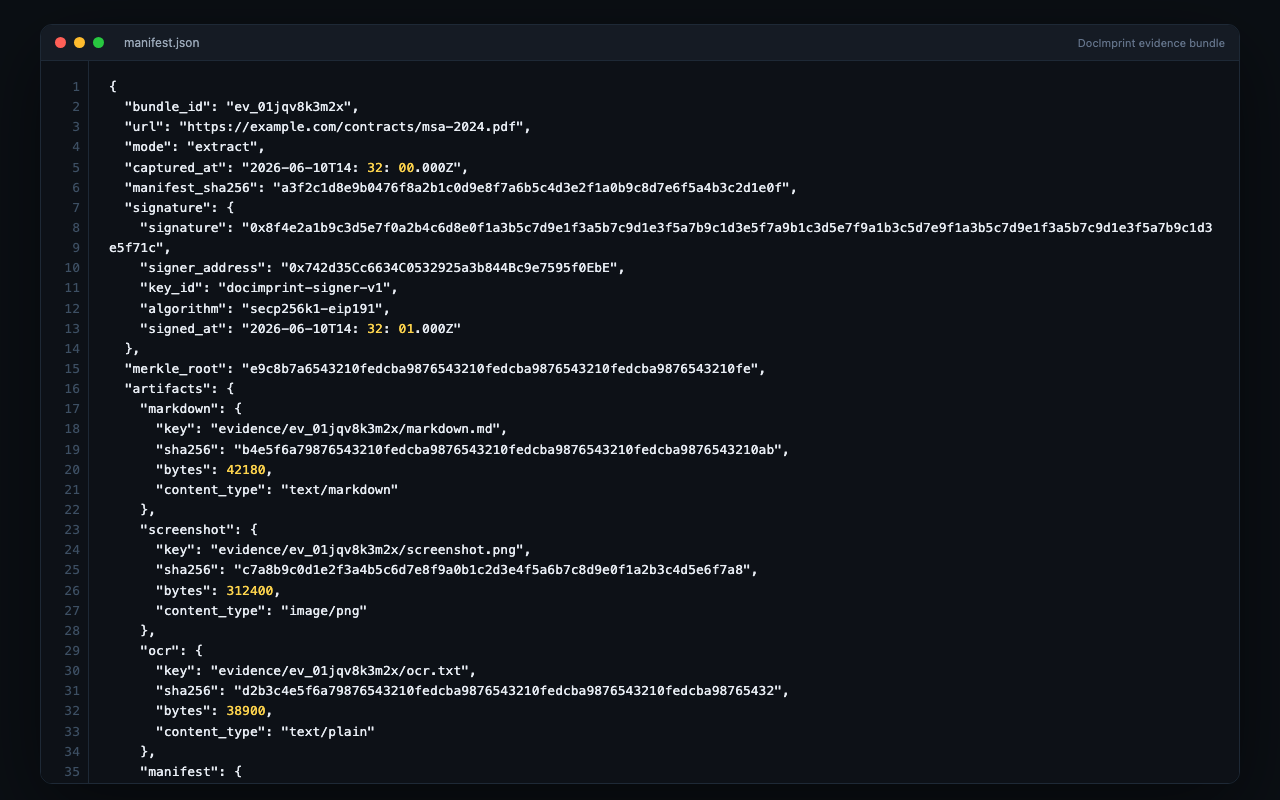
Every response includes a verifiable bundle ID, manifest hash, and cited answers tied to exact source quotes.
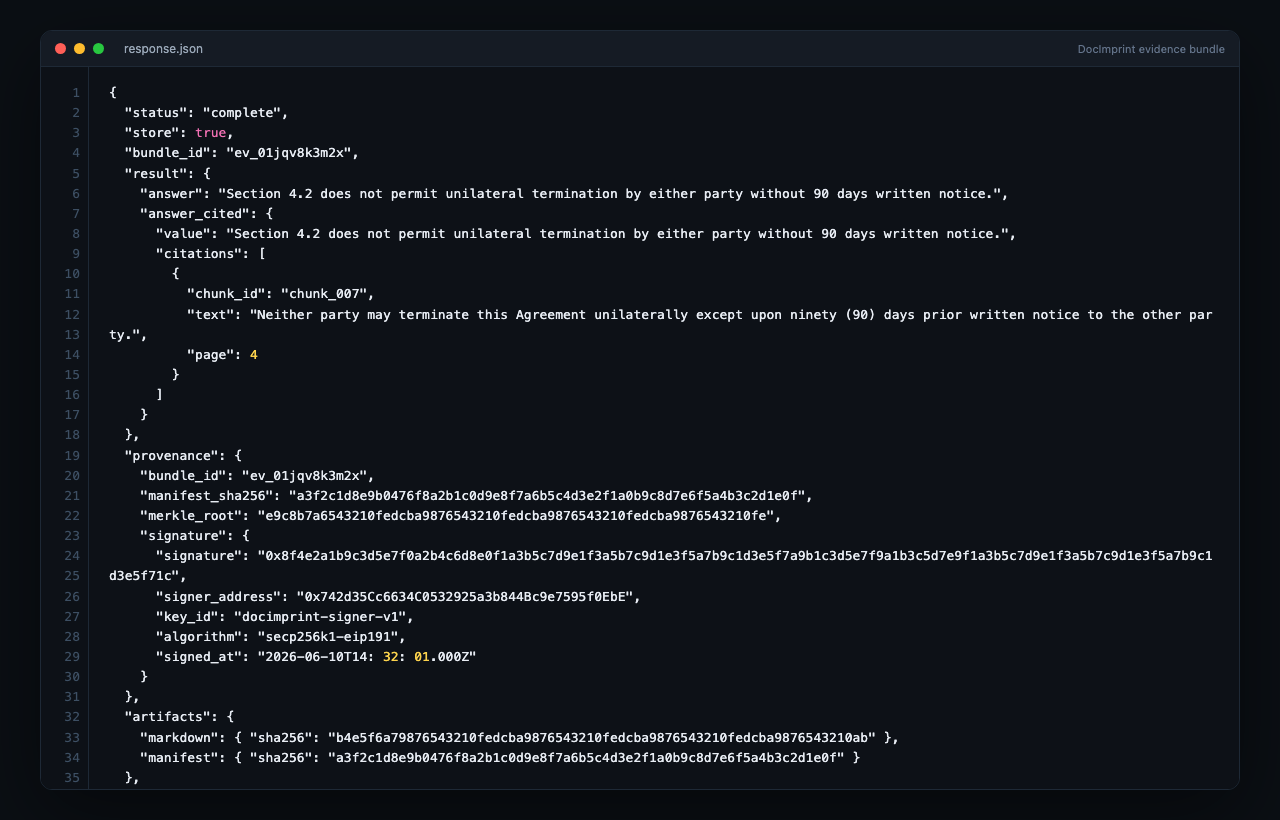
config.json
{
  "bundle_id": "ev_01jqv8k3m2x",
  "manifest_sha256": "a3f2c1d8e9b0476f8a2b1c0d9e8f7a6b5c4d3e2f1a0b9c8d7e6f5a4b3c2d1e0f",
  "signature": {
    "signature": "0x8f4e2a1b9c3d5e7f0a2b4c6d8e0f1a3b5c7d9e1f3a5b7c9d1e3f5a7b9c1d3e5f71c",
    "signer_address": "0x742d35Cc6634C0532925a3b844Bc9e7595f0EbE",
    "algorithm": "secp256k1-eip191"
  },
  "answer_cited": {
    "value": "Section 4.2 does not permit unilateral termination without 90 days written notice.",
    "citations": [
      {
        "quote": "Neither party may terminate this Agreement unilaterally except upon ninety (90) days prior written notice to the other party.",
        "paragraphs": [42],
        "page": 4,
        "confidence": "high"
      }
    ]
  },
  "artifacts": {
    "markdown": { "sha256": "b4e5f6a79876543210fedcba9876543210fedcba9876543210fedcba9876543210ab" },
    "manifest": { "sha256": "a3f2c1d8e9b0476f8a2b1c0d9e8f7a6b5c4d3e2f1a0b9c8d7e6f5a4b3c2d1e0f" }
  }
}

API response with provenance and citations

Evidence bundle manifest anatomy


How it works

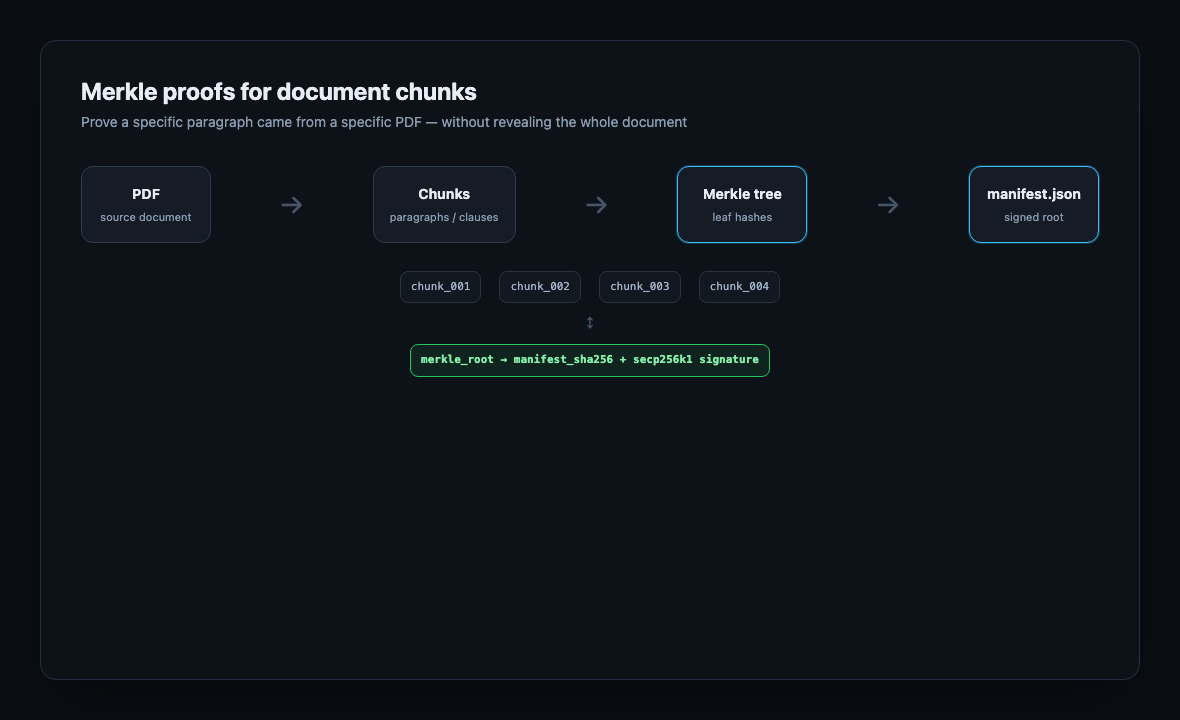
mermaid
flowchart LR
  source[PDF or URL] --> extract[extract / qa / checkClaims]
  extract --> bundle[Evidence bundle ev_...]
  bundle --> artifacts[Artifacts + manifest SHA-256]
  bundle --> citations[Cited answers with quotes]
  artifacts --> verify[verify - free]
  verify --> notarize[notarize on Base L2 - optional]

Merkle citation proof flow


Why not plain OCR or RAG?

Plain OCRVector RAGDocImprint
Exact source quotesNoApproximateYes, with paragraph refs
Tamper evidenceNoNoSHA-256 manifest + EIP-191 sig
Independent verifyNoNoverify() without API key
On-chain attestationNoNoEAS on Base L2
Agent audit trailNoNoProvenance + handoff (Python)

Use cases

ScenarioMethodResult
Contract Q&Aclient.qa()Cited answer with confidence score
Claim verificationclient.checkClaims()Per-claim verdict: supported / contradicted / not_found
Invoice intakeclient.extract({ mode: 'invoice' })Structured merchant, line items, totals β€” all cited
Compliance archivelegal_hold: true + notarize()Immutable on-chain record, deletion blocked

Install

Terminal
npm install docimprint           # TypeScript / Node.js
Terminal
pip install docimprint           # Python REST client
pip install "docimprint[crewai]" # + 10 CrewAI tools & ProvenanceTracker

Python source lives in python/. PyPI: docimprint.


Quick start

Get an API key at docimprint.com β€” free tier available, no credit card required.

TypeScript

server.ts
import { DocImprintClient } from 'docimprint'

const client = new DocImprintClient({ apiKey: 'dr_live_...' })

const result = await client.extract({
  source: 'https://example.com/contract.pdf',
  include: ['markdown', 'summary'],
})

console.log(result.bundle_id)        // ev_01j...
console.log(result.summary)          // AI-generated summary
console.log(result.manifest_sha256)  // tamper-evident hash
console.log(result.key_points_cited[0].citations[0].quote)

Python

server.ts
from docimprint import DocImprintClient

client = DocImprintClient(api_key="dr_live_...")

result = client.extract(
    url="https://example.com/contract.pdf",
    include=["markdown", "summary"],
)
print(result["bundle_id"])         # ev_01j...
print(result["summary"])           # AI-generated summary
print(result["manifest_sha256"])   # tamper-evident hash

REST API (cURL)

Terminal
curl -X POST https://api.docimprint.com/v1/extract \
  -H "Authorization: Bearer dr_live_..." \
  -H "Content-Type: application/json" \
  -d '{"source": "https://example.com/contract.pdf", "include": ["markdown", "summary"]}'

Examples

Runnable demos that show the full proof story β€” claim-check with citations, a stored evidence bundle, and a signed action receipt:

bash
# Python
cd examples/python
pip install -e .
cp .env.example .env   # set DOCIMPRINT_API_KEY
python -m docimprint_examples.prove_what_agent_read

# TypeScript
cd examples/typescript
npm install
cp .env.example .env   # set DOCIMPRINT_API_KEY
npm run prove

See examples/README.md for both languages and what each artifact proves.


Features

CapabilityMethod / ModeDescription
Extractextract()Full evidence bundle β€” markdown, summary, cited key points, artifacts, manifest SHA-256
Invoice parsingmode: 'invoice'Structured InvoiceResult: merchant, date, line items, subtotal, tax, total β€” all with citations
Document comparisonmode: 'compare'Diff two documents; supply previous_bundle_id to track changes
Structured extractionmode: 'extract-structured'Extract typed fields using a caller-defined JSON Schema
Summarizesummarize()Prose summary + key points, each with cited paragraph references
Q&Aqa()Single-question answer with inline citations and confidence score
Claim-checkcheckClaims()Per-claim verdict: supported / contradicted / not_found with evidence quotes
Translatetranslate()Source-cited translation to any language
Describedescribe()AI description of image or PDF page contents
CollectionscreateCollection() + searchCollection() + askCollection()Semantic search + cross-document RAG Q&A across multiple bundles
Verifyverify()Cryptographic integrity check β€” manifest hash, EIP-191 signature, artifact hashes. Free, no auth
Notarizenotarize()Write manifest SHA-256 to Base L2 via EAS β€” permanent, immutable attestation
MCP server20 tools Β· 2 promptsNative MCP for Claude, Cursor, and any MCP-compatible client
x402REST X-Payment headerPay per call in USDC β€” no account required

Why DocImprint?

  • πŸ” Cryptographic provenance β€” every bundle is EIP-191 signed at creation; optionally notarized on Base L2 via EAS for an immutable on-chain audit trail
  • πŸ€– Agent-native by design β€” async jobs, webhooks, idempotency keys, and legal hold built into every request, not bolted on
  • πŸ“Ž Beyond OCR β€” citations carry exact quotes, paragraph indices, and confidence scores (high/medium/low), not just raw text
  • πŸ› οΈ 10 CrewAI tools out of the box β€” research_tools(), legal_tools(), collection_tools() pre-grouped for common agent workflows
  • βš–οΈ Compliance-ready β€” legal_hold, provenance logging, multi-agent handoff tracking, and on-chain notarization designed for legal and regulated industries
  • πŸ’³ Flexible payment β€” monthly credit plans or pay-per-call USDC via x402, no account required

Agent-native features

DocImprint is designed for autonomous agent workflows, not just synchronous API calls.

server.ts
// Fire-and-forget async extraction β€” returns job_id immediately
const job = await client.extract({
  source: 'https://example.com/large-report.pdf',
  async: true,
  webhook: 'https://your-agent.io/callback',
  idempotency_key: 'report-2025-q4',
  legal_hold: true,
})

const status = await client.getJob(job.job_id)
// { status: 'complete', bundle_id: 'ev_...', progress_pct: 100 }

// Monitor a URL for changes β€” get notified on diff
await client.extract({
  source: 'https://example.com/terms.html',
  monitor: { webhook: 'https://your-agent.io/changes', mode: 'diff' },
})

Python: provenance & multi-agent handoff tracking

python
client.log_provenance(bundle_id="ev_...", agent_id="agent-research", action="extracted")
client.handoff(bundle_id="ev_...", from_agent="agent-research", to_agent="agent-legal", note="ready for claim check")

CrewAI integration

10 purpose-built tools for CrewAI agents, organized into preset groups.

server.ts
from docimprint.crewai import DocImprintToolkit

toolkit = DocImprintToolkit(
    api_key="dr_live_...",
    collection_id="col_...",  # required for collection tools
)

toolkit.research_tools()      # extract, summarize, qa, check_claims
toolkit.legal_tools()         # check_claims, verify, notarize
toolkit.collection_tools()    # search, ask, add_to_collection
toolkit.all_tools()           # all 10 tools
ToolWhat it does
ExtractEvidenceToolFull evidence bundle with citations and manifest hash
SummarizeToolKey points with cited paragraph references
QAToolCited answer with confidence score
CheckClaimsToolPer-claim verdict: supported / contradicted / not_found
TranslateToolSource-cited translation
VerifyBundleToolCryptographic integrity check β€” manifest, hash, signature
NotarizeToolOn-chain EAS attestation on Base L2
SearchCollectionToolSemantic vector search across document collection
AskCollectionToolCross-document RAG Q&A with cited sources
AddToCollectionToolAdd bundle to collection and trigger async indexing

ProvenanceTracker wraps all tools to automatically log agent actions and bundle handoffs.

server.ts
from docimprint.crewai import DocImprintToolkit, ProvenanceTracker

tracker = ProvenanceTracker(client=toolkit.client)
trackable = toolkit.trackable_tools()

DocImprintKnowledgeSource integrates with CrewAI's knowledge system for retrieval-augmented agents.


MCP server

DocImprint exposes a native MCP server for use with Claude, Cursor, and any MCP-compatible client.

Install via Smithery (one command):

Terminal
npx @smithery/cli install docimprint --client claude

Manual config:

config.json
{
  "mcpServers": {
    "docimprint": {
      "type": "streamable-http",
      "url": "https://api.docimprint.com/mcp",
      "headers": {
        "Authorization": "Bearer dr_live_..."
      }
    }
  }
}

Transport: streamable-http Β· Auth: Bearer token Β· Listed on Smithery Β· Listed on Glama

smithery badge

MCP tools

URL tools β€” lean mode, no bundle stored:

ToolDescription
extract_urlFetch URL β†’ text + metadata
summarize_urlFetch URL β†’ prose summary + key points
qa_urlFetch URL β†’ cited answer to a specific question
translate_urlFetch URL β†’ translated content

Document tools β€” accepts base64 PDF or image:

ToolDescription
extract_textOCR plain text from PDF / image
extract_tablesOCR tables as Markdown from PDF / image
parse_invoiceStructured invoice fields: merchant, line items, totals + citations
summarize_documentProse summary + cited key points
check_claimsPer-claim verdict with evidence quotes
extract_structuredExtract typed fields using a caller-defined schema

Bundle & collections:

ToolDescription
verify_bundleCryptographic integrity check (returns signed action receipt)
get_bundleBundle metadata and notarization status (returns receipt)
notarize_bundleOn-chain EAS attestation on Base L2 (returns receipt)
list_receiptsList signed action receipts for a bundle
verify_action_receiptVerify a receipt signature + manifest binding
create_collectionCreate a named document collection
list_collectionsList your collections
add_document_to_collectionAdd bundle + trigger async indexing (returns receipt)
search_collectionSemantic vector search
ask_collectionCross-document RAG Q&A
get_job_statusPoll async job (extract, indexing, batch)
get_quotaCheck credit balance and plan status

Guided prompts: claim_check_workflow Β· invoice_intake

Resource: bundle://{bundle_id} β€” read bundle metadata directly


API reference

Full typed reference: docimprint.com/docs Β· OpenAPI

CategoryMethods
Coreextract, verify, download, notarize, deleteBundle
Focusedsummarize, qa, translate, checkClaims, describe
Extract modesinvoice, extract-structured, compare, store: false (lean)
CollectionscreateCollection, listCollections, addToCollection, searchCollection, askCollection
JobsgetJob, listJobs, getQuota

Error handling

server.ts
import { DocImprintClient, DocImprintError } from 'docimprint'

try {
  const result = await client.extract({ source: 'https://example.com/doc.pdf' })
} catch (err) {
  if (err instanceof DocImprintError) {
    console.error(err.message)    // human-readable error
    console.error(err.status)     // HTTP status code
    console.error(err.requestId)  // x-request-id for support
  }
}

Authentication

API key

Monthly credits via Stripe β€” sign up at docimprint.com, free tier available:

server.ts
const client = new DocImprintClient({ apiKey: 'dr_live_...' })

x402 USDC payments

DocImprint supports the x402 open standard β€” pay per call in USDC on Base, straight from any EVM wallet. No account. No sign-up. No API key. Your agent can call the API autonomously without any human-managed credentials.

The API is x402-native: it returns a standard 402 Payment Required response with on-chain payment details, your client settles in USDC, and the request completes automatically. From $0.01 / call.

With @x402/fetch (automatic payment handling):

server.ts
import { wrapFetchWithPayment } from '@x402/fetch'
import { createWalletClient, http } from 'viem'
import { privateKeyToAccount } from 'viem/accounts'
import { base } from 'viem/chains'

const account = privateKeyToAccount('0x...')
const wallet = createWalletClient({ account, chain: base, transport: http() })

const fetchWithPayment = wrapFetchWithPayment(fetch, wallet)

const res = await fetchWithPayment('https://api.docimprint.com/v1/summarize', {
  method: 'POST',
  headers: { 'Content-Type': 'application/json' },
  body: JSON.stringify({ source: 'https://example.com/report.pdf' }),
})
const data = await res.json()

Identity on owner routes: For GET/DELETE operations that require ownership (e.g. fetching your bundle), pass the payment-signature header from a prior payment response so the API can verify your wallet address without a separate login.


TypeScript

All request and response types are exported:

server.ts
import type {
  ExtractRequest,
  ExtractResponse,
  Citation,
  CitedField,
  InvoiceResult,
  Job,
  Collection,
  SearchResult,
} from 'docimprint'

Pricing

Free tier available β€” no credit card required. Monthly credit plans via Stripe, or pay per call in USDC via x402. See pricing β†’


Community

Questions, integrations, and announcements: GitHub Discussions.


Links

  • Documentation
  • API Reference
  • Python examples β€” prove what an agent read
  • TypeScript examples β€” same demo in Node/TS
  • Evidence bundles
  • x402 payments
  • Pricing

Related MCP Servers

View all in Developer Tools View all alternatives
  • A
    Api

    AI document intelligence: extract, summarize, claim-check, and notarize with on-chain proofs.

    πŸ’» Developer Tools0 views
    Compare vs Api β†’
  • A
    Api

    AI document intelligence: extract, summarize, claim-check, and notarize with on-chain proofs.

    πŸ’» Developer Tools0 views
    Compare vs Api β†’
  • G
    Graphql

    Turn any GraphQL API into MCP tools. Zero config, zero code.

    πŸ’» Developer Tools0 views
    Compare vs Graphql β†’
  • World Monitor logoWorld Monitor

    Live global intelligence: real-time markets, conflicts, country risk, chokepoints, energy. 39 tools.

    πŸ’» Developer Tools1 views
    Compare vs World Monitor β†’

Frequently Asked Questions about Api

Add the following block to your claude_desktop_config.json under mcpServers: "mcpServers": { "api": { "command": "npx", "args": ["-y", "api"] } }

AllMCPs Directory Badge

Full Badge Customizer

Showcase your server listing on GitHub or your project documentation. Embed this dynamic SVG badge to highlight official listing status and live engagement.

Badge Style:
Live Dynamic SVG PreviewApi AllMCPs Directory Badge

Markdown (GitHub README)
[![AllMCPs](https://allmcps.com/api/badge/api-4?style=directory)](https://allmcps.com/mcp/api-4)
HTML Embed
<a href="https://allmcps.com/mcp/api-4"><img src="https://allmcps.com/api/badge/api-4?style=directory" alt="Api on AllMCPs" /></a>

Technical Specs & Signals

CategoryπŸ’»Developer Tools
More technical detailsExpand β–Ύ
TransportSTDIO
RuntimeNode.js
Views0
Unique ViewsTotal visits recorded for this listing page on AllMCPs.
Installs0
Installs & Copy ActionsTotal times users copied install commands or configuration snippets for this server.
27Quality signal: Emerging Β· 27/100How this signal is calculated β–Ύ
Server availabilityNot measured

Not scored for repo-hosted servers β€” we can't reach the running server, only its GitHub page. Hosted MCP endpoints are health-checked live.

Verified ownership8/20
Documentation & tools11/30
Adoption & activity1/15
Community engagement0/10

A guidance signal from public completeness & health data β€” not a user rating. New listings start lower and rise as they add docs, get verified, and grow adoption. Signals we can't observe for a listing are skipped, not counted against it.

β˜… Spotlight Slot

Feature Your MCP Server

Get maximum visibility for your server across our directory, search results, and detail pages.

Spotlight Your Server

Own this project?

This directory is pre-filled from public sources. Claim via GitHub README, site badge, or DNS TXT to get the verified badge and attach your website.

Free dofollow backlink: after claiming, verify your product site and place a dofollow AllMCPs badge β€” we recheck it stays live.

Claim & get free dofollow

Share & Embed

Add our SVG badge (dark/light directory styles) or embeddable widget to your site.

Explore more

More in πŸ’» Developer Tools β†’Best MCP servers for Developers β†’Alternatives to Api β†’Install in Claude DesktopInstall in CursorInstall in VS Code