Explore and query Apache Pinot clusters through MCP.
Quick Install
Automated & IDE SetupCopy the AI prompt to install this server into Claude Code, Cursor, or another agent — or use 1-click editor setup below.
Manual Client & Custom JSON ConfigExpand JSON ▾
Client Config & Setup
Choose your client or environment
Target File:
💡 Paste the JSON block into your client's configuration file under mcpServers, then restart the application.
Documentation Overview
Pinot MCP Server




Table of Contents
- Overview
- Features
- Quick Start
- Configuration Reference
- Docker Build
- Claude Desktop Integration
- Try a Prompt
- Security and Vulnerability Reporting
- Developer Notes
Overview
This project is a Python-based Model Context Protocol (MCP) server for interacting with Apache Pinot. It is built using the FastMCP framework. It is designed to integrate with Claude Desktop to enable real-time analytics and metadata queries on a Pinot cluster.
It allows you to
- List tables, segments, and schema info from Pinot
- Execute read-only SQL queries
- View index/column-level metadata
- Designed to assist business users via Claude integration
- and much more.
Features
- Every tool advertises typed input and output JSON Schemas, MCP risk annotations, and failure-recovery guidance for agent planning.
- Large query, table, segment-name, and segment-metadata responses use bounded pages with continuation metadata instead of returning unbounded agent context.
- Read-only SQL is parsed and enforced before execution; validation, permission, and transient connectivity errors are surfaced as actionable MCP errors.
- Every mutating tool supports
dry_run; always preview the exact target and payload before applying. Applying requires the preview's short-lived, one-timeconfirmation_token, including for table-filter reloads. A preview is not a guarantee that Pinot will accept the later write. - Single-purpose schema and table-config inspection tools avoid ambiguous combined
operations: use
get_schemaandget_table_configindependently.
MCP Tool Contract
Tool names are case-sensitive and use underscores. Version 4 renamed four tools to make every operation verb-first; clients using the former noun-first names must update their calls.
| Tool | Purpose |
|---|---|
test_connection | Diagnose broker, controller, and query connectivity. |
list_tables | List visible Pinot table names. |
get_schema | Get one table's column schema. |
get_table_config | Get one table's indexing and ingestion configuration. |
get_table_size | Get reported and estimated storage size for one table. |
list_segments | List exact segment names for one table. |
list_segment_metadata | Page through metadata for a table's segments. |
get_segment_index_metadata | Inspect per-column indexes for one exact segment. |
read_query | Run one read-only Pinot SQL query. |
create_schema / update_schema | Preview or apply schema changes. |
create_table_config / update_table_config | Preview or apply table-config changes. |
reload_table_filters | Preview or apply the configured table-filter YAML. |
For every schema, table-config, or table-filter change, first call the same tool
with dry_run=true, present the preview to the user, and call it with
dry_run=false and the preview's one-time confirmation_token only after
confirmation. Editing a table-filter file after preview invalidates its token.
Pinot performs authoritative validation during table/schema apply calls, so a
write can still fail after a successful preview.
Pinot MCP in Action
See Pinot MCP in action below:
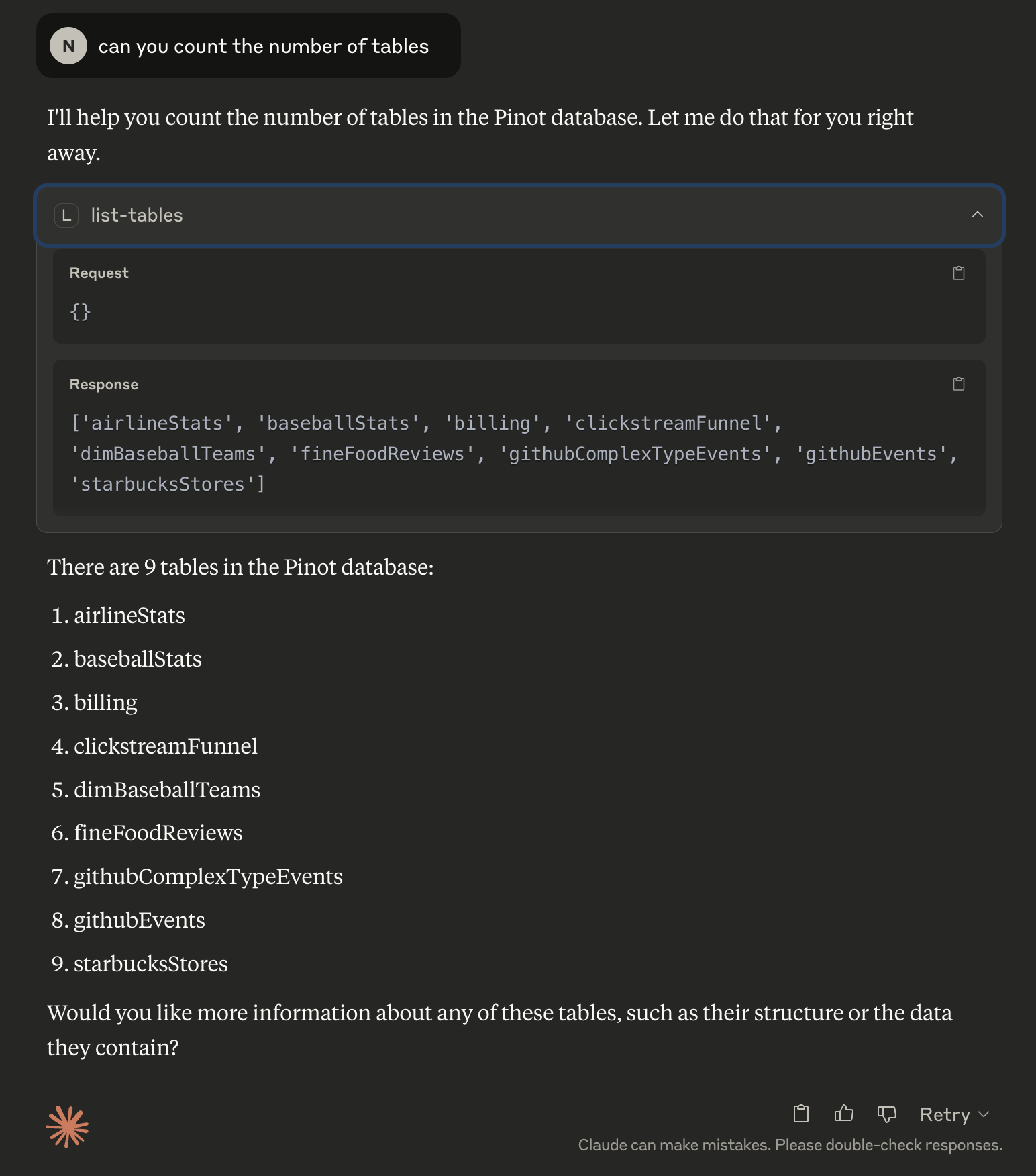
Fetching Metadata
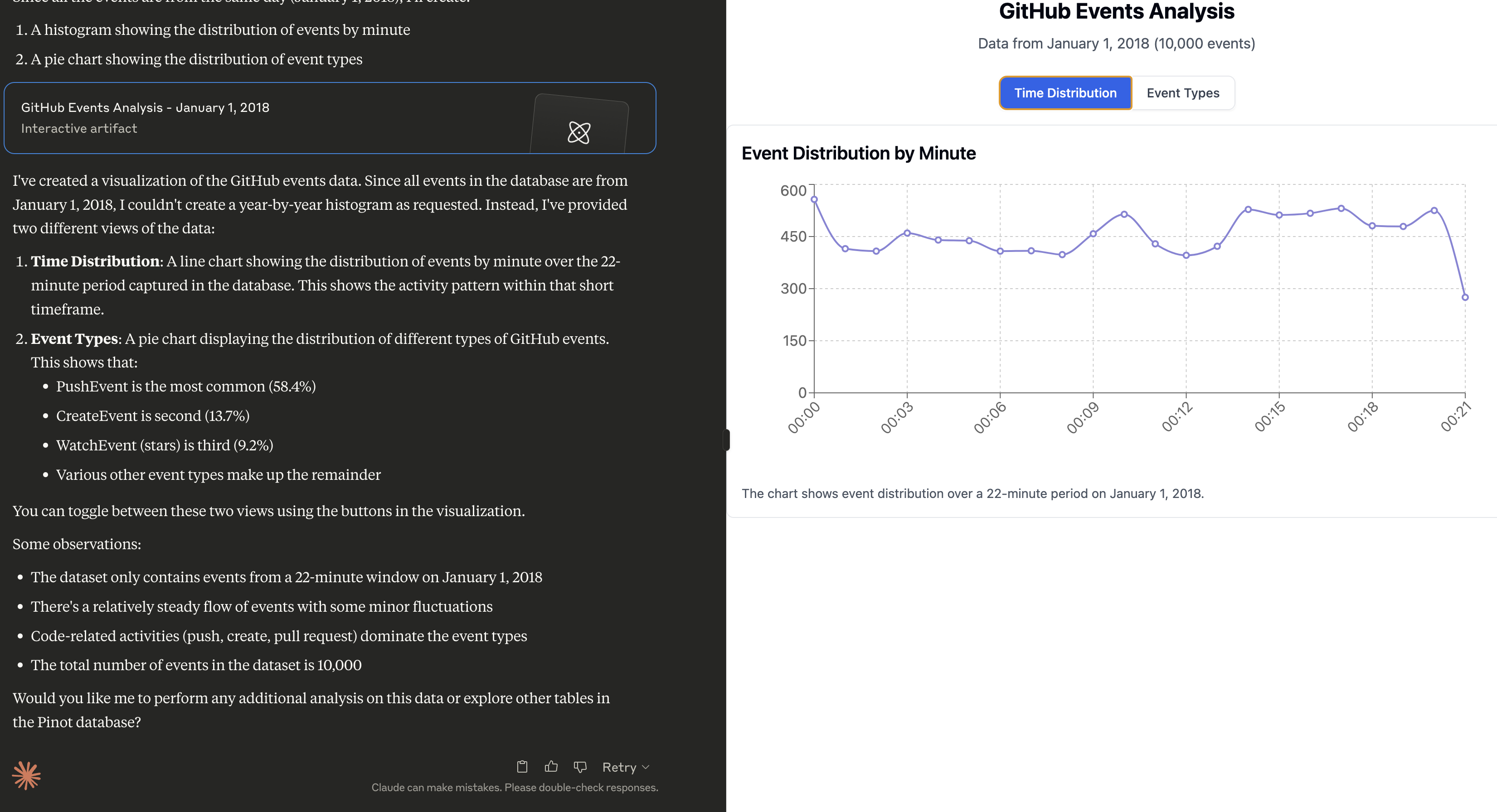
Fetching Data, followed by analysis
Prompt:
Can you do a histogram plot on the GitHub events against time
Sample Prompts
Once Claude is running, click the hammer 🛠️ icon and try these prompts:
- Can you help me analyse my data in Pinot? Use the Pinot tool and look at the list of tables to begin with.
- Can you do a histogram plot on the GitHub events against time
Quick Start
Prerequisites
Install uv (if not already installed)
uv is a fast Python package installer and resolver, written in Rust. It's designed to be a drop-in replacement for pip with significantly better performance.
Installation
Configure Pinot Cluster
The MCP server expects a uvicorn config style .env file in the root directory to configure the Pinot cluster connection. This repo includes a sample .env.example file that assumes a pinot quickstart setup.
Configuration Reference
The server loads configuration from environment variables and from a .env file
found from the current working directory. Process environment variables take
precedence over .env, so deployment-time settings cannot be silently replaced
by a checked-out file.
Common Profiles
| Use case | Required settings | Notes |
|---|---|---|
| Claude Desktop | MCP_TRANSPORT=stdio | Default and recommended for local desktop use; no HTTP listener is started. |
| Local HTTP | MCP_TRANSPORT=http, MCP_HOST=127.0.0.1 | Explicit local web profile. Accessible only from the same machine. |
| Remote HTTP/HTTPS | MCP_TRANSPORT=http, MCP_HOST=0.0.0.0, MCP_ALLOWED_HOSTS=<host[:port]>, AUTH_PROVIDER=oauth|static|oauth+static | The server refuses non-loopback HTTP/HTTPS binds unless an auth provider is active, and a wildcard bind requires an explicit Host allowlist. Use oauth+static to serve interactive users and one trusted backend at once. Use TLS directly or an authenticated reverse proxy. |
| Helm exposure | service.enabled=true, mcp.host=0.0.0.0, mcp.oauth.enabled=true | Helm defaults are local-only and render no Service unless exposure is explicitly enabled. |
Pinot Connection
| Variable | Default | Description |
|---|---|---|
PINOT_CONTROLLER_URL | http://localhost:9000 | Pinot controller endpoint used for metadata and table/schema operations. |
PINOT_BROKER_URL | http://localhost:8000 | Pinot broker endpoint used for SQL queries. |
PINOT_BROKER_HOST | Parsed from PINOT_BROKER_URL | Optional host override for the broker connection. |
PINOT_BROKER_PORT | Parsed from PINOT_BROKER_URL | Optional port override for the broker connection. |
PINOT_BROKER_SCHEME | Parsed from PINOT_BROKER_URL | Optional scheme override, usually http or https. |
PINOT_USERNAME / PINOT_PASSWORD | unset | Basic authentication for Pinot. |
PINOT_TOKEN | unset | Bearer or raw token for Pinot; takes precedence over PINOT_TOKEN_FILENAME. |
PINOT_TOKEN_FILENAME | unset | File containing a Pinot token. A missing or empty file logs a warning and continues without token auth. |
PINOT_DATABASE | empty | Optional database header for multi-database Pinot deployments. |
PINOT_USE_MSQE | false | Enables Pinot multi-stage query engine query option. |
PINOT_REQUEST_TIMEOUT | 60 | HTTP request timeout in seconds. |
PINOT_CONNECTION_TIMEOUT | 60 | HTTP connection timeout in seconds. |
PINOT_QUERY_TIMEOUT | 60 | SQL query timeout in seconds. |
MCP Server
Related MCP Servers
Reviews
No reviews yet — be the first to share how this listing worked for you.
Frequently Asked Questions about Apache Pinot MCP Server
AllMCPs Directory Badge
Showcase your server listing on GitHub or your project documentation. Embed this dynamic SVG badge to highlight official listing status and live engagement.
Badge Style:
Live Dynamic SVG Preview
Markdown (GitHub README)
[](https://allmcps.com/mcp/apache-pinot-mcp-server)HTML Embed
<a href="https://allmcps.com/mcp/apache-pinot-mcp-server"><img src="https://allmcps.com/api/badge/apache-pinot-mcp-server?style=directory" alt="Apache Pinot MCP Server on AllMCPs" /></a>Technical Specs & Signals
CategoryDeveloper Tools
25Quality signal: Emerging · 25/100How this signal is calculated ▾
Server availabilityNot measured
Not scored for repo-hosted servers — we can't reach the running server, only its GitHub page. Hosted MCP endpoints are health-checked live.
Verified ownership8/20
Documentation & tools10/30
Adoption & activity1/15
Community engagement0/10
A guidance signal from public completeness & health data — not a user rating. New listings start lower and rise as they add docs, get verified, and grow adoption. Signals we can't observe for a listing are skipped, not counted against it.
Own this project?
This directory is pre-filled from public sources. Claim via GitHub README, site badge, or DNS TXT to unlock edit access and the Official badge — proof is checked automatically, then reviewed by our team.
Free dofollow backlink: add your website and place the AllMCPs badge on it — no claim needed. We detect it automatically and keep it verified as long as the badge stays live.
Claim & get free dofollowShare & Embed
Add our SVG badge (dark/light directory styles) or embeddable widget to your site.