AllMCPs
BrowseBestCategoriesStackCompareToolsGuidesBlog
Log in Submit MCP

Stay in the loop

Get new MCP servers and top picks in your inbox.

AllMCPs

The open directory for discovering and installing Model Context Protocol servers.

AllMCPs on GitHub (opens in a new tab)
Launched onTiny Startupstinystartups.com
Explore
  • Browse servers
  • Best MCP servers
  • Categories
  • MCP clients
  • Agent prompts
  • Stack Builder
  • Compare servers
  • Random discovery New
  • Submit a server
  • Pricing & Boost Boost
Learn
  • Guides hub
  • What is MCP?
  • Install guide
  • Build an MCP server
  • Deploy an MCP server
  • Security guide
  • Troubleshooting
  • MCP for SEO & AEO
  • Protocol versioning
  • Blog & updates
Tools
  • All developer tools
  • Config generator
  • Config validator
  • Config auditor
  • MCP playground
  • Token calculator
  • OpenAPI → MCP
  • Badge generator
For agents
  • REST API docs
  • Trust & traffic Live
  • Remote MCP server SSE ↗ (opens in a new tab)
  • llms.txt ↗ (opens in a new tab)
  • Catalog JSON ↗ (opens in a new tab)
Company
  • About
  • Advertise Sponsor
  • Contact
  • GitHub ↗ (opens in a new tab)
  • Terms
  • Privacy
AllMCPs VerifiedAllMCPs VerifiedFeatured on Nick LaunchesFeatured on Nick LaunchesLaunch Llama NewsletterLaunch Llama NewsletterVerified DR - allmcps.comVerified DR - allmcps.comFeatured on SaaSGrowFeatured on SaaSGrowFeatured on Twelve ToolsFeatured on Twelve ToolsFeatured on Saaspa.geFeatured on Saaspa.geFeatured on Findly.toolsFeatured on Findly.toolsFeatured on Startup FameFeatured on Startup FameFeatured on LaunchKiwiFeatured on LaunchKiwiFeatured on ScrollLaunchFeatured on ScrollLaunchFeatured on DailyPingsFeatured on DailyPingsFazier badgeFazier badgeFeatured on NewTool.siteFeatured on NewTool.siteFeatured on saasfame.comFeatured on saasfame.comDR Checker - Domain RatingDR Checker - Domain RatingListed on Turbo0Listed on Turbo0Launched on LaunchBoard - Product Launch PlatformLaunched on LaunchBoard - Product Launch PlatformList on SimilarlabsList on Similarlabshttps://codetrendy.comhttps://codetrendy.comListed on DevTool.ioFeatured on BuildlistFeatured on BuildlistLaunched on Tiny StartupsFeatured on ShowMeBestAIFeatured on ShowMeBestAIFind us on LaunchZoneFind us on LaunchZoneAllMCPs VerifiedAllMCPs VerifiedFeatured on Nick LaunchesFeatured on Nick LaunchesLaunch Llama NewsletterLaunch Llama NewsletterVerified DR - allmcps.comVerified DR - allmcps.comFeatured on SaaSGrowFeatured on SaaSGrowFeatured on Twelve ToolsFeatured on Twelve ToolsFeatured on Saaspa.geFeatured on Saaspa.geFeatured on Findly.toolsFeatured on Findly.toolsFeatured on Startup FameFeatured on Startup FameFeatured on LaunchKiwiFeatured on LaunchKiwiFeatured on ScrollLaunchFeatured on ScrollLaunchFeatured on DailyPingsFeatured on DailyPingsFazier badgeFazier badgeFeatured on NewTool.siteFeatured on NewTool.siteFeatured on saasfame.comFeatured on saasfame.comDR Checker - Domain RatingDR Checker - Domain RatingListed on Turbo0Listed on Turbo0Launched on LaunchBoard - Product Launch PlatformLaunched on LaunchBoard - Product Launch PlatformList on SimilarlabsList on Similarlabshttps://codetrendy.comhttps://codetrendy.comListed on DevTool.ioFeatured on BuildlistFeatured on BuildlistLaunched on Tiny StartupsFeatured on ShowMeBestAIFeatured on ShowMeBestAIFind us on LaunchZoneFind us on LaunchZone
© 2026 Jackalope Digital LLC. All rights reserved.
  1. Home
  2. Other Tools and Integrations
  3. Notion MCP Server
  4. README

Notion MCP Server README

The full upstream README, mirrored here for reference. Install config, tool schemas, adoption signals, and an original overview live on the Notion MCP Server listing page.

Back to Notion MCP Server View source on GitHub

🧠 Agentic Long-Term Memory with Notion Integration

Trust Score This project explores the concept of long-term memory in AI agents and demonstrates how to build sophisticated agentic memory systems using various approaches and tools. Now featuring complete Notion workspace integration and MCP (Model Context Protocol) implementation!

Feel free to ⭐️ the repo if it helps you understand long-term memory for agents!

🚀 What's New - Enhanced Features

🔥 Complete Notion Integration

  • 15+ Notion Functions: Search, read, create, update, and analyze your Notion workspace
  • Smart Content Management: Add paragraphs, headings, bullets, todos with intelligent formatting
  • Advanced Content Types: Bookmarks and internal page links with URL validation
  • Workspace Analytics: Get insights about your Notion usage patterns
  • Bulk Operations: Handle multiple pages and operations efficiently with smart pagination
  • Function Chaining: Complex multi-step workflows handled automatically
  • Production-Ready MCP Server: Complete Notion MCP Server V2.1 with bulletproof validation and comprehensive testing

🎯 MCP (Model Context Protocol) Implementation

  • Multiple Transport Support: HTTP and stdio transport protocols
  • Production Ready: Deployable MCP servers with fallback strategies
  • Tool Discovery: Automatic tool registration and discovery
  • Error Handling: Comprehensive error management and recovery

📚 Comprehensive Documentation

📖 Core Documentation

  • 🤖 Complete System Explanation - Detailed walkthrough of the entire chatbot system
  • 🔧 How MCP Tools Work - Deep dive into MCP implementation and tool mechanics
  • 🚀 Notion Integration Guide - Complete Notion ServerV2 integration documentation
  • 🔗 Notion MCP Server - Complete Notion MCP Server V2.1 - Production-ready server with bulletproof validation

🔍 Implementation Guides

  • 📊 MCP Implementation Comparison - Comparison of different MCP implementation approaches
  • 🎯 MCP Notion README - Specific MCP Notion integration setup and usage
  • ⚙️ Production Configuration - Production deployment and configuration guide

🧠 Memory System Research

  • Memory in LLM Agents - Research paper reference
  • MemGPT Paper - PDF available in the repo

📚 What You'll Learn

  1. How to design a custom agentic long-term memory system
  2. How to implement long-term memory using Vector DB and Graph DB with LangChain and LangGraph
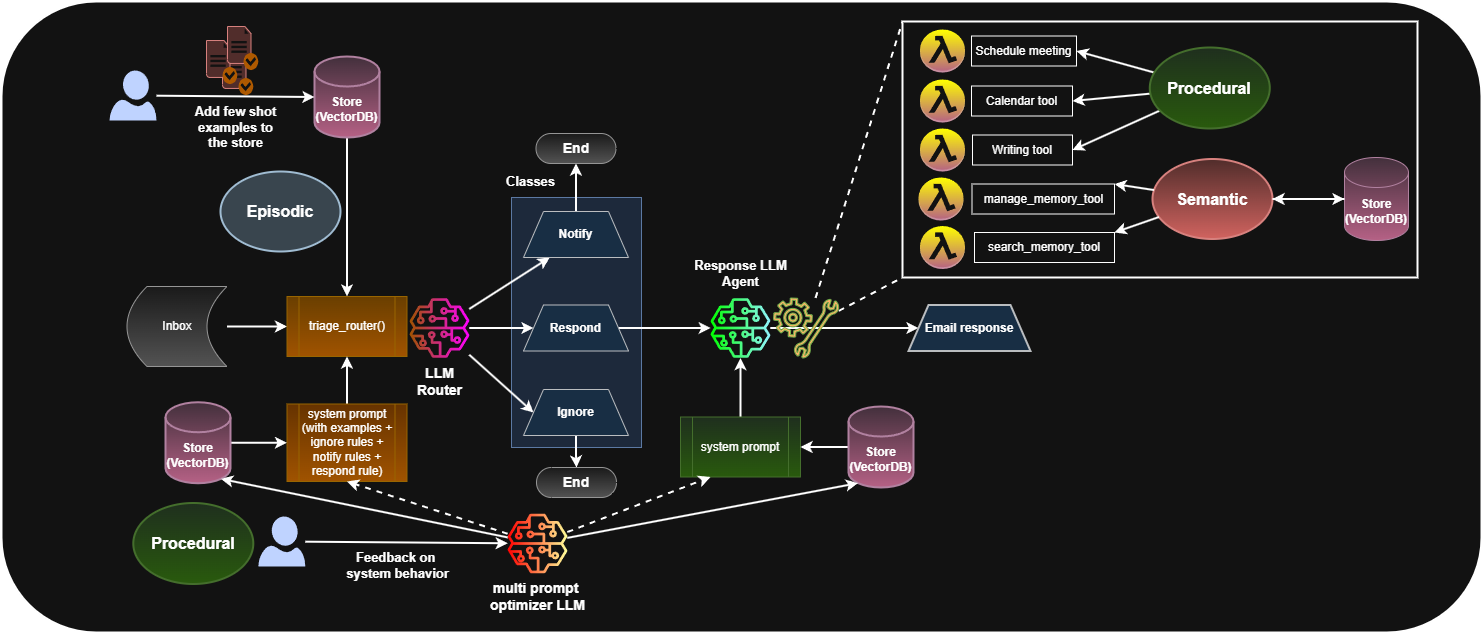
  3. How to structure memory into semantic, episodic, and procedural components
  4. Complete Notion workspace integration with natural language processing
  5. MCP (Model Context Protocol) implementation for scalable tool integration
  6. Production-ready MCP server development - see our Notion MCP Server V2.1
  7. Advanced function chaining for complex multi-step workflows
  8. Production-ready deployment strategies and configurations

💾 How to Run the Project

⚠️ Note: Please use Python 3.11 as Python 3.12 may cause compatibility issues with some dependencies.

1. Environment Setup

bash
# Create virtual environment
python -m venv venv
source venv/bin/activate  # or venv\Scripts\activate on Windows

# Install dependencies
pip install -r requirements.txt

2. Database Preparation

bash
# Setup SQLite DB
python src/prepare_sqldb.py

# Setup Vector DB
python src/prepare_vectordb.py

# Verify databases
python src/check_sqldb.py
python src/check_vectordb.py

3. Environment Variables

server.ts
# Required
export OPENAI_API_KEY="your_openai_api_key"
export NOTION_TOKEN="your_notion_integration_token"

# Optional
export NOTION_API_KEY="your_notion_integration_token"  # Alternative to NOTION_TOKEN

4. Run the Enhanced Chatbot

bash
# Terminal version with full Notion integration
python src/chat_in_terminal.py

# Gradio UI version
python src/chat_in_ui.py

5. Test the Integration

bash
# Test Notion integration
python test_notion_integration.py

# Test MCP functionality
python test_notion_mcp.py

🎯 Available Chatbot Versions

Version 1: Basic Chatbot (basic_chatbot_v1.py)

  • Simple conversation handling
  • Basic OpenAI integration

Version 2: Agentic Chatbot (chatbot_agentic_v2.py)

  • Function calling capabilities
  • User information management
  • Chat history search

Version 3: Enhanced Agentic Chatbot (chatbot_agentic_v3.py) - ⭐ MAIN VERSION

  • Complete Notion integration (15+ functions)
  • Advanced memory systems (Vector DB + SQL)
  • Smart function chaining
  • Production-ready architecture
  • MCP protocol support

🔧 Key Features

🧠 Memory Systems

  • SQL Database: Structured user information and chat history
  • Vector Database: Semantic search through conversation history
  • Smart Summarization: Automatic conversation summarization
  • Context Management: Intelligent context preservation

🔗 Notion Integration

  • Search & Discovery: Full-text search across pages and databases
  • Content Management: Create, read, update pages with rich formatting
  • Advanced Content Types: Bookmarks and internal page links with validation
  • Analytics: Workspace insights and usage patterns
  • Bulk Operations: Handle multiple operations efficiently
  • Production MCP Server: Complete V2.1 Server with bulletproof validation and 48KB test suite

🎯 Function Chaining

  • Multi-step Workflows: Automatic handling of complex tasks
  • Context Awareness: Understanding when tasks require multiple steps
  • Smart Routing: Intelligent function selection and execution

⚙️ Production Features

  • Error Handling: Comprehensive error management
  • Fallback Systems: Multiple backup strategies
  • Scalable Architecture: Easy to extend and modify
  • MCP Protocol: Standard tool integration protocol

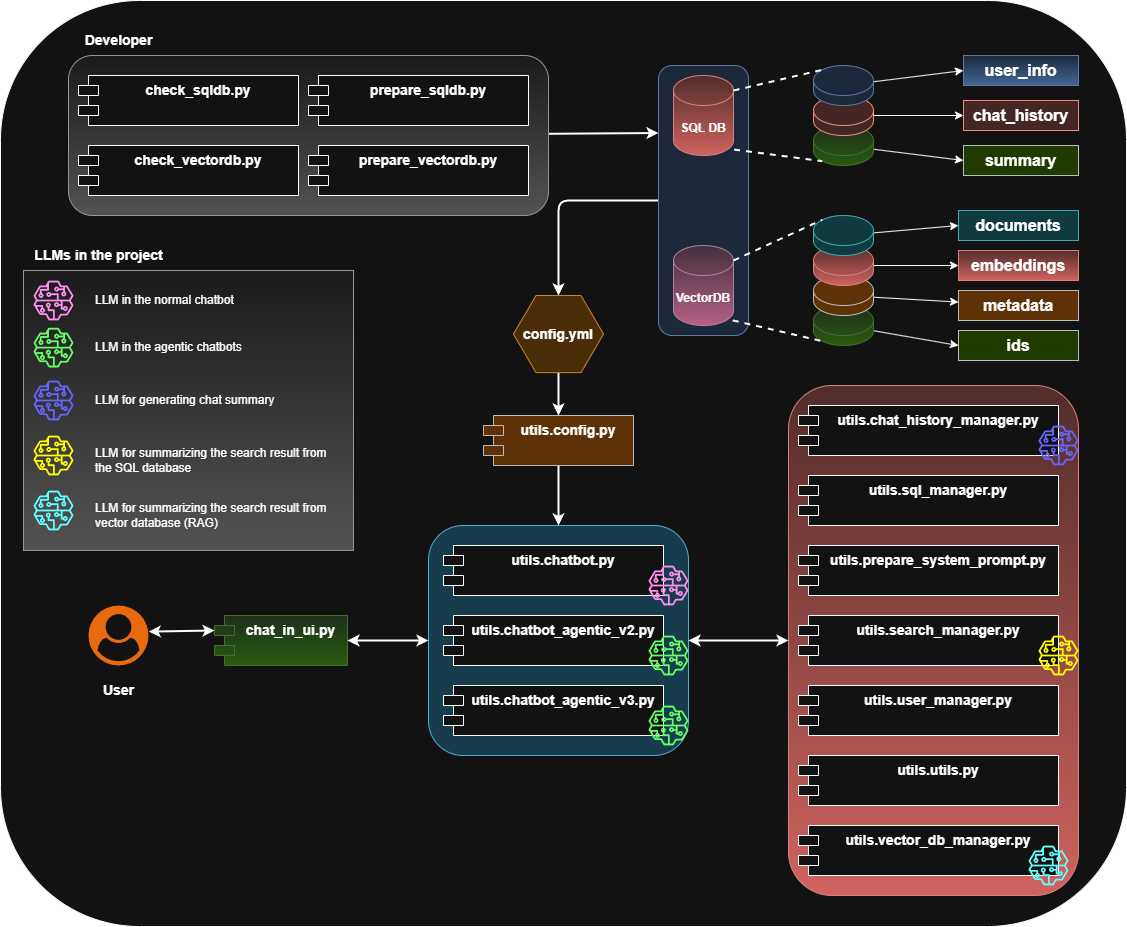
🏗️ Project Architecture

Code
┌─────────────────────┐    ┌─────────────────────┐    ┌─────────────────────┐
│   User Interface    │───▶│  Chatbot Agentic V3  │───▶│  External Systems   │
│   (Terminal/UI)     │    │  (Main Controller)   │    │  (Notion, DB, etc)  │
└─────────────────────┘    └─────────────────────┘    └─────────────────────┘
                                      │
                                      ▼
                      ┌─────────────────────────────────────────┐
                      │           Core Components               │
                      │  ┌─────────────┐  ┌─────────────────┐  │
                      │  │   OpenAI    │  │   Notion        │  │
                      │  │   Agent     │  │   ServerV2      │  │
                      │  └─────────────┘  └─────────────────┘  │
                      │  ┌─────────────┐  ┌─────────────────┐  │
                      │  │   Memory    │  │   Vector DB     │  │
                      │  │   Systems   │  │   (Embeddings)  │  │
                      │  └─────────────┘  └─────────────────┘  │
                      │  ┌─────────────┐  ┌─────────────────┐  │
                      │  │     MCP     │  │   SQL Database  │  │
                      │  │   Protocol  │  │   (Structured)  │  │
                      │  └─────────────┘  └─────────────────┘  │
                      └─────────────────────────────────────────┘

📂 Updated Project Structure

bash
src/
├── chat_in_terminal.py        # Enhanced terminal chatbot
├── chat_in_ui.py              # Gradio UI version
├── prepare_sqldb.py           # Creates SQLite DB
├── prepare_vectordb.py        # Creates Vector DB
├── check_sqldb.py             # Checks SQLite DB contents
├── check_vectordb.py          # Checks Vector DB contents
├── notion_mcp_server/         # 🆕 Complete Notion MCP Server
│   ├── core_operations.py     # Basic Notion operations
│   ├── analytics_operations.py # Workspace analytics
│   ├── bulk_operations.py     # Bulk operations
│   ├── update_operations.py   # Content updates
│   ├── notion_utils.py        # Utility functions
│   ├── api_serverV2.py        # HTTP API server
│   ├── serverV2.py            # MCP server implementation
│   ├── test_server.py         # 🆕 48KB comprehensive test suite
│   └── README.md              # 🆕 Complete MCP Server V2.1 documentation
└── utils/
    ├── basic_chatbot_v1.py    # Basic chatbot implementation
    ├── chatbot_agentic_v2.py  # Agentic chatbot v2
    ├── chatbot_agentic_v3.py  # 🆕 Main enhanced chatbot (LATEST)
    ├── mcp_client_manager.py  # 🆕 MCP client management
    ├── chat_history_manager.py
    ├── vector_db_manager.py
    ├── user_manager.py
    ├── prepare_system_prompt.py
    ├── search_manager.py
    ├── sql_manager.py
    ├── config.py
    └── utils.py

# Testing Files
├── test_notion_integration.py  # 🆕 Notion integration tests
├── test_notion_mcp.py          # 🆕 MCP functionality tests
├── test_chatbot_integration.py # 🆕 Chatbot integration tests
└── [other test files...]

# Documentation
├── HOW_MCP_TOOLS_WORK.md      # 🆕 MCP implementation guide
├── NOTION_INTEGRATION_README.md # 🆕 Notion integration docs
├── MCP_IMPLEMENTATION_COMPARISON.md # 🆕 Implementation comparison
├── MCP_NOTION_README.md       # 🆕 MCP Notion setup guide
├── PRODUCTION_CONFIG.md       # 🆕 Production deployment
└── README.md                  # This file

# Additional Directories
langgraph/                     # LangGraph implementations
letta/                         # Letta memory system
docker/                        # 🆕 Docker deployment
config/                        # Configuration files
data/                          # Database storage

🛠️ Technologies Used

Core Technologies

  • Python 3.11: Main programming language
  • OpenAI API: GPT models for conversation and function calling
  • Notion API: Complete workspace integration

Memory & Database

  • SQLite: Structured data storage
  • ChromaDB: Vector database for semantic search
  • Embeddings: OpenAI text-embedding models

Integration & Protocols

  • MCP (Model Context Protocol): Standard tool integration
  • HTTP/stdio: Multiple transport protocols
  • JSON-RPC: Communication protocol

UI & Testing

  • Gradio: Web-based user interface
  • Terminal: Command-line interface
  • Comprehensive Testing: Integration and unit tests

📊 System Schemas

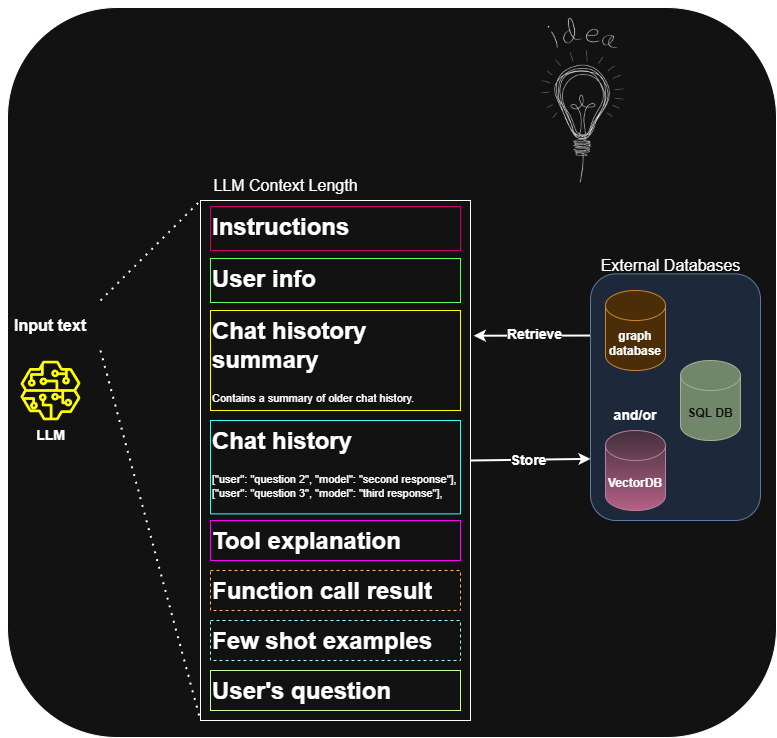
LLM Default Behavior Schema 1
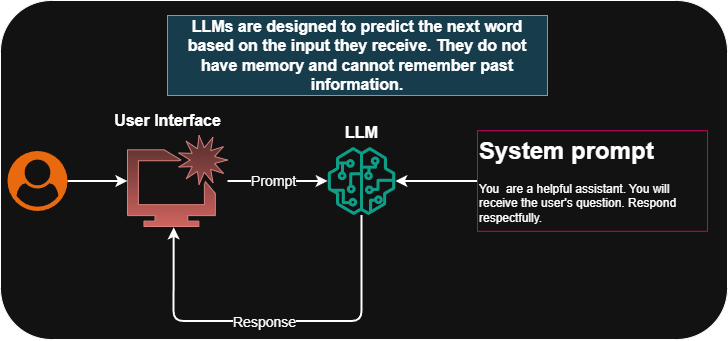
Concept of Memory Schema 2

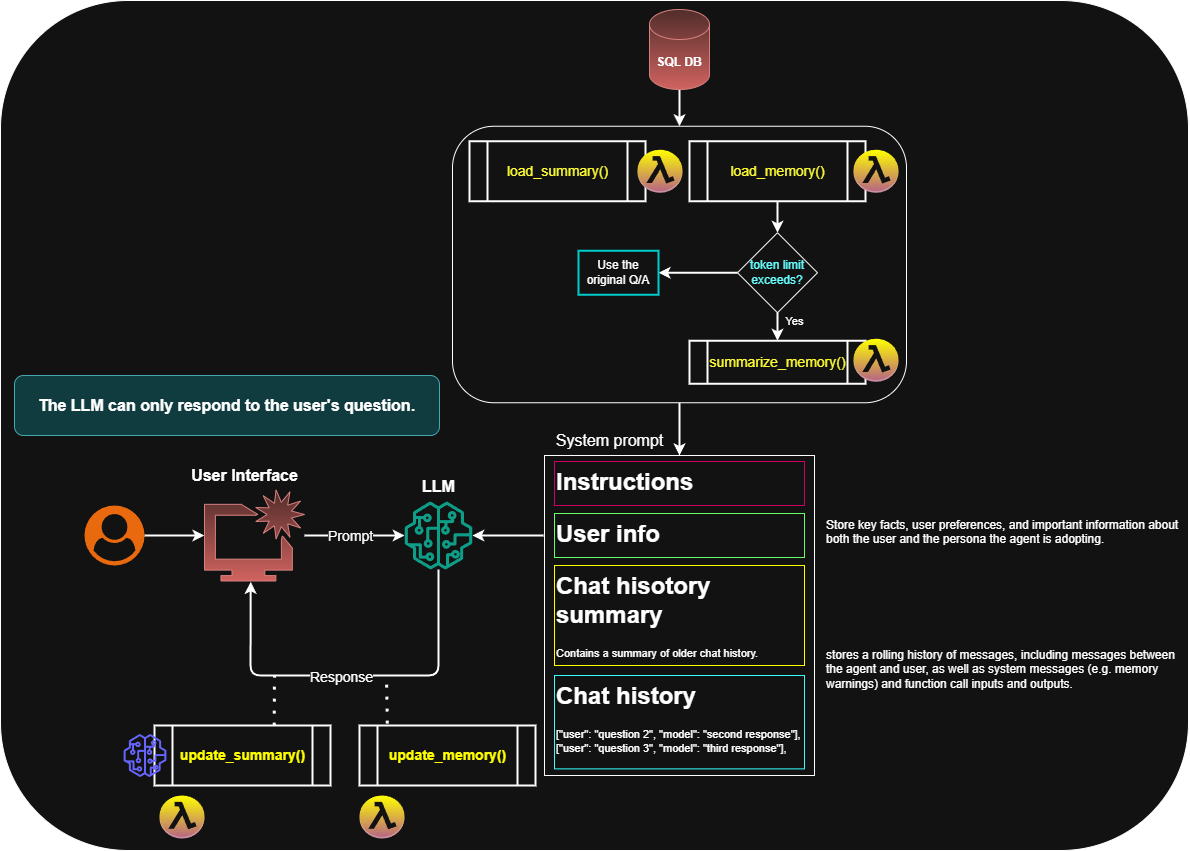
Basic Chatbot Schema Schema 3

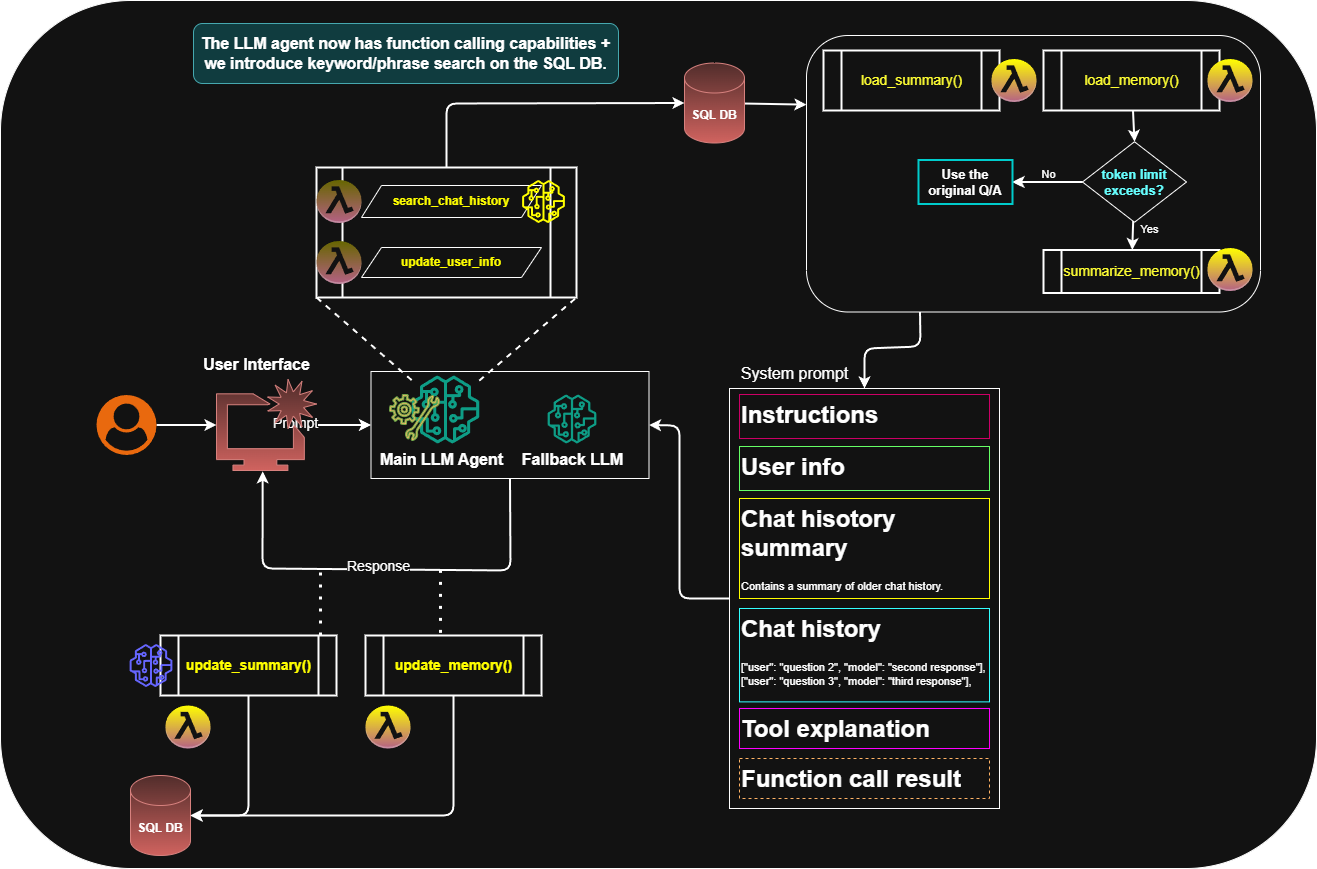
Agentic_Chatbot_v2 Schema Schema 4

Agentic_Chatbot_v3 Schema (Old Version) Schema 5
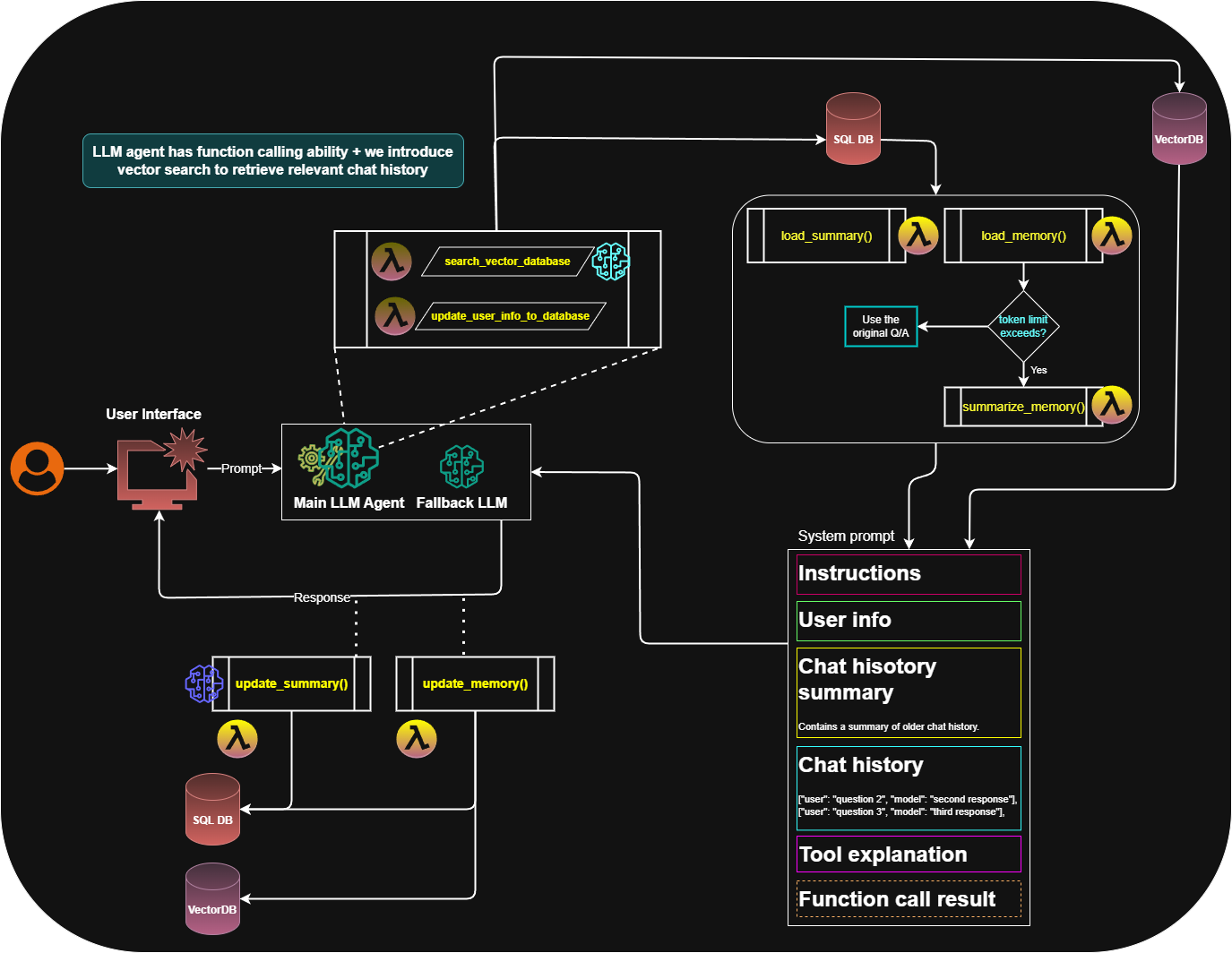
Longterm Memory with Graph DB and Vector DB using LangGraph Schema 6
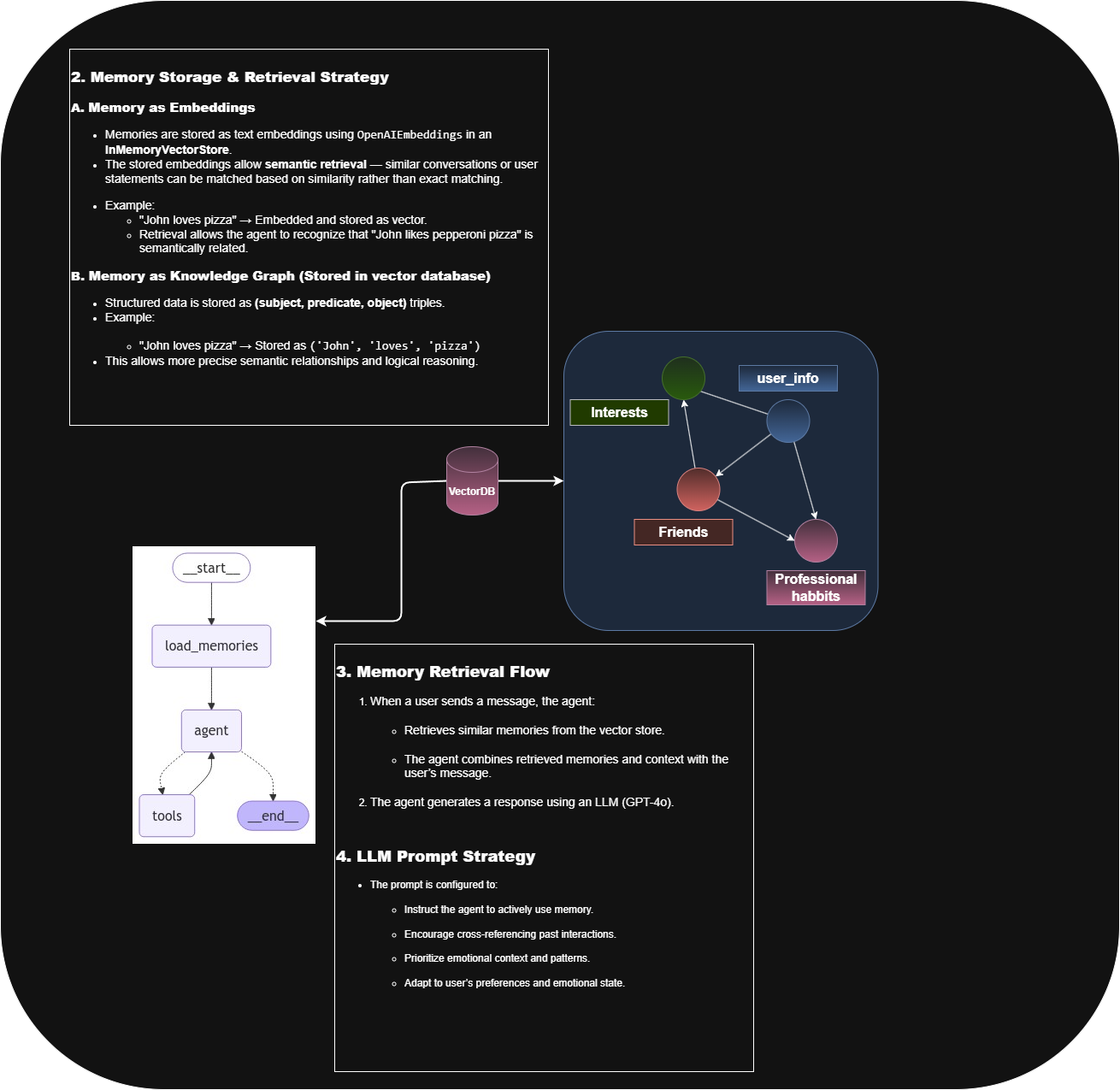
Longterm Memory (Semantic, Episodical, and Procedural) with LangGraph Schema 7 Schema 8
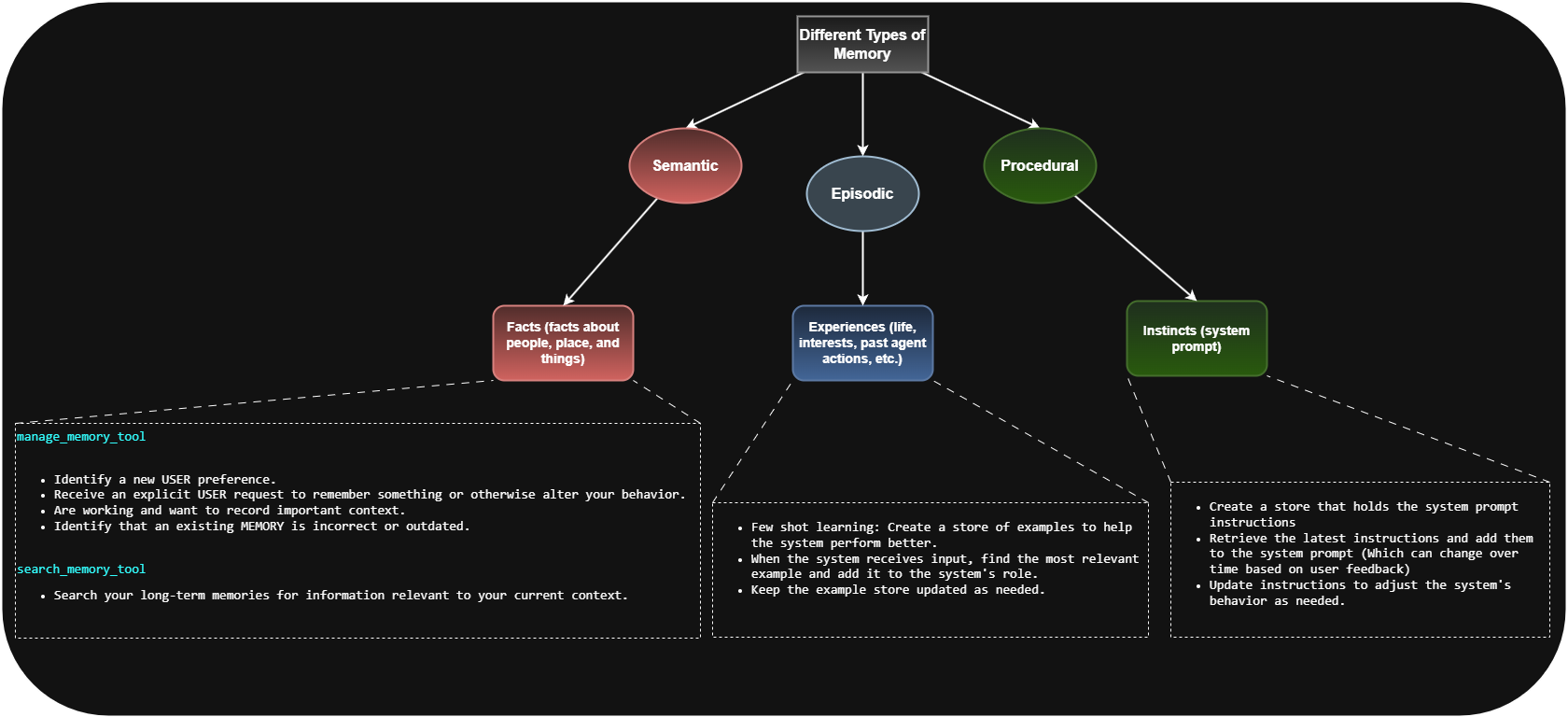
Old Project Structure Schema 9

🚀 Getting Started

  1. Read the Documentation: Start with 🤖 Complete System Explanation
  2. Explore the MCP Server: Check out our Notion MCP Server V2.1 - production-ready with comprehensive testing
  3. Set up Environment: Follow the installation steps above
  4. Configure Notion: Set up your Notion integration token
  5. Run Tests: Verify everything works with the test files
  6. Start Chatting: Use the enhanced chatbot with natural language

🤝 Contributing

Feel free to contribute by:

  • Adding new Notion operations
  • Improving memory systems
  • Enhancing the MCP implementation
  • Adding more test cases
  • Improving documentation

📄 License

This project is open source


🎉 This is a complete AI agent system with production-ready Notion integration, advanced memory management, and MCP protocol implementation!