aggregatorproxycompressiontool-managementmcp
Local MCP proxy collapsing many downstream tools into 4 meta-tools with output compression and progressive tool discovery.
Quick Install
Automated & IDE SetupCopy the AI prompt to install this server into Claude Code, Cursor, or another agent — or use 1-click editor setup below.
We couldn’t automatically confirm this listing starts correctly
We ran the install command below but it didn't respond within our test window — this can mean a slow first-time install rather than a real problem.
npx -y context-firewallNo response to initialize.
This is an experimental automated check and can have false negatives — missing environment variables, a slow cold install, etc. It doesn’t necessarily mean something’s wrong. Last checked 1mo ago.
Manual Client & Custom JSON ConfigExpand JSON ▾
Client Config & Setup
Choose your client or environment
Target File:
💡 Paste the JSON block into your client's configuration file under mcpServers, then restart the application.
Overview
Use cases
Consolidate multiple MCP servers into a single proxy exposing only 4 meta-tools
Compress large tool outputs (HTML, JSON, base64) before sending to the model
Progressively discover and load tool schemas on demand to save tokens
Retrieve full original outputs via paged read_more calls
Generate session reports showing token savings from compression and tool collapse
Key features
Collapses 50+ MCP tools into 4 meta-tools
Compresses outputs by 60–95% using HTML→Markdown, JSON summarization, base64 stripping
Progressive tool schema disclosure to reduce upfront token cost
Full output retrievable with read_more method
Per-session token savings report with breakdown by tool
Supports per-tool allow/deny policies for downstream servers
Capabilities & Tool Schemas
Inspect callable tools, capabilities, and parameters exposed to AI agents by Context Firewall.
Extracted Tool Capabilities
Collapses 50+ MCP tools into 4 meta-tools
Compresses outputs by 60–95% using HTML→Markdown, JSON summarization, base64 stripping
Progressive tool schema disclosure to reduce upfront token cost
Full output retrievable with read_more method
Per-session token savings report with breakdown by tool
Supports per-tool allow/deny policies for downstream servers
Documentation Overview
Context Firewall


Shrink large MCP tool outputs by 60–95% before they reach your model's context window — and collapse 50+ tool definitions into 4. Real HTML/JSON, measured — see benchmarks. Works with any MCP client, any model. Anything still over your configured token budget after compression is hard-truncated to that budget, with the full original always retrievable via read_more.
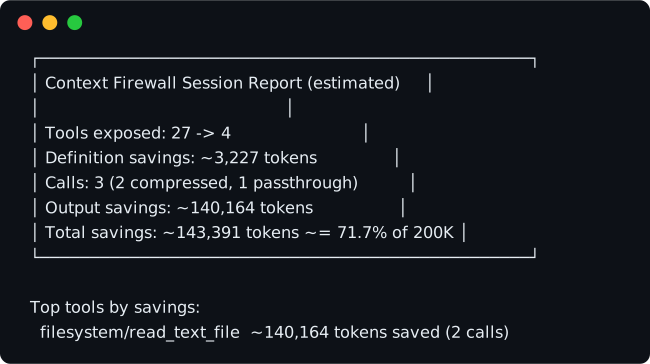
The session report printed on shutdown — this one from a real 3-call session (two large file reads, one echo). Every number measured, none simulated.
Context Firewall is a local MCP proxy that sits between your AI agent (Claude Code, Claude Desktop, Cursor, Cline, ...) and every downstream MCP server you've configured. Large tool outputs (raw HTML, base64 blobs, giant JSON) are compressed before they ever reach the model's context window, and the client sees exactly 4 tools no matter how many the downstream servers actually have.
Measured results
| Metric | Result |
|---|---|
| Output compression | 70–94% on real HTML pages, ~97% on large structured JSON (smart stages alone, before budget truncation) — e.g. a live Wikipedia page via the fetch tool: 232,391 → 6,907 chars (97.0%, measured); a GitHub issues JSON payload via the jsonSummary stage: 186,810 → 3,480 chars (98.1%, measured) |
| Tool collapse | 122 → 4 exposed meta-tools (5 real downstream servers incl. official GitHub github-mcp-server, 85 tools) |
| Tool-definition savings | ~28,600 tokens (estimated, chars ÷ 3.5) — 102,158 raw definition chars vs. 2,146 exposed |
All figures measured against real downstream MCP servers, not synthetic data — full methodology and tables in docs/BENCHMARKS.md.
What it does
- Progressive tool disclosure — instead of loading every downstream tool's full schema at startup, the client sees 4 meta-tools (
list_tool_categories,search_tools,invoke_tool,read_more) and only pays the token cost of a tool's full schema when it actually searches for it. - Output compression pipeline — large tool results are run through base64 stripping, main-content extraction + HTML→Markdown conversion (page chrome — nav, site headers/footers — is stripped when the page has a recognizable content region, so your token budget goes to actual content instead of navigation links), JSON structure-aware summarization, and finally character-budget truncation, in that order, before being returned.
- Full output retrievable via
read_more— nothing is silently thrown away. Every compressed output is stored in full (in memory, opaque handle) and can be paged back withread_more(handle, offset, length). - Session savings report — on shutdown, prints a shareable terminal card (and optional Markdown file) showing tool-definition and output-token savings for the session, plus a breakdown of which tools saved the most.
Quickstart
Minimal context-firewall.json (the downstreams block mirrors the mcpServers format you already know):
(${GITHUB_TOKEN} above is just this example's environment variable name — pick whatever's already set in your shell; it gets expanded into GITHUB_PERSONAL_ACCESS_TOKEN, the env var name the downstream server itself actually reads.)
Which GitHub server? Two options, different tool counts:
-
@modelcontextprotocol/server-github(used above) — the original npm package, 26 tools, onenpx -yline, zero extra setup. Archived/no longer maintained upstream, but still functional. -
github/github-mcp-server— the actively-maintained official server, 44 tools (default toolset) to 85 (GITHUB_TOOLSETS=all). Ships as a Go binary or Docker image, not an npm package:or, running a locally-built/downloaded binary directly:
"command": "/path/to/github-mcp-server", "args": ["stdio"](sameenvblock; addGITHUB_TOOLSETSto scope which of the 85 tools are exposed).
Per-tool allow/deny policy. Add allowTools/denyTools (array of exact names or * globs) to any downstream entry to restrict which of its tools can be invoked:
Deny always wins over allow. When allowTools is set, only matching tools are permitted; everything else on that server is blocked. An empty allowTools: [] is treated the same as omitting it (allow everything), not "deny everything". Blocked tools are hidden from search_tools results, and invoke_tool rejects them before dispatching to the downstream server. Tool counts in list_tool_categories and in the meta-tool descriptions are unfiltered totals — the policy is only enforced at search_tools/invoke_tool time.
Client setup
Set Context Firewall as your only MCP server — move every downstream server you currently configure directly (filesystem, github, everything, ...) into context-firewall.json's downstreams block instead. Your agent then sees 4 tools instead of the sum of every downstream server's tool count; pointing the client at Context Firewall alongside your existing servers doesn't give you the tool-collapse or compression benefit.
Each client below takes the same server entry:
Claude Code
Project-scoped .mcp.json in your repo root (shown above), or via the CLI:
Claude Desktop
claude_desktop_config.json (macOS: ~/Library/Application Support/Claude/claude_desktop_config.json; Windows: %APPDATA%\Claude\claude_desktop_config.json) — same mcpServers block as above.
Cursor
.cursor/mcp.json (project-scoped) or ~/.cursor/mcp.json (global) — same mcpServers block as above.
Cline
cline_mcp_settings.json (VS Code extension storage; macOS: ~/Library/Application Support/Code/User/globalStorage/saoudrizwan.claude-dev/settings/cline_mcp_settings.json) — same mcpServers block as above.
Compatibility status
| Client | Status |
|---|---|
| Claude Code | tested in real agent sessions — autonomous list → search → invoke → read_more workflow verified end-to-end |
| Claude Desktop | protocol-verified* |
| Cursor | config format documented, community testing welcome |
| Cline | config format documented, community testing welcome |
* Verified via MCP protocol integration tests (236 automated tests, including full stdio protocol round-trips against real downstream servers, run in CI on every push). Real-client reports welcome.
Configuration
downstreams
Each entry is either a stdio server (same shape as mcpServers) or a Streamable HTTP server:
${VAR_NAME} in any string value is expanded from the environment; a missing variable fails config load with a readable error.
compression
Policy resolution order is default < perServer < perTool (later overrides earlier, field by field):
Related MCP Servers

Adoption & maintenance
Factual signals from GitHub, npm, and our automated checks — not a rating.
GitHub stars
2
Stargazers on the source repository.
npm downloads
705
Package downloads in the last 30 days.
Last commit
1mo ago
Most recent push to the default branch.
Install check
Inconclusive
Didn't respond in our test window — often a slow first install.
Directory activity
2 views
Config copies, upvotes, and views on AllMCPs.
Reviews
No reviews yet — be the first to share how this listing worked for you.
Frequently Asked Questions about Context Firewall
AllMCPs Directory Badge
Showcase your server listing on GitHub or your project documentation. Embed this dynamic SVG badge to highlight official listing status and live engagement.
Badge Style:
Live Dynamic SVG Preview
Markdown (GitHub README)
[](https://allmcps.com/mcp/alepha188838884-context-firewall)HTML Embed
<a href="https://allmcps.com/mcp/alepha188838884-context-firewall"><img src="https://allmcps.com/api/badge/alepha188838884-context-firewall?style=directory" alt="Context Firewall on AllMCPs" /></a>Technical Specs & Signals
CategoryAggregators
PricingFree
56Quality signal: Good · 56/100How this signal is calculated ▾
Server availabilityNot measured
Not scored for repo-hosted servers — we can't reach the running server, only its GitHub page. Hosted MCP endpoints are health-checked live.
Verified ownership10/20
Documentation & tools26/30
Adoption & activity6/15
Community engagement0/10
A guidance signal from public completeness & health data — not a user rating. New listings start lower and rise as they add docs, get verified, and grow adoption. Signals we can't observe for a listing are skipped, not counted against it.
Supply-chain signal
No high-severity advisories surfaced by our automated scan.
Critical 0High 0Medium 0Low 0
Scanned 21h ago via OSV.dev · context-firewall (npm)
Own this project?
This directory is pre-filled from public sources. Claim via GitHub README, site badge, or DNS TXT to unlock edit access and the Official badge — proof is checked automatically, then reviewed by our team.
Free dofollow backlink: add your website and place the AllMCPs badge on it — no claim needed. We detect it automatically and keep it verified as long as the badge stays live.
Claim & get free dofollowShare & Embed
Add our SVG badge (dark/light directory styles) or embeddable widget to your site.