AIContextBuilder README
The full upstream README, mirrored here for reference. Install config, tool schemas, adoption signals, and an original overview live on the AIContextBuilder listing page.
AIContextBuilder (aicb)





Give coding agents a Roslyn-accurate map of your C#/.NET solution. aicb is
a code intelligence server for C# and .NET: it answers questions about callers,
implementations, dependency injection, tests, side effects and change impact,
then packs the relevant code into compact Markdown for an LLM. It runs locally as
an MCP server and CLI; a Windows desktop app adds visual context selection,
analysis and editing.
The software is closed source. This public repository contains its documentation, license and releases. It is free for individuals, education and organizations below the license thresholds.
See it answer a code question
Ask your coding agent:
What could be affected if I change
ColorMixerService? Use AICB.
Or call the same tool from a terminal:
Abridged output from the bundled ColorMixer.SelectionLab sample:
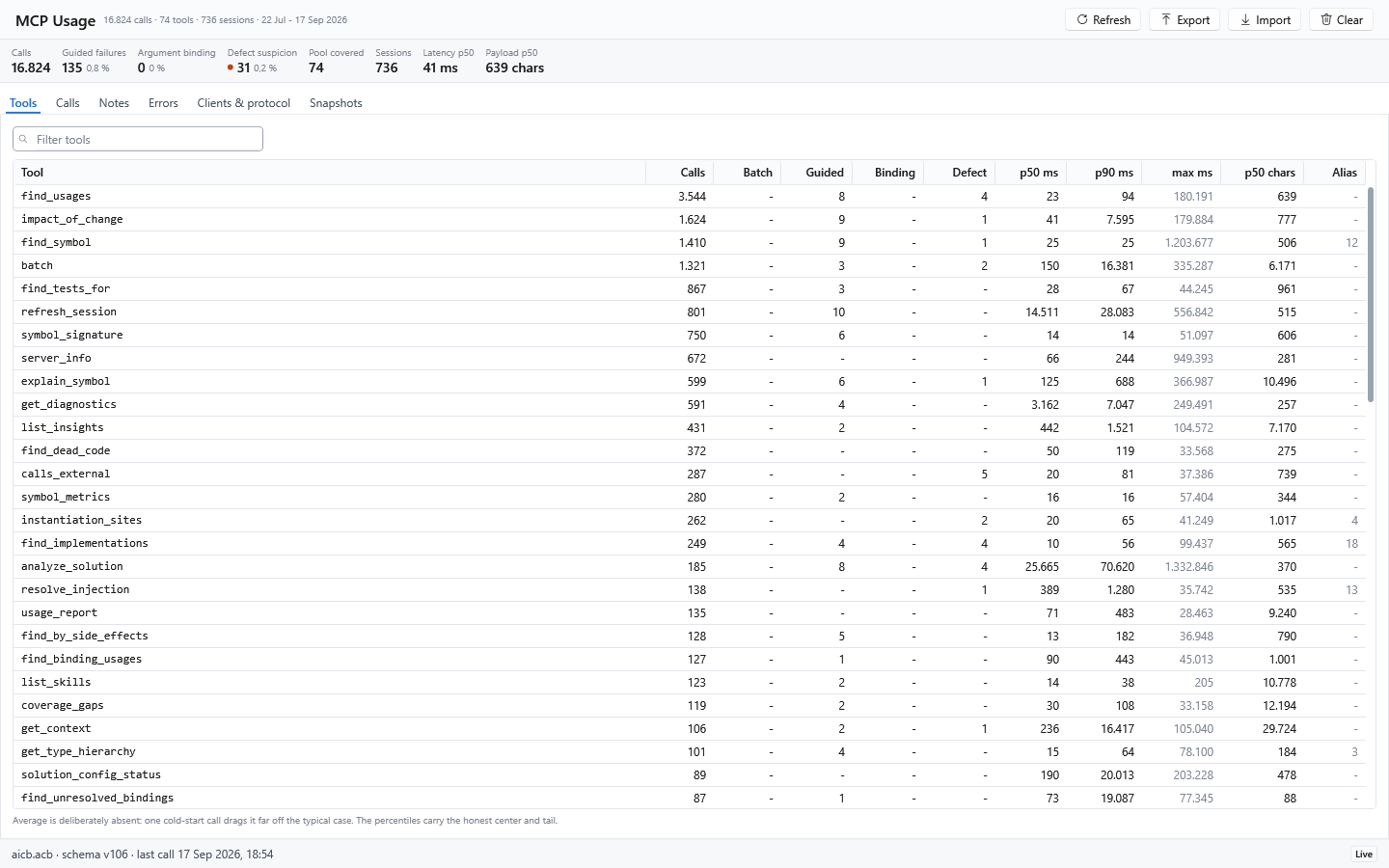
The desktop app's MCP Usage page records calls locally and separates guided refusals from suspected defects:
That answer comes from the Roslyn symbol graph, not a substring search. AICB distinguishes overloads, follows interface and override relationships, understands partial types and records DI construction paths.
Build context that fits the task
AICB does more than answer individual symbol questions. It can assemble a focused, task-specific context package for an agent instead of sending an unfiltered source dump:
| Need | Tool | What it returns |
|---|---|---|
| Read one symbol in context | get_context | The symbol plus its direct dependencies and callees |
| Explore a named symbol with selected surroundings | explain_symbol | Callers, callees, implementations, tests or other requested dimensions |
| Pack context for a natural-language goal | pack_for_task | Goal-named symbols and their semantic neighborhood |
| Prepare to edit | prepare_task | The goal-focused context plus covering tests and likely siblings such as a factory or validator |
| Check the response cost first | measure | The exact token count of one or more planned tool answers, without returning their large payloads |
The focused context tools accept a token budget. Explicitly named seed symbols stay in the package; AICB first reduces method detail and then removes less-relevant surrounding content when the budget is tight. It does not cut text in the middle of a block, and a leading note discloses types, tests or siblings that were omitted. AICB can therefore tell you that a bundle was structurally reduced or capped; it cannot certify that the remaining budget is sufficient to solve the task correctly. Whole-document rendering can use the same budget pipeline through a pipeline profile, including a configurable overshoot allowance and an optional trimming report.
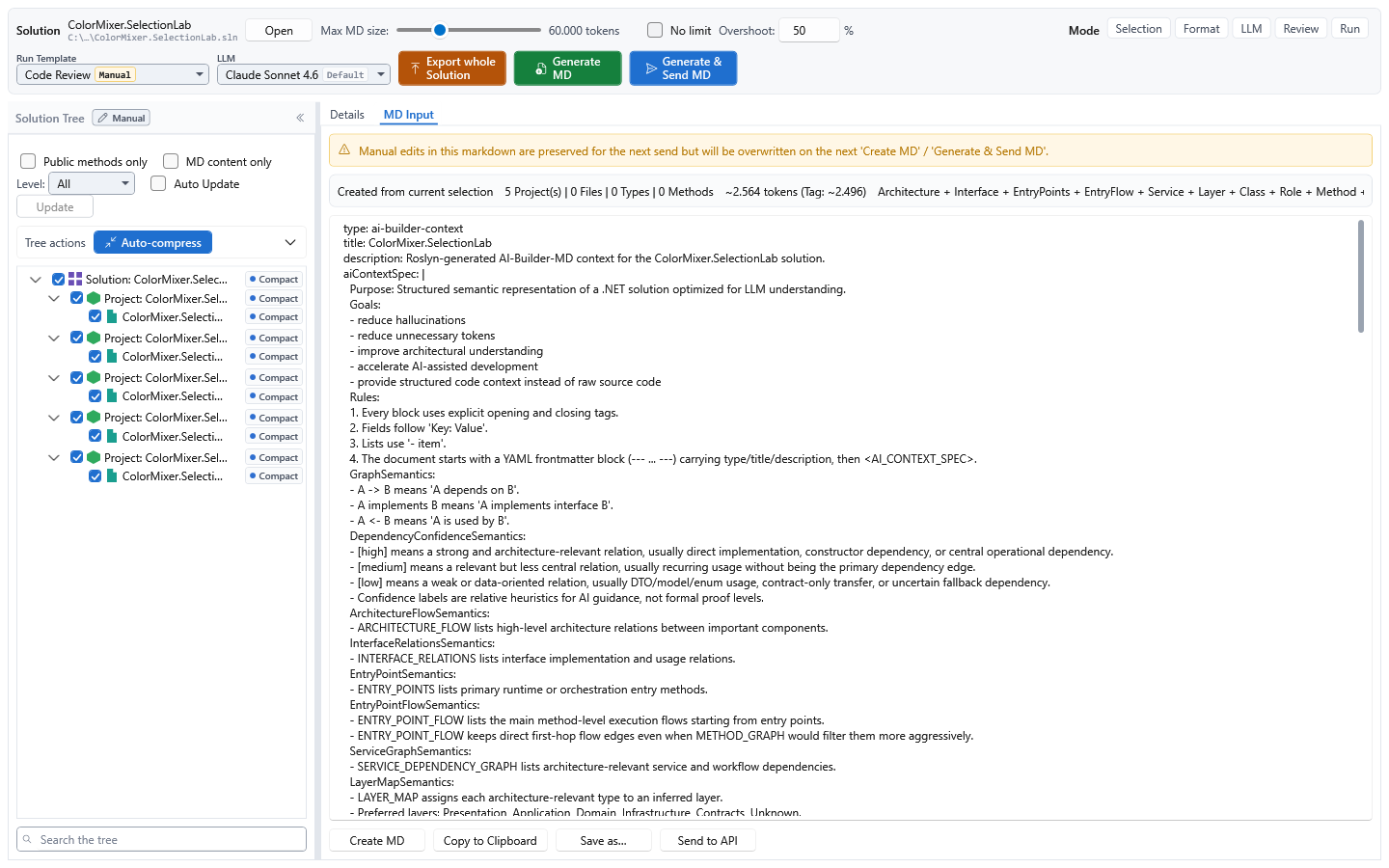
The result is AI-Builder-MD: structured Markdown for an LLM, containing the selected code together with symbol relationships, architecture graphs, semantic metadata and provenance. It can use the established tag notation or YAML. See the context-document guide and the task-packing tools.
Add explicit meaning with AI Tags and semantic annotations
AICB works without annotations. Where source structure and conventions are not
enough, optional <ai> tags in XML documentation let a developer state the intended
role of a type or method explicitly:
Annotations can describe semantics such as role, domain, architectural layer,
priority, stability, responsibility and side effects. Explicit values take
precedence over heuristic inference; sentinel values such as none can deliberately
suppress inference for one field. AICB preserves provenance so an agent can
distinguish source-derived facts, author-provided meaning and inferred hints. The
AI annotation reference
documents the supported forms and fields.
How analysis and memory work
AICB is more than a response cache around Roslyn. During analysis it walks the solution's C# documents, records declarations, calls, type references and other facts, then consolidates caller and type fan-in, implementations, resolved markup references and transitive side-effect classifications. Tools traverse or project that warm model for a particular question; context tools select and render a task-specific slice. This does not mean that every possible answer or runtime relationship is precomputed.
An MCP session belongs to one aicb mcp process and pins both the analyzed graph
and its Roslyn workspace. A second server process builds its own session. The
desktop app, CLI and MCP server use the same analysis and rendering engine and can
share configuration and persisted snapshots through the local database, but they
do not share one live in-memory graph. Within one session, only one refresh runs at
a time; concurrent callers join it. A source-only edit can take the incremental
path, replaying changed document text without reloading the workspace. When that
path is unavailable, or when force: true is requested, AICB fully reloads it.
Live sessions, snapshots and persistent codebase memory
These states serve different purposes and should not be treated as interchangeable:
| State | Lifetime and purpose | Important boundary |
|---|---|---|
| Live MCP session | In-memory graph and Roslyn workspace reused by one server process | Sees saved files, not unsaved editor buffers; another server process has a separate session |
| Remembered codebase | remember_codebase persists an analyzed model; recall_codebase can rehydrate it later or in another process without running Roslyn | A recalled session has no live workspace, no reliable line numbers and a reduced insight contract; use refresh_remembered when live precision is required |
| Saved snapshot | Named baseline used by compare_with_previous and public-contract comparison | A comparison baseline, not a live workspace |
<Solution>.aicb.json | Git-trackable solution configuration | Contains rules and choices, never analysis results, sessions or credentials |
remember_codebase, recall_codebase and refresh_remembered are opt-in tools: no
MCP profile exposes them, so start the server with AICB_MCP_TOOLS naming them (or
AICB_MCP_TOOLS=all). recall_codebase reports whether the persisted model still matches the source,
payload schema and analyzer identity. It deliberately returns the recalled model
even when it is stale, with metadata that tells the agent when a live re-analysis
is necessary. See sessions, recall and staleness.
What the model can and cannot prove
- AICB analyzes statically visible C# and selected XAML/AXAML relationships. Code reached only through reflection, runtime assembly scanning, dynamic configuration or an external consumer can remain invisible.
- DI analysis recognizes statically readable Microsoft-DI-shaped registrations; runtime-produced registrations are disclosed as dynamic or unknown rather than invented.
- XAML binding analysis resolves paths only where the source and data type are safe to establish. Unknown scopes are skipped conservatively.
- A reported side effect is a conservative static contact classification propagated through known call edges. It is not general data-flow, taint or runtime state analysis.
- Responses disclose stale sessions, unresolved projects and capped result sets.
Read
staleness,incompleteProjects,totalFoundandtruncatedbefore treating an empty or short answer as proof.
How an agent should judge an answer
An AICB response is evidence together with its limits. Before acting on an empty, short or apparently definitive result, inspect the accompanying signals:
| Signal | Meaning | Typical response |
|---|---|---|
staleness | Saved source changed after the analysis, or an automatic refresh ran or failed | Save the files and refresh if the response is not current |
incompleteProjects or verdict: "inconclusive" | Project references could not be resolved well enough for a complete semantic graph | Restore or build, then call refresh_session(force: true) |
totalFound and truncated | More matches exist than were returned | Narrow the scope, paginate or raise the documented cap |
| Bundle manifest or leading omission note | A token budget removed surrounding types, tests or sibling implementations | Increase the budget or request the missing axis explicitly |
mergedNamesakes, ambiguity or multiple candidates | A name did not resolve to one unique symbol | Repeat the query with a qualified symbol name |
confidence, provenance, dynamic or unknown markers | A value is measured, author-supplied, inferred or not statically knowable | Preserve the uncertainty and verify the relevant runtime configuration when needed |
origin: "Recalled" or lineNumbersAvailable: false | The answer came from persisted memory rather than a live Roslyn workspace | Use refresh_remembered before relying on live-only details |
The MCP profile controls automatic refresh. Off only discloses drift,
Reactive refreshes before a reading tool answers and is the normal shipped
setting, while Proactive starts analysis after saved edits settle. Automatic
refresh never sees unsaved editor buffers. Staleness is also different from
reference incompleteness: the first needs a refresh; the second normally needs a
restore or build followed by a forced refresh.
AICB also distinguishes unknown from verified absent. Tools such as
assert_absence return confirmed, refuted or indeterminate rather than
turning missing evidence into a false negative.
The question-first architecture, limits and evidence guide explains what lives in memory, how refresh and context selection work, which claims are measured, and where the published scale benchmark stands.
Where it helps
| Question | Tool |
|---|---|
| Who calls or uses this? | find_usages |
| What is the blast radius of a change? | impact_of_change |
| Where is this interface implemented or overridden? | find_implementations, find_overrides |
| Which tests exercise this symbol? | find_tests_for |
| What gets injected here? | resolve_injection |
| Which code has side effects or calls an external API? | find_by_side_effects, calls_external |
| What context does an agent need for this task? | explain_symbol, prepare_task, pack_for_task |
| How large would these answers be before I pull them? | measure |
| Where is this property or resource used in XAML/AXAML? | find_binding_usages, find_resource_usages |
| Which markup bindings cannot be resolved safely? | find_unresolved_bindings |
| What changed between two analyzed states? | semantic_diff, diff_review |
| Does this change set violate a policy or public contract? | evaluate_change_set, compare_public_api |
| Is the claim that this symbol is unused, untested or absent actually supported? | assert_absence, verify_claim |
| What evidence should a reviewer see for these changed symbols? | review_context |
| Where are concurrency, resource-lifetime or event-subscription risks? | find_by_concurrency_risk, find_by_resource_leak, find_by_event_subscription |
| Where did repeated structures, conventions or documentation drift apart? | find_structural_twins, check_pattern_drift, check_doc_drift |
The default profile exposes every tool in this table except semantic_diff,
diff_review, find_by_concurrency_risk, find_by_resource_leak,
find_structural_twins, check_pattern_drift and check_doc_drift, which need the
Full Select profile, and compare_public_api, which is opt-in (see
Tool sets and Agent Skills).
These tools form a broader capability map rather than a flat search catalog:
| Capability | Examples |
|---|---|
| Semantic navigation | usages, implementations, overrides, hierarchy, DI and XAML |
| Change safety | impact, tests, diagnostics, review context and public API comparison |
| Runtime-risk indicators | concurrency, resources, events, external calls and side effects |
| Architecture and consistency | layers, cycles, structural twins, pattern drift and documentation drift |
| Verification | negative claims, baseline-to-changed claims and change-set policy |
| Context economy | task packing, measurement, token budgets and compression |
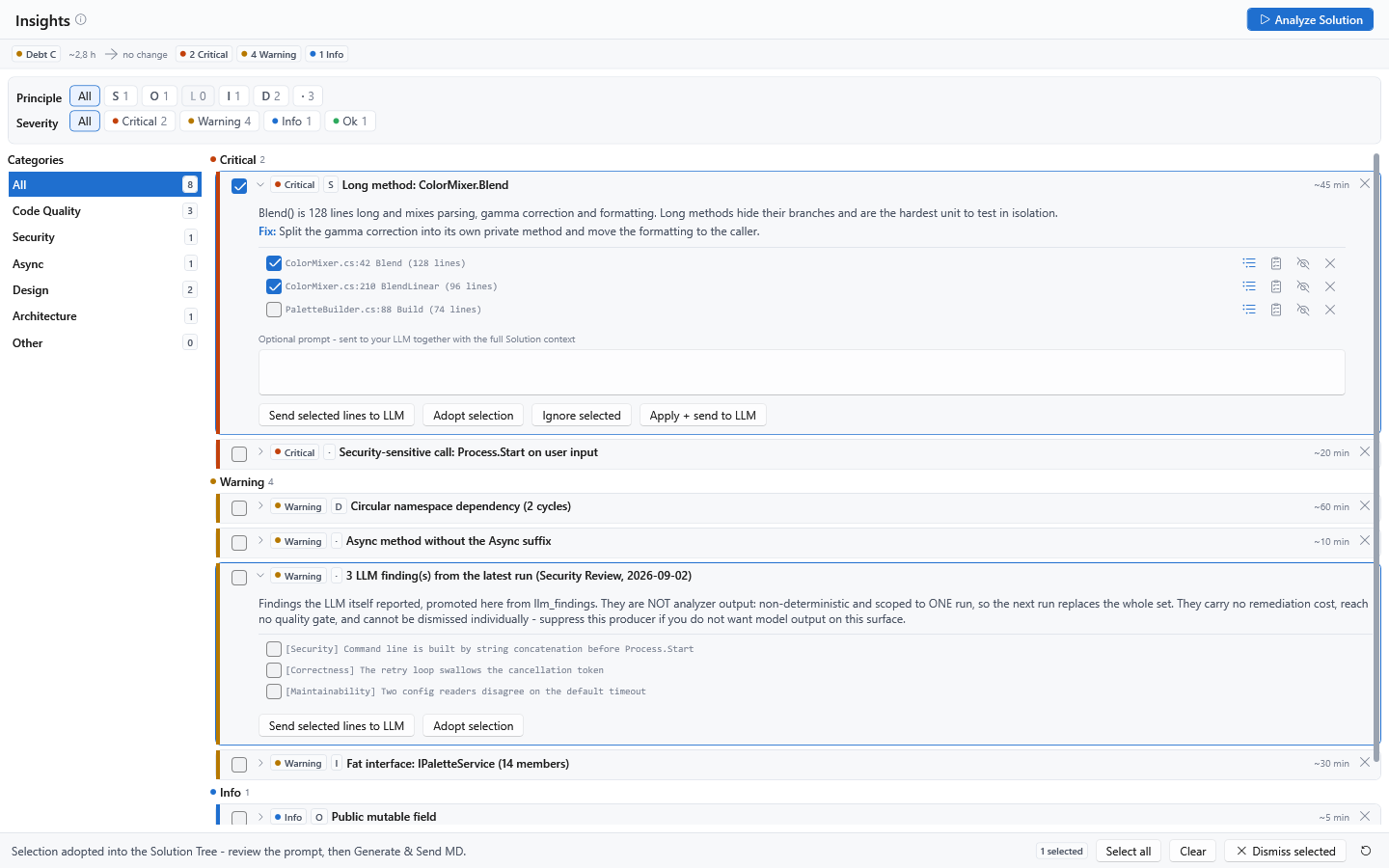
The desktop app turns code-quality, security, design and architecture findings into an actionable review queue:
AICB is most useful for non-trivial C#/.NET solutions and semantic questions that plain text search cannot answer reliably. It analyzes C#; selected XAML/AXAML relationships supplement that graph. Other programming languages are out of scope.
Multi-targeted projects are loaded once per target framework by default, while
query surfaces generally deduplicate them to one logical project. Setting
analyzePreferredTfmOnly in <Solution>.aicb.json reduces analysis and export work
to the newest target-framework instance. The symbol inventory remains available,
but fan-in edges that exist only in another target can disappear, so this is a
documented precision-versus-cost choice rather than a transparent optimization.
A safe agent workflow
An agent can use AICB without memorizing the tool catalog:
- Call
server_infoto verify the connection and detect binary or configuration drift. Uselist_skillsfor the complete capability map ordocs()for the built-in operating manual. - Start an edit task with
prepare_taskto collect the named symbols, relevant context, covering tests and likely sibling implementations within one budget. - Before changing a symbol that other code names, call
impact_of_change; usefind_tests_forwhen the task bundle does not give enough test evidence. - Read uncertainty and completeness signals before treating an empty result as proof. Qualify ambiguous symbol names; restore and force-refresh incomplete projects.
- Make and save the change. Then call
refresh_sessionbeforeget_diagnostics. Under the normalReactiveprofile this is usually redundant, but it remains correct in every mode and makes the intended boundary explicit. - Use
review_context,evaluate_change_setorverify_claimwhen the task makes a review or policy claim; do not infer absence merely from a short search result. - Finish with the repository's real build and test commands.
get_diagnosticsreports Roslyn compiler diagnostics, not third-party analyzer or runtime results.
For several independent read-only questions, batch reuses one session and returns
one bounded response. Use measure first when the likely response size matters.
Reproducible analysis, CI and review
| Need | AICB workflow |
|---|---|
| Version the portable solution rules | Commit <Solution>.aicb.json next to the solution. It can carry layer rules, namespace exclusions, test definitions, suppressions, auto-init flags and analysis scope. Each surface consumes only the axes documented for it; the sidecar contains configuration, not analysis results, sessions, snapshots or credentials. Use solution_config_status → init_solution_config → apply_solution_config; aicb init does not create this file. |
| Enforce a quality threshold in CI | Run aicb analyze -s App.sln -o context.md --fail-on "critical>0 OR debt>120min". A failed gate returns exit code 6 and still writes the context document for diagnosis. |
| Compare an in-place change with a baseline | Call save_session before the edit, then refresh_session and compare_with_previous; use diff_public_contract (Full Select profile) when the public API is the contract that matters. |
| Review two live analyzed states | semantic_diff reports structural changes. diff_review adds blast radius, tests and newly introduced findings with a policy verdict. These two-session tools require the Full Select profile. |
| Reuse an analyzed model across processes | remember_codebase persists it, recall_codebase loads it without Roslyn, and refresh_remembered restores a full live analysis when required. These three are opt-in tools (AICB_MCP_TOOLS). |
| Curate context visually | The Windows app adds a solution tree, manual context selection, detail and token controls, AI-Builder-MD preview/export, snapshots, Insights, LLM runs and a source editor. |
Configuration precedence is axis- and surface-specific. For example, headless layer
mapping can fall back to the sidecar, while headless test detection currently resolves
from the database or built-in rules rather than the sidecar's test axis. The exact
matrix is in the
configuration guide.
A running MCP session keeps the configuration it was analyzed with; after editing the
sidecar, start a new analysis instead of assuming refresh_session re-reads it.
Suppressions hide accepted findings from suppression-aware reading surfaces, but
solution_metrics and the CLI quality gate continue to count them. A shared
suppression is therefore an explicit review decision, not a way to lower the gate.
From semantic engine to human-in-the-loop workspace
The MCP server is currently AICB's most complete and operationally mature integration surface. Its 82 registered tools cover semantic navigation, change impact, dependency injection, test discovery, architecture, quality, context packing, review and session management. Profiles expose a curated 54-tool default or the 72-tool Full Select set, while sessions, staleness signals and bounded responses make the surface practical for coding agents. These numbers describe the available product surface; they are not a published benchmark of agent outcome quality.
The active MCP profile also selects task-oriented facets: each facet connects agent
guidance, a context-template slot and the corresponding tool subset. list_skills
is the runtime source of truth for which tools are exposed, which are callable, and
which additional registered tools sit outside the active pool.
The Windows app complements that agent-facing surface with a visual workspace for people: solution navigation, manual context selection, detail and token controls, AI-Builder-MD preview and export, snapshots, Insights, reusable configuration and manual LLM runs.
Quality and solution-specific analysis profiles
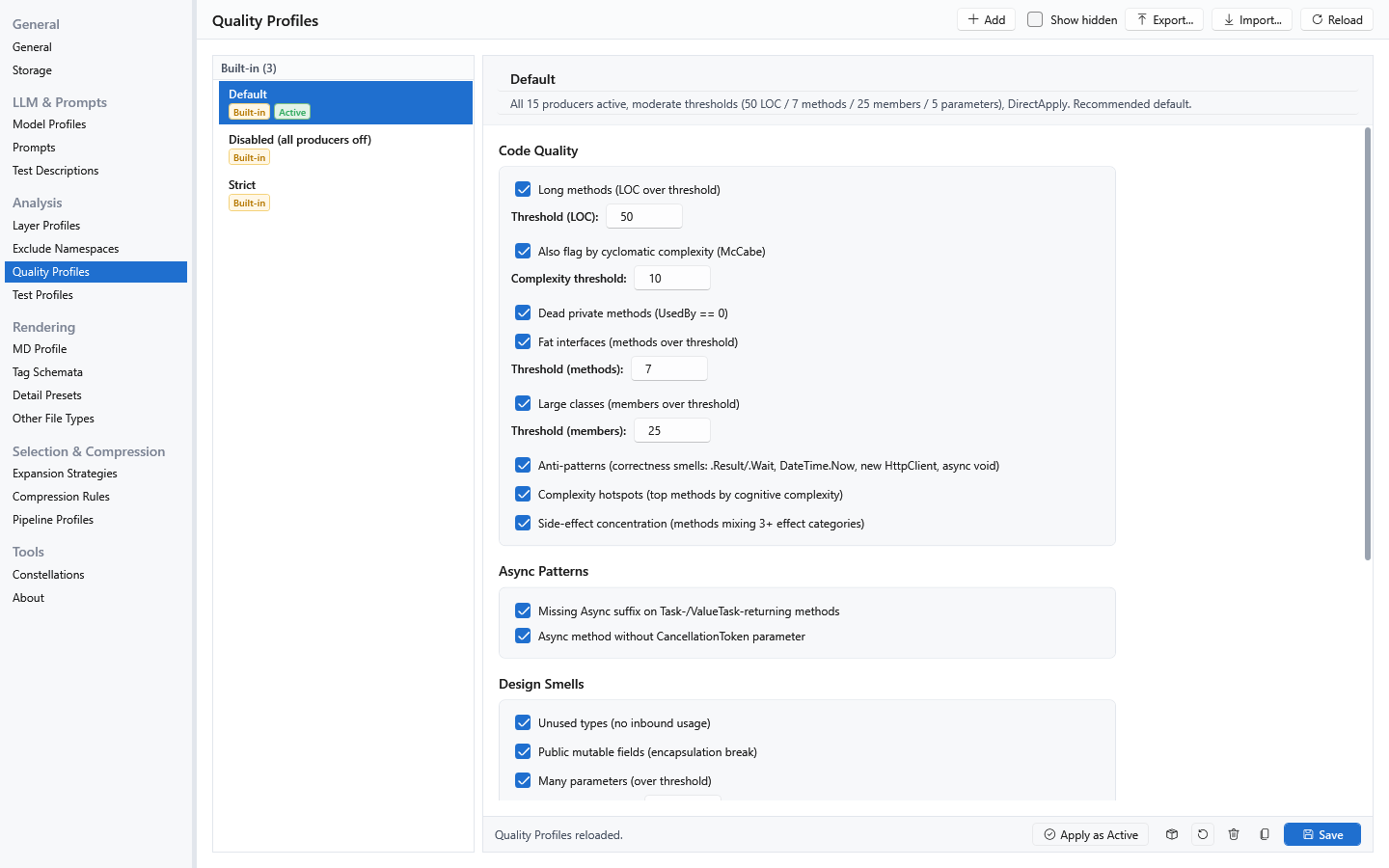
A Quality Profile controls which insight producers run and the thresholds they use, such as method length, cyclomatic complexity and class size. It does not by itself define finding severity or the CLI quality gate.
Each solution also has three independent analysis axes:
| Axis | Question it answers | What it controls |
|---|---|---|
| Layer Profile | Where does this code belong architecturally? | Ordered namespace-pattern-to-layer mappings for layers such as Domain, Application and Infrastructure. The first matching rule wins. The profile also determines whether a detected cross-layer violation is Advisory (warning) or Strict (critical). |
| Exclude Namespaces | What should stay outside the analysis? | Named namespace patterns skipped by the analyzer, using Contains, StartsWith, EndsWith or Exact matching. This keeps configured framework or vendor dependencies from dominating the semantic graph; shipped presets cover the BCL and SAP Business One. |
| Test Profile | What counts as test code? | Project-name rules plus method-attribute markers. The built-in profiles recognize xUnit, NUnit and MSTest conventions, and production-focused tools can exclude the detected test code by default. |
The desktop app presents these three pickers side by side for the selected solution. The Settings pages are the library editors; the Workspace pickers choose which library entry applies to this particular solution. A per-solution choice wins over the global default.
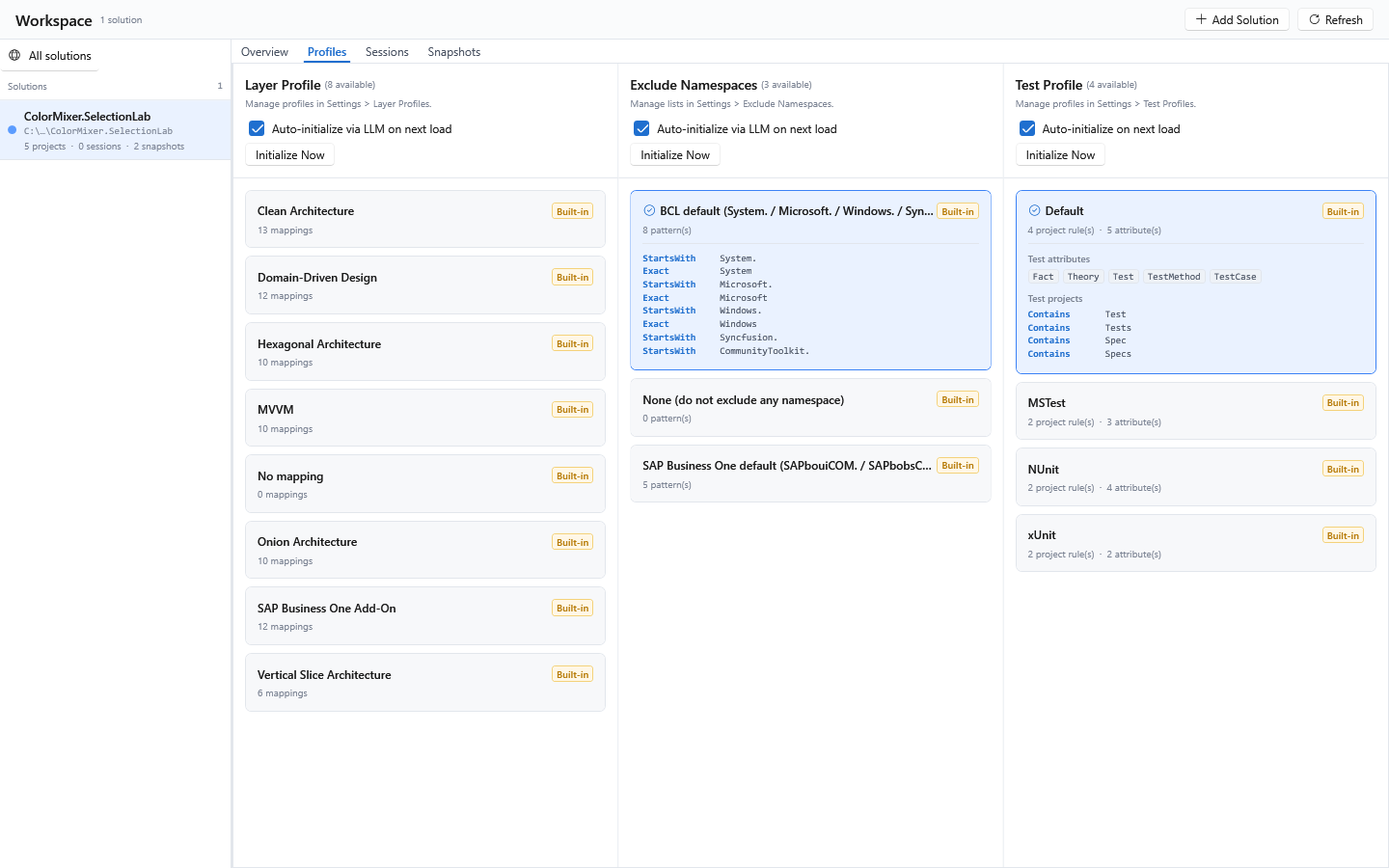
Initialize the three axes
For a freshly registered solution, all three auto-init flags start enabled. The next time the desktop Context Builder loads it, AICB attempts each still-unconfigured axis. If a sidecar already covers an axis, the GUI offers to restore it without a model call. Otherwise, with a usable default model profile, one LLM request proposes layer rules and exclusions from declared and referenced namespace lists; test detection is derived locally from the analyzed projects and test attributes. The confirmation dialog decides whether the proposal is applied - the LLM request has already happened at that point. A missing model profile, no detected tests, or declining the proposal can leave an axis unconfigured. Existing choices are never overwritten.
Successful GUI auto-initialization stores the chosen profiles in the local database.
It does not create <SolutionName>.aicb.json automatically. Use Workspace → Profiles → Export Config to write that portable sidecar, then commit it. A later GUI
can restore the supported axes from it without an LLM call; headless consumers apply
the per-axis rules described in the configuration matrix. Initialize Now performs
only an immediate sidecar restore - it does not call a model or analyze the solution.
An agent can guide the same setup explicitly:
solution_config_statusreports which axes are initialized and whether their active values come from the local database, the sidecar or neither.init_solution_configreturns proposal material: declared namespaces for the layer map, referenced namespaces for exclusions, and detected test projects and attributes for the test profile.- After reviewing or adapting that proposal,
apply_solution_configcreates and activates the custom entries, marks the axes initialized and writes both the local configuration database and<SolutionName>.aicb.jsonbeside the solution. - Commit the sidecar so the portable solution configuration travels with the
repository. Each consumer applies the supported axes described above; do not
assume every surface resolves every field identically. Later,
check_solution_config_driftreports namespaces or test projects no longer covered by that configuration.
aicb init is a different operation: it connects a repository to the MCP server
and installs the agent skill and optional symbol guard. It does not initialize
these three solution axes or create <SolutionName>.aicb.json.
See profiles and solution configuration for precedence, the sidecar schema and the full initialization behavior.
Context templates and run templates
The two template types have different responsibilities:
| Template type | Purpose |
|---|---|
Context Template (Templates) | Defines what goes into an export: prompt, Markdown profile, detail presets, expansion strategies, compression, quality settings and export switches |
Run Template (Run Templates) | Defines how a task is executed: run type, selected context template, model defaults and run-specific options |
Detail Presets, Markdown Profiles, Expansion Strategies, Compression Rules, Pipeline Profiles and Quality Profiles are reusable building blocks referenced by a context template; a run template selects that context template.
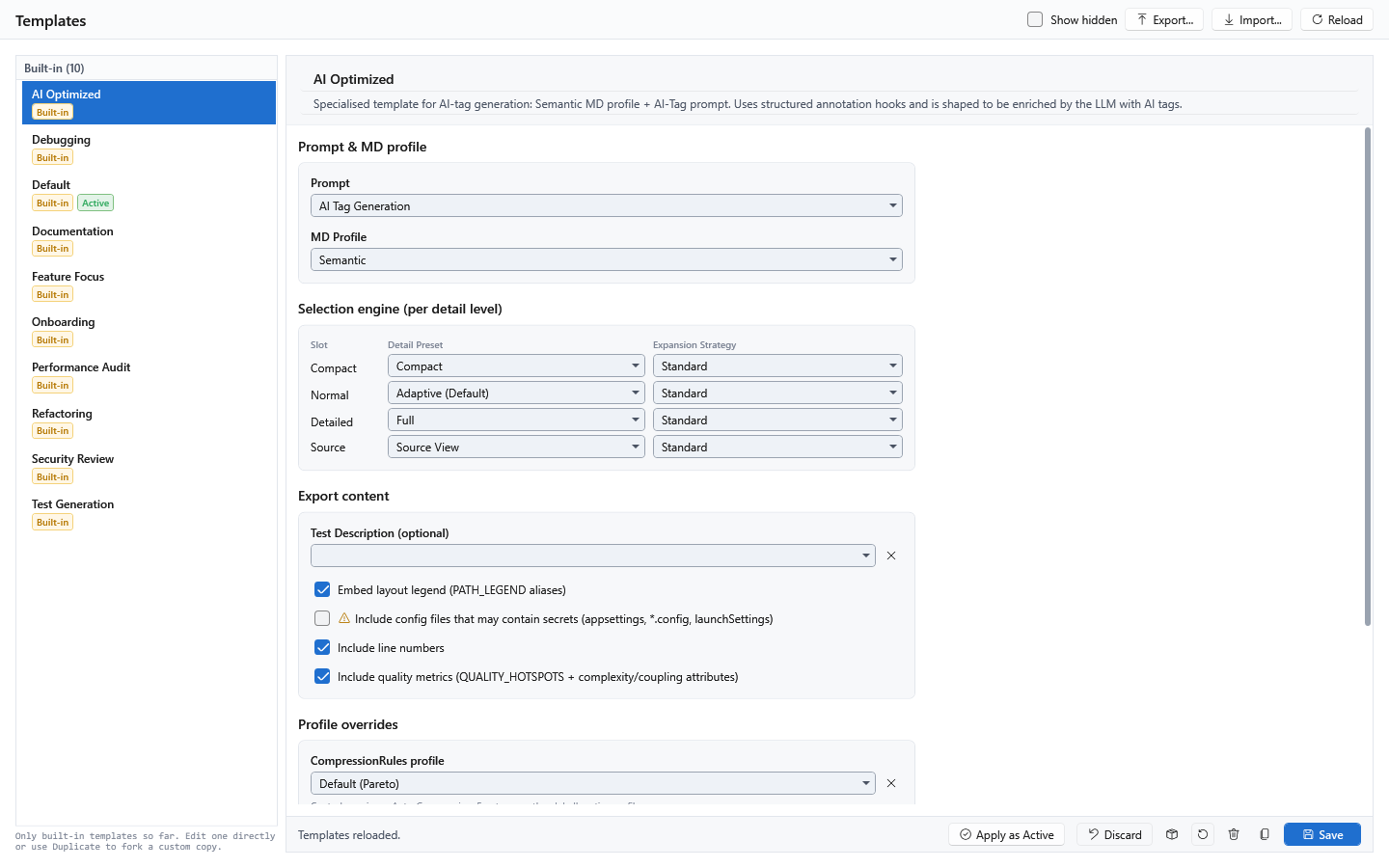
Product direction, not a release commitment
The direction for the desktop app is a human-facing orchestration workspace: a
developer selects and constrains context, inspects intermediate results, approves
decisions and controls what an AI model runs next. Manual is the released run
type today. Iteration is intended to process selected nodes one by one, and
Preselection to let a model narrow the relevant context before the main run;
both are represented in the application but are not released yet. Pipeline
currently exists only as a placeholder in the data model and executes nothing.
Install
Install one form per machine:
| You want | Install | Platform |
|---|---|---|
| MCP server and CLI | .NET global tool | Windows, Linux, macOS |
| Desktop app plus the same MCP server and CLI | Windows installer or portable ZIP | Windows |
The .NET tool needs the .NET 8 SDK:
Update it later with dotnet tool update -g AIContextBuilder. For a container, the
repository's Dockerfile
installs the same .NET tool and serves MCP over stdio.
The Windows downloads are self-contained, but analyzing a solution still needs MSBuild from a .NET SDK or Visual Studio. The installer is not code-signed yet, so Windows SmartScreen displays a warning; every release provides SHA-256 checksums.
Connect a coding agent
Run this from the project you want the agent to work on:
It writes .mcp.json, the MCP configuration Claude Code reads (other clients need
the manual step named below), and the aicb-csharp-context agent skill under
.claude/skills/, without overwriting existing files. If it detects Claude Code, Codex or OpenCode project
configuration, it also installs a symbol guard that blocks C# symbol searches
by grep and redirects the agent to the semantic tool. This intentionally changes
agent behavior. Opt out with:
Client-specific status:
| Client | MCP setup | Skill and guard |
|---|---|---|
| Claude Code | .mcp.json written by aicb init | Skill and optional guard installed |
| Codex | Add aicb mcp through the client's MCP configuration | Optional guard supported; skill location is not guessed |
| OpenCode | Add aicb mcp to opencode.json | Optional guard supported; skill location is not guessed |
| Cursor / Cline / other stdio clients | Add command aicb with argument mcp | Use the published skill if the client supports Agent Skills |
Manual .mcp.json configuration for clients that read it:
Verify the connection by asking the client to call server_info. Every analysis
tool accepts an absolute .sln, .slnx or .slnf path as its session, so no
separate analyze step is required. See the five-minute guide
for setup, first questions and troubleshooting.
Tool sets and Agent Skills
| Set | Size | Purpose |
|---|---|---|
| Default MCP profile | 54 tools | Curated semantic and structural tools for normal agent work |
| Full Select profile | 72 tools | Default set plus the measured long tail |
| Complete server surface | 82 tools | Full Select plus the opt-in session-memory, database and API-comparison tools |
Start the Full Select profile with
aicb mcp --mcp-profile mcp-profile/full. Set AICB_MCP_TOOLS=all to add
the opt-in tools as well. The generated tool reference documents
the default set; the MCP server manual
documents all 82 tools and their parameters, and alongside them sessions and
staleness, profiles, pools and facets, and what aicb init writes - twelve
chapters in Markdown, readable in the browser and by an agent, and also
published as a PDF.
The three published counts are starting points, not fixed editions. In the
desktop MCP Profiles editor you can create or duplicate a profile, enable only
the task facets you want, and select individual core and facet tools. Every core
tool can be removed except the locked diagnostic server_info, so even a very
small task-specific tools/list is possible. The server's fixed lead-in is
standing agent guidance, not another selectable tool group. For headless setup,
AICB_MCP_TOOLS=methods:<tool>,<tool>,... exposes exactly the named functions;
class lists, lean and all are also supported. Profile and environment changes
take effect at the next server start. list_skills shows the resulting in-pool and
out-of-pool tools. See profiles, pools and facets.
Four Agent Skills ship in skills/:
aicb-csharp-contextroutes semantic C# questions to the right tool.aicb-code-reviewchecks a completed change for correctness.aicb-code-simplifierlooks for unnecessary complexity.aicb-usage-checkreports what this server was actually reached for.
The last three are opt-in: aicb init --skills=all.
Scale, releases and compatibility
AICB has no published hard project-count limit. Initial cost and peak memory are
solution-specific and grow with loaded projects, documents, target-framework
instances and graph density. The first analysis can take seconds to minutes;
subsequent questions reuse the warm graph, and eligible saved-source edits use the
incremental refresh path. For a very large repository, use a .slnf to reduce what
MSBuild loads and optionally set analyzePreferredTfmOnly to avoid analyzing every
target-framework instance. summaryOnly, query scopes and token budgets reduce
response volume; they do not necessarily reduce the underlying solution analysis.
The desktop load-perf.log and MCP usage_report provide local phase and latency
measurements. A standardized cold/warm time and RAM benchmark on three public
.NET solutions (≈ 25k, ≈ 55k and ≈ 1.8M lines of C#) is published in the
architecture and evidence guide;
these controls are still not a universal performance claim, but there is now a
measured boundary.
Public releases currently have no declared LTS window, response-time SLA or promise
that every MCP response and persisted schema remains unchanged across versions.
Operational safeguards are explicit instead: the changelog records releases;
server_info reports version, build and configuration drift; persisted analyses
carry payload-schema and analyzer identities and fall back to a live analysis when
they are incompatible; and the desktop refuses to write a database created by a
newer schema. Database migrations can be one-way, so a reliable rollback means
backing up before an update and using the older build with a separate or restored
pre-migration database. Commercial agreements can define stronger support,
response-time and version-maintenance commitments where required; see
Support.
CLI at a glance
Run aicb <command> --help for options.
Local by default
- The CLI and MCP server have no outbound network capability and do not modify the source code they analyze.
- There is no outbound telemetry, analytics, update check, account or license
server. The MCP server records its tool calls locally for
usage_reportand the desktop app's MCP Usage page; that log never leaves the machine. - The desktop app can contact only an LLM endpoint you configure: for a manual run, a model-profile connection test, or first-load proposals for Layer Profile and Exclude Namespaces when those auto-init flags are armed. The endpoint may be a local model. The Details tab is also a real editor and saves a file only when you explicitly use Save.
- Opening a solution runs its MSBuild logic to resolve references, and building its
compilation runs the source generators its projects reference, as in an IDE or
dotnet build. Analyze only solutions you trust. AICB does not run third-party Roslyn analyzers.
A small number of explicitly named tools can write configuration or an export;
their tool descriptions state this. The complete threat model and private
reporting route are in SECURITY.md.
License at a glance
Use is free for:
- private, hobby and educational use by natural persons,
- accredited educational institutions for teaching, learning and non-commercial research,
- organizations that reach none of these thresholds: 100 employees, EUR 10 million annual turnover, 21 developers.
The thresholds apply to your organization, not to your clients. After first
reaching any one threshold, you have 90 days to agree a commercial license; use
remains free during that period. The 90 days are contractual text only: AICB
starts no license timer, sends no threshold or deadline data, blocks no feature
and does not technically stop working when the period ends. Commercial licenses
start at EUR 25 per licensed developer per month; the exact price and scope depend
on the number of users, the requested support level and any agreed priority for
improvement requests. A commercial agreement can include support, defined response
or maintenance commitments, prioritized consideration or
implementation of improvements - for example, making a generally useful analyzer
handle patterns found in the customer's code more accurately. Such work improves
the general AICB product; it does not create a customer-specific fork or specialize
AICB to one codebase. Customer code is never collected or used for improvement
automatically; examining it requires material or access deliberately provided by
the customer and a separate agreement on scope and confidentiality. Exact
deliverables, priorities and guarantees exist only when written into the individual
agreement. Connecting AICB to MCP clients, agent harnesses, scripts, build systems
and CI through its documented interfaces is permitted. Redistributing, modifying,
repackaging, reselling or offering the AICB binaries as a hosted service is not.
Contact aicb@dadera.de. See the plain-language guide,
LICENSE.txt and the full bilingual EULA.md.
Support and continued development
AICB is under active development: the changelog records every release, and published releases appear on the Releases page.
Support follows the license:
| Free | Commercial agreement | |
|---|---|---|
| Who | Everyone below the thresholds | Organizations at or above a threshold, or anyone who wants stronger terms |
| Channel | GitHub Discussions, Issues | Direct contact plus the public channels |
| Response target | Best effort | ≤ 2 business days |
| Security fixes | Shipped through public releases | Fix target ≤ 10 business days for confirmed vulnerabilities |
| Version maintenance | Current release | Individually agreed maintenance window |
| Improvement requests | Community-driven | Prioritized consideration; agreed priorities are written into the contract |
| Source access | None | Code review under NDA can be agreed |
The targets in this table are typical values an individual agreement can include;
they bind only when written into the agreement, and payment alone creates no
unstated SLA. Prices are in License at a glance. Contact
aicb@dadera.de.
Questions and feature requests are welcome in
GitHub Discussions. Report bugs
through GitHub Issues and include
aicb --version and, for MCP problems, the output of server_info. Report security
issues privately as described in SECURITY.md.
Documentation
- Getting started - install, connect and ask the first question
- Tool reference - generated reference for the default MCP profile
- Architecture, limits and evidence - in-memory model, refresh, context selection, static-analysis boundaries and benchmark status
- MCP server manual - the full reference in twelve Markdown chapters: connecting a client,
aicb init, sessions and staleness, profiles and facets, every tool, troubleshooting - General reference manual - the full reference in twelve Markdown chapters, with the printable PDF in the same folder
- Desktop app reference manual - the full reference in eleven Markdown chapters, with the printable PDF in the same folder
- Changelog and latest release
"AIContextBuilder" and "AIContextBuilder for .NET" are product names used by Gregor Dadera; no registration is claimed.