A
Ai Netcafe
Compare LLM cost & latency on one prompt, translate PDF keeping layout, cited research, make PPTX
Quick Install
Automated & IDE SetupCopy the AI prompt to install this server into Claude Code, Cursor, or another agent — or use 1-click editor setup below.
Manual Client & Custom JSON ConfigExpand JSON ▾
Install Config Generator
Choose your client
💡 Paste into ~/Library/Application Support/Claude/claude_desktop_config.json (macOS) or %APPDATA%\Claude\claude_desktop_config.json (Windows)
Documentation Overview
NextChat
English / 简体中文
✨ Light and Fast AI Assistant,with Claude, DeepSeek, GPT4 & Gemini Pro support.


NextChatAI / iOS APP / Web App Demo / Desktop App / Enterprise Edition



❤️ Sponsor AI API
302.AI is a pay-as-you-go AI application platform that offers the most comprehensive AI APIs and online applications available.
🥳 Cheer for NextChat iOS Version Online!
🫣 NextChat Support MCP !
Before build, please set env ENABLE_MCP=true
Enterprise Edition
Meeting Your Company's Privatization and Customization Deployment Requirements:
- Brand Customization: Tailored VI/UI to seamlessly align with your corporate brand image.
- Resource Integration: Unified configuration and management of dozens of AI resources by company administrators, ready for use by team members.
- Permission Control: Clearly defined member permissions, resource permissions, and knowledge base permissions, all controlled via a corporate-grade Admin Panel.
- Knowledge Integration: Combining your internal knowledge base with AI capabilities, making it more relevant to your company's specific business needs compared to general AI.
- Security Auditing: Automatically intercept sensitive inquiries and trace all historical conversation records, ensuring AI adherence to corporate information security standards.
- Private Deployment: Enterprise-level private deployment supporting various mainstream private cloud solutions, ensuring data security and privacy protection.
- Continuous Updates: Ongoing updates and upgrades in cutting-edge capabilities like multimodal AI, ensuring consistent innovation and advancement.
For enterprise inquiries, please contact: business@nextchat.club
Screenshots
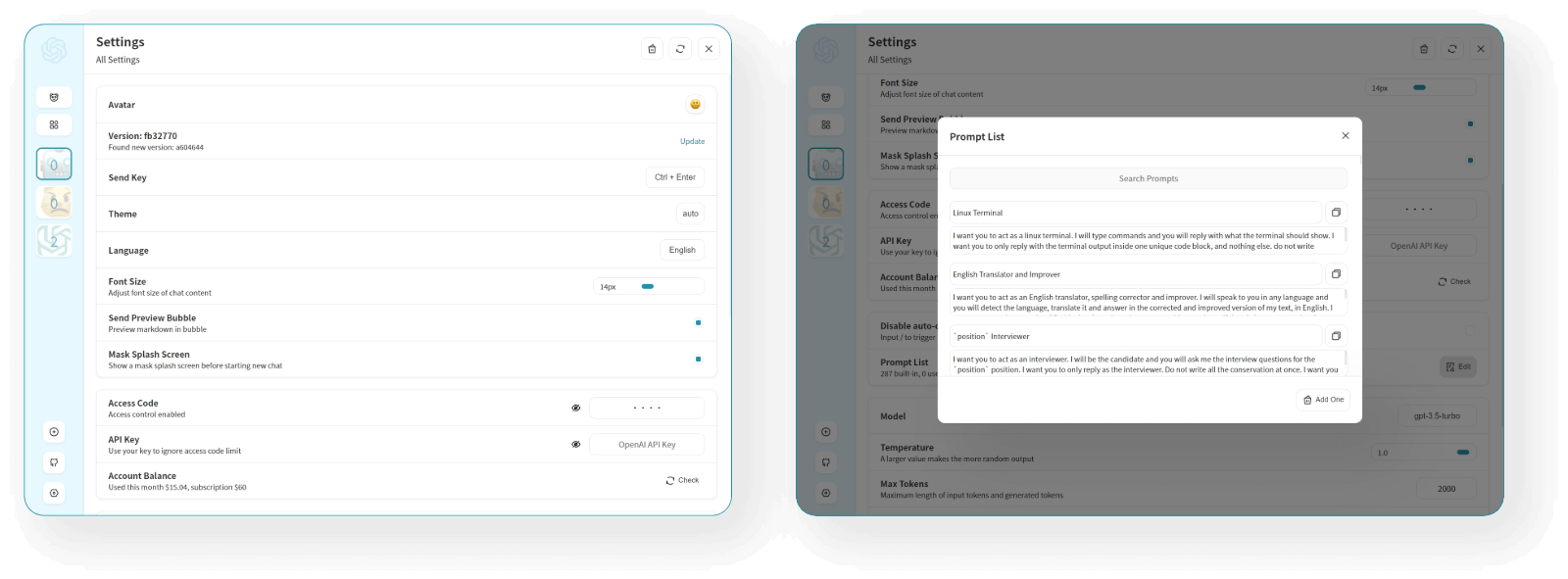
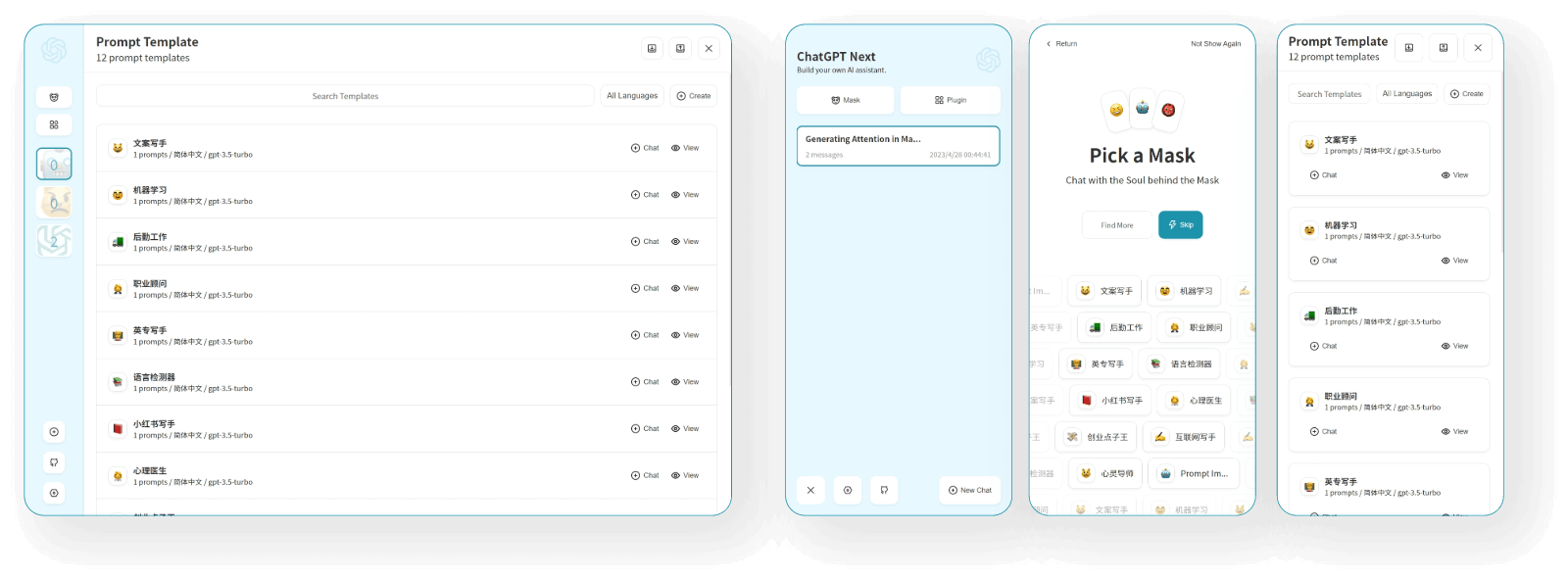
Features
- Deploy for free with one-click on Vercel in under 1 minute
- Compact client (~5MB) on Linux/Windows/MacOS, download it now
- Fully compatible with self-deployed LLMs, recommended for use with RWKV-Runner or LocalAI
- Privacy first, all data is stored locally in the browser
- Markdown support: LaTex, mermaid, code highlight, etc.
- Responsive design, dark mode and PWA
- Fast first screen loading speed (~100kb), support streaming response
- New in v2: create, share and debug your chat tools with prompt templates (mask)
- Awesome prompts powered by awesome-chatgpt-prompts-zh and awesome-chatgpt-prompts
- Automatically compresses chat history to support long conversations while also saving your tokens
- I18n: English, 简体中文, 繁体中文, 日本語, Français, Español, Italiano, Türkçe, Deutsch, Tiếng Việt, Русский, Čeština, 한국어, Indonesia
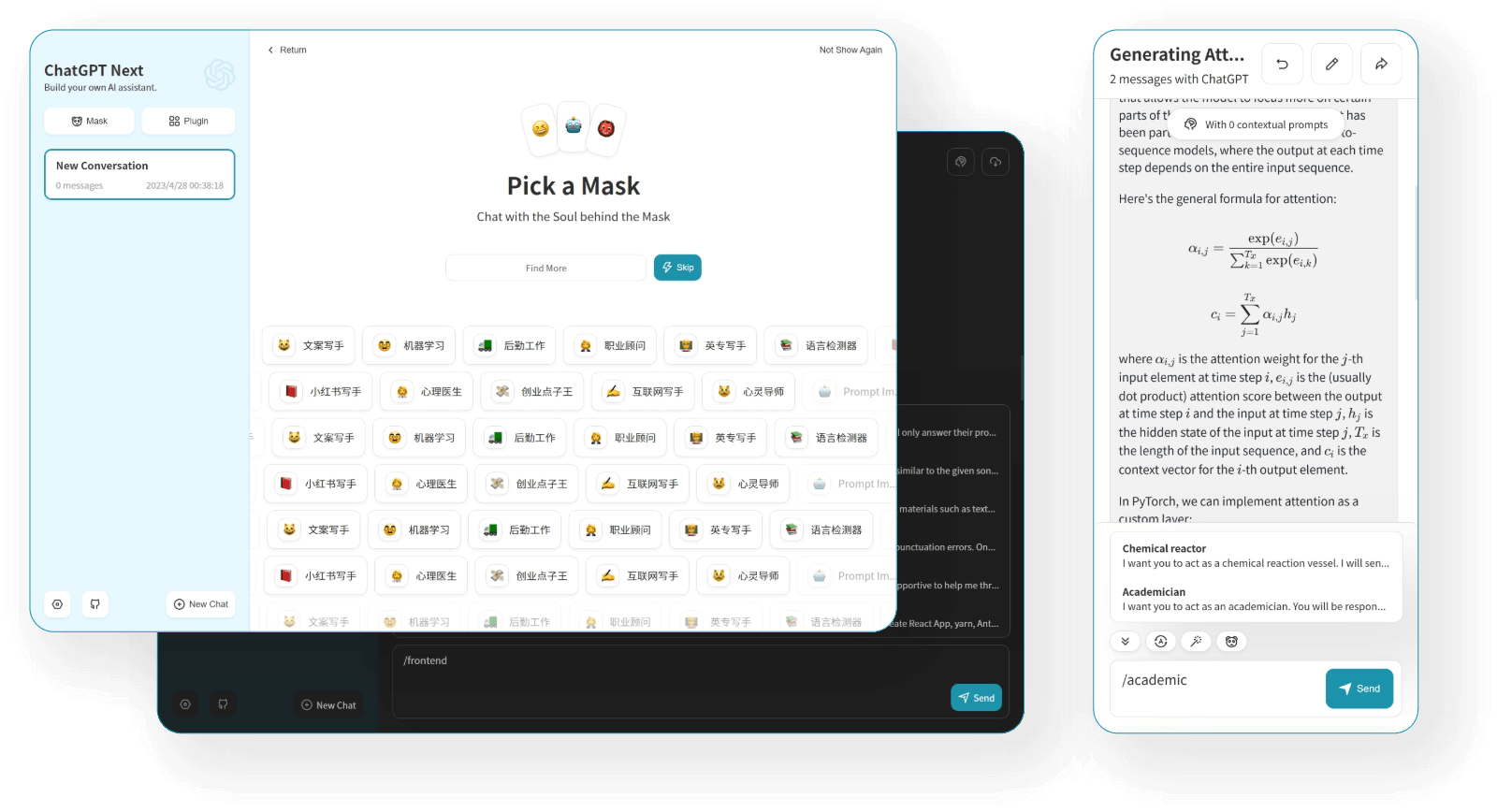
Roadmap
- System Prompt: pin a user defined prompt as system prompt #138
- User Prompt: user can edit and save custom prompts to prompt list
- Prompt Template: create a new chat with pre-defined in-context prompts #993
- Share as image, share to ShareGPT #1741
- Desktop App with tauri
- Self-host Model: Fully compatible with RWKV-Runner, as well as server deployment of LocalAI: llama/gpt4all/rwkv/vicuna/koala/gpt4all-j/cerebras/falcon/dolly etc.
- Artifacts: Easily preview, copy and share generated content/webpages through a separate window #5092
- Plugins: support network search, calculator, any other apis etc. #165 #5353
- Supports Realtime Chat #5672
- local knowledge base
What's New
- 🚀 v2.15.8 Now supports Realtime Chat #5672
- 🚀 v2.15.4 The Application supports using Tauri fetch LLM API, MORE SECURITY! #5379
- 🚀 v2.15.0 Now supports Plugins! Read this: NextChat-Awesome-Plugins
- 🚀 v2.14.0 Now supports Artifacts & SD
- 🚀 v2.10.1 support Google Gemini Pro model.
- 🚀 v2.9.11 you can use azure endpoint now.
- 🚀 v2.8 now we have a client that runs across all platforms!
- 🚀 v2.7 let's share conversations as image, or share to ShareGPT!
- 🚀 v2.0 is released, now you can create prompt templates, turn your ideas into reality! Read this: ChatGPT Prompt Engineering Tips: Zero, One and Few Shot Prompting.
Get Started
- Get OpenAI API Key;
- Click
, remember that
CODEis your page password; - Enjoy :)
FAQ
Keep Updated
If you have deployed your own project with just one click following the steps above, you may encounter the issue of "Updates Available" constantly showing up. This is because Vercel will create a new project for you by default instead of forking this project, resulting in the inability to detect updates correctly.
We recommend that you follow the steps below to re-deploy:
- Delete the original repository;
- Use the fork button in the upper right corner of the page to fork this project;
- Choose and deploy in Vercel again, please see the detailed tutorial.
Enable Automatic Updates
If you encounter a failure of Upstream Sync execution, please manually update code.
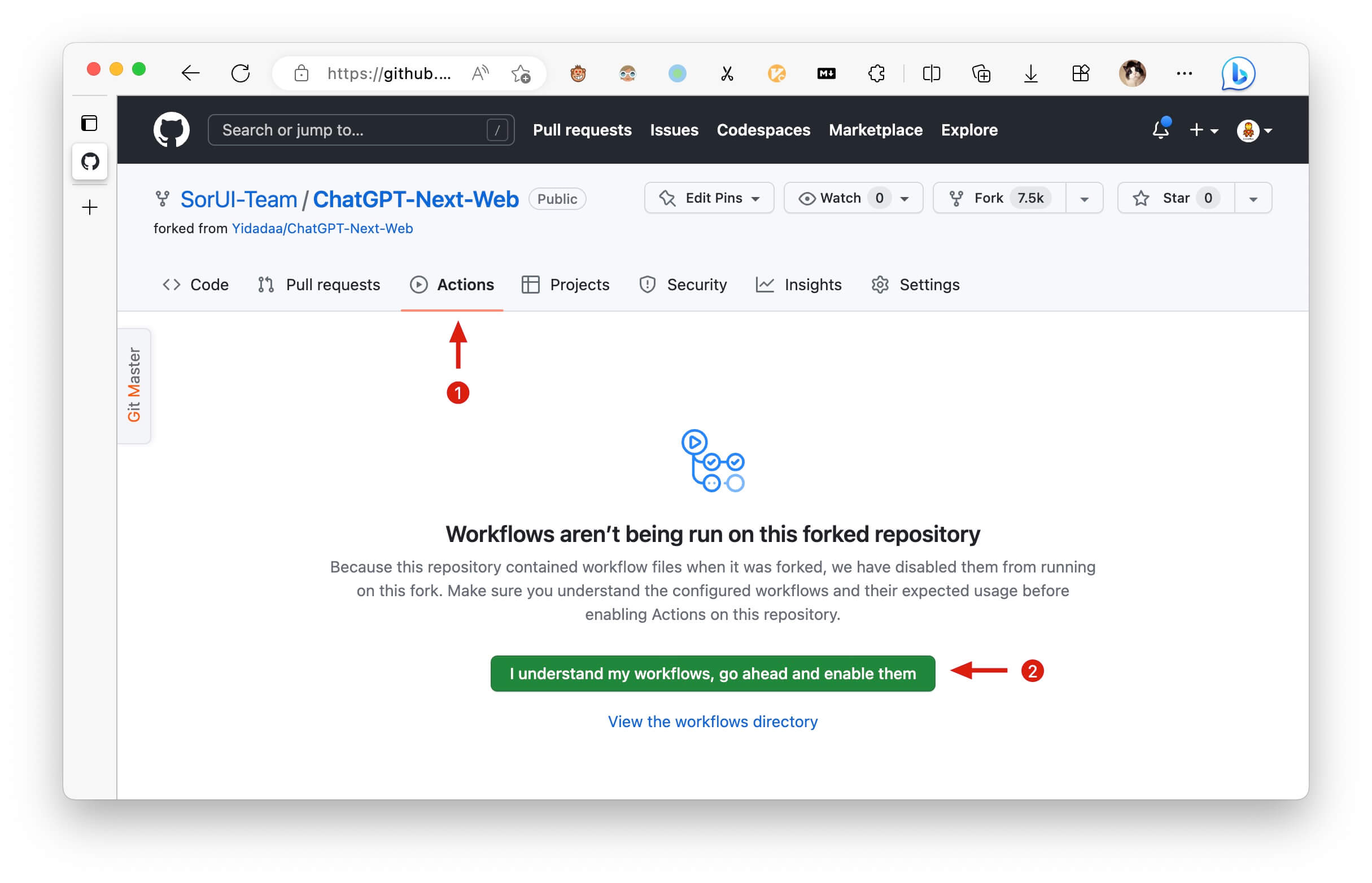
After forking the project, due to the limitations imposed by GitHub, you need to manually enable Workflows and Upstream Sync Action on the Actions page of the forked project. Once enabled, automatic updates will be scheduled every hour:
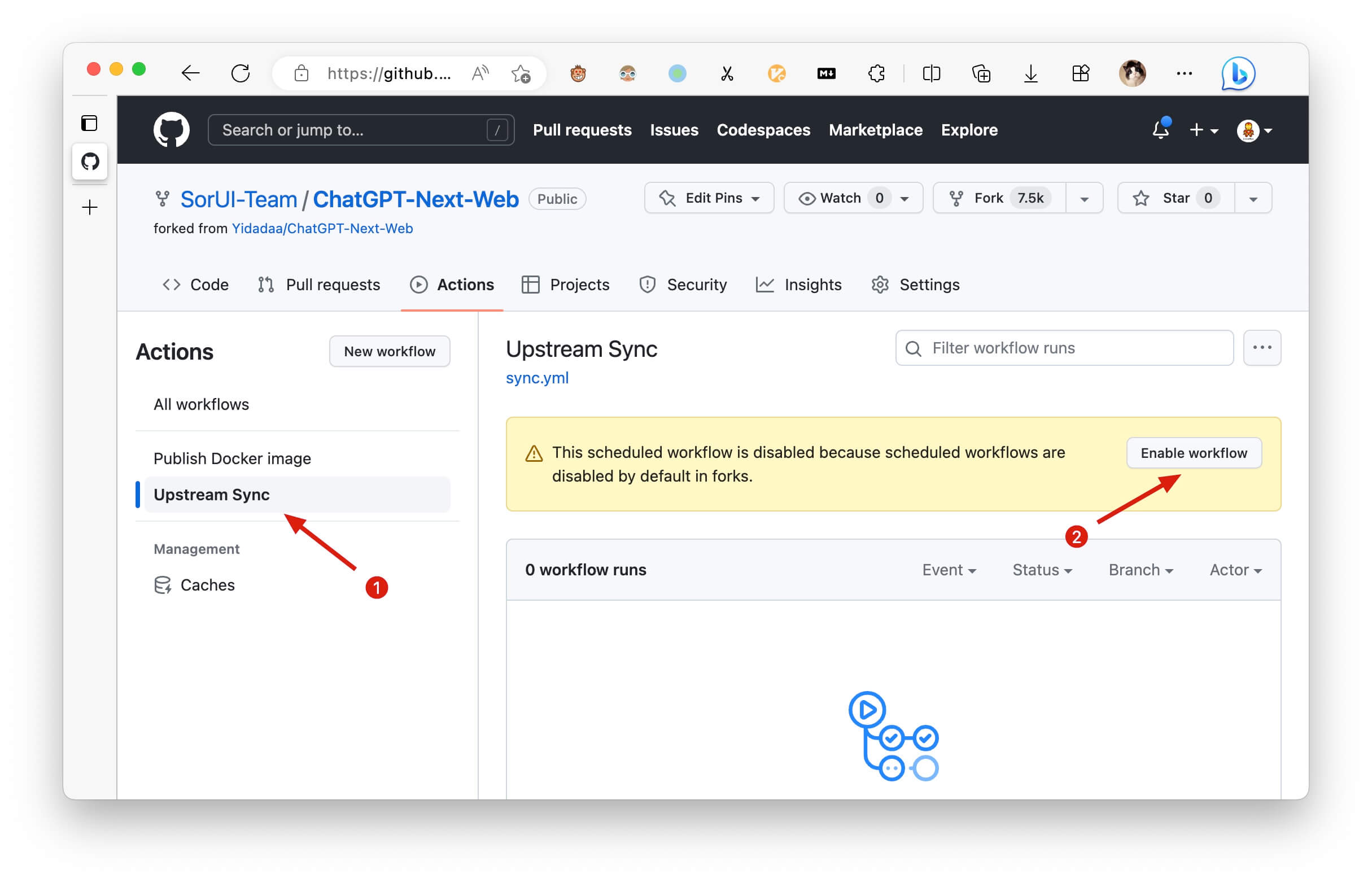
Manually Updating Code
If you want to update instantly, you can check out the GitHub documentation to learn how to synchronize a forked project with upstream code.
You can star or watch this project or follow author to get release notifications in time.
Access Password
This project provides limited access control. Please add an environment variable named CODE on the vercel environment variables page. The value should be passwords separated by comma like this:
After adding or modifying this environment variable, please redeploy the project for the changes to take effect.
Environment Variables
CODE (optional)
Access password, separated by comma.
OPENAI_API_KEY (required)
Your openai api key, join multiple api keys with comma.
BASE_URL (optional)
Default:
https://api.openai.com
Examples:
http://your-openai-proxy.com
Override openai api request base url.
OPENAI_ORG_ID (optional)
Specify OpenAI organization ID.
AZURE_URL (optional)
Example: https://{azure-resource-url}/openai
Azure deploy url.
AZURE_API_KEY (optional)
Azure Api Key.
AZURE_API_VERSION (optional)
Azure Api Version, find it at Azure Documentation.
GOOGLE_API_KEY (optional)
Google Gemini Pro Api Key.
GOOGLE_URL (optional)
Google Gemini Pro Api Url.
ANTHROPIC_API_KEY (optional)
anthropic claude Api Key.
ANTHROPIC_API_VERSION (optional)
anthropic claude Api version.
ANTHROPIC_URL (optional)
anthropic claude Api Url.
BAIDU_API_KEY (optional)
Baidu Api Key.
BAIDU_SECRET_KEY (optional)
Baidu Secret Key.
BAIDU_URL (optional)
Baidu Api Url.
BYTEDANCE_API_KEY (optional)
ByteDance Api Key.
BYTEDANCE_URL (optional)
ByteDance Api Url.
ALIBABA_API_KEY (optional)
Alibaba Cloud Api Key.
ALIBABA_URL (optional)
Alibaba Cloud Api Url.
IFLYTEK_URL (Optional)
iflytek Api Url.
IFLYTEK_API_KEY (Optional)
iflytek Api Key.
IFLYTEK_API_SECRET (Optional)
iflytek Api Secret.
CHATGLM_API_KEY (optional)
ChatGLM Api Key.
CHATGLM_URL (optional)
ChatGLM Api Url.
DEEPSEEK_API_KEY (optional)
DeepSeek Api Key.
DEEPSEEK_URL (optional)
DeepSeek Api Url.
HIDE_USER_API_KEY (optional)
Default: Empty
If you do not want users to input their own API key, set this value to 1.
DISABLE_GPT4 (optional)
Default: Empty
If you do not want users to use GPT-4, set this value to 1.
ENABLE_BALANCE_QUERY (optional)
Default: Empty
If you do want users to query balance, set this value to 1.
DISABLE_FAST_LINK (optional)
Default: Empty
If you want to disable parse settings from url, set this to 1.
CUSTOM_MODELS (optional)
Default: Empty Example:
+llama,+claude-2,-gpt-3.5-turbo,gpt-4-1106-preview=gpt-4-turbomeans addllama, claude-2to model list, and removegpt-3.5-turbofrom list, and displaygpt-4-1106-previewasgpt-4-turbo.
To control custom models, use + to add a custom model, use - to hide a model, use name=displayName to customize model name, separated by comma.
User -all to disable all default models, +all to enable all default models.
For Azure: use modelName@Azure=deploymentName to customize model name and deployment name.
Example:
+gpt-3.5-turbo@Azure=gpt35will show optiongpt35(Azure)in model list. If you only can use Azure model,-all,+gpt-3.5-turbo@Azure=gpt35willgpt35(Azure)the only option in model list.
For ByteDance: use modelName@bytedance=deploymentName to customize model name and deployment name.
Example:
+Doubao-lite-4k@bytedance=ep-xxxxx-xxxwill show optionDoubao-lite-4k(ByteDance)in model list.
DEFAULT_MODEL (optional)
Change default model
VISION_MODELS (optional)
Default: Empty Example:
gpt-4-vision,claude-3-opus,my-custom-modelmeans add vision capabilities to these models in addition to the default pattern matches (which detect models containing keywords like "vision", "claude-3", "gemini-1.5", etc).
Add additional models to have vision capabilities, beyond the default pattern matching. Multiple models should be separated by commas.
WHITE_WEBDAV_ENDPOINTS (optional)
You can use this option if you want to increase the number of webdav service addresses you are allowed to access, as required by the format:
- Each address must be a complete endpoint
https://xxxx/yyy - Multiple addresses are connected by ', '
DEFAULT_INPUT_TEMPLATE (optional)
Customize the default template used to initialize the User Input Preprocessing configuration item in Settings.
STABILITY_API_KEY (optional)
Stability API key.
STABILITY_URL (optional)
Customize Stability API url.
ENABLE_MCP (optional)
Enable MCP(Model Context Protocol)Feature
SILICONFLOW_API_KEY (optional)
SiliconFlow API Key.
SILICONFLOW_URL (optional)
SiliconFlow API URL.
AI302_API_KEY (optional)
302.AI API Key.
AI302_URL (optional)
302.AI API URL.
Requirements
NodeJS >= 18, Docker >= 20
Development
Before starting development, you must create a new .env.local file at project root, and place your api key into it:
Local Development
Deployment
Docker (Recommended)
You can start service behind a proxy:
If your proxy needs password, use:
If enable MCP, use:
Shell
Synchronizing Chat Records (UpStash)
| 简体中文 | English | Italiano | 日本語 | 한국어
Documentation
Please go to the [docs][./docs] directory for more documentation instructions.
- Deploy with cloudflare (Deprecated)
- Frequent Ask Questions
- How to add a new translation
- How to use Vercel (No English)
- User Manual (Only Chinese, WIP)
Translation
If you want to add a new translation, read this document.
Donation
Special Thanks
Contributors
LICENSE
Related MCP Servers
Frequently Asked Questions about Ai Netcafe
AllMCPs Directory Badge
Showcase your server listing on GitHub or your project documentation. Embed this dynamic SVG badge to highlight official listing status and live engagement.
Badge Style:
Live Dynamic SVG Preview
Markdown (GitHub README)
[](https://allmcps.com/mcp/ai-netcafe)HTML Embed
<a href="https://allmcps.com/mcp/ai-netcafe"><img src="https://allmcps.com/api/badge/ai-netcafe?style=directory" alt="Ai Netcafe on AllMCPs" /></a>Technical Specs & Signals
CategoryDeveloper Tools
49Quality signal: Fair · 49/100How this signal is calculated ▾
Server availabilityNot measured
Not scored for repo-hosted servers — we can't reach the running server, only its GitHub page. Hosted MCP endpoints are health-checked live.
Verified ownership10/20
Documentation & tools16/30
Adoption & activity11/15
Community engagement0/10
A guidance signal from public completeness & health data — not a user rating. New listings start lower and rise as they add docs, get verified, and grow adoption. Signals we can't observe for a listing are skipped, not counted against it.
Own this project?
This directory is pre-filled from public sources. Claim via GitHub README, site badge, or DNS TXT to get the verified badge.
Free dofollow backlink: after claiming, verify your product site and place a dofollow AllMCPs badge — we recheck it stays live.
Claim & get free dofollowShare & Embed
Add our SVG badge (dark/light directory styles) or embeddable widget to your site.