AI Divination Skills
Audited tarot, I Ching, and Xiao Liu Ren divination. Model never invents results.
Install AI Divination Skills
Pick your client, then add it in one click or paste the config.
~/Library/Application Support/Claude/claude_desktop_config.json{
"mcpServers": {
"ai-divination-skills": {
"command": "uvx",
"args": [
"oraclebone"
]
}
}
}
Settings → Developer → Edit Config, merge this into mcpServers, then fully quit and reopen Claude Desktop.
We couldn’t confirm it starts correctly
We ran the install command but it didn't respond within our test window — this can mean a slow first-time install rather than a real problem.
uvx oracleboneProcess exited before answering initialize.
This is an experimental automated check and can have false negatives — missing environment variables, a slow cold install, etc. It doesn’t necessarily mean something’s wrong. Last checked 14d ago.
Overview
Security & health
What it can reach and how reliably it runs — from our own checks, not the maintainer’s claims.
Recent health check succeeded.
Supply-chain signal
No high-severity advisories surfaced by our automated scan.
Scanned 5d ago via OSV.dev · oraclebone (PyPI)
Adoption & maintenance
Factual signals from GitHub, npm, and our automated checks — not a rating.
From the project README
Oraclebone
Three thousand years ago, Shang kings carved their divinations into bone — the first auditable record of an oracle at work. Oraclebone brings the same discipline to AI agents: audited scripts produce the draw, the hexagram, the pillars; the model only interprets what it is given. It never invents the result.
Demo
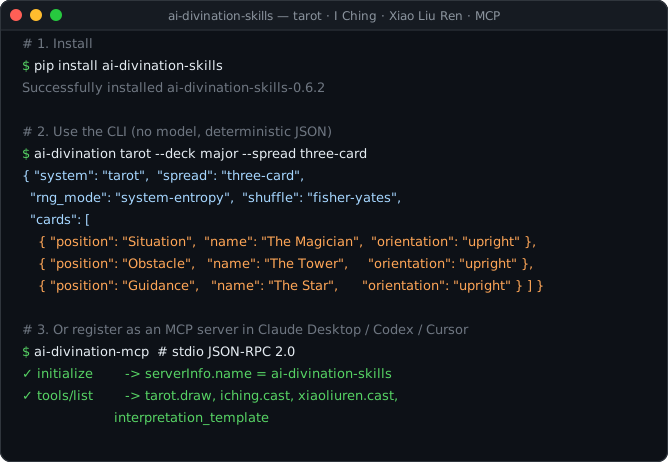







🔮 Open-source divination toolkit for AI agents, formerly known as ai-divination-skills (renamed in v8.0.0 — the old PyPI package is frozen; install oraclebone instead).
oraclebone is a practical skill collection for tarot, I Ching, Xiao Liu Ren, and future symbolic systems. It is built for agent workflows that need auditable randomness, clear method boundaries, and reusable interpretation templates.
This project treats divination as symbolic reasoning and reflection, not deterministic prediction.
⚡ One-line Install for AI Agents
Paste this into your AI agent:
Install Oraclebone for this agent: https://raw.githubusercontent.com/sapuyou45-bit/oraclebone/main/docs/install.md
Or install directly for Claude-style local skills:
curl -fsSL https://raw.githubusercontent.com/sapuyou45-bit/oraclebone/main/install.sh | bash
The default target is ~/.claude/skills. Set AI_SKILLS_DIR for another agent skill directory.
✨ Overview
Most AI divination prompts let the model invent the result. This repo separates the two jobs:
- A local script produces the card draw, hexagram, or Xiao Liu Ren position.
- The AI agent interprets that generated result with clear safety boundaries.
That makes readings easier to test, reproduce, audit, and reuse across agents.
🧭 Methodological Rigor
The core rule is simple: scripts or user-provided physical casts generate the divination result; AI interprets that result and does not generate the divination result.
This is not scientific proof of divination efficacy. It is a stricter workflow for symbolic reasoning:
- real readings use system randomness by default
- seeded mode is only for tests and reproducible demos
- traditional methods and limitations are documented per skill
- JSON outputs include enough metadata to audit the method
- approximate modes emit warnings instead of pretending to be traditional
🌐 Multilingual Docs
The GitHub Pages site ships a six-language switcher — 简体中文, English, 日本語, Português, 한국어, Español. It follows your browser language by default and remembers your manual choice.
Local preview:
python3 -m http.server 8000 -d docs
Published site:
https://sapuyou45-bit.github.io/oraclebone/
🧩 Included Skills
| Skill | What it does | Script |
|---|---|---|
tarot | Draws tarot cards for reflection, decisions, creative blocks, and project reframing. | skills/tarot/scripts/draw.py |
iching | Casts six-line I Ching hexagrams with primary and resulting hexagrams. | skills/iching/scripts/cast.py |
xiaoliuren | Casts Xiao Liu Ren from lunar-style numbers or a Gregorian time fallback. | skills/xiaoliuren/scripts/cast.py |
bazi | Casts a Bazi (Four Pillars / 八字) chart from a Gregorian birth datetime. Requires the optional lunar-python extra. | skills/bazi/scripts/cast.py |
🚀 Quick Start
Install from PyPI:
pip install oraclebone
Or from a checkout:
pip install .
Use editable mode while developing:
pip install -e .
Use one command for every system:
ai-divination tarot --deck major --spread three-card --reversals
ai-divination iching --method yarrow
ai-divination xiaoliuren --method numbers --month 3 --day 12 --hour 7
Ask for an agent interpretation template:
ai-divination template tarot
Use the Python API directly:
from oraclebone.tarot import draw
from oraclebone.iching import cast
from oraclebone.xiaoliuren import cast_numbers
You can still run the underlying scripts directly:
python3 skills/tarot/scripts/draw.py --deck major --spread three-card --reversals
python3 skills/iching/scripts/cast.py --method coins
python3 skills/iching/scripts/cast.py --method yarrow
python3 skills/xiaoliuren/scripts/cast.py --method numbers --month 3 --day 12 --hour 7
Use a seed for reproducible demos:
python3 skills/tarot/scripts/draw.py --spread decision --seed demo
python3 skills/iching/scripts/cast.py --method yarrow --seed demo
All scripts output JSON.
📦 Install as Agent Skills
For AI-agent-guided setup, use the remote install runbook:
Install Oraclebone for this agent: https://raw.githubusercontent.com/sapuyou45-bit/oraclebone/main/docs/install.md
For direct shell install:
curl -fsSL https://raw.githubusercontent.com/sapuyou45-bit/oraclebone/main/install.sh | bash
The installer copies tarot, iching, and xiaoliuren into ~/.claude/skills by default. To target another agent, set AI_SKILLS_DIR before running it.
Manual install is just copying the folders you want into your agent's skill directory:
mkdir -p ~/.claude/skills
cp -R skills/tarot ~/.claude/skills/tarot
cp -R skills/iching ~/.claude/skills/iching
cp -R skills/xiaoliuren ~/.claude/skills/xiaoliuren
Each skill is self-contained:
skills/name/
  SKILL.md
  agents/openai.yaml
  scripts/
  references/
Install individual folders, not the entire repository, when you only want one skill.
Each skill script also works in single-folder mode. If the Python package is installed, the script delegates to the package runtime. If only the skill folder is copied, it falls back to the bundled standalone script in that skill.
Per-host adapters
Every skill ships four adapter files in skills/<skill>/agents/:
| Host | File | How it is invoked |
|---|---|---|
| OpenAI / Codex skills | openai.yaml | Skill metadata + brand icons. |
| Claude Desktop / claude.ai project skills | claude.yaml | Tool spec that runs ai-divination <skill>. |
| Gemini CLI / Gemini Extensions | gemini.yaml | Extension manifest that runs the same CLI. |
| Cursor | cursor.mdc | Rule file with hard "never invent the draw" guard. |
All four adapters route through the same audited ai-divination <skill> CLI, so the agent host never invents the result.
🧠 Use it from Claude Desktop / Codex / any MCP host
oraclebone ships a built-in MCP server (ai-divination-mcp). Any
Model Context Protocol host — Claude Desktop, Codex,
Continue, Cursor — can mount it with a single config line, and the model gets five tools:
tarot_draw, iching_cast, xiaoliuren_cast, bazi_cast, and interpretation_template.
The model never invents the draw; the server runs the audited scripts locally.
Claude Desktop
Install the package once:
pip install oraclebone
Then edit ~/Library/Application Support/Claude/claude_desktop_config.json (macOS) or
%APPDATA%\Claude\claude_desktop_config.json (Windows):
{
  "mcpServers": {
    "divination": {
      "command": "ai-divination-mcp"
    }
  }
}
Restart Claude Desktop. Ask "draw three tarot cards for my decision" — Claude will call
tarot_draw and interpret the JSON output.
Codex / Continue / Cursor
Any MCP-aware host follows the same pattern. The server speaks JSON-RPC 2.0 over stdio with no third-party dependencies.
Per-client setup guides
Copy-paste JSON configs and example prompts for each host:
🤖 Agent Behavior
Each skill instructs the agent to:
- generate or accept a concrete draw/cast result
- read concise reference material only when needed
- interpret with the shared response contract
- avoid certainty, fatalism, and professional advice
Shared guidance lives in:
Reviews
No reviews yet — be the first to share how it worked for you.
Frequently Asked Questions about AI Divination Skills
Related MCP servers
Add a badge to your READMEShow it’s listed — live SVG, Markdown or HTML.
AllMCPs Directory Badge
Showcase your server listing on GitHub or your project documentation. Embed this dynamic SVG badge to highlight official listing status and live engagement.
[](https://allmcps.com/mcp/ai-divination-skills)<a href="https://allmcps.com/mcp/ai-divination-skills"><img src="https://allmcps.com/api/badge/ai-divination-skills?style=directory" alt="AI Divination Skills on AllMCPs" /></a>