AllMCPs
BrowseBestCategoriesStackCompareToolsGuidesBlog Log in Submit MCP

Stay in the loop

Get new MCP servers and top picks in your inbox.

AllMCPs

The open directory for discovering and installing Model Context Protocol servers.

Explore

  • Browse servers
  • Best MCP servers
  • Categories
  • MCP clients
  • Agent prompts
  • Stack Builder
  • Compare servers
  • Tags index
  • Submit a server
  • Pricing

Learn

  • Guides hub
  • What is MCP?
  • Install guide
  • Troubleshooting
  • Security
  • Blog
  • Blog RSS

Tools

  • All tools
  • Config generator
  • Config validator
  • MCP playground
  • OpenAPI โ†’ MCP
  • Badge generator

For agents

  • API docs
  • Trust & traffic
  • llms.txt โ†— (opens in a new tab)
  • Catalog JSON โ†— (opens in a new tab)
  • Remote MCP โ†— (opens in a new tab)

Company

  • About
  • Contact
  • X (@AllMCPs) โ†— (opens in a new tab)
  • GitHub โ†— (opens in a new tab)
  • Terms
  • Privacy
AllMCPs VerifiedAllMCPs VerifiedFeatured on Nick LaunchesFeatured on Nick LaunchesLaunch Llama NewsletterLaunch Llama NewsletterVerified DR - allmcps.comVerified DR - allmcps.comFeatured on SaaSGrowFeatured on SaaSGrowFeatured on Twelve ToolsFeatured on Twelve ToolsFeatured on Saaspa.geFeatured on Saaspa.geFeatured on Findly.toolsFeatured on Findly.toolsFeatured on Startup FameFeatured on Startup FameFeatured on LaunchKiwiFeatured on LaunchKiwiFeatured on ScrollLaunchFeatured on ScrollLaunchFeatured on DailyPingsFeatured on DailyPingsFazier badgeFazier badgeFeatured on NewTool.siteFeatured on NewTool.siteFeatured on saasfame.comFeatured on saasfame.comDR Checker - Domain RatingDR Checker - Domain RatingListed on Turbo0Listed on Turbo0Launched on LaunchBoard - Product Launch PlatformLaunched on LaunchBoard - Product Launch PlatformList on SimilarlabsList on Similarlabshttps://codetrendy.comhttps://codetrendy.comListed on DevTool.ioFeatured on BuildlistFeatured on BuildlistAllMCPs VerifiedAllMCPs VerifiedFeatured on Nick LaunchesFeatured on Nick LaunchesLaunch Llama NewsletterLaunch Llama NewsletterVerified DR - allmcps.comVerified DR - allmcps.comFeatured on SaaSGrowFeatured on SaaSGrowFeatured on Twelve ToolsFeatured on Twelve ToolsFeatured on Saaspa.geFeatured on Saaspa.geFeatured on Findly.toolsFeatured on Findly.toolsFeatured on Startup FameFeatured on Startup FameFeatured on LaunchKiwiFeatured on LaunchKiwiFeatured on ScrollLaunchFeatured on ScrollLaunchFeatured on DailyPingsFeatured on DailyPingsFazier badgeFazier badgeFeatured on NewTool.siteFeatured on NewTool.siteFeatured on saasfame.comFeatured on saasfame.comDR Checker - Domain RatingDR Checker - Domain RatingListed on Turbo0Listed on Turbo0Launched on LaunchBoard - Product Launch PlatformLaunched on LaunchBoard - Product Launch PlatformList on SimilarlabsList on Similarlabshttps://codetrendy.comhttps://codetrendy.comListed on DevTool.ioFeatured on BuildlistFeatured on Buildlist
ยฉ 2026 Jackalope Digital LLC. All rights reserved.
  1. Home
  2. ๐Ÿ’ป Developer Tools
  3. Ai Context
A
Health: Not checked yetWe have not completed a health check for this listing yet.Last checked 8/10/2026, 11:36:18 PM

Ai Context

Enrichment pendingWe havenโ€™t run our AI enrichment pass on this listing yet, so the overview, use cases, and FAQ below may be sparse or missing. We work through the catalog over time โ€” check back soon.
View RepositoryVisit Website

Local-first MCP server: version-correct library docs, code map, and offline drift for your repo.

Quick Install

Automated & IDE Setup

Copy the AI prompt to install this server into Claude Code, Cursor, or another agent โ€” or use 1-click editor setup below.

Add to CursorAdd to VS Code
Manual Client & Custom JSON ConfigExpand JSON โ–พ

Install Config Generator

Choose your client
claude_desktop_config.json
{
  "mcpServers": {
    "ai-context": {
      "command": "npx",
      "args": [
        "-y",
        "ai-context"
      ]
    }
  }
}

๐Ÿ’ก Paste into ~/Library/Application Support/Claude/claude_desktop_config.json (macOS) or %APPDATA%\Claude\claude_desktop_config.json (Windows)

Install Directory Badge Claim listing Alternatives๐Ÿ’ป More in Developer Tools

Documentation Overview

Vibgrate

@vibgrate/cli
Local codebase intelligence for AI coding agents โ€” graph, drift, and version-correct docs on your machine

npm version npm downloads Vibgrate DriftScore live demo Vibgrate Cloud MCP Apache 2.0 node 22+

vg answers two questions for any repo:

  1. What is this codebase? โ€” A deterministic code graph: call trees, import paths, impact surfaces, dependency facts.
  2. How far behind is it? โ€” A ranked DriftScore (0โ€“100) with runtime/framework lag, dependency age and EOL proximity, and a prioritised fix list. Exposure is scored separately as a RiskScore; the two together are the DriftRisk Index. The full methodology โ€” formulas, sources, and limitations โ€” is published as a whitepaper under CC BY 4.0 (DOI 10.5281/zenodo.21336304).

Everything runs on your machine. No API key, no network call, no data leaving your repo unless you explicitly push. The vibgrate command is an alias for vg โ€” they are interchangeable.


See it run

Animated terminal replay: npx @vibgrate/cli scan produces a 74/100 drift score, a score breakdown, and ranked upgrade priorities.

A real vg scan replay โ€” drift score, breakdown, and ranked priorities in one command. Animation plays right here on GitHub; nothing runs in your browser.

โ–ถ Try the live, interactive CLI simulator โ†’
Step through every command (scan, build, ask, why, โ€ฆ) against real sample repos.


Try it in 10 seconds

No install, no signup:

Terminal
npx @vibgrate/cli scan          # drift score + upgrade priorities
npx @vibgrate/cli build         # build the code graph
npx @vibgrate/cli ask "what does AuthService do?"

Install for repeat runs:

Terminal
npm install -D @vibgrate/cli
npx vg scan                     # vg is the primary command; vibgrate is an alias

Local binaries live in node_modules/.bin โ€” use npx vg (or an npm script) unless you install globally.


Use it with your AI assistant

vg serve starts Vibgrate AI Context โ€” a local-first MCP server that gives any MCP-compatible assistant (Claude, Cursor, Windsurf, Copilot, Gemini CLI, โ€ฆ) your code map, offline drift, local models, and version-correct library docs, all from your machine (no account, nothing uploaded; thin local docs fall through to the hosted catalog unless you pass --local). No context-window stuffing, no hallucinated APIs. The map keeps itself fresh: when files change โ€” including edits the assistant itself just made โ€” the next tool call rebuilds it incrementally before answering, with no watcher or daemon involved.
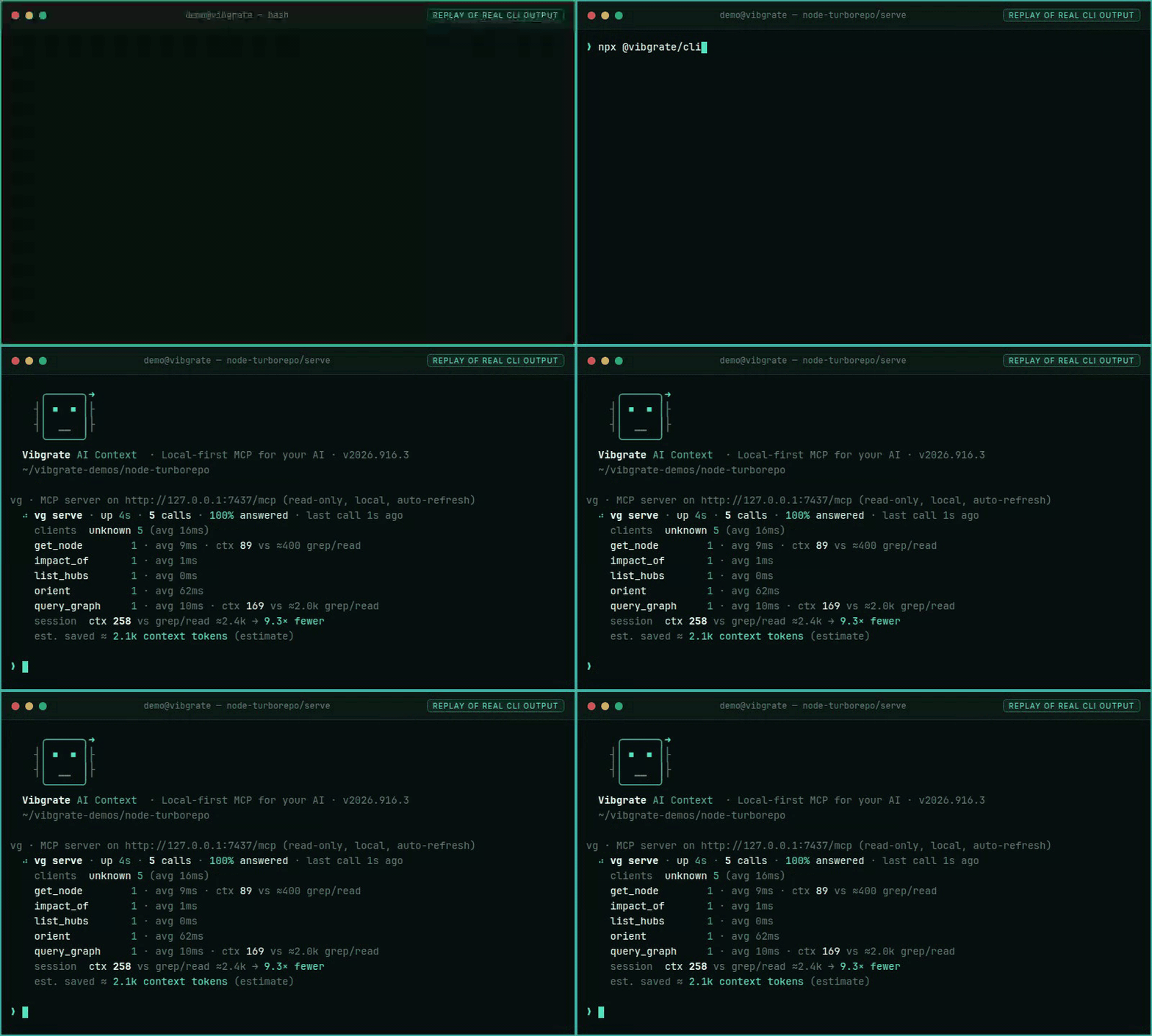
Wire it up in one command:

bash
vg install                      # interactive: pick your assistant(s) and done
vg install --all                # install for every detected assistant at once

This writes the MCP config for your chosen tool(s) and installs a skill that teaches the assistant how to query the graph. After reloading your assistant you get graph-aware answers: call trees, impact analysis, drift findings, version-correct library docs โ€” all from local data. The token savings are measured and published, methodology included, at vibgrate.com/cli/benchmarks/token-savings.

Browse all 21+ supported assistants and their skill descriptions at vibgrate.com/skills.

Tools

vg serve exposes 19 MCP tools:

  • orient โ€” start here: project overview, entry points, where to look first.
  • search_symbols โ€” find a symbol by name or literal string.
  • query_graph โ€” find code by meaning: symptoms, relationships, what-breaks-if.
  • get_node โ€” inspect one symbol: signature, callers, callees, area.
  • find_path โ€” shortest connection between two symbols.
  • impact_of โ€” blast radius of a change: dependents, files, covering tests, risk.
  • tests_for โ€” which tests cover a symbol.
  • get_graph_summary โ€” code map overview: counts, languages, top areas and hubs.
  • list_areas โ€” code areas (communities) by size.
  • list_hubs โ€” most-depended-on symbols.
  • get_facts โ€” deterministic facts for a node (contract / invariant / characterization).
  • guide_node โ€” cited standards and practices for a node (OWASP/CWE).
  • check_drift โ€” offline dependency inventory with optional git who-added attribution.
  • vuln_attribution โ€” who introduced each open vulnerability, exposure windows, CRA remediation metrics.
  • list_vulnerabilities โ€” known vulnerabilities from the last vg scan --vulns: CVE, severity, CVSS, fixed version.
  • upgrade_impact โ€” what breaks if you upgrade a package: major distance, import blast radius, vulns fixed.
  • list_models โ€” local models on disk (Ollama / LM Studio / gguf).
  • resolve_library โ€” resolve a library to its canonical id and the version your project uses.
  • library_docs โ€” version-correct usage docs for a library, sliced to a token budget.

Prefer the hosted server over your team's scan data? Vibgrate Cloud MCP connects your assistant to Vibgrate Cloud (OAuth 2.1, 51 tools).


Understand any codebase

Build the graph once, query it continuously:

bash
vg build                        # index the repo (incremental; re-run after changes)
vg show src/auth/service.ts     # what this file does, calls, and is called by
vg ask "where is rate limiting enforced?"
vg impact src/db/connection.ts  # what breaks if this changes + tests to run
vg path src/api/handler.ts src/db/query.ts   # shortest call path between two files
vg tree src/server.ts           # call tree rooted at a node
vg insights                     # overview: hubs, hotspots, untested paths

The graph is byte-deterministic and reproducible โ€” the same repo always produces the same graph on every machine.

bash
vg share                        # make the graph committable + auto-updating for the team
vg serve                        # start Vibgrate AI Context (local-first MCP: code map + drift + version-correct docs)

Measure and manage upgrade drift

bash
vg scan                         # drift score + risk level + ranked priorities
vg scan --push                  # same, and upload to Vibgrate Cloud for trend tracking
vg baseline                     # snapshot current drift for regression gating
vg report                       # generate a report from a saved scan artifact

One scan gives you:

  • Overall score (0โ€“100) and risk level (Low / Moderate / High)
  • Score breakdown โ€” runtime, frameworks, dependencies, EOL
  • Per-project detail across Node.js/TypeScript, .NET, Python, and Java
  • Actionable findings ranked by likely impact
  • SBOM export (CycloneDX / SPDX)
  • Known vulnerabilities (opt in with --vulns) โ€” severity, CVSS, the fixing version, and, in a git repo, who introduced them

Find known vulnerabilities and who introduced them

vg scan --vulns checks your installed dependencies against the public OSV database and reports each known vulnerability with its severity, CVSS score, and the version that fixes it โ€” as text, JSON, or SARIF. Add --package-manifest to run it fully offline from a local advisory bundle.

bash
vg scan --vulns                 # drift score + known vulnerabilities
vg scan --full                  # drift + vulnerabilities + a banned-dependency report

In a git repository, every finding is attributed from history: who introduced the vulnerable version, in which commit, and how long you have been exposed. Those exposure windows roll up into remediation metrics framed around the EU Cyber Resilience Act (CRA) โ€” and feed Vibgrate Evidence, which freezes shipped-release manifests so "which shipped products contain this vulnerability?" has a signed, offline-verifiable answer โ€” per-severity time-exposed and SLA breaches โ€” so "are we fixing things fast enough?" has a number.

bash
vg why lodash                   # who added a dependency, every version since, and any open vulnerabilities
vg bisect lodash 4.17.21        # the commit where lodash crossed a version line (e.g. reached the fix)

Detection and attribution span the whole npm ecosystem (npm, pnpm, yarn) plus pip/poetry, cargo, composer, bundler, go, pub, hex, NuGet, and Maven/Gradle โ€” read from each project's lockfile, so it works whatever you build in.

Your AI assistant sees this too: vg serve exposes list_vulnerabilities, vuln_attribution, and an upgrade_impact tool that tells an agent what an upgrade will cost โ€” version distance, how many files import the package, the vulnerabilities it fixes, and (online, opt in) the breaking-change notes between your version and the latest.


Track drift over time โ†’ create a free workspace

The CLI is fully useful offline. When you want trends across runs and repos โ€” so drift becomes a metric you manage, not a surprise you discover โ€” push scans to a Vibgrate Cloud workspace:

  1. Create a workspace at dash.vibgrate.com and copy your DSN.
  2. Connect and push:
bash
VIBGRATE_DSN="vibgrate+https://<key_id>:<secret>@us.ingest.vibgrate.com/<workspace_id>" \
  vg scan --push

Upload is opt-in โ€” nothing leaves your machine until you run --push. Store the DSN as a CI secret, never commit it.

โ†’ Create your workspace


CI integration

Drop vg into any pipeline to turn drift scoring into a quality gate:

yaml
# GitHub Actions โ€” drift gate + SARIF upload
- name: Vibgrate scan
  env:
    VIBGRATE_DSN: ${{ secrets.VIBGRATE_DSN }}
  run: npx @vibgrate/cli scan --push --format sarif --out vibgrate.sarif --fail-on error

- name: Upload SARIF
  if: always()
  uses: github/codeql-action/upload-sarif@v3
  with:
    sarif_file: vibgrate.sarif

Gate on drift budgets and regression relative to a baseline:

bash
vg baseline
vg scan --baseline .vibgrate/baseline.json --drift-budget 40 --drift-worsening 5
  • --drift-budget <score> fails the build if drift exceeds your budget.
  • --drift-worsening <percent> fails the build if drift worsens by more than X% vs baseline.

Copy-paste CI templates live in examples/github-actions/. Azure DevOps and GitLab CI snippets are in DOCS.md.


Version-correct library docs

vg lib fetches usage docs pinned to the exact version in your lockfile โ€” never a newer API your code can't call yet:

bash
vg lib react                    # React docs at your installed version
vg lib express --fn middleware  # specific function reference

AI assistants connected via MCP use vg lib automatically when answering questions about library APIs in your project.


SBOM and OpenVEX

server.ts
vg sbom export --format cyclonedx --out sbom.cdx.json
vg sbom export --format spdx     --out sbom.spdx.json
vg sbom delta  --from .vibgrate/baseline.json --to .vibgrate/scan_result.json --out delta.txt
vg vex                          # generate an OpenVEX document for attestation

Privacy & offline-first

  • No data leaves your machine unless you run --push / vg push / vg share.
  • Drift scoring reads manifests and configs only. The code graph (vg build/vg map) and a few extended scanners (code quality, database schema, UI text) read your source locally to compute structural facts and metrics โ€” never a raw source line, and never uploaded as-is; see DOCS.md for exactly what each one reads.
  • Works without login and without any SaaS dependency.
  • --offline disables registry/network lookups; --package-manifest <file> feeds drift scoring a local version bundle.
  • --max-privacy suppresses local artifact writes and high-context scanners; --no-local-artifacts skips writing .vibgrate/*.json to disk.
bash
vg scan --offline --package-manifest ./package-versions.zip --max-privacy --format json --out scan.json

Add .vibgrate/ to your .gitignore โ€” those are regenerated local outputs.

More on how Vibgrate handles code and data: vibgrate.com/security, and the subprocessor register.


Quick start with AI assistants

Paste this into your AI coding tool (Claude, Cursor, Copilot, Gemini CLI, โ€ฆ):

Code
Set up Vibgrate for local codebase intelligence:
1. Install: npm install -g @vibgrate/cli@latest
2. Build the graph: vg build
3. Wire your assistant: vg install
4. Ask: vg ask "what are the main entry points?"
Then explain the architecture and my top 3 upgrade priorities.

See docs/QUICKSTART-PROMPT.md for the full prompt.


Command reference

Under each set, commands are listed Aโ€“Z. A short typical path (usual order) is called out where it helps.

Code graph

Typical path: vg build โ†’ vg status โ†’ vg ask โ†’ vg impact โ†’ vg share

CommandDescription
vg ask "<question>"Query the map in natural language
vg build [path]Build / update the code map (incremental, deterministic)
vg bundleBuild an air-gapped bundle (grammars + graph + library catalog)
vg code "<instruction>"Propose a graph-grounded code edit (dry-run by default; --apply --yes to write)
vg embedPrecompute the semantic index for instant vg ask
vg exportExport the map (json / ndjson / graphml / dot / cypher / md / html / SBOM)
vg facts <file>Deterministic facts for a node (contracts, invariants)
vg guide <file>Cited standards / practices for a node (free pack)
vg impact <file>What breaks if you change it โ€” and the tests to run
vg install / vg uninstallWire (or remove) Vibgrate AI Context + skill in your AI assistant (--detect, --all, --list)
vg lib <package>Version-correct, drift-annotated library docs
vg map / vg hubs / vg areas / vg odditiesMap insights: overview, most-depended-on code, natural groupings, cross-area smells
vg modelsCode Modes (Spark / Flow / Forge) + local fleet (Ollama / LM Studio / gguf); install / pull by default (--dry-run to preview)
vg path <from> <to>How A connects to B (shortest path)
vg savingsLocal report of tokens/$ saved vs a grep baseline (estimates)
vg watchRebuild the map when files change
vg serveStart Vibgrate AI Context (local-first MCP: code map + drift + version-correct docs)
vg shareMake the graph committable + auto-updating for your team
vg show <file>Explain a node: what it is, what it calls, what calls it
vg statusCache/freshness, counts, staleness
vg tests <file>Which tests cover a node
vg tree <file>Call tree rooted at a node
vg unknownsWhat the graph cannot resolve, ranked by blast radius

Diagnostics, IDE & runtime

Typical path: vg doctor โ†’ vg lsp โ†’ vg daemon

CommandDescription
vg daemonLocal workspace daemon for multi-root graph sessions (IDE / agents): status, ensure, publish, query, impact, โ€ฆ
vg doctorRead-only diagnosis: config, credentials (redacted), map freshness, hosted reachability, MCP launch
vg lspLanguage server (stdio) โ€” engine behind Vibgrate for VS Code and other thin IDE clients
vg policyShow production context-policy pin; vg policy verify <file> for signed learning patches

Drift scoring & supply chain

Typical path: vg init โ†’ vg scan โ†’ vg baseline โ†’ vg report โ†’ vg fix

CommandDescription
vg baseline [path]Create a drift baseline
vg bisect <package> <constraint>The commit where a dependency crossed a version line (--assert to gate CI)
vg driftWhat is outdated across dependencies (offline; --online for currency)
vg evidenceSigned, reproducible regulatory evidence (regime-neutral; CRA first)
vg fixRanked, risk-tiered upgrade plans from the hosted planner โ€” then apply the one you choose
vg init [path]Initialise config and .vibgrate/
vg reportGenerate a report from a scan artifact
vg sbom export / delta / vexExport CycloneDX/SPDX SBOM, diff two artifacts, or emit an OpenVEX document
vg scan [path]Scan for upgrade drift
vg scan --fullComprehensive scan: drift + vulnerabilities + a banned-dependency report
vg scan --pushScan and push results to Vibgrate Cloud
vg scan --vulnsAlso detect known vulnerabilities (OSV; offline via --package-manifest)
vg updateCheck for and install updates
vg why <package>Who introduced a dependency, its version history, and any open vulnerabilities

Workspace auth & cloud upload

Local scoring does not require this โ€” nothing leaves your machine until you push.

Typical path: vg login โ†’ vg dsn create โ†’ vg push โ†’ vg logout

CommandDescription
vg dsn createGenerate a DSN token
vg login / vg logoutAuthenticate the CLI with your Vibgrate workspace (or clear stored credentials)
vg pushUpload scan results to Vibgrate Cloud
bash
vg scan [path] [--vulns] [--full] [--format text|json|sarif|md] [--out <file>] [--fail-on warn|error] \
  [--offline] [--package-manifest <file>] [--no-local-artifacts] [--max-privacy] \
  [--drift-budget <score>] [--drift-worsening <percent>] [--baseline <file>]

Full flag and configuration reference: DOCS.md ยท vibgrate.com/cli ยท help centre ยท glossary.


Why teams adopt Vibgrate

Most systems don't fail all at once โ€” they accumulate upgrade debt and architectural drift silently until migrations become expensive. vg makes that debt measurable and repeatable โ€” the practice we call Code Drift Intelligence โ€” and gives AI assistants the local context they need to be useful. See how it lands for teams and enterprises, or compare it with what you already run: vs Renovate ยท vs Dependabot ยท vs Snyk.

ModeWhat you getBest for
One-off scanFast snapshot of drift score, lag, and findingsAudits, due diligence, migration planning
CI-integrated scanContinuous drift signal, SARIF annotations, regression guardrailsKeeping upgrade debt under control long-term
MCP + graphAI assistant with real-time, offline codebase contextDay-to-day development, code review, refactoring

Recommended rollout: vg build + vg install now, add vg scan to CI this week.


Requirements

  • Node.js 22+
  • macOS, Linux, Windows

Command name conflicts

vg is short and occasionally conflicts with other tools (virtualgo, vugu, the oh-my-zsh git verify-commit alias, custom shell aliases, etc.).

vibgrate is an identical alias โ€” same binary, same flags, same behaviour. If vg is taken on your system, use vibgrate everywhere instead:

bash
vibgrate scan          # same as: vg scan
vibgrate build         # same as: vg build
vibgrate serve         # same as: vg serve

When @vibgrate/cli is installed, it registers both bin entries unconditionally. If it detects at install time that vg is already claimed by another tool, it prints a one-line notice pointing you to vibgrate.


Everything else Vibgrate makes

Vibgrate CLIThis package โ€” scan, score, and map any repository. Live demo ยท benchmarks ยท token savings
Vibgrate for VS CodeThe same score in your editor, plus VG Code. Marketplace ยท Open VSX
Vibgrate GraphThe deterministic local code map behind vg map, vg impact and vg show
Vibgrate AI Contextvg serve โ€” version-correct library docs, your code map, and offline drift, served to any assistant. Supported assistants ยท on mcp.so
Vibgrate Cloud MCPThe hosted MCP server over your workspace data (OAuth 2.1)
Vibgrate CloudHistory, trends, and team rollups. Create a workspace ยท pricing
Vibgrate EvidenceSigned, reproducible release evidence โ€” including for the EU CRA

How the scores work: DriftScore ยท RiskScore ยท DriftRisk Index ยท published methodology ยท public index of real scans ยท README badges

Reference: package registry ยท integrations marketplace ยท glossary ยท help centre ยท security ยท mission

Create a free workspace โ†’ ย ยทย  Try the live demo ย ยทย  Full docs

Apache-2.0 licensed ยท Copyright ยฉ 2026 Vibgrate

Related MCP Servers

View all in Developer Tools View all alternatives
  • A
    Ai Netcafe

    Compare LLM cost & latency on one prompt, translate PDF keeping layout, cited research, make PPTX

    ๐Ÿ’ป Developer Tools0 views
    Compare vs Ai Netcafe โ†’
  • Claude Task Master logoClaude Task Master

    AI-powered task management system for AI-driven development. Features PRD parsing, task expansion, multi-provider support (Claude, OpenAI, Gemini, Perplexity, xAI), and selective tool loading for optimized context usage.

    ๐Ÿ’ป Developer Tools7 views
    Compare vs Claude Task Master โ†’
  • C
    Chinese Text Tools

    Claude Code ไธญๆ–‡ๅ†™ไฝœๅ››ๅˆไธ€ๅทฅๅ…ท็ฎฑ๏ผšๆ–‡ๆœฌๅˆ†ๆž๏ผˆๅญ—ๆ•ฐ/ๆฎต่ฝ/้˜…่ฏปๆ—ถ้—ด๏ผ‰ใ€็ป“ๆž„ๅŒ–ๅคง็บฒ็”Ÿๆˆ๏ผˆ่ฎบๆ–‡/ๅฐ่ฏด/ๅ•†ไธš่ฎกๅˆ’ไนฆ๏ผ‰ใ€GB/T 7714 ๅ‚่€ƒๆ–‡็Œฎๆ ผๅผๅŒ–ใ€ไธญๆ–‡ๅญ—้ข‘็ปŸ่ฎกใ€‚็บฏๆœฌๅœฐ่ฟ่กŒใ€‚

    ๐Ÿ’ป Developer Tools1 views
    Compare vs Chinese Text Tools โ†’
  • V
    Vaspera Pm

    Verify docs against code, detect drift, and generate verified specs (MCP server).

    ๐Ÿ’ป Developer Tools0 views
    Compare vs Vaspera Pm โ†’

Frequently Asked Questions about Ai Context

Add the following block to your claude_desktop_config.json under mcpServers: "mcpServers": { "ai-context": { "command": "npx", "args": ["-y", "ai-context"] } }

AllMCPs Directory Badge

Full Badge Customizer

Showcase your server listing on GitHub or your project documentation. Embed this dynamic SVG badge to highlight official listing status and live engagement.

Badge Style:
Live Dynamic SVG PreviewAi Context AllMCPs Directory Badge

Markdown (GitHub README)
[![AllMCPs](https://allmcps.com/api/badge/ai-context?style=directory)](https://allmcps.com/mcp/ai-context)
HTML Embed
<a href="https://allmcps.com/mcp/ai-context"><img src="https://allmcps.com/api/badge/ai-context?style=directory" alt="Ai Context on AllMCPs" /></a>

Technical Specs & Signals

Category๐Ÿ’ปDeveloper Tools
More technical detailsExpand โ–พ
TransportSTDIO
RuntimeNode.js
Views0
Unique ViewsTotal visits recorded for this listing page on AllMCPs.
Installs0
Installs & Copy ActionsTotal times users copied install commands or configuration snippets for this server.
27Quality signal: Emerging ยท 27/100How this signal is calculated โ–พ
Server availabilityNot measured

Not scored for repo-hosted servers โ€” we can't reach the running server, only its GitHub page. Hosted MCP endpoints are health-checked live.

Verified ownership8/20
Documentation & tools11/30
Adoption & activity1/15
Community engagement0/10

A guidance signal from public completeness & health data โ€” not a user rating. New listings start lower and rise as they add docs, get verified, and grow adoption. Signals we can't observe for a listing are skipped, not counted against it.

โ˜… Spotlight Slot

Feature Your MCP Server

Get maximum visibility for your server across our directory, search results, and detail pages.

Spotlight Your Server

Own this project?

This directory is pre-filled from public sources. Claim via GitHub README, site badge, or DNS TXT to get the verified badge.

Free dofollow backlink: after claiming, verify your product site and place a dofollow AllMCPs badge โ€” we recheck it stays live.

Claim & get free dofollow

Share & Embed

Add our SVG badge (dark/light directory styles) or embeddable widget to your site.

Explore more

More in ๐Ÿ’ป Developer Tools โ†’Best MCP servers for Developers โ†’Alternatives to Ai Context โ†’Install in Claude DesktopInstall in CursorInstall in VS Code