memorylocal-storageterminalsemantic-memorymcp
Local-first MCP server providing long-term semantic memory for terminal AI agents via anchored compacting in a JSON store.
Quick Install
Automated & IDE SetupCopy the AI prompt to install this server into Claude Code, Cursor, or another agent — or use 1-click editor setup below.
Automated check passed— started and listed 3 tools correctly (1mo ago).
Manual Client & Custom JSON ConfigExpand JSON ▾
Client Config & Setup
Choose your client or environment
Target File:
💡 Paste the JSON block into your client's configuration file under mcpServers, then restart the application.
Overview
Use cases
Preserve project history and architecture across AI agent sessions
Compactly store code references as file-line-concept anchors
Retain distilled lessons and blueprints verbatim for recall
Avoid context window bloat in long or multi-session interactions
Enable local, offline memory storage without cloud or API keys
Key features
Local JSON memory store under .zipmem/ directory
Anchored Compacting replaces code blocks with file-line anchors
No external database, API keys, or embedding calls required
Injects Constitutional Directive into CLAUDE.md for agent integration
Automatic memory loading and compaction triggered by agent
Per-project initialization and configuration
Capabilities & Tool Schemas (3)
Inspect callable tools, capabilities, and parameters exposed to AI agents by Zipmem MCP.
zipmem_load_memoryLoad this project's compressed long-term memory. CALL THIS FIRST, at the very start of every session, before doing anything else. Returns architectural blueprints, file-coordinate anchors, and lessons learned from previous sessions so you regain full context at near-zero token cost.
zipmem_save_and_compactCompress the current session and merge it into long-term memory. CALL THIS when the user signals they are done (exit/quit/goodbye/wrap up) OR when you sense your context window is nearing capacity. Provide your work as structured sections: blueprints (verbatim architecture/schemas/decisions), anchors (file coordinates instead of raw code), and lessons (distilled bug fixes). Never include raw code blocks — use anchors.
zipmem_checkpointStage incremental progress for crash-safety. Call this PERIODICALLY during a session — after each meaningful unit of work (a feature wired up, a bug fixed, a decision made) — so that an abrupt exit (Ctrl+C, a closed terminal, a crash) never loses more than the last few steps. It is cheap and does NOT finalize the session: pass the same structured fields as save_and_compact (blueprints/anchors/lessons + a running summary). The data is buffered durably and folded into memory automatically on the next session if the current one ends without a clean compaction.
Documentation Overview
zipmem-mcp
Endless semantic memory for terminal AI agents — without the bloated context window.
zipmem-mcp is a local-first MCP server + CLI that lets agents like Claude Code carry an entire project's history across sessions while keeping the live context window small. It works by Anchored Compacting: stripping semantic noise, replacing massive code blocks with file-coordinate anchors, and preserving architectural blueprints, schemas, and hard-won lessons verbatim.
No cloud. No API keys. No AI calls on the server side. Your memory lives in a single human-readable JSON file under .zipmem/.
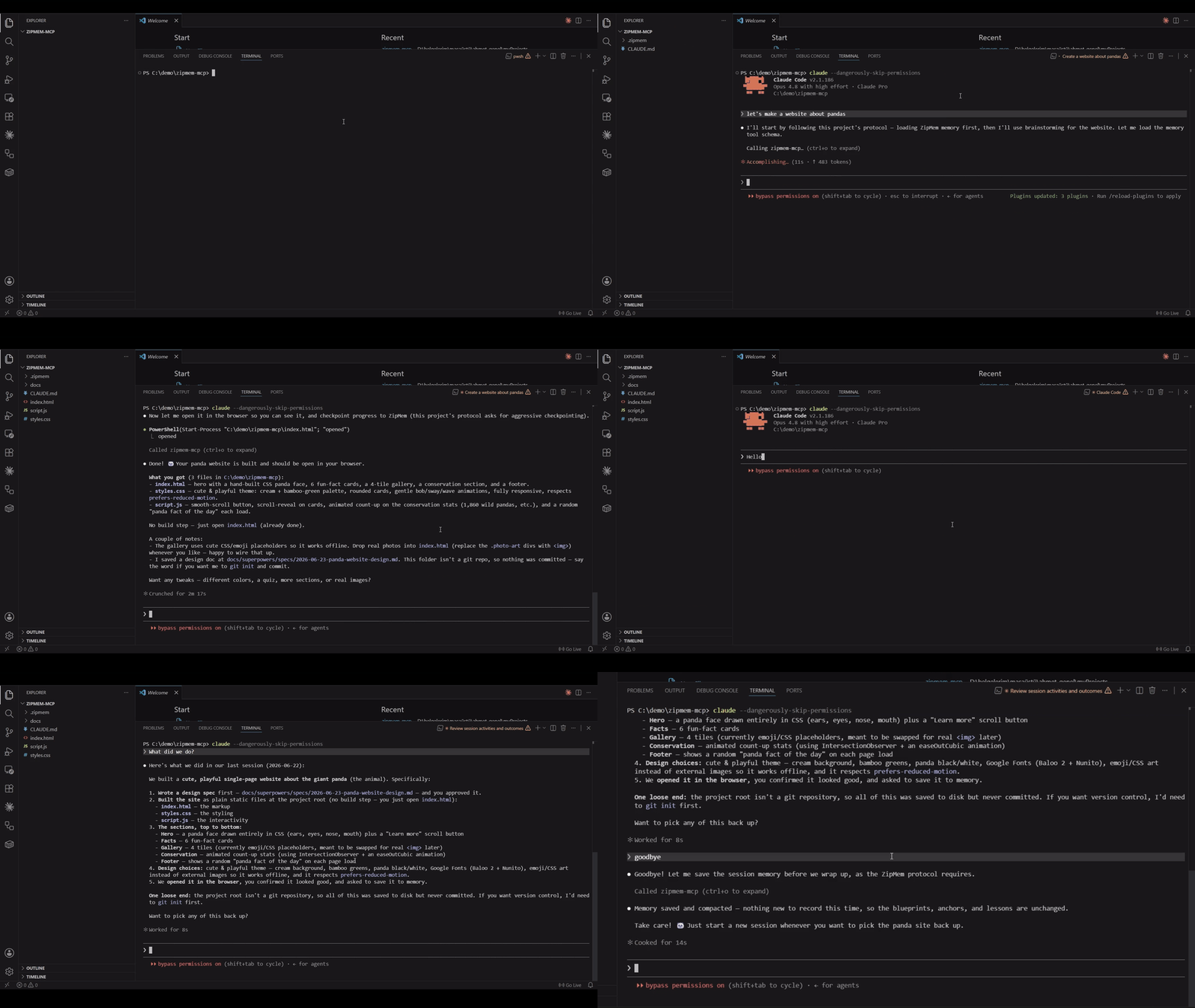
The problem
Long, high-intensity agent sessions fill up the context window:
- Prompt caching only saves money, not space. Cached or not, every re-read of a giant terminal history still consumes window tokens.
- A 5-minute idle invalidates the cloud KV cache. The next turn re-reads the whole history at full price.
- Manual "summarize the session" is lossy and tedious, and dumping raw terminal logs just moves the bloat around.
The approach: Anchored Compacting
Instead of storing the session, zipmem stores its meaning:
| Raw session content | What zipmem keeps |
|---|---|
| 200-line code block you just wrote | [src/auth/oauth.ts -> 15-42 -> PKCE flow with refresh-token rotation] |
| A 6-step debugging saga | A one-line lesson: "Stripe webhook must be idempotent — it retries on 5xx" |
| Architecture you designed | A blueprint, preserved verbatim |
| Repetitive logs, dead ends, pleasantries | Discarded |
Anchors are coordinates, not code — the agent re-reads the file on demand when it actually needs the detail. The result is an endless memory loop where the window stays small but nothing foundational is ever lost.
The intelligence lives in the prompt, not the server.
zipmem initinjects a Constitutional Directive into yourCLAUDE.md. The agent itself produces the compact, structured payload; the server only validates, deduplicates, merges, and persists. That keeps the server dependency-free and instant.
Install
Requires Node.js ≥ 18.
Quick start
That's it. zipmem init:
- creates
.zipmem/state.json(your memory store), - injects the Constitutional Directive into
CLAUDE.md(ormemory.md, or createsCLAUDE.md), - adds
.zipmem/to.gitignore(keep memory local — see Shared memory), - records a checkpoint mode (
balancedby default; pass--checkpoint=conservative|aggressiveto change it).
From the next session on, the agent loads memory automatically at the start and compacts automatically when you say goodbye or it nears its context limit. You don't run anything by hand.
Manual MCP config
If you register MCP servers via a JSON config (claude_desktop_config.json or similar):
The server reads CLAUDE_PROJECT_DIR (set automatically by Claude Code) to find the project's .zipmem/. It otherwise falls back to the nearest .zipmem/ ancestor of the working directory.
Using zipmem across multiple projects
zipmem works per-project, and getting it running everywhere depends on two separate, independent steps. If it works in one project but seems dead in another, one of these is almost always the reason:
1. Register the MCP server at the right scope. Claude Code's claude mcp add defaults to local scope — the server is then only visible inside the one directory where you ran it. In any other project the tools simply don't exist. To register it once for all your projects, use user scope:
Verify what's registered (and at which scope) from inside the project that isn't working:
If zipmem-mcp isn't listed there, that's the problem — re-add it with -s user (or -s project to share it with a repo via a committed .mcp.json).
2. Run zipmem init in every project. This is per-project, not per-machine. Registering the server is not enough on its own, because init is what:
- creates that project's
.zipmem/state.json(without it there's no memory to load), and - injects the Constitutional Directive into that project's
CLAUDE.md. Without the directive the agent never learns to call the tools — the server is running but nothing triggers it, so it looks like "zipmem doesn't work here."
Heads-up on project resolution. The server locates memory via
CLAUDE_PROJECT_DIR→ the nearest.zipmem/ancestor →cwd. If a project has no.zipmem/of its own but sits inside another project that does, the agent can silently read/write the parent project's memory. Runningzipmem initin each project gives it its own.zipmem/and avoids this.
Quick checklist when a project "doesn't work":
| Symptom | Check | Fix |
|---|---|---|
| Tools not offered at all | claude mcp list — is zipmem-mcp there? | claude mcp add -s user zipmem-mcp -- npx zipmem-mcp |
| Server runs but agent never calls it | Is the directive in this project's CLAUDE.md? Is there a .zipmem/? | zipmem init in the project root |
| Wrong / unexpected memory loads | Does a parent folder have a .zipmem/? | zipmem init here so the project has its own store |
How the loop works
MCP tools
| Tool | When the agent calls it | What it does |
|---|---|---|
zipmem_load_memory | First thing, every session | Returns blueprints, anchors, and lessons as compact text. Surfaces a recovery banner if the previous session ended abruptly. |
zipmem_checkpoint | Depends on the checkpoint mode (every unit of work, only at milestones, or when you say checkpoint) | Stages progress into a crash-safe buffer (session.json) — intermediate, not final, never touches state.json. Called many times per session. |
zipmem_save_and_compact | When you signal the session is wrapping up in a chat message ("we're done", "that's all", "goodbye", or save), or when context nears its limit | Finalizes: folds the staged buffer + final delta into persistent memory (state.json), prunes, closes the session. Usually once at the end. |
The tool descriptions are written so the agent knows when and why to call them without you prompting it.
Heads-up about
exit/quit: these are Claude Code's own CLI commands — they close the terminal instantly, before the agent gets a turn, so they do not triggerzipmem_save_and_compact. To get a clean final save, send a normal chat message first ("we're done", "save", "goodbye"), let the agent compact, then quit. Otherwise durability falls back to your last checkpoint + next-session recovery.
Checkpoint vs. save — the one-line version
Checkpoint = cheap, frequent, "don't lose my progress" insurance (recovered only on the next session if you crash). Save & compact = the authoritative commit to long-term memory that a future zipmem_load_memory reads back. Many checkpoints during a session; one save at the end.
Checkpoint modes
zipmem_checkpoint is the main cost ↔ safety knob. Each checkpoint is agent-generated output, so frequent checkpoints mean more durability but more tokens. You pick the cadence at init time and it's baked into the injected directive (the server treats every checkpoint identically — only the instruction to the agent changes):
| Mode | The agent is told to… | Best for |
|---|---|---|
aggressive | Checkpoint after every meaningful unit of work (a feature wired up, a bug fixed). Maximum durability against hard exits. | Long, high-stakes sessions where losing even a few steps hurts. |
balanced (default) | Checkpoint only at major milestones — a big refactor finished, a critical bug resolved, a foundational decision made. | Most projects: low token overhead, still protects the work that matters. |
conservative | Never persist on its own. Memory is written only when you say so, via two plain words: say checkpoint → the agent stages progress (zipmem_checkpoint); say save → the agent does a full compaction (zipmem_save_and_compact). Either way it runs the tool immediately and replies with a one-line confirmation. | Token-tight workflows where you want full manual control. |
Related MCP Servers
Adoption & maintenance
Factual signals from GitHub, npm, and our automated checks — not a rating.
npm downloads
48
Package downloads in the last 30 days.
Last commit
2mo ago
Most recent push to the default branch.
Availability
100%
Our rolling endpoint + install checks that succeeded.
Install check
Passed
Our sandbox started it and listed its tools.
Tools exposed
3
Callable tools this server registers over MCP.
Directory activity
2 views
Config copies, upvotes, and views on AllMCPs.
Reviews
No reviews yet — be the first to share how this listing worked for you.
Frequently Asked Questions about Zipmem MCP
AllMCPs Directory Badge
Showcase your server listing on GitHub or your project documentation. Embed this dynamic SVG badge to highlight official listing status and live engagement.
Badge Style:
Live Dynamic SVG Preview
Markdown (GitHub README)
[](https://allmcps.com/mcp/ahmetakyurt-zipmem-mcp)HTML Embed
<a href="https://allmcps.com/mcp/ahmetakyurt-zipmem-mcp"><img src="https://allmcps.com/api/badge/ahmetakyurt-zipmem-mcp?style=directory" alt="Zipmem MCP on AllMCPs" /></a>Technical Specs & Signals
CategoryKnowledge & Memory
PricingFree
10/10 checks healthy over the last 32d
69Quality signal: Great · 69/100How this signal is calculated ▾
Server availability25/25
Verified ownership10/20
Documentation & tools30/30
Adoption & activity4/15
Community engagement0/10
A guidance signal from public completeness & health data — not a user rating. New listings start lower and rise as they add docs, get verified, and grow adoption. Signals we can't observe for a listing are skipped, not counted against it.
Supply-chain signal
No high-severity advisories surfaced by our automated scan.
Critical 0High 0Medium 0Low 0
Scanned 23d ago via OSV.dev · zipmem-mcp (npm)
Own this project?
This directory is pre-filled from public sources. Claim via GitHub README, site badge, or DNS TXT to unlock edit access and the Official badge — proof is checked automatically, then reviewed by our team.
Free dofollow backlink: add your website and place the AllMCPs badge on it — no claim needed. We detect it automatically and keep it verified as long as the badge stays live.
Claim & get free dofollowShare & Embed
Add our SVG badge (dark/light directory styles) or embeddable widget to your site.