MCP server for LLM-driven SUMO traffic simulation, scenario design, and result analysis.
Quick Install
Automated & IDE SetupCopy the AI prompt to install this server into Claude Code, Cursor, or another agent — or use 1-click editor setup below.
Not yet automatically verified
We haven't yet run this listing's install command through our automated sandbox check. This isn't a red flag — we're steadily working through the catalog.
Manual Client & Custom JSON ConfigExpand JSON ▾
Client Config & Setup
Choose your client or environment
Target File:
💡 Paste the JSON block into your client's configuration file under mcpServers, then restart the application.
Documentation Overview
AgentSUMO
An Agentic Framework for Interactive Simulation Scenario Generation in SUMO via Large Language Models






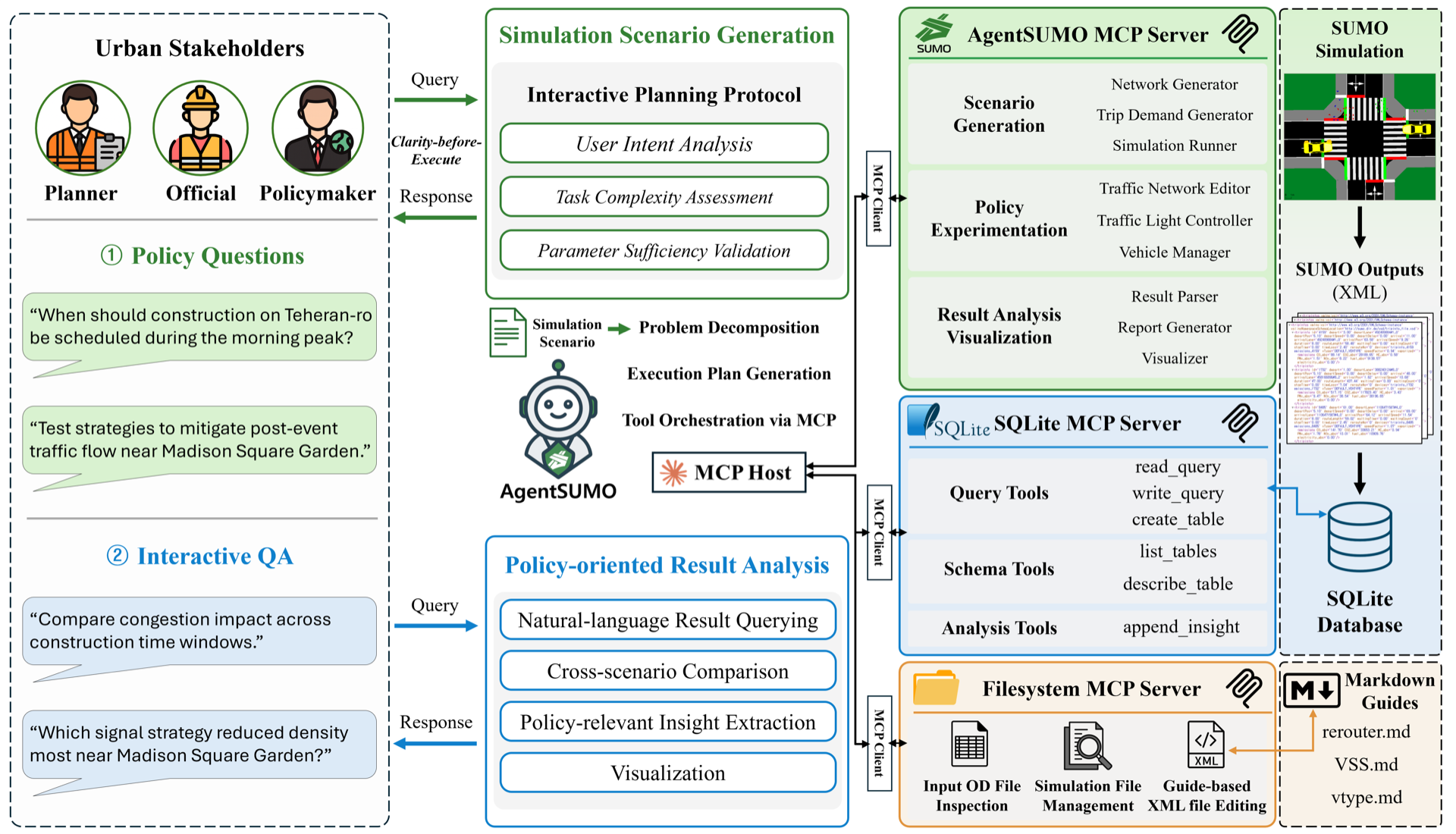
Documentation · Installation · Tools · Schema · Tutorials
Overview
AgentSUMO lets non-expert stakeholders design, execute, and analyze SUMO traffic simulations through natural-language interaction. The Planner Agent translates abstract policy questions into executable simulation plans, drives them via the Model Context Protocol (MCP), and surfaces results through a web dashboard.
- Conversational scenario design — describe a policy question, get a runnable simulation
- Policy experiments — road closures, lane reductions, signal optimization, demand changes
- Cross-scenario analysis — SQL-based comparison across runs, with auto-generated HTML reports
- Web dashboard — geospatial visualization, time-series charts, and trip replay
Demo
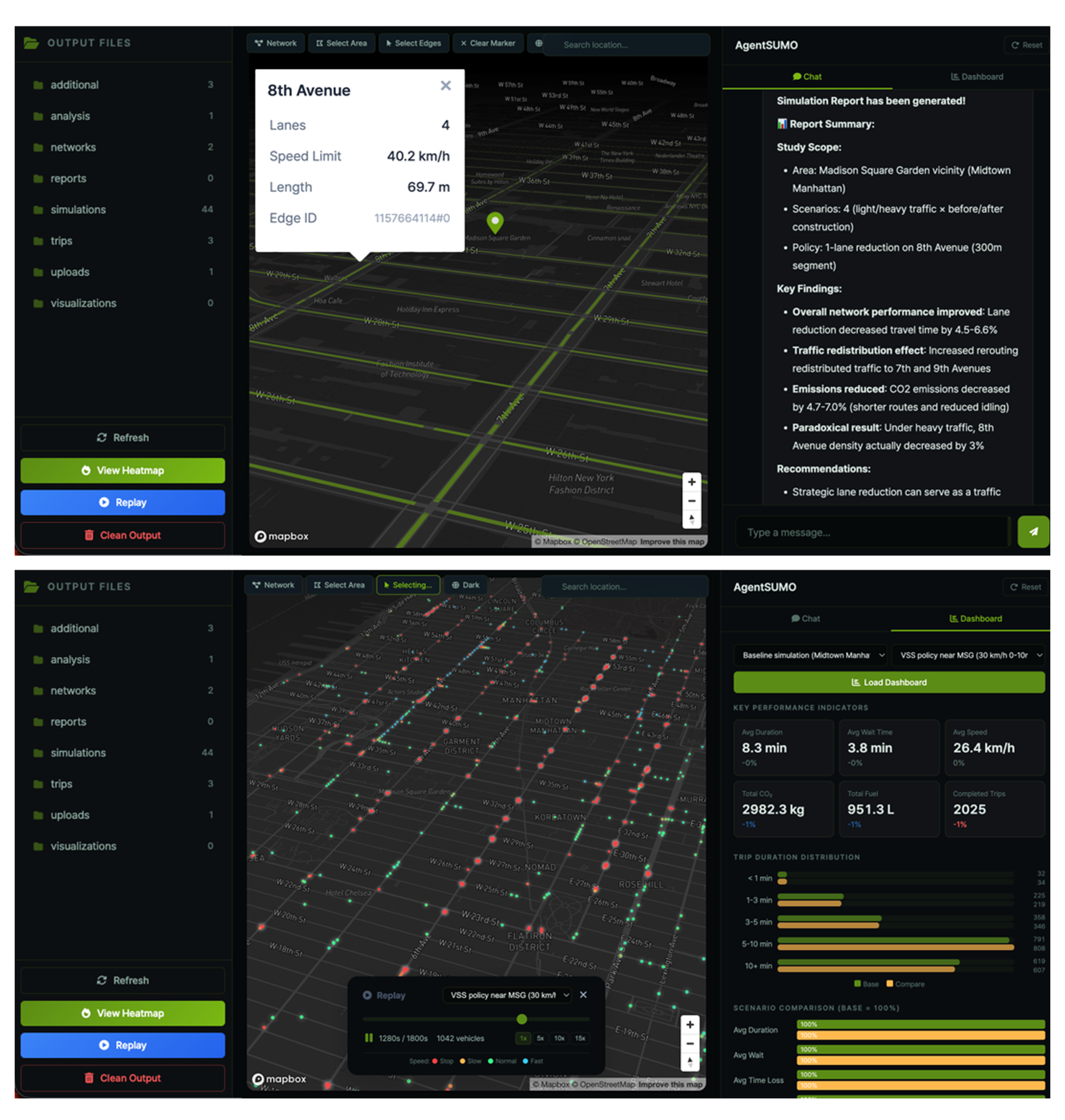
Web interface: conversational planning panel, scenario list, and live simulation status.
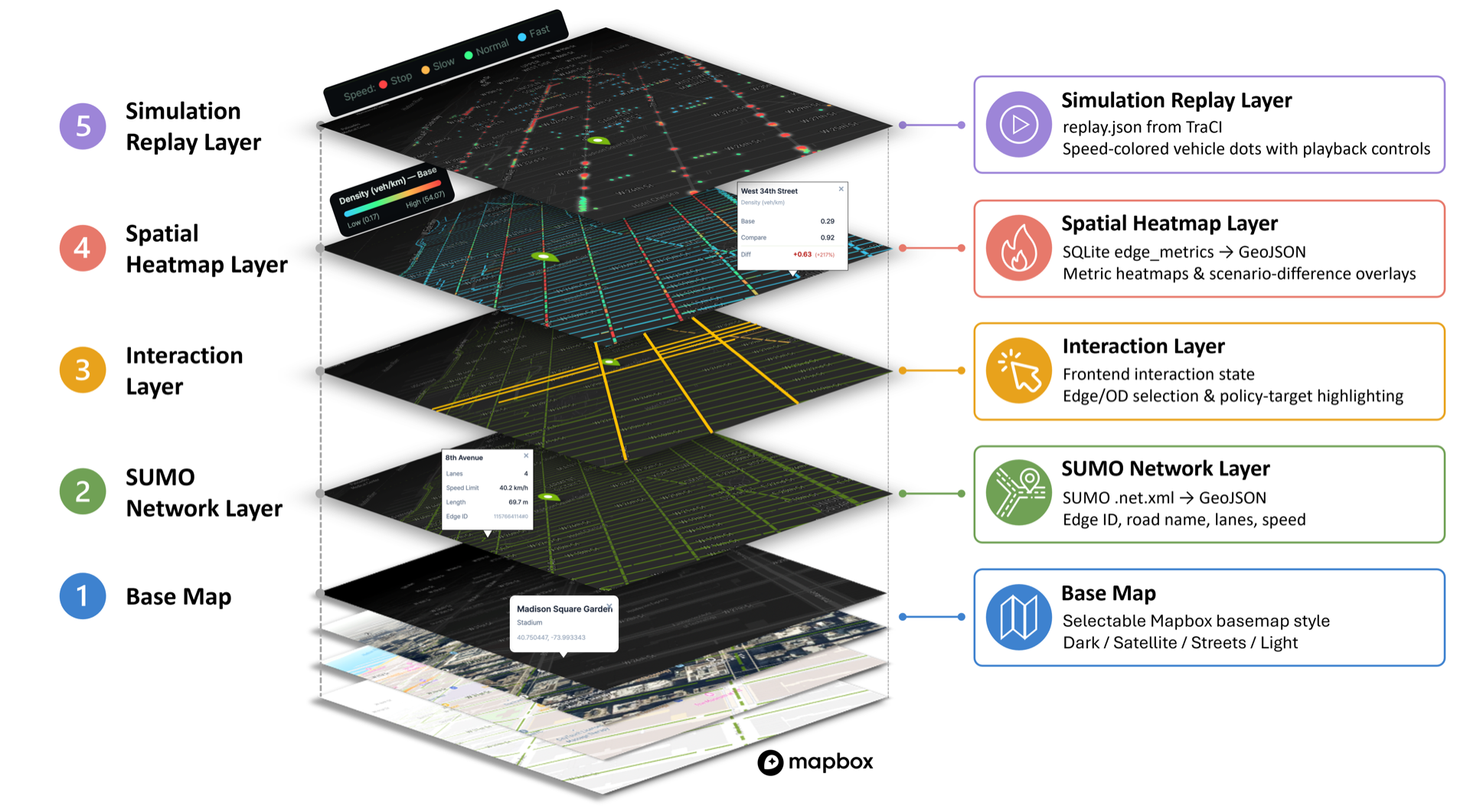
Geospatial visualization: per-edge metrics, congestion overlays, and trip replay on the 2.5D basemap.
Architecture
The reasoning layer (Planner Agent) lives in this repository. The execution layer (agentsumo-mcp) is published to PyPI and installed automatically as a dependency.
Tool Layer
The AgentSUMO MCP Server exposes 26 tools grouped into five capability categories that follow the simulation workflow. Full reference at agentsumo.readthedocs.io/.../tools.
| Category | Purpose | Representative tools |
|---|---|---|
| Scenario Generation | Build a baseline SUMO simulation: OSM → network → trips → routes → run | osm_extract, net_convert, trip_generate, route_generate, sumo_runner |
| Policy Experimentation | Apply infrastructure, demand, and signal-control interventions | edge_edit_tool, reduce_lanes_tool, vehicle_generation_tool, flow_generation_tool, tls_offset_tool, tls_adaptation_tool |
| Result Analysis | Convert SUMO XML output to SQLite and render HTML reports | xml_to_sqlite_tool, simulation_report_tool |
| Visualization | Render networks, highlighted edges, and per-edge metric heatmaps | visualize_net_tool, visualize_edge_tool, visualize_policy_target_tool, visualize_edgedata_tool |
| Utility Functions | Network statistics, routing, road-name ↔ edge-id resolution, OD-coordinate validation, web-search grounding | network_summary_tool, route_analysis_tool, validate_od_coordinates_tool, web_search_tool |
Installation
Requirements
- Python 3.10 or later
- SUMO 1.24 or later (locally installed, with
SUMO_HOMEset) - Anthropic Claude API key (bring-your-own-key)
- Mapbox access token (used by the web map renderer)
1. Install SUMO
macOS
Or download the installer from the Eclipse SUMO downloads page.
Windows — Download the installer from the Eclipse SUMO downloads page.
Linux (Ubuntu/Debian)
2. Set up the Python environment
Install uv:
Clone the repository, create a virtual environment, and install AgentSUMO:
3. Configure environment variables
AgentSUMO reads API keys and the SUMO path from environment variables. The easiest way is a .env file at the project root:
Open .env in your editor and fill in:
ANTHROPIC_API_KEY (required) — Claude API key that drives the Planner Agent. Get one at the Anthropic Console.
MAPBOX_TOKEN (required for the web UI) — used to render the basemap. Get one at the Mapbox access tokens page.
SUMO_HOME (required) — absolute path to your local SUMO installation. The directory must contain bin/sumo (or bin/sumo.exe on Windows).
AGENTSUMO_MCP_OUTPUT_BASE (optional) — override the base directory where the MCP server writes simulation outputs (networks, trips, results). Defaults to the current working directory.
4. Run
Project Structure
Use the MCP Server Standalone
The AgentSUMO MCP Server can be used independently from this framework with any MCP-compatible LLM client (Claude Desktop, OpenAI tool clients, Gemini, local LLMs):
Or via uvx without installing:
The server is registered in the official MCP Registry under io.github.mw-jeong/agentsumo-mcp.
Troubleshooting
SUMO path error — Verify SUMO_HOME in your .env. The directory must contain bin/sumo (or bin/sumo.exe on Windows).
API key error — Verify ANTHROPIC_API_KEY in your .env is set to a valid Claude API key. The Planner Agent will refuse to start without it.
Dependency error — Re-resolve dependencies:
Legacy token files (deprecated, scheduled for removal in 0.2.0) — AgentSUMO still falls back to claude_api.txt and mapbox_token.txt at the project root when the corresponding environment variables are missing, but those code paths now emit a DeprecationWarning at import time. Use the .env workflow for new installations.
Documentation
Full documentation lives at agentsumo.readthedocs.io.
Related MCP Servers
Reviews
No reviews yet — be the first to share how this listing worked for you.
Frequently Asked Questions about AgentSUMO
AllMCPs Directory Badge
Showcase your server listing on GitHub or your project documentation. Embed this dynamic SVG badge to highlight official listing status and live engagement.
Badge Style:
Live Dynamic SVG Preview
Markdown (GitHub README)
[](https://allmcps.com/mcp/agentsumo)HTML Embed
<a href="https://allmcps.com/mcp/agentsumo"><img src="https://allmcps.com/api/badge/agentsumo?style=directory" alt="AgentSUMO on AllMCPs" /></a>Technical Specs & Signals
CategoryDeveloper Tools
39Quality signal: Fair · 39/100How this signal is calculated ▾
Server availabilityNot measured
Not scored for repo-hosted servers — we can't reach the running server, only its GitHub page. Hosted MCP endpoints are health-checked live.
Verified ownership10/20
Documentation & tools16/30
Adoption & activity3/15
Community engagement0/10
A guidance signal from public completeness & health data — not a user rating. New listings start lower and rise as they add docs, get verified, and grow adoption. Signals we can't observe for a listing are skipped, not counted against it.
Own this project?
This directory is pre-filled from public sources. Claim via GitHub README, site badge, or DNS TXT to unlock edit access and the Official badge — proof is checked automatically, then reviewed by our team.
Free dofollow backlink: add your website and place the AllMCPs badge on it — no claim needed. We detect it automatically and keep it verified as long as the badge stays live.
Claim & get free dofollowShare & Embed
Add our SVG badge (dark/light directory styles) or embeddable widget to your site.