Read-only MCP server for AgentLoopKit tasks, policies, reports, handoffs, and status.
Quick Install
Automated & IDE SetupCopy the AI prompt to install this server into Claude Code, Cursor, or another agent — or use 1-click editor setup below.
Not yet automatically verified
We haven't yet run this listing's install command through our automated sandbox check. This isn't a red flag — we're steadily working through the catalog.
Manual Client & Custom JSON ConfigExpand JSON ▾
Client Config & Setup
Choose your client or environment
Target File:
💡 Paste the JSON block into your client's configuration file under mcpServers, then restart the application.
Documentation Overview
AgentLoopKit
A drop-in engineering loop for software agents.
An open-source Baseframe Labs developer tool.
Your software agent can produce a diff. AgentLoopKit helps you decide whether that work is reviewable, verifiable, and merge-ready.
It gives Codex, Claude Code, Cursor, OpenCode, Gemini CLI, GitHub Copilot CLI, and other engineering agents a local acceptance layer: task contracts, safety rules, verification evidence, review-readiness scores, PR descriptions, and reviewer handoffs.
Unstructured automation produces code. Agentic engineering produces auditable work.
ProjScan finds the risk. AgentLoopKit controls the work. AgentFlight proves the result.
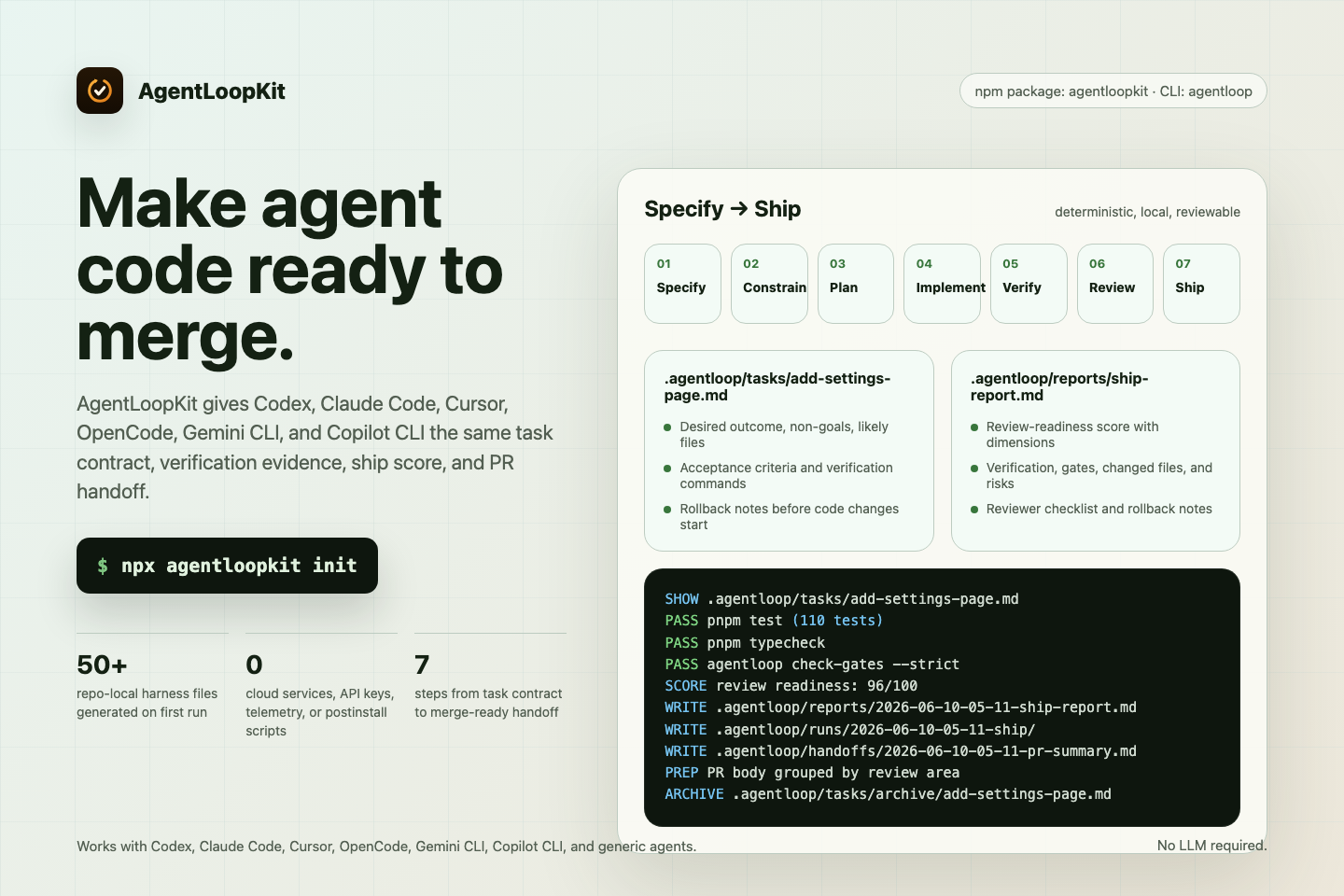
The screenshots and terminal demos in this README are generated from committed sources in docs/assets/readme/ with Playwright and VHS. You can regenerate them locally.
What It Does
AgentLoopKit is a repo-level toolkit for developers using Codex, Claude Code, Cursor, OpenCode, Gemini CLI, GitHub Copilot CLI, and other engineering agents.
Keep your agent, IDE, and CLI. AgentLoopKit gives those tools a repeatable local workflow:
- Specify the task.
- Constrain the risk.
- Implement the smallest useful change.
- Verify with real commands.
- Review the diff.
- Hand off with evidence.
- Ship only when the work is reviewable.
Run init inside an existing repository and AgentLoopKit creates:
.agentloop/for tasks, reports, handoffs, gates, policies, templates, and agent instructionsAGENTS.mdfor agent-facing repo guidanceAGENTLOOP.mdfor the working loopagentloop.config.jsonfor local command and path settings
Generated AGENTS.md includes a specialist roster for product, CLI, template, verification, security, release, docs, compatibility, MCP, and repo-steward work. It helps future agent sessions split work without adding a background service.
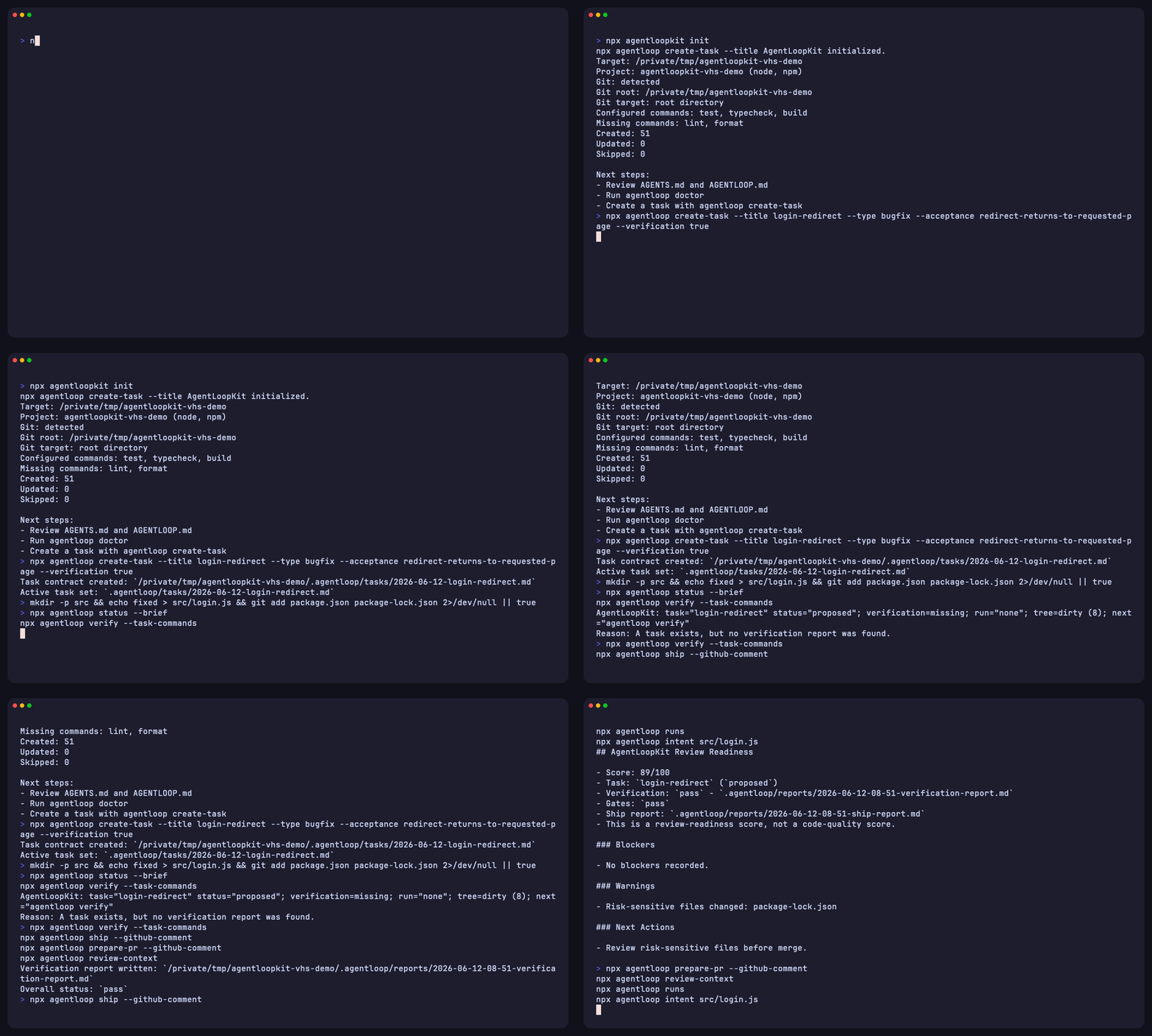
The CLI demo shows the normal path: initialize a repo, create a task, run reviewed verification, score review readiness, draft PR copy, inspect review context, and trace why a file changed.
Install
Use it with npx from the repository you want to configure:
init writes files into the current directory. --dry-run previews the same plan and writes nothing.
Commit the generated harness baseline before your first feature task when you want clean diff evidence. If the harness files are still uncommitted, explain-diff, Guard, and resume packs will include those generated files as local work, which is accurate but noisier than the steady-state loop.
After setup, non-init commands search upward for the nearest agentloop.config.json and use that folder as the AgentLoop root. You can run agentloop status, agentloop verify, agentloop ship, or agentloop prepare-pr from a nested source folder and still write tasks, reports, runs, and handoffs to the initialized repo root.
Do not run init from your home directory unless you intend to configure your home folder. AgentLoopKit refuses that by default; --force allows it and prints a home-directory target warning. If you want local agent guidance but do not want to commit the generated files, use local-only mode:
--local-only writes the harness, asks Git for this clone's metadata directory, then adds a marked block to that clone's info/exclude for .agentloop/, AGENTS.md, AGENTLOOP.md, and agentloop.config.json. It does not edit .gitignore, global Git config, shell profiles, or other project files.
The examples below use agentloop after setup. If you are not installing the package locally or exposing its binary on PATH, keep using the one-off form, for example npx --yes agentloopkit@latest doctor --redact-paths.
Check the published package explicitly:
For repeatable CI or team setup, replace @latest with a vetted version.
Before initialization, exploratory preflight can be advisory:
Advisory mode keeps missing-setup diagnostics visible but exits 0 so first-run scripts can continue. Use plain doctor or doctor --strict for gates that should fail on setup errors.
Pinned team usage:
Existing Repos
Repos that already use AgentLoopKit can update the CLI without rewriting local harness files:
These commands inspect the published package. This repository may document unreleased guidance before the next publish; check release status before expecting agentloopkit@latest to include new subcommands.
init skips existing generated files and appends to unmarked AGENTS.md files instead of overwriting maintainer edits. Use upgrade-harness to find older guidance that does not tell agents to run agentloop doctor and agentloop start before broad reads, list handles with agentloop context handles when available, or expand source truth with agentloop context show <handle>. Copy only the useful pieces into AGENTS.md, AGENTLOOP.md, or .agentloop/harness/*.
You can use the latest loop before refreshing old guidance:
Core Workflow
First useful loop after init:
That sequence creates a task contract, checks the repo setup, gives the next software agent a compact start briefing, records a local loop contract with token receipts, scores whether another loop pass should continue, checks readiness gates, runs only reviewed verification commands, records review-readiness evidence, drafts PR copy, and closes the active task. It does not post to GitHub, publish packages, call an LLM, execute a coding agent, or run hidden commands.
Make Your Agent Start Here
Before a software agent broad-scans the repo, run:
doctor checks the Agent Readiness Matrix: Doctor-before-Start guidance, Start guidance, context-handle guidance, broad-read avoidance, MCP guidance, and installed agent instruction files. start gives the current task, proof, risk, context budget, and source handles. context handles lists which handles are available now. context show expands exact local source truth only when the agent needs detail.
create-task sets the new contract as the active task. Use agentloop task set <path> only when you need to switch to another contract.
Add --include-config-commands when you want the task contract to copy non-empty test, lint, typecheck, and build commands from agentloop.config.json. Task creation records those commands; it does not run them. Use verify --task-commands --only-task-commands when the active contract already includes the full check list.
Use verify --post-verification-gates only for reviewed task gates that need the verification report to exist first.
After verification and ship, use agentloop prepare-pr for reviewer copy and agentloop task done to close the active task before starting unrelated work.
Use agentloop status or agentloop next when an agent needs the next local action without reading every file:
Related MCP Servers
Adoption & maintenance
Factual signals from GitHub, npm, and our automated checks — not a rating.
GitHub stars
1
Stargazers on the source repository.
Last commit
2mo ago
Most recent push to the default branch.
Reviews
No reviews yet — be the first to share how this listing worked for you.
Frequently Asked Questions about Agentloopkit
AllMCPs Directory Badge
Showcase your server listing on GitHub or your project documentation. Embed this dynamic SVG badge to highlight official listing status and live engagement.
Badge Style:
Live Dynamic SVG Preview
Markdown (GitHub README)
[](https://allmcps.com/mcp/agentloopkit)HTML Embed
<a href="https://allmcps.com/mcp/agentloopkit"><img src="https://allmcps.com/api/badge/agentloopkit?style=directory" alt="Agentloopkit on AllMCPs" /></a>Technical Specs & Signals
CategoryDeveloper Tools
11/15 checks healthy over the last 46d
39Quality signal: Fair · 39/100How this signal is calculated ▾
Server availabilityNot measured
Not scored for repo-hosted servers — we can't reach the running server, only its GitHub page. Hosted MCP endpoints are health-checked live.
Verified ownership10/20
Documentation & tools16/30
Adoption & activity3/15
Community engagement0/10
A guidance signal from public completeness & health data — not a user rating. New listings start lower and rise as they add docs, get verified, and grow adoption. Signals we can't observe for a listing are skipped, not counted against it.
Supply-chain signal
No high-severity advisories surfaced by our automated scan.
Critical 0High 0Medium 0Low 0
Scanned 7d ago via OSV.dev · agentloopkit (npm)
Own this project?
This directory is pre-filled from public sources. Claim via GitHub README, site badge, or DNS TXT to unlock edit access and the Official badge — proof is checked automatically, then reviewed by our team.
Free dofollow backlink: add your website and place the AllMCPs badge on it — no claim needed. We detect it automatically and keep it verified as long as the badge stays live.
Claim & get free dofollowShare & Embed
Add our SVG badge (dark/light directory styles) or embeddable widget to your site.