Control Classic Mac OS (System 7-9) from AI agents via shared folder protocol.
Quick Install
Automated & IDE SetupCopy the AI prompt to install this server into Claude Code, Cursor, or another agent — or use 1-click editor setup below.
Not yet automatically verified
We haven't yet run this listing's install command through our automated sandbox check. This isn't a red flag — we're steadily working through the catalog.
Manual Client & Custom JSON ConfigExpand JSON ▾
Client Config & Setup
Choose your client or environment
Target File:
💡 Paste the JSON block into your client's configuration file under mcpServers, then restart the application.
Documentation Overview
AgentBridge


Let AI talk to your Classic Mac.
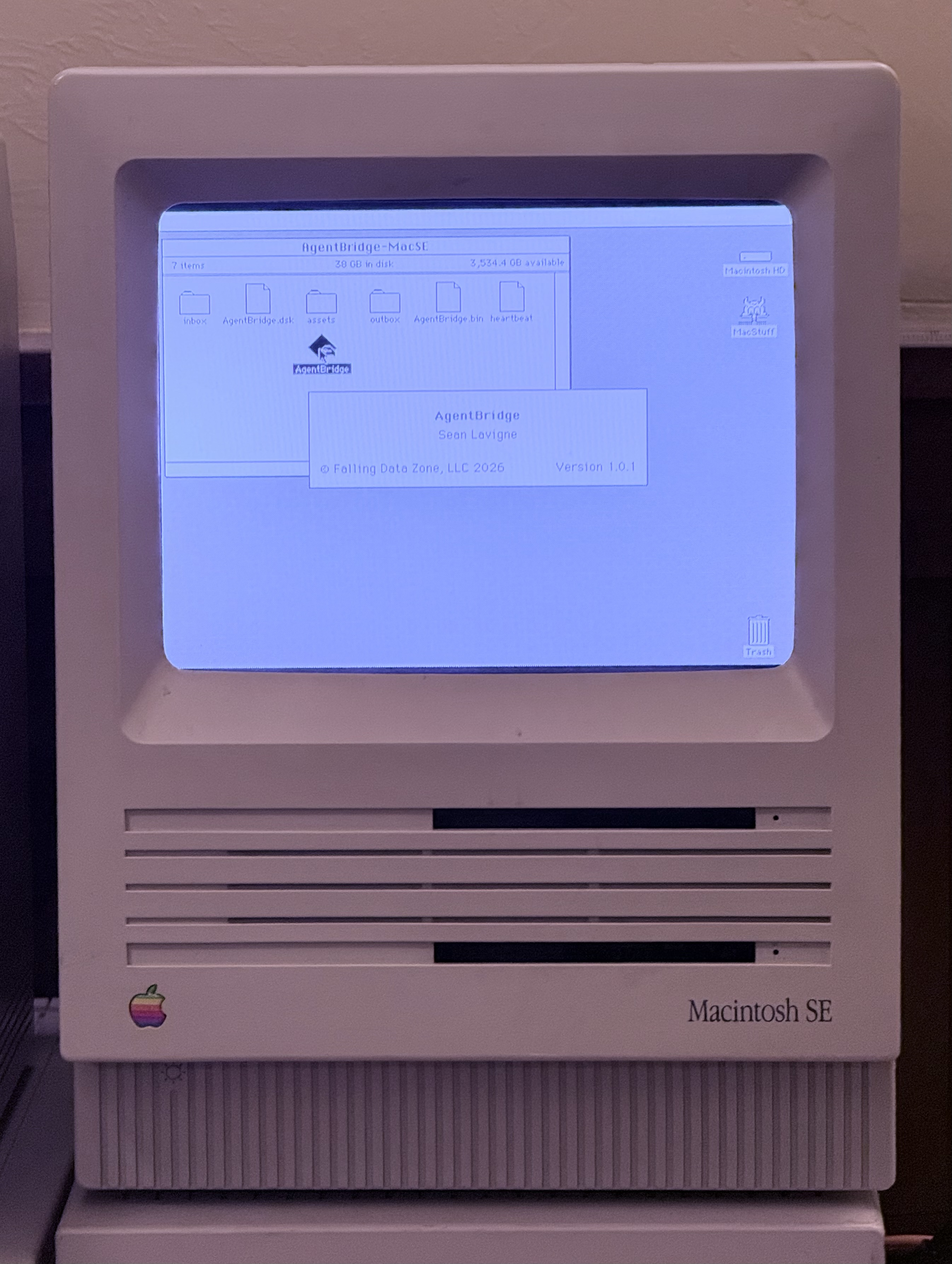
AgentBridge is a native Classic Mac OS application that lets AI agents (like Claude) interact with Mac OS 7–9 through structured commands and responses. It works on real hardware and emulators — no modifications to your Mac required.
Drop AgentBridge into a shared folder, launch it on your Mac, and an AI agent can list windows, open apps, type text, read the clipboard, browse files, and more — all through a simple text-based protocol.
How It Works
The transport is just a folder. How that folder is shared between the AI and the Mac is up to you:
- NAS/file server (AFP or SMB) — multiple Macs and your modern computer all mount the same share
- Emulator shared folder — BasiliskII and SheepShaver both support host directory sharing
- Any other shared filesystem — if both sides can read and write files, it works
No SSH. No special drivers. No modifications to your Mac's system. AgentBridge is a regular application — launch it, quit it, done.
MCP Tools Reference
The MCP server exposes these tools to AI agents. If the fleet has only one target, the target parameter is optional on all tools.
System & Status
classic_mac_list_targets
List all configured Classic Mac targets and their status (heartbeat alive/dead).
No parameters.
classic_mac_ping
Health check — returns pong if AgentBridge is responding.
| Parameter | Required | Description |
|---|---|---|
target | No | Target ID or alias |
classic_mac_heartbeat
Read the heartbeat file — shows uptime, front app, free memory, timestamp.
| Parameter | Required | Description |
|---|---|---|
target | No | Target ID or alias |
classic_mac_get_about
System information — OS version, machine type, RAM, free memory, uptime.
| Parameter | Required | Description |
|---|---|---|
target | No | Target ID or alias |
Windows & Processes
classic_mac_list_windows
Enumerate all visible windows across all applications. Returns window index, title, bounds (left,top,right,bottom), and front/back layer.
| Parameter | Required | Description |
|---|---|---|
target | No | Target ID or alias |
classic_mac_get_front_window
Get details about the frontmost window — title, bounds, owning app.
| Parameter | Required | Description |
|---|---|---|
target | No | Target ID or alias |
classic_mac_list_processes
List running applications with name, creator code, PID, and memory partition.
| Parameter | Required | Description |
|---|---|---|
target | No | Target ID or alias |
Menus
classic_mac_list_menus
List the menu bar entries for the frontmost application.
| Parameter | Required | Description |
|---|---|---|
target | No | Target ID or alias |
classic_mac_get_menu_items
Get items within a specific menu by name.
| Parameter | Required | Description |
|---|---|---|
target | No | Target ID or alias |
menu | Yes | Menu title (e.g. "File", "Edit") |
classic_mac_menu_select
Activate a menu item by name. Works for items with keyboard shortcuts.
| Parameter | Required | Description |
|---|---|---|
target | No | Target ID or alias |
menu | Yes | Menu title |
item | Yes | Menu item name |
Mouse & Keyboard
classic_mac_click
Click at screen coordinates.
| Parameter | Required | Description |
|---|---|---|
target | No | Target ID or alias |
x | Yes | X coordinate (pixels from left) |
y | Yes | Y coordinate (pixels from top) |
clicks | No | Number of clicks (default 1, use 2 for double-click) |
classic_mac_mouse_move
Move the cursor without clicking.
| Parameter | Required | Description |
|---|---|---|
target | No | Target ID or alias |
x | Yes | X coordinate |
y | Yes | Y coordinate |
classic_mac_mouse_drag
Click and drag from one point to another.
| Parameter | Required | Description |
|---|---|---|
target | No | Target ID or alias |
x1 | Yes | Start X |
y1 | Yes | Start Y |
x2 | Yes | End X |
y2 | Yes | End Y |
classic_mac_type_text
Type a string of text into the frontmost application.
| Parameter | Required | Description |
|---|---|---|
target | No | Target ID or alias |
text | Yes | Text to type |
classic_mac_key_press
Press a single key with optional modifiers.
| Parameter | Required | Description |
|---|---|---|
target | No | Target ID or alias |
key | Yes | Key name: single character, or return, enter, tab, space, delete, escape, left, right, up, down, home, end, pageup, pagedown, f1–f5 |
modifiers | No | Comma-separated: cmd, opt, shift, ctrl (e.g. "cmd,shift") |
Clipboard
classic_mac_get_clipboard
Read the current clipboard text contents.
| Parameter | Required | Description |
|---|---|---|
target | No | Target ID or alias |
classic_mac_set_clipboard
Set the clipboard text contents.
| Parameter | Required | Description |
|---|---|---|
target | No | Target ID or alias |
text | Yes | Text to place on clipboard |
Application Control
classic_mac_launch_app
Launch an application by HFS path or creator code.
| Parameter | Required | Description |
|---|---|---|
target | No | Target ID or alias |
path | No* | HFS path (e.g. "Macintosh HD:Applications:SimpleText") |
creator | No* | 4-character creator code (e.g. "ttxt") |
*One of path or creator is required.
classic_mac_activate_app
Bring a running application to the front.
| Parameter | Required | Description |
|---|---|---|
target | No | Target ID or alias |
name | Yes | Application name |
classic_mac_quit_app
Send a quit Apple Event to a running application.
| Parameter | Required | Description |
|---|---|---|
target | No | Target ID or alias |
name | Yes | Application name |
classic_mac_send_appleevent
Send a generic Apple Event to a running application.
| Parameter | Required | Description |
|---|---|---|
target | No | Target ID or alias |
app | Yes | Target app name or 4-char creator code |
event | Yes | Event type: oapp, quit |
Files & Volumes
classic_mac_get_volumes
List all mounted volumes with name, free space, and total size.
| Parameter | Required | Description |
|---|---|---|
target | No | Target ID or alias |
classic_mac_list_folder
List contents of a folder by HFS path. Returns name, type code, creator code, size, and whether each item is a folder.
| Parameter | Required | Description |
|---|---|---|
target | No | Target ID or alias |
path | Yes | HFS path (e.g. "Macintosh HD:System Folder:") |
Compatibility
| Environment | Architecture | OS Versions | Status |
|---|---|---|---|
| 68k Macs | 68k | System 7.0–8.1 | ✅ Tested on System 7.6.1 |
| PowerPC Macs | PowerPC | Mac OS 8.5–9.2.2 | Builds, untested |
| BasiliskII | 68k | System 7.0–8.1 | ✅ Tested on System 7.6.1 |
| SheepShaver | PowerPC | Mac OS 8.5–9.2.2 | Builds, untested |
AgentBridge requires System 7.0 or later (for Apple Events support).
Quick Start
Pre-built Binaries
Download from the Releases page:
AgentBridge-68k.bin— MacBinary for 68k Macs (System 7–8.1)AgentBridge-68k.dsk— HFS disk image for 68k Macs (System 7–8.1)AgentBridge-ppc.bin— MacBinary for PowerPC Macs (OS 8.5–9.2.2)AgentBridge-ppc.dsk— HFS disk image for PowerPC Macs (OS 8.5–9.2.2)
Setup
-
Create a shared folder accessible to both your Mac and your modern computer. This can be a NAS share, an emulator's host directory, or any shared filesystem.
-
Create the directory structure inside the shared folder:
-
Copy AgentBridge into the folder alongside inbox/outbox/assets.
Related MCP Servers
Adoption & maintenance
Factual signals from GitHub, npm, and our automated checks — not a rating.
GitHub stars
24
Stargazers on the source repository.
Last commit
5mo ago
Most recent push to the default branch.
Reviews
No reviews yet — be the first to share how this listing worked for you.
Frequently Asked Questions about Agentbridge
AllMCPs Directory Badge
Showcase your server listing on GitHub or your project documentation. Embed this dynamic SVG badge to highlight official listing status and live engagement.
Badge Style:
Live Dynamic SVG Preview
Markdown (GitHub README)
[](https://allmcps.com/mcp/agentbridge)HTML Embed
<a href="https://allmcps.com/mcp/agentbridge"><img src="https://allmcps.com/api/badge/agentbridge?style=directory" alt="Agentbridge on AllMCPs" /></a>