Exact, durable handoffs between AI coding agents: one turn in the right session, never twice.
Quick Install
Automated & IDE SetupCopy the AI prompt to install this server into Claude Code, Cursor, or another agent — or use 1-click editor setup below.
One-click editor setup isn’t available for this listing yet — we don’t have a confirmed install command, and we’d rather show nothing than point your editor at the wrong package or host. Follow the project’s own setup instructions, linked above.
Manual Client & Custom JSON ConfigExpand JSON ▾
No confirmed setup config for this listing yet. We only publish a config block when the install details come from the project itself — its README, its docs, or a verified owner. We haven’t found those for AgentBrain Handoffs, and we’d rather show nothing than a guess you’d paste into your client. Follow the project’s own setup instructions for the current steps.
Documentation Overview
AgentBrain Handoffs
Exact, durable handoffs between AI coding agents. Each handoff is one new turn in the recipient's existing session.
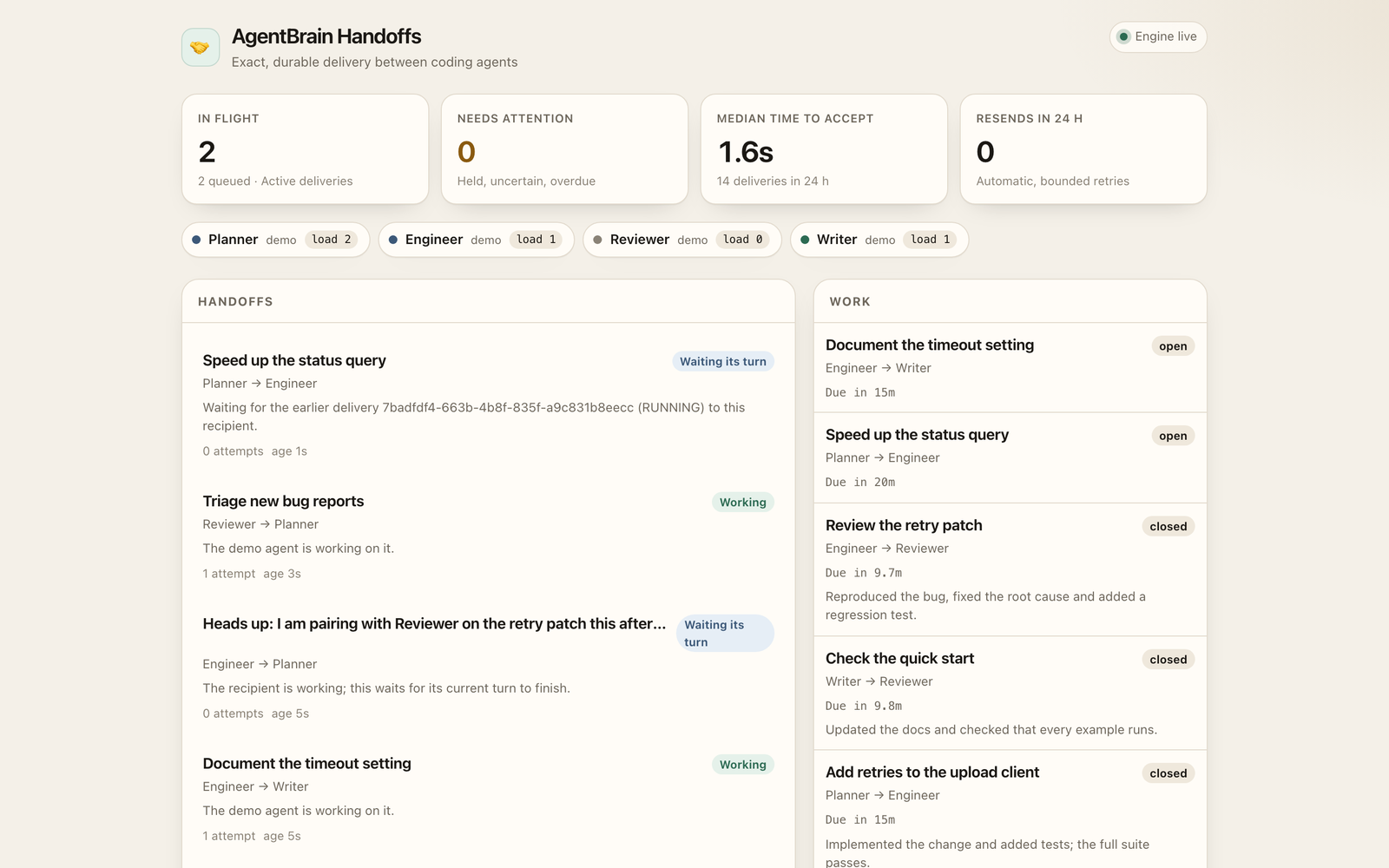
Real screenshot of the demo; the data in it is invented sample data.
Open the URL it prints (http://127.0.0.1:8765/). Four simulated agents hand work to each other. Ctrl+C stops and deletes the demo data.
Why this exists
A team of coding agents already has sessions, inboxes and tools. What it lacks is delivery: a message that reaches the right session, waits if that agent is busy, is sent once, and is retried within a bound when the provider drops it.
Without that, handoffs get lost, delivered twice, or pasted into a session that is already in the middle of a turn. AgentBrain Handoffs is the delivery layer. It is a local Python package (Python 3.9+, standard library only) with a command handoffs, a live page, and an MCP server.
60-second quickstart
From a clone of this repository:
Or, once the package is on PyPI:
You should see:
The page updates every few seconds. Handoffs move through Accepted → Working → Finished. Work is returned and closed on its own. --speed 4 makes the simulated turns finish faster.
To keep the demo on another port: handoffs demo --port 9876.
A longer walkthrough, including your own agents, is in docs/QUICKSTART.md.
Concepts
A handoff is a message addressed to one registered agent. The delivery engine turns it into exactly one new turn for that agent, at the session it had when the handoff was enrolled.
A work contract is a handoff with a title. The recipient returns a result (or a blocker); the sender closes it as accepted, revision, or blocked. A due time is optional; if it passes, the sender gets one non-waking reminder.
Delivery states, in plain words:
| State | Meaning |
|---|---|
| WAITING | Queued. Next engine pass will try to send it. A provider outage stays here too: the detail explains the hold and no attempt is used. |
| BUSY | The recipient is in the middle of a turn. This waits. |
| HELD | Blocked on purpose: the connection is blocked or delivery is paused. No attempt used. |
| UNAVAILABLE | The agent or its session is gone. Nothing is redirected. |
| OWNER_REJECTED | The session refused the write. One retry is allowed. |
| SENDING | The write is in flight. |
| UNCERTAIN | The write may have landed; the reply was lost, or an accepted turn could not be observed for 10 minutes. Observed, never resent. |
| ACCEPTED | The recipient's session took the turn. |
| RUNNING | The turn is in progress. |
| RETURNED | The turn finished. |
| FAILED | The turn failed or was interrupted, or the session refused it twice (then it was never delivered). |
| ACKNOWLEDGED | The recipient read the message; no separate turn is needed. |
| CANCELLED | Proven absent after enough history scans, or released by a person with handoffs release. Not resent. |
| DUPLICATE | Identical to a handoff still in progress. |
Guarantees
- Exact recipient. A handoff is delivered only to the agent it was addressed to, at the endpoint it had when enrolled.
- One write per attempt. The attempt is reserved before sending. A lost reply goes to UNCERTAIN and is reconciled by observation. A refused write is retried once; a second refusal ends the delivery as FAILED, so it never holds the recipient.
- Never interrupt. A busy recipient keeps its turn. A second handoff to the same agent waits as BUSY.
- Bounded resend. An errored turn is resent up to twice; an interrupted turn once, after ten minutes, and only while the work is still open. Each resend has a new request id.
- Honest release. An UNCERTAIN delivery that three complete history scans over an hour prove was never received is CANCELLED. An accepted turn nobody can observe for 10 minutes becomes UNCERTAIN, so the same rule applies. When you know how a stuck delivery ended,
handoffs release IDcancels it; nothing is resent either way. - Outages hold. A provider status-page guard can hold delivery without spending an attempt.
- Deadlines. Work past its due time alerts the sender once, as a non-waking notification.
Adapters
| Provider | Status | What it talks to |
|---|---|---|
demo | Stable | Simulated agents. Used by handoffs demo. |
command | Stable | An argv (no shell) or an HTTP POST. |
codex | Experimental | codex app-server JSON-RPC over stdio. |
claude-code | Experimental | Claude Code headless (claude -p --resume). |
See docs/ADAPTERS.md for settings, examples and the experimental caveats.
MCP
Each agent session launches its own MCP server. The identity is fixed at start, so a tool call cannot act as another agent.
Claude Code
Replace me with the agent id you registered (handoffs agent add me --provider claude-code ...).
Codex (~/.codex/config.toml)
Cursor (MCP servers in Cursor settings)
Point every process at the same database with --db or HANDOFFS_DB. The engine (handoffs serve or handoffs run) is what actually delivers; the MCP server only writes to the inbox. Details: docs/MCP.md.
Project memory: the ContextLib plugin
ContextLib keeps a project's decisions, facts and lessons as plain Markdown files. Install it and point the same server at a library, and each agent gets the context_* tools (brief, search, get, record, supersede, review, capture, export, import, status) next to its handoff tools:
$CONTEXTLIB_ROOT works in place of the flag. The plugin runs as the server's fixed agent id, so an agent's records are authored by exactly the agent that sent its handoffs. Without a library, the server offers handoff tools only.
CLI
--db PATH or HANDOFFS_DB selects the database (default ./.handoffs/handoffs.sqlite3). --json is accepted on the commands that print records. Usage errors exit 2.
| Command | Purpose |
|---|---|
init | Create the database. |
agent add|list|remove | Register agents. --set KEY=VALUE is JSON when it parses. |
allow / block | Directed connections. |
config KEY VALUE | enabled, enabledAfter, connections, outageGuard. |
send FROM TO MESSAGE | Inbox message; --title makes it work. --key is idempotent. |
inbox / read / accept / return / close | Work lifecycle. --as or HANDOFFS_AGENT. |
status / tick / run / serve / mcp / demo | Inspect and deliver. |
release ID | Cancel one stuck delivery (for example UNCERTAIN) so its recipient is free. Nothing is sent. |
Security
The live page binds to loopback and refuses non-loopback Host headers (DNS-rebinding). POST /api/send needs the token in <db>.token (mode 0600). --public-demo exists only on handoffs demo (simulated agents, temporary data); that page cannot send and shows plain state sentences instead of adapter errors. MCP identity is the --agent you started with. Full model: docs/SECURITY-MODEL.md.
Roadmap
- Keep the demo and command adapters stable.
- Harden the Codex and Claude Code adapters as those app protocols settle.
- More status-page presets for
outageGuard. - Planned: Agent Rooms will use this delivery contract.
Run with Docker
The image is published at ghcr.io/willykeenan/agentbrain-handoffs for Apple silicon and Intel.
The MCP server writes to the handoff database in ~/.handoffs; run the engine (handoffs serve) on the machine where your agents live so it can deliver.
License
Apache-2.0. Copyright KE Studios.
Related MCP Servers
Reviews
No reviews yet — be the first to share how this listing worked for you.
Frequently Asked Questions about AgentBrain Handoffs
AllMCPs Directory Badge
Showcase your server listing on GitHub or your project documentation. Embed this dynamic SVG badge to highlight official listing status and live engagement.
Badge Style:
Live Dynamic SVG Preview
Markdown (GitHub README)
[](https://allmcps.com/mcp/agentbrain-handoffs)HTML Embed
<a href="https://allmcps.com/mcp/agentbrain-handoffs"><img src="https://allmcps.com/api/badge/agentbrain-handoffs?style=directory" alt="AgentBrain Handoffs on AllMCPs" /></a>Technical Specs & Signals
CategoryDeveloper Tools
27Quality signal: Emerging · 27/100How this signal is calculated ▾
Server availabilityNot measured
Not scored for repo-hosted servers — we can't reach the running server, only its GitHub page. Hosted MCP endpoints are health-checked live.
Verified ownership8/20
Documentation & tools11/30
Adoption & activity1/15
Community engagement0/10
A guidance signal from public completeness & health data — not a user rating. New listings start lower and rise as they add docs, get verified, and grow adoption. Signals we can't observe for a listing are skipped, not counted against it.
Own this project?
This directory is pre-filled from public sources. Claim via GitHub README, site badge, or DNS TXT to unlock edit access and the Official badge — proof is checked automatically, then reviewed by our team.
Free dofollow backlink: add your website and place the AllMCPs badge on it — no claim needed. We detect it automatically and keep it verified as long as the badge stays live.
Claim & get free dofollowShare & Embed
Add our SVG badge (dark/light directory styles) or embeddable widget to your site.